WenzAgent Open-Source Framework: A Practical Tutorial for Multi-Agent Collaborative Management on LAN
WenzAgent Open-Source Framework: A Pra…
WenzAgent: An Apache-licensed open-source framework for LAN-based multi-Agent collaborative management
WenzAgent is an open-source multi-Agent management framework under the Apache License that uses a Server-Client architecture to deploy multiple AI Agents within a LAN and manage them collaboratively through a unified client across devices. Users can remotely control AI workflows on computers from their phones or deploy to servers for remote operation. The project supports Linux/macOS/Windows and is currently in its early stages—basic multi-device conversation management is functional, while complex orchestration features are still under development.
WenzAgent Project Overview: A LAN-Based Multi-Agent Management Framework
WenzAgent is an open-source AI multi-Agent management framework released under the Apache License, allowing developers to freely conduct commercial secondary development and deployment. Apache License 2.0 is a permissive open-source license that allows users to freely use, modify, and distribute code—including for commercial purposes—without requiring the release of modified source code. Unlike the "copyleft" nature of the GPL, the Apache License is extremely business-friendly and is the mainstream choice for enterprise-grade open-source projects. Well-known projects like Kubernetes and TensorFlow both use this license—meaning developers can confidently build commercial products on top of WenzAgent without worrying about intellectual property risks.
The core philosophy of this project is to deploy multiple AI Agents within a local area network (LAN) and manage them collaboratively through a unified client (phone or computer) for task scheduling.
In simple terms, you can lie in bed and use your phone to control an AI on another computer to complete work, or deploy it to a server for remote operation. This multi-device collaborative architecture provides individual developers and small teams with a lightweight distributed AI management solution.
How Multi-Agent Collaboration Works and Its Use Cases
To understand the value of WenzAgent, you first need to understand the background of Multi-Agent Systems (MAS). MAS is an important research direction in distributed artificial intelligence, originating from distributed computing theory in the 1980s. Each Agent is an autonomous entity with perception, decision-making, and execution capabilities. Multiple Agents accomplish complex tasks that a single Agent cannot handle through collaboration, competition, or negotiation. After the rise of Large Language Models (LLMs), modern multi-Agent frameworks represented by AutoGen, CrewAI, and LangGraph use LLMs as the Agent's "brain," giving Agents natural language understanding and reasoning capabilities, significantly lowering the development barrier for multi-Agent systems. WenzAgent rides this technological wave, focusing specifically on solving the problem of multi-Agent device management and LAN scheduling.
The core of multi-Agent collaboration lies in this: after launching multiple Agent instances within a LAN, users can freely switch between AI agents on different devices through a unified client interface, with each agent maintaining independent conversation context and task state.
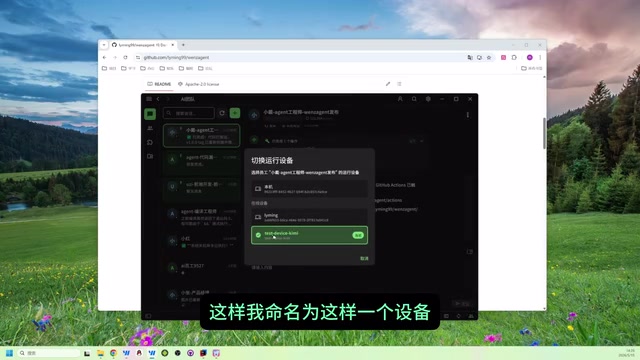
As shown in the demo, when switching to different devices, messages come from different devices. For example, when switching to the "KimiTest" device, the conversation history for that device is displayed; switching to another device shows a completely blank conversation. This design ensures the independence of each Agent while enabling management under a unified interface.
Core Use Cases
- Cross-device remote control: Control AI workflows on your computer from your phone without being at your desk
- Server deployment: Deploy Agents to cloud servers for true remote AI collaboration
- Multi-task parallelism: Agents on different devices can execute different tasks simultaneously without interference
- Team collaboration: Multiple people can connect to the same Agent system through their own clients
It's worth noting that LAN communication has natural advantages of low latency, high bandwidth, and controllable security, making it ideal for Agent task scheduling with high real-time requirements. When cross-network deployment is needed, developers typically use intranet penetration tools (such as frp, ngrok) or VPNs to expose LAN services to the public network, or directly deploy the Server on a cloud server with a public IP. WenzAgent's support for server deployment means its communication protocol has a certain degree of network adaptability and is not limited to pure LAN environments.
WenzAgent Deployment in Practice: From Download to Running
WenzAgent has released its first official version, providing command-line tools with support for Linux, macOS, and Windows. The following demonstrates the complete deployment process using Windows as an example.
Download and Extract
Download the command-line tool for your platform from the project's Release page and extract it to an easy-to-remember working path.
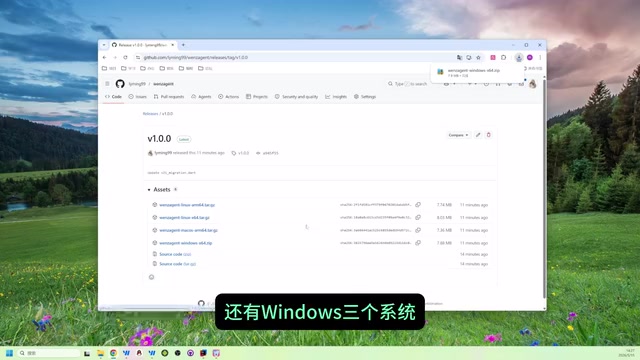
After extraction, you'll find an example configuration file template in the config folder. Copy it out and create separate client and server configuration files—these are the foundation for starting the system.
Configure and Start the Server
The Server is the hub of the entire system, responsible for managing the registration and communication of all Agents. From an architectural perspective, WenzAgent's Server essentially plays the role of a lightweight service registry—similar to the positioning of Consul, Etcd, or Nacos in the microservices domain. Each Client (Agent node) registers itself with the Server upon startup and maintains online status through a heartbeat mechanism, while the Server maintains a global device state table and message routing. Key configuration points:
- Modify the Server name (e.g.,
wenz_agent_server) - Set the listening port (e.g.,
9090) - The
device_idfield is not required for the Server side
After configuration, start the Server. It will listen on the specified port and bind to the LAN IP address.
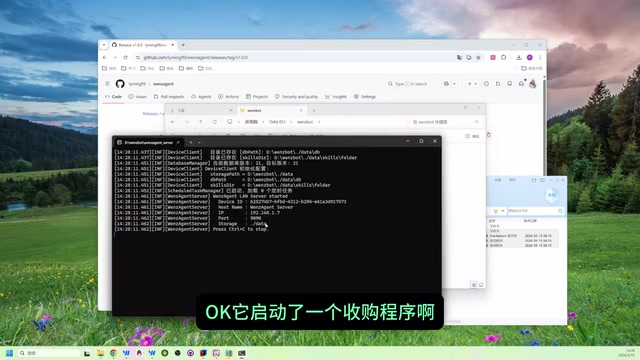
Configure and Start the Client
Start the Client in another terminal. Key configuration items include:
- host_ip: Points to the Server's LAN IP address
- device_id: Set a unique identifier for the current device (e.g.,
test_device_9527) - Database storage path: Specify the local data storage location
- topic: Can be left empty for flexible connections later
You can start it by double-clicking or via the command line. The Client will automatically register with the Server upon startup.
Connect Devices via the WenzFlow Tool
Open the WenzFlow client tool and enter the Server's IP and port to join the LAN. Once joined, you can see a list of all registered devices.
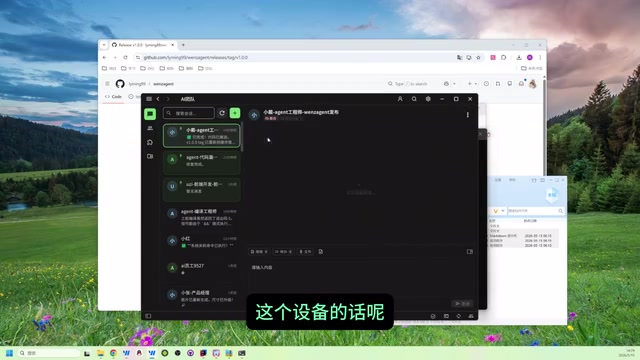
In the device list, you can see the online and offline status of devices. After switching to a target device, conversation data syncs automatically. Sending a message triggers the AI Agent on that device to start working. The Agent automatically invokes preset tool chains to process tasks and return results.
Architecture Analysis and Future Development
From a technical architecture perspective, WenzAgent adopts the classic Server-Client pattern: the Server acts as a registry and message relay, while Clients serve as the actual Agent nodes executing AI tasks. Server-Client architecture is a classic design pattern for network applications—the Server as the central node handles service registration, message routing, and state management, while Clients as edge nodes handle actual business execution. This pattern has been engineering-validated in distributed systems for decades, offering advantages such as clear structure, easy scalability, and good fault isolation—which is also an important reason WenzAgent chose it as its foundational architecture. This design brings several clear advantages:
- Good scalability: Adding a new device only requires starting a Client and registering it with the Server
- Flexible deployment: Server and Client can run on different machines, supporting cross-network deployment
- Developer-friendly: The Apache License allows commercial use, and developers can fork the project and customize freely
However, as a first version, the project is still in its early stages. From the demo, current functionality mainly focuses on basic multi-device conversation management and task distribution. More complex multi-Agent collaborative orchestration awaits future versions. Complex multi-Agent collaborative orchestration involves multiple technical challenges: Task Chains need to resolve dependency relationships and execution order between Agents; Inter-Agent Communication requires defining unified message protocols and state-sharing mechanisms; automatic load balancing requires real-time monitoring of resource usage on each node and dynamic task allocation. Currently, mainstream frameworks like Microsoft AutoGen solve Agent collaboration through "conversational" orchestration, while LangGraph borrows from Directed Acyclic Graph (DAG) concepts to manage complex workflows. As an early-stage project, WenzAgent's pragmatic approach of first solving basic device management and message routing, then layering more advanced orchestration capabilities on top, represents a promising evolutionary path.
For developers looking to get started with multi-Agent system development, WenzAgent provides a clearly structured and easy-to-understand starting point. Interested developers are encouraged to fork the project first, read the source code to understand its communication mechanisms, and then conduct secondary development based on their own needs.
Key Takeaways
- WenzAgent is open-sourced under the Apache License, supports commercial secondary development, and provides support for Linux/macOS/Windows
- It adopts a Server-Client architecture, enabling deployment of multiple AI Agents within a LAN with collaborative management through a unified client
- Supports cross-device remote control—users can control AI workflows on computers via phone, or deploy to servers for remote operation
- The deployment process is straightforward: configure Server and Client IP, port, and device ID, then start up and connect via the WenzFlow tool
- The project is in its early stages—basic multi-device conversation management is functional, while more complex Agent orchestration features (task chains, load balancing, inter-Agent communication) are yet to be developed
Related articles
 Tutorials
Cursor + Codex Dual-IDE Collaboration: A Practical Methodology for Open-Source Project Customization
A complete methodology for open-source project customization based on real-world experience, detailing the Cursor+Codex dual-IDE workflow, seven-stage process, MVP validation, and AI source code reading techniques.
 Tutorials
Cursor Multi-Agent in Practice: Building a Full-Stack Next.js Blog in 50 Minutes
Build a full-stack blog in 50 minutes using Cursor IDE's multi-Agent mode with Next.js, Clerk auth, and Supabase. Learn the 4-phase AI Agent workflow and key integration pitfalls.
 Tutorials
Building an AI Software Factory from Scratch: A Cursor Engineer's Hands-On Experience with Multi-Agent Collaboration
Cursor engineer Eric shares practical insights on building an AI software factory: automation levels, guardrail design, parallel Agent management, and scaling to 1000+ Agents for 24/7 development.