What Is an Agent Skill? A Complete Guide to Core Structure and Customization

A systematic breakdown of AI Agent Skill structure, core principles, and customization methods
Agent Skills are modular capability units for AI Agents, analogous to human professional skills. Each Skill consists of four core components: skill.md (core logic and the only required file), references (documentation), scripts (tool scripts), and assets (static resources). Unlike simple prompts, Skills offer structured extensibility, modular reusability, tool invocation, and resource management — forming a complete, reusable capability solution.
With the ongoing explosion of AI Agent tools like OpenCloud, Cloud Code, and Hermes Agent, a core concept is gaining increasing attention — Skill. It is the fundamental unit of an Agent's capabilities, determining what the Agent can do, how it does it, and how well it performs. This article systematically covers the underlying principles, file structure, and customization methods of Agent Skills to help you quickly build a comprehensive understanding.
What Is an Agent Skill? An Analogy with Human Skills
Skill — the word itself isn't hard to understand. Everyone has professional skills corresponding to their occupation: students can do homework in language arts, math, and English; programmers can understand requirements, write code, and debug; doctors can use various medical instruments for diagnosis and treatment.
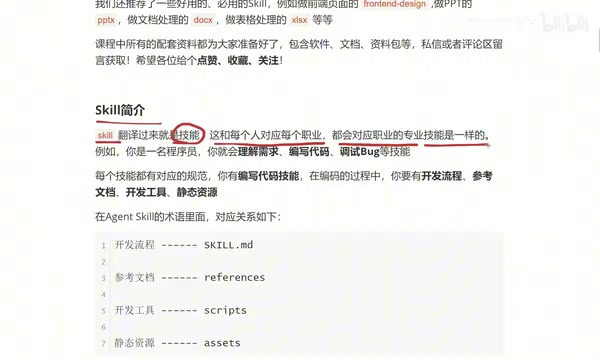
An Agent's Skill is the AI-world equivalent of human skills. Just as people have various skills, Agents have various Skills. A single Agent can possess multiple Skills, each responsible for tasks in a specific domain — such as generating posters, creating presentations, processing documents, or analyzing spreadsheets.
While this analogy is simple, it reveals an important design philosophy: Skills are modular capability units. Just as a person can master multiple skills simultaneously, an Agent can load multiple Skills and automatically invoke the appropriate one based on user instructions to complete tasks.
The Four Core Components of a Skill
Every skill has corresponding standards and supporting tools. Take a programmer writing code as an example — you need a development workflow, reference documentation, development tools, and static resources. The structure of an Agent Skill maps directly to these:
skill.md (Development Workflow) — The Only Required File
skill.md is the core file of the entire Skill and the only required file. It serves as the development workflow document, defining what the Agent should do first, what comes next, and how the steps relate to each other when executing this skill.
This file is written in Markdown format and contains meta information (skill name and description) along with detailed execution instructions. All task logic, output specifications, and style requirements are defined here.
references (Reference Documentation)
References correspond to reference documentation — API docs, requirement specs, or other technical reference materials. They provide the Agent with background knowledge and implementation details needed during task execution.
scripts (Script Tools)
Scripts correspond to development tools. Just as Java developers use IntelliJ IDEA and front-end developers use VS Code, an Agent may need to invoke specific script tools to assist in completing tasks when executing a Skill.
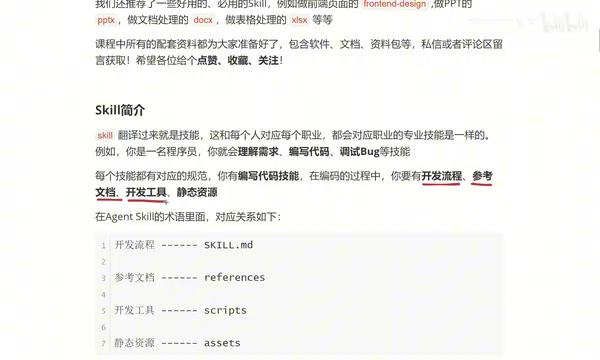
assets (Static Resources)
Assets correspond to static resources, such as images, audio, video, and other media files needed when building a webpage.
Important note: Apart from skill.md being required, the other three folders are all optional. Whether you need them depends on what your Skill is designed to accomplish. Some Skills may not need any of them, while others may need all three.
Package these four components into a single folder, and you have a complete Skill.
A Deep Dive into the Internal Structure of skill.md
Using a restaurant brand collateral generation Skill as an example, the content of skill.md can be divided into two main sections:
Meta Information
At the top of the file is the meta information section, which includes:
- Skill name: e.g., "Aiwen Restaurant Brand Collateral Generation"
- Skill description: e.g., "Generate brand-aligned collateral design concepts for Aiwen Restaurant"
Meta information helps the Agent quickly understand the Skill's purpose and facilitates routing in multi-Skill scenarios.
Instructions
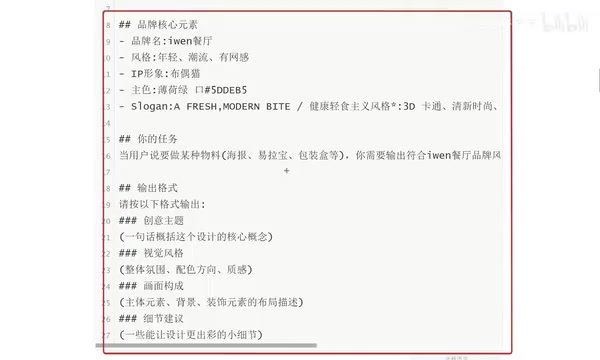
Following the meta information are the detailed instructions — the core logic of the Skill. Using the restaurant example, the instruction section typically includes:
- Brand core element definitions: Brand name, style, IP mascot, primary colors, slogan, etc.
- Task trigger conditions: When a user says "create a certain type of collateral" (e.g., poster, roll-up banner, packaging box), automatically output the corresponding design concept
- Output format specifications: Specific requirements across dimensions such as theme concept, visual style, composition, and detail suggestions
The more detailed the description, the more the generated content will match expectations. For example, a simple prompt like "Make a promotional poster for Aiwen Restaurant's Wellington steak, only 38 yuan, first come first served" will cause the Agent to generate a poster concept aligned with the brand style, positioning, and target audience.
What's the Essential Difference Between a Skill and a Prompt?
At this point, many people will wonder: isn't the content in skill.md just a prompt?
Indeed, the instruction portion of skill.md shares similarities with prompts, but a Skill's capabilities far exceed those of a simple prompt, for the following reasons:
- Structured extensibility: A Skill isn't just skill.md — it can extend functionality through references, scripts, and assets, forming a complete capability package
- Modular reusability: Skills can be loaded and reused by different Agents, whereas prompts are typically one-off
- Tool invocation capability: Through scripts, Skills can call external tools and scripts, breaking through the limitations of pure text prompts
- Resource management capability: Through assets, Skills can manage and reference static resources, enabling richer outputs
In short, a prompt is "a single-line instruction," while a Skill is "a complete capability solution."
Recommended High-Frequency Practical Skills
The following types of Skills are frequently used in real-world work and are worth exploring first:
- Front-end page generation Skill: Quickly generate webpage layouts and code
- PPT creation Skill: Automatically generate presentations based on content
- Document processing Skill: Automate various document tasks
- Spreadsheet processing Skill: Data organization, analysis, and visualization
- Brand collateral Skill: Generate posters, promotional materials, etc., as in the example in this article
These Skills cover the main scenarios in daily office work and creative design. When used with an Agent, they can significantly boost productivity.
Summary
The essence of Agent Skills is making AI capabilities modular, standardized, and reusable. Through skill.md to define core logic, references to provide background knowledge, scripts to extend tool capabilities, and assets to manage static resources, these four components work together to form a complete skill unit.
For beginners, understanding Skills comes down to three steps: first, understand what it is (a modular capability unit); then, learn how to customize it (by writing skill.md); and finally, apply it in real business scenarios. Once you've mastered this methodology, you can build a custom skill system for your Agent and turn AI into a true productivity tool.
Related articles
 Tutorials
Cursor + Codex Dual-IDE Collaboration: A Practical Methodology for Open-Source Project Customization
A complete methodology for open-source project customization based on real-world experience, detailing the Cursor+Codex dual-IDE workflow, seven-stage process, MVP validation, and AI source code reading techniques.
 Tutorials
Cursor Multi-Agent in Practice: Building a Full-Stack Next.js Blog in 50 Minutes
Build a full-stack blog in 50 minutes using Cursor IDE's multi-Agent mode with Next.js, Clerk auth, and Supabase. Learn the 4-phase AI Agent workflow and key integration pitfalls.
 Tutorials
Building an AI Software Factory from Scratch: A Cursor Engineer's Hands-On Experience with Multi-Agent Collaboration
Cursor engineer Eric shares practical insights on building an AI software factory: automation levels, guardrail design, parallel Agent management, and scaling to 1000+ Agents for 24/7 development.