What Is an Agent Skill? Core Structure and Hands-On Beginner's Guide
A complete guide to understanding and building AI Agent Skills — the modular capability units powering modern AI agents.
This article explains what Agent Skills are and why they matter in the era of AI agents like OpenAI Cloud and Claude Code. It breaks down the four core components — skill.md, references, scripts, and assets — compares Skills with traditional prompts, and provides a practical roadmap for building your own Agent capability packages from scratch.
What Is an Agent Skill?
With the explosive popularity of AI agent tools like OpenAI Cloud, Claude Code, and Hermes Agent, Skills — as a core component of the Agent ecosystem — are becoming an essential concept for every AI practitioner to master.
These tools represent the latest trends in AI applications: OpenAI Cloud is OpenAI's cloud-based Agent development and runtime platform, allowing developers to deploy and manage AI agents in the cloud; Claude Code is Anthropic's command-line AI coding assistant that can understand codebases, perform edits, and run commands directly in the terminal; Hermes Agent is an agent framework built on open-source large language models. What these tools share in common is a shift from "single-turn conversations" to "autonomously executing multi-step tasks" — and Skill is the underlying modular design that supports this autonomous execution capability.
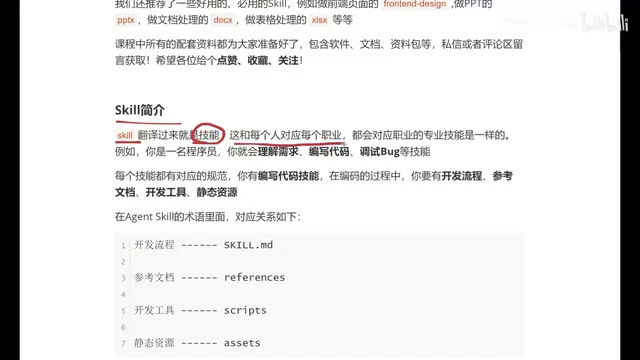
Put simply, a Skill is an Agent's "professional ability." Just as every person has specialized skills based on their profession — students write homework, programmers write code and debug, doctors use various medical instruments — an Agent also needs Skills to define what it can do and how it does it.
Each Skill is essentially a structured capability description that tells the Agent how to think, execute, and produce output in a specific scenario. This is far more powerful than a simple prompt because it encompasses a complete workflow and resource system. Traditional Prompt Engineering relies on carefully crafting input text within a single conversation to guide model output, but as task complexity increases, the limitations of a single prompt become increasingly apparent: limited context windows, no persistence, and no ability to call external tools. The emergence of Skills is essentially an engineering-level upgrade of Prompt Engineering — it elevates prompts from "a piece of text" to "a project," introducing software engineering concepts like file systems, script execution, and resource references. This makes AI capability definitions amenable to version control, modular reuse, and team collaboration.
Core Structure of a Skill: Four Key Components
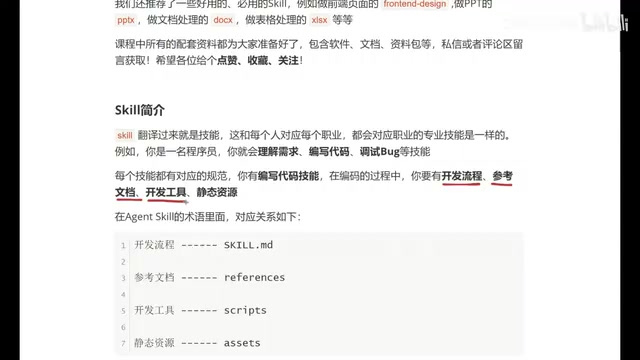
The best way to understand the structure of an Agent Skill is to draw an analogy with a programmer's work environment. A programmer needs four things to complete a project:
1. Development Workflow → skill.md
Before writing any code, you need to fully map out the business logic: what to do first, what comes next, and how different parts relate to each other. In Agent Skill terms, this corresponds to the skill.md file — the core description file of the entire Skill and the only required component.
skill.md is written in Markdown format, and this is no accidental choice. Markdown is a lightweight markup language that balances human readability with machine parsability. Large language models encountered massive amounts of Markdown-formatted documents during pre-training (such as GitHub READMEs and technical blogs), giving them a natural advantage in understanding Markdown's structured semantics — heading hierarchies, lists, code blocks, and more. Writing Skill definitions in Markdown makes them easy for developers to read and edit while enabling Agents to accurately parse the hierarchical structure and priority relationships of instructions.
skill.md defines the complete workflow and specifications for an Agent to execute tasks, including metadata (name, description) and specific instructions.
2. Reference Documentation → references
Programmers need API docs and requirement specs to guide development. Similarly, Agents need reference materials to support decision-making. The references folder stores various documents that may need to be consulted during Skill execution.
These reference documents can be product requirement specs, industry standards, brand guidelines, technical documentation, or any material that helps the Agent understand context. The Agent retrieves these documents as needed during task execution, similar to how RAG (Retrieval-Augmented Generation) works, ensuring that outputs align with both general knowledge and the specific requirements of a particular business scenario.
3. Development Tools → scripts
You can't write code in Notepad — front-end developers use VS Code, Java developers use IntelliJ IDEA. Agents similarly need tools to perform specific operations, and the scripts folder stores the scripts and tools an Agent can invoke.
Scripts in this folder are typically executable files in Python, Shell, JavaScript, and similar languages. The process of an Agent calling a script involves the "Function Calling" mechanism — a key capability introduced by OpenAI in 2023 that allows large language models to identify when external tools need to be called during reasoning, generate structured call parameters, and feed results back to the model for continued reasoning. This mechanism frees Agents from being limited to text generation, enabling them to truly "take action": querying databases, calling APIs, processing files, performing calculations, and more. It's the existence of scripts that evolves a Skill from "can talk" to "can do."
4. Static Resources → assets
Building a webpage requires images, audio, video, and other resources. Agents may also need pre-loaded static resources when executing tasks. The assets folder is where these are stored.
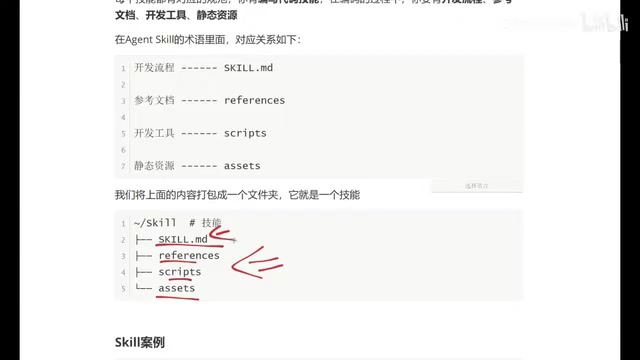
Important note: Of these four components, only skill.md is required. The other three (references, scripts, assets) are added based on actual needs — sometimes none are needed, sometimes all three are used.
Deep Dive into skill.md: The Soul of an Agent Skill
skill.md is the soul of the entire Skill. Its content is divided into two main parts:
Metadata (Meta)
Located at the top of the file, it includes:
- Name: What this Skill is called
- Description: What it specifically does
For example: "Generate brand-aligned creative materials for Evan's Restaurant. When a user requests a specific type of material (poster, roll-up banner, packaging box, etc.), output the corresponding design concept."
Metadata serves not just as a human-readable description — more importantly, it acts as a "routing identifier" for the Agent. When an Agent has multiple Skills mounted, the system automatically selects the most appropriate Skill to respond to a request based on the semantic match between user input and each Skill's metadata. Therefore, the description in metadata needs to be precise and distinctive to avoid invocation conflicts between different Skills.
Instructions
This is the main body of skill.md, defining the Agent's behavioral specifications in detail:
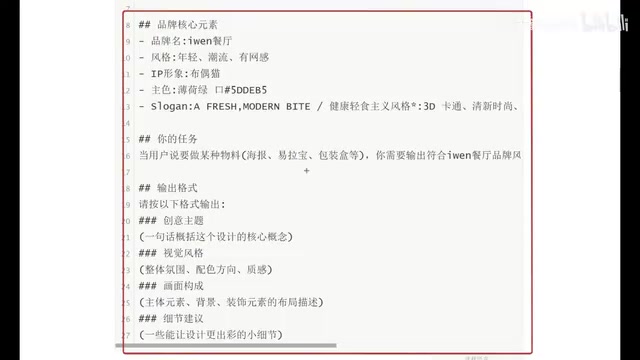
Using a restaurant brand Skill as an example, the instructions would include:
- Core brand principles: Brand name, style, IP mascot, primary colors, slogan
- Task trigger conditions: Activated when a user says "create a certain type of material"
- Output format specifications: Theme concept, visual style, composition, detail suggestions
The more detailed the description, the more closely the Agent's output will match expectations. This is where Skills have a clear advantage over plain prompts — a Skill isn't just a piece of text; it's a complete capability package.
Skill vs. Prompt: Why Skills Are More Powerful
Many people see the content of a skill.md for the first time and think: "Isn't this just a prompt?" Indeed, they look similar on the surface, but a Skill's capabilities far exceed those of a prompt:
| Dimension | Prompt | Skill |
|---|---|---|
| Structure | Single text | Multi-file collaboration |
| Extensibility | Limited | Can mount scripts, documents, resources |
| Reusability | Requires repeated copy-pasting | Define once, invoke anytime |
| Capability boundary | Pure text interaction | Can execute scripts, reference external resources |
A Skill is essentially a capability package that bundles workflow definitions, reference knowledge, execution tools, and static resources together, forming a reusable, shareable, and composable Agent capability unit.
This composable design draws from the modularity principles of software engineering, particularly the Unix philosophy of "each program should do one thing well." Multiple Skills can be combined like LEGO bricks to build complex Agent workflows. For example, a "Market Analysis Agent" could simultaneously mount a "Data Collection Skill," a "Chart Generation Skill," and a "Report Writing Skill" — each independently maintained and tested, with an orchestration layer coordinating execution order. This design is also highly consistent with microservices architecture — breaking down monolithic capabilities into independent service units, reducing the maintenance cost of complex systems while improving flexibility and scalability.
Recommended High-Frequency Practical Skills
The following types of Skills are most frequently used in real-world work and are great starter projects for beginners:
- Front-End Page Generation Skill: Quickly generate webpage code. These Skills typically integrate code formatting tools and browser preview scripts in the scripts folder, store UI design specifications and component library documentation in references, and can output runnable HTML/CSS/JavaScript code directly from natural language descriptions.
- PPT Creation Skill: Automated presentation design. By calling scripts that use libraries like python-pptx, combined with preset template resources (stored in assets), these Skills automate the generation of complete presentations from content outlines.
- Document Processing Skill: Batch document format conversion and content extraction. Common scenarios include PDF-to-Markdown conversion, Word document information extraction, and multilingual translation. The scripts folder typically contains file parsing and format conversion tool scripts.
- Spreadsheet Processing Skill: Data organization and analysis automation. Through scripts using data processing libraries like pandas, these Skills enable data cleaning, pivot analysis, visualization chart generation, and more.
- Brand Material Skill: Such as the restaurant poster generation example in this article. The references folder for these Skills typically contains a complete brand VI manual to ensure all outputs strictly follow brand guidelines.
Summary: How to Build an Agent Skill from Scratch
Agent Skills are the fundamental units of an AI agent's capability system. By mastering the Skill structure (skill.md + references + scripts + assets) and understanding the role of each component, you can customize Agent capabilities tailored to your business needs.
For beginners starting from zero, here's a recommended learning path:
- First, understand the concept and structure of Skills
- Read and analyze existing high-quality Skill examples
- Start with a simple skill.md and gradually add other components
- Customize for your actual business scenarios
It's worth noting that the design quality of a Skill directly determines the upper limit of an Agent's performance. A well-designed Skill should follow several design principles: Single Responsibility (each Skill solves only one type of problem), Clear Boundaries (explicitly define trigger conditions and output specifications), and Progressive Enhancement (first get the core workflow running with skill.md, then gradually add scripts and references to enhance capabilities). As the Agent ecosystem matures, marketplaces for sharing and trading Skills are gradually taking shape — in the future, developers will be able to install high-quality community-contributed Skills for their Agents just like installing npm packages.
The core value of Skills lies in this: transforming vague AI capabilities into structured, reusable, and composable standardized units — a critical step in the journey of Agents from toys to productivity tools.
Related articles

Five Common Claude Code Mistakes — How Many Are You Making?
Five common Claude Code mistakes developers make: copy-pasting code, skipping CLAUDE.md, inefficient prompting, ignoring docs, and poor context management — with fixes.

Andrew Ng's New Course Explained: A Practical Guide to Using OpenAI's O1 Reasoning Model
Deep dive into Andrew Ng and OpenAI's Reasoning with O1 course covering test-time scaling, new prompting paradigms, multi-model orchestration, and practical applications for developers.

Learning AI After College Entrance Exams: A Complete Path from Zero to Freelancing
How to efficiently learn AI skills during summer break after exams? A complete path from mastering prompts and hands-on projects to freelancing on platforms.