What Is Cursor? A Complete Guide to the AI Coding Tool's Core Features and Target Users
A comprehensive guide to Cursor, the AI-native code editor redefining how developers write code.
Cursor is an AI-native code editor built on VS Code that integrates top LLMs like Claude and DeepSeek to offer intelligent code generation, context-aware suggestions, real-time coding assistance, and AI-powered refactoring. This guide breaks down its five core features, compares it with traditional IDEs across six dimensions, and explains why it benefits everyone from senior developers to complete beginners.
What Is Cursor? A Coding Tool Built for the AI Era
If you're still writing code line by line in a traditional IDE, you might be missing the most significant productivity revolution in programming. Cursor — the AI coding tool gaining a rapidly growing following among developers — is redefining how we interact with code.
In simple terms, Cursor is a code editor with built-in AI capabilities, deeply rebuilt on top of VS Code. VS Code (Visual Studio Code) is an open-source code editor released by Microsoft in 2015 that quickly became the most widely used editor among developers worldwide thanks to its lightweight, extensible architecture — the Stack Overflow 2023 survey showed it commanding over 73% market share. By choosing to build on VS Code, the Cursor team ensures users can seamlessly migrate their existing plugin ecosystem, keyboard shortcuts, and workflow configurations. But this isn't simply slapping an AI plugin onto VS Code — Cursor was designed from the ground up for AI-powered programming. The team rewrote the editor's core interaction layer so that AI can directly manipulate the editor's text buffers, file system, and terminal, rather than communicating through the limited API interfaces available to traditional plugins.
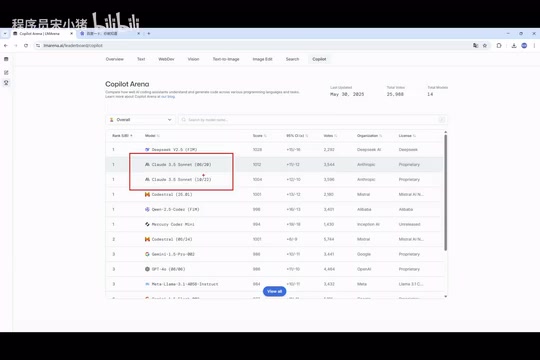
Think of it as a "VS Code that can write code and teach you programming," with the world's top large language models integrated, including Claude 3.5/3.7/4.0, DeepSeek, and other models that excel in the coding domain. These large language models (LLMs) are deep learning models based on the Transformer architecture, trained on massive amounts of text data. The Claude series is developed by Anthropic, with its 3.5 Sonnet version performing exceptionally well on code generation benchmarks (such as HumanEval and SWE-bench). DeepSeek is an open-source model from the Chinese company DeepSeek, known for its outstanding cost-effectiveness and impressive code comprehension abilities. These models can "write code" because they were exposed to billions of lines of open-source code on GitHub during training, learning programming language syntax rules, design patterns, and best practices.
Compared to similar tools in China (such as ByteDance's Trae and Alibaba's Tongyi Lingma), Cursor currently maintains a notable lead in overall feature integration and intelligence — which is exactly why it deserves an in-depth look.
Cursor's Five Core Features
AI-Native Design
Cursor's most fundamental characteristic is its AI-native architecture. Rather than bolting an AI plugin onto a traditional editor after the fact, it weaves AI capabilities into every aspect of the programming experience from the very beginning. This design philosophy directly translates into a dramatically different user experience.
An AI-native architecture is fundamentally different from an "AI-enhanced" one. The traditional approach integrates AI capabilities into existing software through API calls, with clear boundaries between the AI module and core functionality. AI-native means AI participates in every decision point of the product — from how file indexes are built, to the granularity of code parsing, to the interaction logic of the user interface — all specifically optimized around AI's input/output characteristics. For example, Cursor continuously builds a semantic index of your project in the background (rather than just a traditional symbol index), enabling AI to understand the semantic relationships in your code rather than relying on mere text matching.
Intelligent Code Generation
All you need to do is describe your requirements in natural language — for example, "write me a login and registration API" — and Cursor understands your intent and automatically generates complete code logic. It doesn't simply apply templates; it generates code based on your specific business requirements and logic.
Context Awareness
This is one of the core challenges facing large language models today. As conversations grow longer, AI may "forget" earlier context. The context window is one of the key limitations of LLMs, referring to the maximum number of tokens the model can process in a single inference. Early GPT-3.5 had a context window of only 4K tokens (roughly 3,000 English words), while the latest Claude models support 200K tokens. But even with a large enough window, models still exhibit the "Lost in the Middle" phenomenon when processing long texts — they remember information at the beginning and end better while tending to overlook content in the middle.
Cursor has deeply optimized for this challenge through intelligent context management strategies (such as RAG — Retrieval-Augmented Generation, code chunk indexing, and automatic association of related files) to mitigate this problem. It understands your project's overall structure, relationships between variables, and dependency logic, ensuring the AI receives the most relevant project information when generating code, resulting in more precise suggestions.
Real-Time Coding Assistance
Getting suggestions as you write code — this "pair programming" experience makes the development process significantly smoother. Pair programming is a core practice in Extreme Programming (XP) methodology, where traditionally two programmers share one computer — one writes code (the Driver) while the other reviews and thinks (the Navigator). Research shows pair programming can reduce defect rates by 15–50%, but the reality of doubling labor costs has made it difficult to adopt at scale.
Cursor's real-time coding assistance essentially has AI playing the Navigator role. It continuously analyzes your coding intent, detects potential issues, and offers optimization suggestions while you code — achieving "pair programming at zero additional labor cost." It doesn't wait until you're done to review; it provides real-time optimization suggestions as you write.
Multi-Model Support
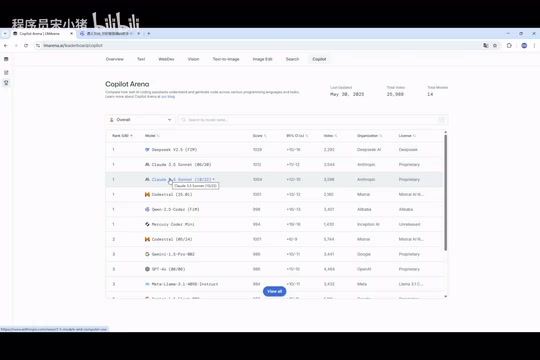
Cursor integrates virtually all of the world's top coding models, including the Claude series, Google's models, and more, allowing users to switch freely based on their needs. This flexibility means you can always choose the AI capability best suited for your current task.
Cursor vs. Traditional IDEs: A Deep Comparison Across Six Dimensions
Code Completion: From Syntax Analysis to Intent Prediction
Traditional IDE code completion is based on syntax analysis — if you've written a function before, it auto-suggests it next time. Cursor's completion, however, is intent prediction based on contextual understanding. It anticipates what you're about to do and proactively completes entire blocks of logic for you.
Code Generation: From Template Application to Logic Creation
Traditional IDEs rely on preset templates and code snippets to assist with code generation, while Cursor can generate complete business logic code from natural language descriptions. You describe the requirements; it handles the implementation.
Problem Solving: From Search Engines to Instant Q&A
When you encounter an unfamiliar API or error message, the traditional approach is to open a browser, search, and dig through documentation. In Cursor, the built-in AI assistant on the right side can answer questions at any time, completing knowledge acquisition directly within the editor — the efficiency gains are obvious.
Refactoring: From Experience-Dependent to AI-Empowered
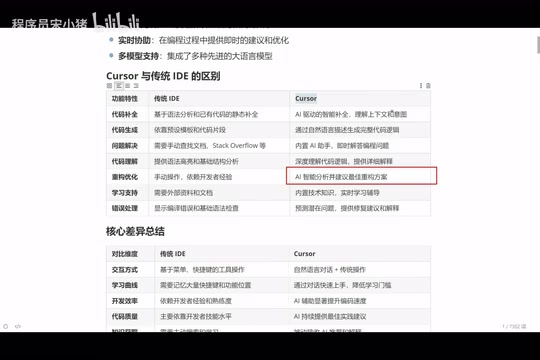
This is one of the scenarios where AI's value shines brightest. Code refactoring refers to the process of improving a software's internal structure without changing its external behavior. Martin Fowler systematized this practice in his classic book Refactoring: Improving the Design of Existing Code. Common refactoring techniques include extracting methods, inlining variables, and introducing design patterns. High-quality refactoring requires developers to simultaneously possess the ability to identify code smells and a deep understanding of design principles (such as the SOLID principles).
In traditional IDEs, code refactoring depends entirely on the developer's personal experience — junior programmers rarely produce high-quality refactoring plans. With Cursor, you simply say "optimize this function for me," and the AI, drawing on its training across massive codebases, identifies the gaps between your current code and best practices and delivers an optimal refactoring plan.
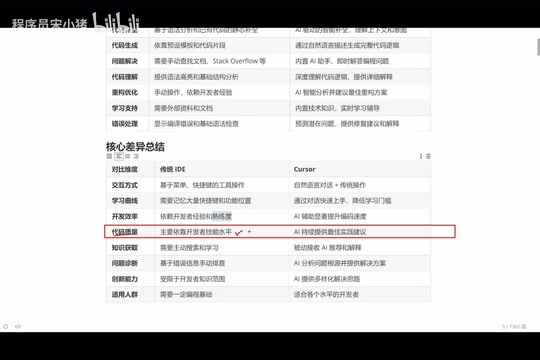
What does this mean? A junior programmer equipped with Cursor can potentially produce code approaching the quality of a developer with five years of experience. This isn't an exaggeration — it's the qualitative leap that AI tools deliver.
Error Handling: From Manual Debugging to Intelligent Diagnosis
The biggest headache for beginner programmers is "seeing red" — encountering error messages and not knowing what to do. Experienced programmers can quickly pinpoint issues thanks to years of accumulated knowledge. Cursor can directly analyze error messages, combine them with code context, and provide fix suggestions along with detailed explanations — it's like having a senior developer guiding you at all times.
Learning Curve: From Memorizing Shortcuts to Natural Conversation
Traditional IDEs require memorizing numerous keyboard shortcuts and feature locations, which comes with a significant learning cost. Cursor's interaction model is natural language conversation — describe what you want to do in plain language, and it gets it done.
Who Should Use Cursor? Four User Groups Covered
The answer is: almost everyone.
- Senior Programmers (5–10 years of experience): Not because they can't write code, but because they'd rather not write the tedious parts. Let Cursor generate simple, repetitive code while you focus on reviewing and fine-tuning — a massive efficiency boost.
- Junior to Mid-Level Programmers: Cursor serves as both a productivity tool and a learning tool. Comparing AI-generated code with your own helps you quickly identify gaps and improve your coding skills.
- Programming Beginners: Even with a weak programming foundation, you can describe what you want in natural language and have Cursor generate runnable code, significantly lowering the barrier to entry.
- Non-Programmers: Product managers, designers, and other roles can use Cursor to quickly build prototypes or implement simple features.
The Right Way to Use AI Coding Tools
It's important to emphasize that while Cursor is powerful, it is fundamentally still an assistive tool. It can help junior programmers produce senior-level code, but the prerequisite is that you understand the business requirements and can evaluate the quality of AI-generated code.
The real value lies in this: You no longer need to spend time memorizing syntax and manually typing code — instead, you can focus your energy on business logic and architectural design. This is the biggest change AI coding tools bring — they don't replace programmers; they enable programmers to focus on higher-value work.
For today's technology learning roadmap, mastering AI coding tools like Cursor is no longer a "nice-to-have" — it's a must-have. The sooner you adapt to this new programming paradigm, the greater your advantage in career development.
Related articles

Replit President: Writing Code Will Become Insignificant — Ideas Are Everything
Replit's president shares insights on AI programming's future: how a 40M-user platform uses Claude to eliminate coding barriers, making natural language the new programming language.

Stripe Data Reveals an AI Startup Explosion: A New Business Paradigm Where New Company Creation Has Doubled
Stripe data shows new business creation nearly doubled YoY, surpassing pandemic peaks. A deep analysis of how AI is transforming startup speed, vertical SaaS, and global entrepreneurship.
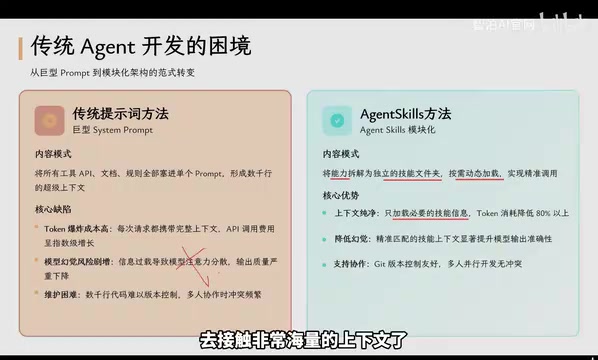
Agent Skills: Folders as Skills — Making AI Produce Precise, Template-Based Output
Agent Skills splits AI capabilities into independent skill folders with on-demand loading and progressive disclosure, cutting token costs by 80% and reducing hallucinations for template-based output.