What Is Cursor? A Complete Guide to the AI-Native Programming IDE's Core Features and Use Cases
A comprehensive guide to Cursor, the AI-native IDE built on VS Code with integrated LLMs for smarter coding.
Cursor is an AI-native IDE built on a deeply modified VS Code that integrates leading LLMs like Claude, DeepSeek, and Gemini directly into its core. This article explores its four key features — AI-native design, intelligent context-aware code generation, multi-model support — and compares it with traditional IDEs across six dimensions including code completion, error handling, and refactoring.
What Is Cursor? A Programming IDE Built for AI
Cursor is an AI-native programming tool built on a deeply modified version of VS Code. Unlike traditional IDEs, it doesn't simply bolt AI plugins onto an editor — it's designed from the ground up for AI collaboration. Think of Cursor as a "VS Code that can write code and teach you programming."
Developers familiar with VS Code know it as Microsoft's free and widely popular code editor, supporting development in Python, frontend technologies, Java, and many other languages. Released in 2015 and built on the Electron framework, VS Code's extension marketplace now hosts over 50,000 plugins, making it one of the most widely used code editors in the world. Cursor inherits all of VS Code's capabilities while integrating the world's leading large language models — including DeepSeek, Claude 3.5/3.7/4.0, and Google's Gemini series — allowing developers to interact with the IDE using natural language to handle the entire workflow of writing, debugging, error-checking, and refactoring code.
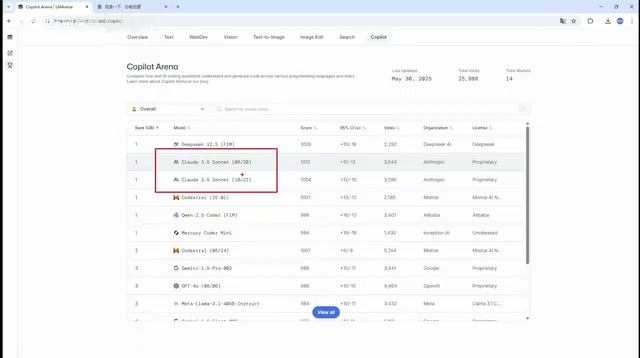
Here's an interesting detail: among the large models currently used in programming, the Claude series consistently ranks at the top. Developed by Anthropic, Claude continues to set new records on SWE-bench (an authoritative benchmark that measures AI's ability to automatically fix real GitHub issues), with particularly outstanding code reasoning and long-context understanding capabilities. DeepSeek is an open-source model from the company DeepSeek, which performs exceptionally well on the code generation benchmark HumanEval and is widely embraced by developers for being open-source and free. Google's Gemini series has unique advantages in multimodal understanding, capable of processing code, images, and documents simultaneously. All of these models can be freely switched between within Cursor. Of course, some advanced models (like Claude) are paid, which is a core part of the value behind Cursor's subscription pricing.
Four Core Features of Cursor
AI-Native Design: Not a Plugin, but a Foundational Capability
Cursor's most fundamental advantage lies in its "AI-native" philosophy. Many IDEs on the market add AI-assisted features through plugins — for example, GitHub Copilot communicates with the editor via the Language Server Protocol (LSP), essentially layering functionality on top of the editor's periphery. This approach often suffers from insufficient integration and a fragmented experience — plugins can't deeply perceive state changes in the editor's core, and both response speed and context understanding are constrained by architectural limitations.
Cursor takes a completely different approach. While it's forked from VS Code's open-source codebase, it deeply modifies the editor's core, embedding the AI inference pipeline directly into the editor's core event loop. This means AI can perceive low-level events in real time — cursor position, file changes, terminal output, and more. AI capability is woven into every interaction from the very beginning of the design. AI isn't an add-on feature; it's the core of the entire development experience.
Intelligent Code Generation and Context Awareness
By describing your requirements in natural language, Cursor can generate complete code logic. For example, you just need to say "write me a login API endpoint," and it will understand the context, auto-complete the code, and explain the implementation.
Even more critical is its context awareness. A common bottleneck with current large language models is that they tend to "forget" earlier information when conversations get too long. This problem is technically known as "context window limitation" and "attention decay" — even if a model supports a 200K token context window, information in the middle of the window tends to be weakly processed during actual inference. This is what the academic community calls the "Lost in the Middle" phenomenon.
Cursor has specifically optimized for this issue using multiple layers of technical approaches. First is intelligent indexing — it builds a semantic index of the entire project (similar to a search engine's inverted index) and retrieves only the most relevant code snippets when sending requests, rather than dumping all files into the model at once. Second is AST (Abstract Syntax Tree) awareness — Cursor can parse the structural information of code, understanding function call chains, class inheritance relationships, and module dependencies, rather than treating code as plain text. Finally, there's incremental context management — it dynamically maintains a context summary most relevant to the current editing task, ensuring the AI always "remembers" key information. These technologies work together to enable Cursor to understand the entire project structure and relationships between variables, providing precise suggestions in real time as you write code — far beyond simple text completion.
Multi-Model Support: Switch to the Optimal AI on Demand
In Cursor, users can flexibly switch between different AI models based on task requirements. Whether it's the free DeepSeek, the Claude series with the strongest coding capabilities, or Google's Gemini models — virtually all top-ranked large language models globally can be called directly within Cursor.
Different models have different strengths for programming tasks: Claude excels at complex code reasoning and long-context understanding, the DeepSeek-Coder series offers excellent cost-effectiveness for routine code generation, and Gemini shines in multimodal scenarios that require understanding both code and non-code content (such as design mockups and API documentation). Additionally, different models have varying context window sizes — ranging from 128K to 200K tokens — which directly affects how much project code the AI can "see." This multi-model strategy lets developers choose the optimal solution for different scenarios rather than being locked into a single model.
Cursor vs Traditional IDEs: An In-Depth Comparison Across Six Dimensions
Code Completion and Generation
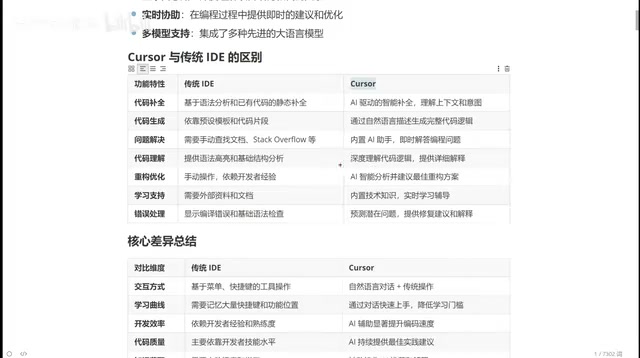
Traditional IDE code completion is based on syntax analysis — more precisely, on deterministic techniques like Lexical Analysis and Parsing that strictly follow the formal grammar rules of programming languages. For example, when you type "document.getElement," the IDE uses type inference to know which methods the document object has and lists the candidates. This approach is precise but mechanical, only completing known API calls.
Cursor's completion, on the other hand, is based on semantic understanding. Under the hood, it relies on the Transformer architecture of large language models, which learn code "intent patterns" through pre-training on massive code corpora — not only knowing what's syntactically valid but also inferring what the developer wants to achieve at the business logic level. This is why it can proactively suggest adding error handling and data validation logic right after you finish writing a database query. It anticipates what you're going to do next and proactively provides complete code suggestions.
For code generation, traditional IDEs rely on preset templates and code snippets, while Cursor can generate complete business logic code based on your requirements through natural language. This is a qualitative difference.
Problem Solving and Error Handling
This is where programming beginners feel the biggest gap. With traditional IDEs, when you encounter an error, you can only rely on search engines and documentation. Experienced programmers can solve problems quickly thanks to years of accumulated experience. Cursor's built-in AI assistant can directly analyze error messages, combine them with your code context, and provide fix suggestions with detailed explanations — it's like having a senior engineer by your side at all times.
Code Refactoring and Optimization
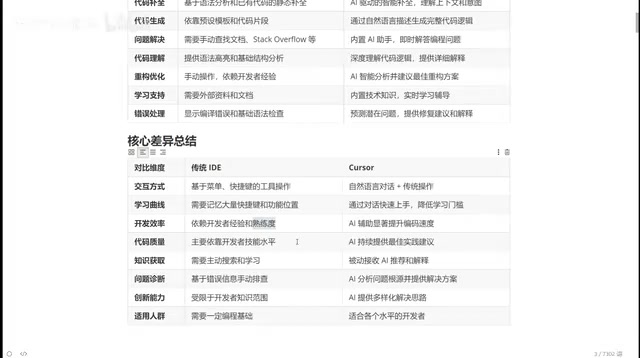
Code refactoring in traditional IDEs is highly dependent on the developer's personal experience — junior programmers write junior code, and senior programmers write senior code. But in Cursor, you just need to say "help me optimize this function," and the AI will provide refactoring suggestions based on best practices. This means a junior programmer using Cursor can write code approaching the level of a senior programmer.
Interaction Methods and Learning Curve
Traditional IDEs require developers to memorize numerous keyboard shortcuts and feature locations, resulting in a steep learning curve. Cursor simplifies the core interaction to natural language conversation — the AI chat panel on the right side is one of your primary work interfaces. This dramatically lowers the barrier to entry, enabling developers of all skill levels to quickly benefit from AI assistance.
An Overview of the AI Programming Tool Ecosystem
The AI programming tool space is currently flourishing with diverse offerings. In China, Alibaba's TONGYI Lingma and ByteDance's Trae are both products worth watching.
TONGYI Lingma is an AI programming assistant built by Alibaba Cloud based on the Tongyi Qianwen large model. It supports VS Code and the entire JetBrains IDE family, with standout features including deep integration with the Alibaba Cloud ecosystem and optimization for Chinese-language programming scenarios. ByteDance's Trae (formerly MarsCode/Doubao Programming Assistant) takes a standalone IDE approach similar to Cursor, with custom development based on VS Code and ByteDance's proprietary Doubao large model built in. Additionally, Baidu's Comate, Huawei's CodeArts Snap, and others are actively competing in this space. Notably, domestic tools have a natural advantage in data compliance — keeping code data within national borders is a hard requirement for many enterprise users, making this an important differentiating competitive point for Chinese AI programming tools.
However, in terms of overall feature integration and intelligence level, Cursor currently remains in the leading position. This is why, even with domestic alternatives available, there's still value in deeply learning Cursor — it represents the cutting edge of AI programming tools and helps developers build the most comprehensive understanding of this category of tools.
Who Should Use Cursor?
Cursor's applicability is broader than traditional IDEs:
- Senior developers: Delegate repetitive coding tasks to AI, focus on architecture design and business logic, and significantly boost development efficiency
- Junior to mid-level programmers: Write higher-quality code with AI assistance while accelerating learning by comparing AI-generated code with your own approaches
- Programming beginners: Even with a weak programming foundation, you can generate usable code by describing requirements in natural language, lowering the barrier to entry
- Cross-language developers: Whether your focus is Python, Java, Go, or frontend development, Cursor provides high-quality assistance for the corresponding language
Here's a thought worth considering: as AI programming tools become standard, the ability to understand business requirements and articulate them accurately may become more important than pure coding skills. This capability is technically known as Prompt Engineering. In AI programming scenarios, it goes beyond simply describing "what feature I want" — it involves a systematic methodology: specifying technical constraints (e.g., "use TypeScript, don't use the any type"), providing example inputs and outputs, defining code style conventions, breaking down complex requirements into steps, and more.
The industry has already seen the emergence of the ".cursorrules" file concept — developers place a rules file in the project root directory that defines the project's tech stack, coding standards, and architectural preferences, so the AI automatically follows these constraints in every interaction. Learning to write effective prompts and clearly describe business logic is becoming one of the core competencies for programmers in the new era. This paradigm of "programming with natural language" is even giving rise to a new career direction — AI-assisted development specialists, whose core skill isn't writing code but precisely conveying engineering intent to AI.
Conclusion
Cursor represents a paradigm shift in programming tools — from "coding assistance" to "AI-collaborative development." It doesn't simply layer a chatbot on top of an IDE; it deeply integrates AI capabilities into every aspect of development. For any programmer looking to boost development efficiency, mastering AI programming tools like Cursor is no longer optional — it's essential.
Key Takeaways
Related articles
Claude Code Workflow in Action: 68 Sub-Agents Working Concurrently
Hands-on test of Claude Code's Workflow mode with 68 concurrent sub-agents. Covers setup, write-review separation, real concurrency results, and token costs.
OpenAI o3 Helps Boston Children's Hospital Tackle Rare Genetic Disease Diagnosis Challenges
OpenAI's o3 Deep Research model partners with Boston Children's Hospital to assist rare genetic disease diagnosis. Published in NEJM AI, this human-AI collaboration shortens diagnostic timelines and advances precision medicine.
Cursor Composer 2.5: The Secret Behind an Open-Source Model's Reinforcement Training to a Top-3 Coding Benchmark Ranking
Cursor built Composer 2.5 on Kimi K2 open-source model, ranking 3rd on coding benchmarks and surpassing K2.6. Deep dive into Cursor's data flywheel, product architecture, and pricing.