What Is Cursor? A Deep Dive into the AI-Native IDE's Core Features and Use Cases
Cursor is an AI-native IDE built on VS Code that lets developers write code through natural language.
Cursor is an AI-native intelligent programming tool built on VS Code's foundation, integrating top LLMs like Claude and DeepThink for natural language-driven coding. Unlike plugin-based AI tools, it's designed from the ground up for AI collaboration, offering superior context awareness, real-time assistance, and multi-model support. It benefits developers at all levels — from beginners who can generate code via plain language to seniors who can offload repetitive tasks to AI.
What Is Cursor? An AI-Native Intelligent Programming Tool
Cursor is an intelligent programming tool with a built-in AI assistant — think of it as an "AI-native upgrade" of VS Code. Unlike traditional editors, Cursor doesn't bolt on AI capabilities through plugins after the fact. Instead, it's designed from the ground up for AI collaboration.
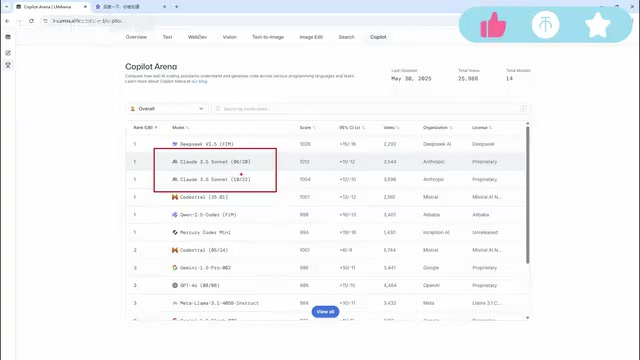
As most developers know, VS Code is Microsoft's widely popular free code editor supporting Python, front-end development, and many other languages. Cursor takes VS Code as its foundation and completely rebuilds it, integrating world-class large language models — including DeepThink (free), Claude 3.5/3.7/4.0, and other top-ranking models in the programming domain. This allows developers to converse with the editor in natural language to handle the entire workflow: writing code, debugging, error detection, refactoring, and more.
Put simply, Cursor is a VS Code that can write code and teach you programming.
Four Core Features of Cursor
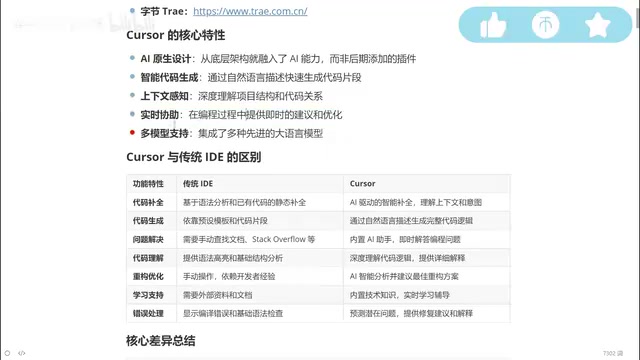
AI-Native Design: Not a Plugin, But a Foundational Capability
This is the most fundamental difference between Cursor and other AI coding plugins. Many IDEs on the market add AI functionality through plugins grafted on after the fact, but Cursor integrates AI as a core capability from day one. This means AI isn't an add-on feature — it's the foundational architecture of the entire programming experience.
Intelligent Code Generation and Context Awareness
One major bottleneck of current large language models is context awareness — when conversations grow too long, models may "forget" earlier information or even hallucinate. Cursor has deeply optimized this aspect. It understands your project's overall structure and the relationships between variables, enabling more precise suggestions during code completion and generation.
Traditional IDE code completion relies on syntax analysis and can only offer simple suggestions after you've already used a function. Cursor, on the other hand, "anticipates" what you're about to do and proactively completes code logic based on contextual understanding.
Real-Time Assistance and Multi-Model Support
Cursor supports receiving AI suggestions while you write code, enabling true real-time collaboration. It also integrates multiple top-tier models, including the Claude series, Google models, and more. Users can freely switch between them to choose the model best suited for the current task.
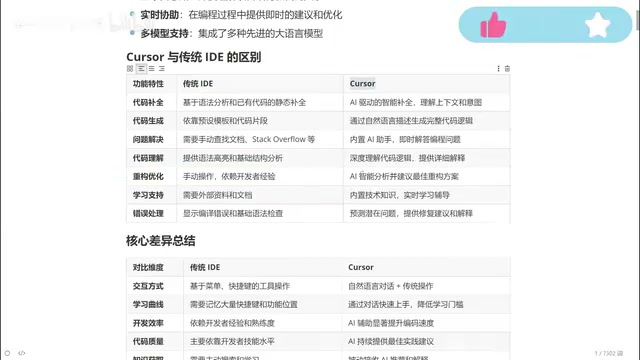
Cursor vs Traditional IDEs: A Six-Dimension Comparison
Code Completion and Generation
Traditional IDE code completion relies on syntax analysis and preset templates — essentially "pattern matching." Cursor, by understanding context and business logic, can generate complete code logic from natural language descriptions. For example, you simply say "write me a login API endpoint," and Cursor understands the requirement and automatically generates the corresponding code.
Troubleshooting and Error Handling
This is the most painful part for beginner programmers. With traditional IDEs, encountering an error means relying on search engines or documentation. Senior programmers can solve problems quickly because of years of accumulated experience. Cursor's built-in AI assistant can directly analyze error messages, provide fix suggestions and detailed explanations — like having an experienced mentor available at all times.
Code Refactoring and Optimization
Code refactoring in traditional development heavily depends on the developer's personal experience — junior programmers often struggle to produce elegant refactoring solutions. With Cursor, you simply describe your needs (e.g., "optimize this function for me"), and the AI provides optimization suggestions based on best practices. This means a junior programmer using Cursor can potentially produce code approaching the quality of someone with five years of experience.
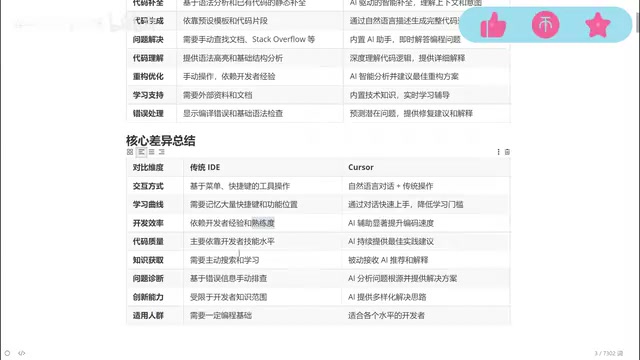
Interaction Model and Learning Curve
Traditional IDEs require developers to memorize numerous keyboard shortcuts and feature locations, resulting in a steep learning curve. Cursor's core interaction model is natural language conversation, dramatically lowering the barrier to entry. You don't need to remember complex operational procedures — just describe your needs in plain language.
Development Efficiency and Code Quality
In traditional development, efficiency depends entirely on the programmer's experience and proficiency, and code quality is directly tied to individual ability. Through AI assistance, Cursor enables junior developers to produce high-quality code. As industry professionals put it: "A fresh graduate junior programmer who effectively uses AI tools can absolutely match the code output capability of a programmer with three to five years of experience."
Domestic and International AI Coding Tool Ecosystem
The AI coding tool landscape is currently flourishing. On the domestic (Chinese) front, Alibaba's Tongyi Lingma and ByteDance's Trae are products worth watching. However, in terms of overall feature integration and intelligence level, Cursor still maintains a leading edge — which is precisely why it's worth investing time to learn this tool deeply.
One detail worth noting: some advanced models in Cursor (such as the Claude series) require a paid subscription, but free models like DeepThink are also available. For developers on a budget, strategically combining free and paid models is a practical approach.
Who Should Use Cursor?
Cursor has an extremely broad range of applicability:
- Senior programmers: Delegate repetitive, simple code to AI generation while focusing on architecture design and core logic, significantly boosting development efficiency
- Junior to mid-level programmers: Leverage AI assistance to improve code quality while learning better coding practices by comparing AI-generated code with your own
- Programming beginners: Even with zero experience, you can describe what you want in natural language and have Cursor generate runnable code, lowering the barrier to entry for programming
More importantly, once you master Cursor, you can handle tasks in virtually any programming language — whether it's Python, Java, Go, or front-end development, AI provides cross-language programming assistance.
Conclusion: Cursor Represents the Future Direction of Programming Tools
Cursor represents an important direction for AI programming tools: rather than simply stacking AI plugins on top of traditional IDEs, it rethinks "how humans interact with code" from the ground up. It transforms programming from "typing code character by character" to "describing requirements in natural language." This paradigm shift will have a profound impact on the entire software development industry.
For any programmer looking to boost development efficiency, getting familiar with and mastering AI-native programming tools like Cursor is no longer a "nice-to-have" — it's an essential skill.
Related articles
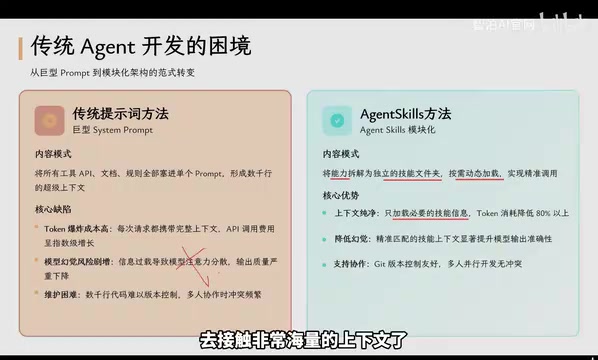
Agent Skills: Folders as Skills — Making AI Produce Precise, Template-Based Output
Agent Skills splits AI capabilities into independent skill folders with on-demand loading and progressive disclosure, cutting token costs by 80% and reducing hallucinations for template-based output.

Five Common Claude Code Mistakes — How Many Are You Making?
Five common Claude Code mistakes developers make: copy-pasting code, skipping CLAUDE.md, inefficient prompting, ignoring docs, and poor context management — with fixes.

Andrew Ng's New Course Explained: A Practical Guide to Using OpenAI's O1 Reasoning Model
Deep dive into Andrew Ng and OpenAI's Reasoning with O1 course covering test-time scaling, new prompting paradigms, multi-model orchestration, and practical applications for developers.