What Is Google WebMCP? A Deep Dive into the New Standard for AI Agents to Directly Invoke Web Functionality
Google WebMCP lets AI Agents directly call website tools instead of fragile DOM parsing and screen scraping.
Google's WebMCP (Web Model Context Protocol) is a proposed web standard that allows websites to expose structured tools for AI Agents to invoke directly in the browser. By replacing fragile DOM parsing and screen scraping with declarative and imperative APIs, WebMCP dramatically reduces token consumption and improves reliability. Currently in early preview on Chrome Canary, it represents a paradigm shift toward AI Agent-friendly web design.
AI Agents Are Changing How We Use the Web
For decades, we've been building web pages for human eyes and human interaction habits. But today, humans aren't the only ones using the web — AI Agents are browsing pages and completing tasks on behalf of users. The problem is that current Agents must pay an enormous cost to perform even a simple web operation: parsing the entire DOM tree, analyzing the accessibility tree, capturing screenshots, calculating click coordinates… This process is not only slow and fragile but also consumes a massive number of tokens.
The DOM (Document Object Model) tree is a tree-like data structure generated by the browser after parsing an HTML document, where each HTML tag becomes a node in the tree. A moderately complex web page can contain thousands or even tens of thousands of DOM nodes. The Accessibility Tree is another, more streamlined tree generated by the browser based on the DOM tree. Originally designed for assistive technologies like screen readers, it preserves the semantic roles, names, and state information of page elements. Current mainstream AI Agents (such as Anthropic's Computer Use and OpenAI's Operator) typically need to parse both trees simultaneously to understand page structure, then combine that with screenshots for visual positioning. Every step of this process requires serializing large amounts of information into text and feeding it into a large language model. A single page comprehension step can consume thousands to tens of thousands of tokens, and the cumulative token consumption for a complete multi-step workflow is staggering.
Worse still, even after all these complex steps, a suddenly loaded ad can shift the page content (a phenomenon known as "layout shift" in web performance — the core issue measured by the CLS metric in Core Web Vitals), causing the Agent to click in the wrong place. Google Chrome team's WebMCP (Web Model Context Protocol) was created precisely to solve this pain point.
What Is WebMCP? Core Concepts Explained
WebMCP is a proposed web standard that allows website developers to define their site's functionality as structured Tools that AI Agents can invoke directly. If MCP is "the USB-C port for AI," then WebMCP is the implementation specifically designed for browser-side AI interaction.
MCP (Model Context Protocol) is an open protocol introduced by Anthropic in late 2024, aimed at establishing standardized communication interfaces between AI models and external data sources and tools. MCP uses a client-server architecture: the MCP Server exposes Tools, Resources, and Prompts, while the MCP Client (typically embedded in an AI application) communicates with the Server via the JSON-RPC 2.0 protocol. The protocol quickly gained widespread industry adoption, with major AI vendors including OpenAI, Google, and Microsoft all announcing support. MCP's core value lies in solving the "M×N integration problem" — without a unified protocol, M AI applications connecting to N external services would require M×N custom integrations. With MCP, each application only needs to implement one MCP Client, and each service only needs to implement one MCP Server.
Key Differences Between WebMCP and MCP
The two are complementary, not competing:
- MCP: Connects AI Agents to server-side applications, requires setting up a dedicated server, and Agents can access it anytime from anywhere
- WebMCP: Focuses on client-side AI interaction within the browser, tools run in the browser, and the browser window must be open
In simple terms, WebMCP is the browser-side implementation of the "Tools" portion of MCP, enabling engineers to provide callable tool interfaces for AI Agents operating within the browser. This design choice gives WebMCP some inherently unique advantages: tools can directly manipulate the DOM, access browser APIs, and synchronize with page state in real time — capabilities that are difficult to achieve with traditional server-side MCP. At the same time, since tools run in the user's browser, users have full visibility and control over the Agent's operations.
Live Demo: AI Agent Playing a Maze Game
The Google Chrome DevRel team built a maze escape game to showcase WebMCP's capabilities. What makes this game unique is that you can't operate it by clicking the UI — you can only play it through AI tools.
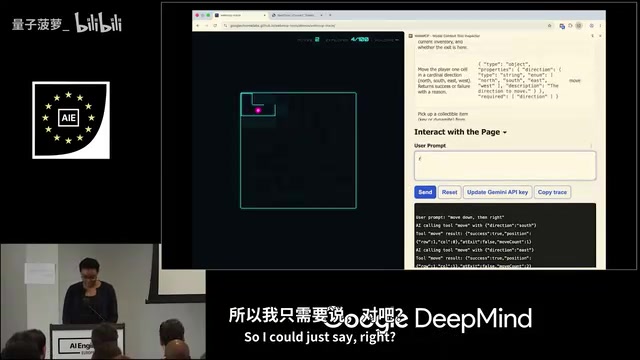
Through the Model Context Tool Inspector extension in Chrome's sidebar, you can see all the tools registered on the page. On the maze's home screen, there's only a "Start Maze Game" tool, but once inside the maze, multiple tools appear for movement (north/south/east/west), looking around, picking up items, using items, and more.
The AI Agent can understand natural language instructions (like "R" for "right"), automatically map them to the corresponding tool calls, and even accept high-level instructions like "complete the maze," autonomously calling tools repeatedly until the goal is achieved. This demonstrates the AI Agent's "Agentic Loop" pattern — rather than simply executing a single tool call, the Agent continuously observes the environment state, formulates plans, executes actions, and evaluates results in a loop until the final objective is met. This aligns with the design philosophy of mainstream Agent architectures like ReAct (Reasoning + Acting).
Four Core Use Cases for WebMCP
WebMCP unlocks an entirely new mode of web interaction: users can browse a website normally, then hand control over to an AI Agent to complete complex operations, and reclaim control at any time. This "human-AI collaboration" pattern is known as Human-in-the-Loop, which maintains AI's efficient execution capabilities while ensuring users retain ultimate control over critical decisions (such as payment confirmation).
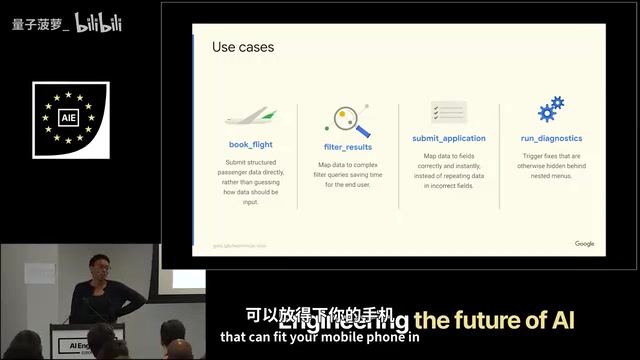
Typical use cases include:
- Complex form filling: Multi-step processes like medical forms and financial forms. These forms often involve conditional logic (e.g., subsequent fields only appear after selecting a certain option), data validation, cross-page state persistence, and other complex interactions where traditional screen scraping is extremely error-prone
- Flight booking: Multi-criteria filtering and multi-step operations
- E-commerce shopping: Product filtering and specification selection (e.g., finding a black faux-leather clutch that fits a phone)
- Ticket purchasing: Seat selection, ticket type selection, and information entry in one seamless flow
Technical Implementation: Declarative and Imperative API Approaches
WebMCP offers both declarative and imperative implementation approaches, allowing developers to choose based on their needs. This dual-track design follows the longstanding tradition of the web platform — HTML itself is declarative while JavaScript provides imperative capabilities, and together they cover the full spectrum from simple to complex scenarios.
Declarative API
Suitable for standard HTML form scenarios. Simply add a few attributes (like tool-name and tool-description) to form elements, and the browser automatically generates a JSON Schema for the Agent to read, with form fields serving as tool parameters.
JSON Schema is a declarative language for describing JSON data structures. It defines data types, formats, constraints, and nesting relationships. In the WebMCP and MCP ecosystem, JSON Schema plays a critical role: it precisely describes the parameter structure each tool accepts, including parameter names, data types, whether they're required, value ranges, default values, and more. Large language models can understand a tool's input requirements simply by reading its JSON Schema, enabling them to correctly construct invocation parameters. This mechanism is consistent with technologies like OpenAI's Function Calling and Anthropic's Tool Use — they all rely on JSON Schema to achieve structured interaction between AI models and external functions.
There's also an agent-invoked boolean attribute that distinguishes whether a form was filled by an Agent or a human. This attribute is very important in practice — websites can use it to decide whether to skip certain human-only interaction steps (like CAPTCHA verification), or to tag the operation source as an AI Agent in backend logs for auditing and analysis.
Imperative API
Suitable for more complex multi-step UI workflows, and currently the most widely used approach. Developers register custom tools through the registerTool function:
registerTool({
  name: "addToDoItem",
  description: "Add a to-do item to the list",
  schema: { /* JSON Schema */ },
  execute: async (params) => {
    // Validate input, create DOM nodes, update the page
    return { success: true, message: "To-do item added" };
  }
});
Key takeaways: The description should be detailed enough for the AI Agent to know when to call this tool — this aligns with Prompt Engineering principles, as clear tool descriptions are essentially instructions for the AI model. The execute block can call existing business logic, meaning developers don't need to rewrite functionality code for WebMCP but can reuse existing frontend functions and component methods. Return values should contain enough information for the Agent to decide its next step, such as operation results, current state, and available follow-up actions.
Music Ticketing Website Demo: Full Multi-Step Purchase Flow
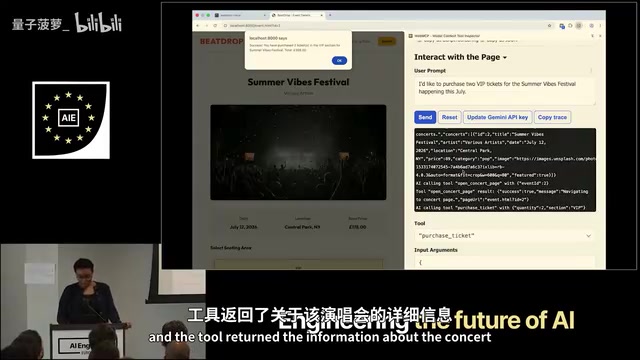
In the demonstrated music ticketing website, a user simply says "Buy two VIP tickets for Summer Vibes Festival," and the AI Agent automatically completes the following steps:
- Calls the
searchConcertstool to find the corresponding concert and its ID - Calls the
openConcertPagetool to open the concert details page - On the new page, calls the
purchaseTickettool with the quantity and ticket type
Throughout the process, the UI updates in sync, and the user can see VIP being selected and the quantity being set. Notably, the tool calls here are cross-page — after navigating to a new page, the Agent can discover and use tools registered on that new page. This shows that WebMCP's tool registration mechanism is tied to the page lifecycle, with each page independently declaring its own set of available tools.
In real-world scenarios, the final payment step should be handed back to the user for manual confirmation. This isn't just a UX consideration — it also involves legal compliance. In many jurisdictions, financial transactions require explicit user authorization, and an AI Agent's automated actions may not satisfy the legal requirement of "informed consent."
How to Get Started with WebMCP
WebMCP is currently in an early preview stage, and the API is still iterating rapidly.
Chrome Canary is Google Chrome's daily build version containing the latest experimental features, primarily targeting developers and early testers. A new web feature typically goes through multiple stages from proposal to official standard: first, a proposal is submitted at standards organizations like W3C or WHATWG (Intent to Prototype), then it's implemented in experimental browser versions and enabled for testing via Feature Flags, followed by an Origin Trial (allowing specific websites to try it in production) to gather feedback, and finally incorporated into the official standard after achieving consensus from multiple browser vendors. WebMCP is currently at a very early stage, meaning the API could undergo significant changes at any time, and it still has a long way to go before becoming an official web standard.
Here's how to get started:
- Install Chrome version 146+ (Chrome Canary recommended)
- Enable the WebMCP test flag (search for the relevant option in chrome://flags)
- Install the Model Context Tool Inspector extension
- Refer to the official blog and sample demos in the GitHub repository
Google also provides an eval CLI tool to help developers test the effectiveness of WebMCP tools on their websites. This tool can simulate AI Agent behavior, automatically discover tools registered on a page and attempt to invoke them, helping developers verify the correctness and usability of tool definitions without a full AI Agent integration.
Summary: WebMCP Represents the Future of Web-AI Interaction
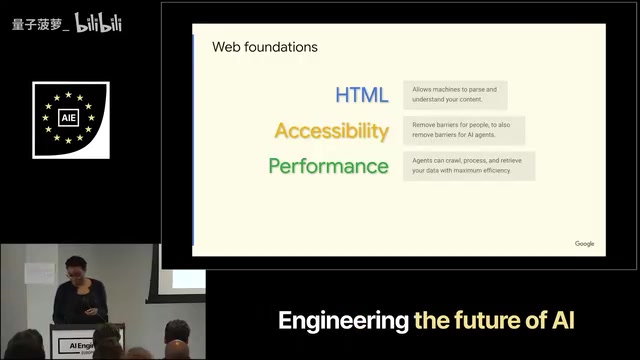
Before using WebMCP, there's an important prerequisite that shouldn't be overlooked: solid web fundamentals. Semantic HTML, accessibility standards, page performance optimization, clear UX flows — get these right, and your website is already halfway to being AI Agent-friendly.
Semantic HTML means using HTML tags with clear meaning (such as <nav>, <article>, <header>, <main>, <form>, etc.) to build pages, rather than overusing semantically meaningless tags like <div> and <span>. This practice was originally intended to improve web accessibility and SEO, but has gained new importance in the age of AI Agents. When an AI Agent needs to understand page structure, semantic tags provide natural structural cues. WCAG (Web Content Accessibility Guidelines) accessibility standards serve a similar purpose — ARIA attributes (like aria-label, aria-role) provide machine-readable semantic descriptions for page elements, and this information is equally crucial for AI Agents' page comprehension. In other words, the accessibility best practices the web community has championed over the past decade are now becoming foundational infrastructure for the AI era.
WebMCP is a further enhancement built on this foundation. AI Agents are already using the web — we don't have to keep tolerating those token-hungry, fragile screen scraping approaches. WebMCP enables every website to become a high-performance API for AI Agents while building a better experience for users.
From a broader perspective, the emergence of WebMCP signals a fundamental paradigm shift for the web platform — evolving from a "human-readable document platform" to a "dual-purpose application platform for both humans and machines." Just as the web evolved from static documents to dynamic applications (Web 2.0), and then to mobile-first responsive design, "AI Agent-first" is becoming the next important design dimension. While this standard is still in its early days, it represents the future direction of web-AI interaction.
Key Takeaways
Related articles

Five Common Claude Code Mistakes — How Many Are You Making?
Five common Claude Code mistakes developers make: copy-pasting code, skipping CLAUDE.md, inefficient prompting, ignoring docs, and poor context management — with fixes.

Andrew Ng's New Course Explained: A Practical Guide to Using OpenAI's O1 Reasoning Model
Deep dive into Andrew Ng and OpenAI's Reasoning with O1 course covering test-time scaling, new prompting paradigms, multi-model orchestration, and practical applications for developers.

Learning AI After College Entrance Exams: A Complete Path from Zero to Freelancing
How to efficiently learn AI skills during summer break after exams? A complete path from mastering prompts and hands-on projects to freelancing on platforms.