Windsurf Wave 3 Hands-On: Building a Professional Landing Page with AI from Scratch
Windsurf Wave 3 Hands-On: Building a P…
Windsurf Wave 3 dramatically lowers AI coding barriers with MCP support, multi-model switching, and more
Windsurf Wave 3 introduces MCP protocol support, free multi-model switching, and drag-and-drop image input. This article demonstrates an efficient workflow for building an AI services sales landing page from scratch using screenshot input, custom GPT prompt generation, and Windsurf code generation. Claude 3.5 Sonnet performs best for web design, and generated HTML can be embedded into WordPress and other platforms with one click — though AI-generated marketing copy still requires manual review for authenticity.
Overview: What Windsurf Wave 3 Brings to the Table
Windsurf (the AI coding tool developed by Codeium) just released its Wave 3 major update, bringing a series of exciting new features. The core highlights of this update include: Model Context Protocol (MCP) support, click-to-navigate, Turbo acceleration mode, and drag-and-drop image input — all of which dramatically lower the barrier to coding. Even complete beginners with zero coding knowledge can leverage these features to quickly build websites, applications, and tools.
Among these, MCP (Model Context Protocol) is an open standard protocol proposed by Anthropic in late 2024, designed to solve interoperability issues between AI models and external data sources/tools. Before MCP, every AI tool needed custom adapter code to connect with external services (such as databases, APIs, file systems), resulting in massive amounts of redundant development work. MCP defines a unified communication interface that allows AI models to call external tools and retrieve contextual information in a standardized way — similar to how USB ports unified the connection method for various peripherals. Introducing MCP support in Windsurf means developers can easily integrate various third-party services into their AI coding workflow, greatly expanding the tool's application boundaries.
This article demonstrates Windsurf Wave 3's real-world performance and workflow through a complete hands-on case study — building an AI services sales landing page from scratch.
Free Multi-Model Switching: Windsurf's API Selection Strategy
One of the most attractive features of the Wave 3 update is support for free switching between multiple top-tier AI models. In the right panel of the Cascade interface, you can choose from multiple APIs including:
- Gemini 2.0 Flash: Consumes only 0.25x credits, extremely cost-effective
- Claude 3.5 Sonnet: Outstanding design and code generation capabilities
- DeepSeek V3: Strong deep reasoning abilities
- GPT-4o / o3-mini: OpenAI series models
Each model displays its credit consumption alongside, allowing users to flexibly choose based on task requirements and budget. This credit-based consumption model reflects an important trend in the AI tools industry: different models have vastly different inference costs. Gemini 2.0 Flash consumes only 0.25x credits because Google specifically optimized it for speed and cost — it maintains high quality while dramatically reducing computational resource consumption per inference. While Claude 3.5 Sonnet has higher credit consumption, it has clear advantages in structured output, code generation, and visual understanding, which relates to Anthropic's special optimization for code tasks during training. DeepSeek V3 is known for its performance on complex reasoning chains, making it suitable for programming tasks requiring multi-step logical deduction. Understanding these model characteristic differences is key to using Windsurf efficiently.
Based on hands-on testing, Claude 3.5 Sonnet performs best in web design and code generation — it produces high-quality designs, generates stable code, and typically gets it right on the first try without repeated debugging.
Hands-On Demo: Building an AI Services Landing Page from Scratch with Windsurf
Step 1: Project Initialization and Screenshot Input
The entire process is very intuitive. First, create a new folder in Windsurf as your project base, then click to use Cascade to start writing code. Cascade is Windsurf's core AI interaction engine, and it's fundamentally different from ordinary AI code completion tools. Traditional code completion (like early versions of GitHub Copilot) mainly provides single-line or multi-line suggestions at the cursor position, while Cascade uses an "Agentic Flow" architecture — it can understand the entire project's context and autonomously decide which files to read, which code to modify, and which terminal commands to execute. This architecture transforms AI from a passive completion tool into a coding agent that can actively plan and execute multi-step tasks.
Cascade offers two interaction modes: a sidebar mode and a chat mode. The sidebar mode directly modifies project files, while the chat mode provides a ChatGPT-like conversational experience that offers consultative interaction without directly modifying project files. Each mode is suited for different use cases.
One extremely practical feature is drag-and-drop image input — you can directly take a screenshot of a reference webpage, paste it into Windsurf, and tell the AI: "Reference this design style and build me a landing page." This visual input method is far more efficient than pure text descriptions. It relies on the visual understanding capabilities of multimodal large language models: when users drag a webpage screenshot into Windsurf, the AI model performs visual parsing of the image, identifying the page's layout structure (such as navigation bars, Hero sections, card components), color schemes, font hierarchy, spacing ratios, and other design elements, then converts this visual information into corresponding HTML/CSS code. This technology reached a qualitative leap in maturity in 2024, particularly with models like Claude 3.5 Sonnet and GPT-4o achieving practical accuracy levels on "screenshot-to-code" tasks. Compared to pure text descriptions, a single screenshot contains layout, color, and typography information that might require hundreds of words to accurately describe — visual input conveys information density several orders of magnitude higher.
Step 2: Using a Custom GPT to Generate Precise Prompts
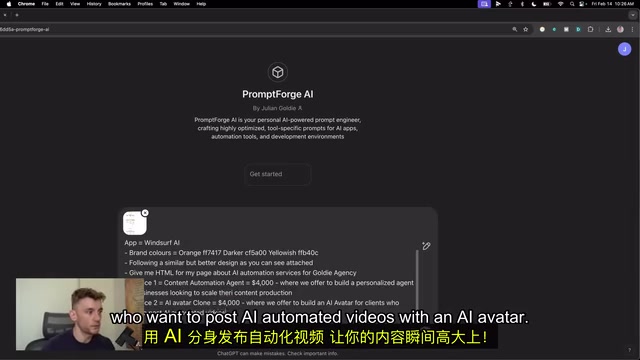
The video demonstrates a clever workflow: first using a custom GPT tool called PromptForge to generate well-structured prompts for Windsurf. This "AI-driving-AI" workflow paradigm is becoming a new trend in efficient development. OpenAI's GPTs feature, launched in late 2023, allows users to create AI assistants optimized for specific tasks by presetting system prompts and knowledge bases to constrain output format and content quality. In this workflow, PromptForge's role is to transform vague business requirements into structured technical prompts — this is essentially an automation of "Prompt Engineering." Good prompts need to include clear role definitions, output format requirements, and specific business parameters (such as hex values for brand colors, specific pricing information, CTA button redirect links, etc.), and these details directly determine the quality of the final code generation.
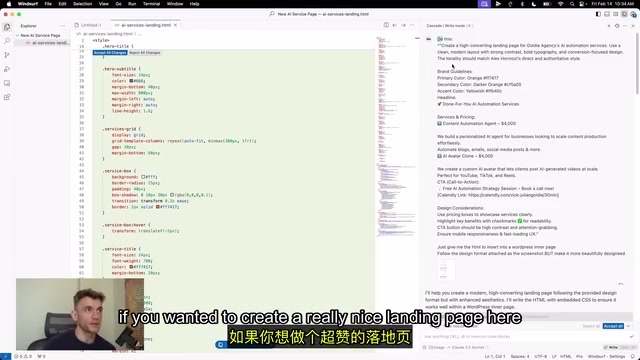
The specific prompt content includes:
- Service 1: Content Automation Powerhouse ($4000) — Custom intelligent assistants for businesses looking to scale content production
- Service 2: AI Digital Twin — Create your own AI twin to automate video publishing
- Brand design specifications, booking links (Calendly), CTA button copy, etc.
Step 3: One-Click HTML Generation with Live Preview
After inputting the carefully prepared prompts into Windsurf, the AI automatically generates HTML code. Once complete, you can preview the results directly in your browser. The smoothness of the entire process is impressive — the page generates like magic, with the design fully adhering to the provided brand guidelines.
If you're not satisfied with the initial results, you can continue iterating in the chat:
- "Add some background colors to certain sections to make the page more eye-catching"
- "Write sales copy with full details, add some benefit-driven marketing language"
- "Remove the false claims and keep it authentic and credible"
Here's an important detail: multi-turn conversation refinement is key to achieving the best results. Don't expect perfection on the first try — instead, approach the ideal outcome through continuous iteration.
Quality Control: From AI-Generated to Production-Ready Landing Page
Replacing False Claims with Real Content
This is the most valuable part of the entire workflow to learn from. AI-generated marketing copy often "oversells," producing exaggerated claims without supporting evidence. The video author's approach is: directly tell the AI to remove all unverifiable promotional statements, ensuring customer expectations match reality.
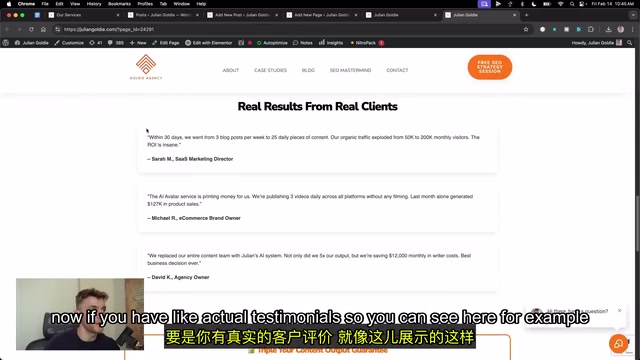
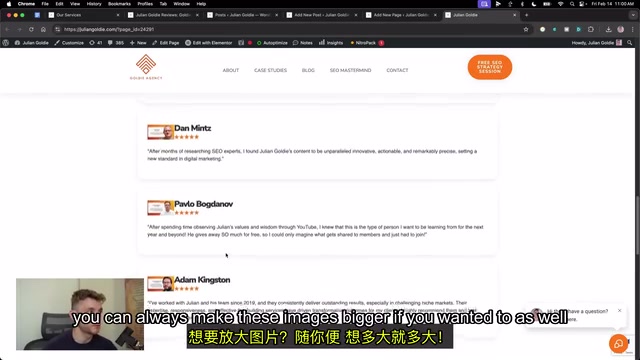
At the same time, replace template placeholder testimonials with real user feedback. The operation is also simple — take screenshots of genuine customer reviews, drag them into Windsurf, and tell the AI to replace the placeholder content with these real testimonials.
One-Click Embedding for WordPress Publishing
After the HTML code is generated, embedding it in WordPress is also very straightforward:
- Have Windsurf output embeddable HTML code
- Add a code block in WordPress
- Switch to the code editor and paste the HTML
- Save and preview
This process seems simple, but involves several important technical considerations. WordPress introduced the Gutenberg block editor starting from version 5.0, and its "Custom HTML" block allows direct insertion of raw HTML/CSS/JavaScript code. However, it's important to note that embedded code may conflict with the WordPress theme's global styles, so best practice is to use CSS scope isolation (such as BEM naming conventions or inline styles) to avoid style pollution. Additionally, image path issues are the most common pitfall — relative paths used during local development need to be replaced with absolute media library URLs in the WordPress environment.
Windsurf also helpfully provides WordPress image path setup guides to ensure images display correctly. Of course, this workflow isn't limited to WordPress — Shopify and other platforms work equally well, though each platform's security policies and rendering mechanisms for custom code differ, potentially requiring platform-specific adjustments.
Beyond Web Pages: More Use Cases for Windsurf Wave 3
Windsurf's capabilities extend far beyond building landing pages. The video also showcases an interesting case — using Windsurf to generate a Python Snake game, which not only automatically generated the game code but also ran it locally. The author admits knowing nothing about Python, yet was still able to run a Python game locally — "no programming knowledge needed whatsoever, the entire process was incredibly smooth."
Additionally, Windsurf supports:
- Scraping trending news online and generating websites with one click
- Developing various applications
- Running terminal commands for local testing
Conclusion: Who Is Windsurf For?
The Windsurf Wave 3 update truly delivers significant experience improvements. Multi-model support lets users choose the optimal model for different tasks, drag-and-drop image input dramatically simplifies design communication costs, and the addition of MCP protocol expands the tool's integration capabilities.
For entrepreneurs and marketers looking to quickly build websites or landing pages, the Windsurf + custom GPT prompt workflow is worth trying. However, it's important to note: AI-generated content still requires manual review and refinement, especially exaggerated claims in marketing copy — always verify carefully before publishing.
Ultimately, no matter how powerful the tool, it's still just an aid. What truly determines your landing page's conversion rate is your understanding of the business and your grasp of user needs.
Key Takeaways
- Windsurf Wave 3 adds MCP protocol support, multi-model switching, drag-and-drop image input, and more, dramatically lowering the coding barrier
- Supports free switching between multiple AI models including Gemini 2.0 Flash, Claude 3.5 Sonnet, and DeepSeek V3, with Claude 3.5 Sonnet performing best for web design
- The workflow of screenshot input + custom GPT prompt generation + Windsurf code generation enables rapid creation of professional-grade sales landing pages
- AI-generated marketing copy requires manual review — remove unverifiable exaggerated claims and replace with real customer testimonials to ensure credibility
- Generated HTML code can be embedded with one click into WordPress, Shopify, and other platforms, achieving a complete loop from development to deployment
Related articles
 Tutorials
Cursor + Codex Dual-IDE Collaboration: A Practical Methodology for Open-Source Project Customization
A complete methodology for open-source project customization based on real-world experience, detailing the Cursor+Codex dual-IDE workflow, seven-stage process, MVP validation, and AI source code reading techniques.
 Tutorials
Cursor Multi-Agent in Practice: Building a Full-Stack Next.js Blog in 50 Minutes
Build a full-stack blog in 50 minutes using Cursor IDE's multi-Agent mode with Next.js, Clerk auth, and Supabase. Learn the 4-phase AI Agent workflow and key integration pitfalls.
 Tutorials
Building an AI Software Factory from Scratch: A Cursor Engineer's Hands-On Experience with Multi-Agent Collaboration
Cursor engineer Eric shares practical insights on building an AI software factory: automation levels, guardrail design, parallel Agent management, and scaling to 1000+ Agents for 24/7 development.