World Monitor: The 50K-Star GitHub OSINT Tool for Real-Time Global Intelligence

A deep dive into World Monitor, the 50K-star GitHub OSINT tool for real-time global intelligence monitoring.
World Monitor is an open-source intelligence monitoring tool with over 50K GitHub stars, built on OSINT principles with 90%+ free features. It offers an interactive world map, global TV broadcast aggregation, public webcam livestreams, AI-powered strategic risk assessment, and multi-dimensional financial data monitoring. It supports five deployment methods — direct web access, Git clone, ZIP download, Docker, and Windows EXE — making global situational awareness accessible to everyone.
Project Overview: A 50K-Star Global Intelligence Monitoring Tool on GitHub
In an age of information overload, how do you efficiently stay on top of real-time developments around the world? There's an open-source project on GitHub with over 50,000 stars — World Monitor (WM) — that provides real-time monitoring of global intelligence and news. It's essentially a "God's-eye view" tool accessible to everyday users.
World Monitor belongs to the field of OSINT (Open Source Intelligence) — a methodology for collecting and analyzing intelligence from publicly available sources. OSINT originated in military and intelligence agencies; during the Cold War, the CIA relied heavily on public media to analyze Soviet activities. With the rise of the internet, OSINT has gradually democratized, enabling ordinary people to extract valuable information from social media, satellite imagery, public databases, and more. In recent years, civilian investigative organizations like Bellingcat have used OSINT techniques to uncover the truth behind multiple international incidents, demonstrating the enormous value of open-source intelligence. WM is a prime example of productizing this concept.
The project's biggest highlight: over 90% of its features are completely free, and the remaining 10% of paid features still offer generous free quotas. More importantly, the project is actively maintained with continuous updates, ensuring high usability. It supports both direct web access and local deployment, catering to different user needs.
Core Features Explained
Interactive World Map & Hotspot Event Tracking
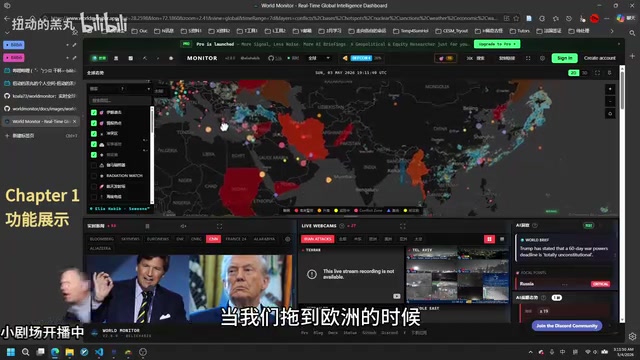
When you open WM's web interface, the first thing you see is an interactive world map. Users can click on any country to view specific metrics — for example, clicking on India reveals its conflict and instability scores. Through dragging and zooming, you can drill down into detailed regional maps and hotspot event markers.
Behind this interactive map lies Geographic Information System (GIS) technology. Modern web-based GIS is typically built on open-source mapping libraries like Leaflet, Mapbox GL, or OpenLayers, supporting vector tile rendering, real-time data overlays, and multi-level zoom. Hotspot event markers involve geocoding technology — automatically converting place names in news text into latitude/longitude coordinates for map visualization. This technology is already widely used in disaster monitoring and epidemic tracking scenarios; WM combines it with intelligence analysis to achieve spatial visualization of news events.
For instance, you can see earthquake and natural disaster markers in western China, while dragging to Europe reveals detailed city maps and additional hotspot information — each marker corresponds to a specific news event.
Global Broadcast TV & Public Webcam Livestreams
The second major feature module aggregates global broadcast television networks. Here you can watch live news broadcasts from mainstream media outlets across countries, including well-known channels like CNN. While any single media source may be biased, cross-referencing multiple sources helps form a more comprehensive understanding. In an era of intensifying information warfare, cross-verifying different sources has become a fundamental methodology for obtaining reliable intelligence.
The third module provides real-time feeds from public webcams worldwide. Users can browse by region — live public webcam feeds from Asia, the Americas, Europe, the Middle East, and more. You can even view real-time footage from hotspot regions (such as conflict zones like Iran).
It's important to note that the public webcams aggregated by WM are cameras intentionally made available to the public by government agencies, tourist attractions, transportation departments, and similar organizations — fundamentally different from illegally hacking into private surveillance systems. Many countries' transportation authorities publicly share highway camera feeds, and tourist cities set up scenic livestream cameras. However, even with public webcams, different jurisdictions have varying usage restrictions. Users should comply with local laws and regulations and avoid using footage in ways that infringe on others' privacy.
AI-Assisted Strategic Risk Assessment
This is one of WM's most distinctive features. The tool uses artificial intelligence to assess regional instability and strategic risk. According to the system's assessment, Iran ranks highest in instability, Russia ranks second, and Ukraine ranks third.
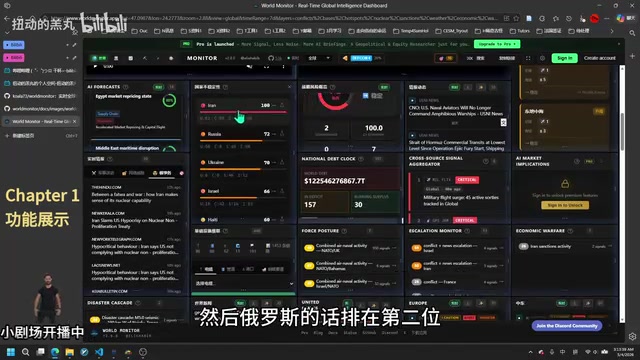
From a technical perspective, WM's AI risk assessment likely combines Natural Language Processing (NLP) with multi-factor quantitative models. The system continuously crawls global news sources, uses sentiment analysis to gauge the negativity of reports, employs Named Entity Recognition (NER) to extract mentioned countries, organizations, and individuals, then combines this with historical conflict data, economic indicators, political stability indices, and other structured data. It uses Large Language Models (LLMs) or traditional machine learning models to generate comprehensive risk scores. This methodology is known in academia as "Conflict Early Warning Systems," and organizations like the United Nations and World Bank use similar techniques to predict regional conflict risks.
The system also provides an overall strategic risk overview, helping users quickly grasp the global security landscape.
Real-Time Intelligence & Financial Data Monitoring
The fifth feature module covers real-time intelligence and news aggregation, including:
- Military Activity: Global military dynamics tracking
- Cyber Threats: Cybersecurity incident monitoring
- Nuclear Affairs: Related news summaries
- Financial Data: Stock and fund trends, commodity indices, cryptocurrency value changes
- Natural Disasters: Regional disaster information (e.g., fires in the Russia-Ukraine region)
- Living Indicators: Global gasoline price fluctuations, etc.
Core news from each region is intelligently summarized by AI, greatly improving information acquisition efficiency. This multi-dimensional information integration approach embodies the modern intelligence analysis concept of "All-Source Fusion" — converging information from different domains and formats onto a unified platform, using correlation analysis to reveal deeper trends that no single source could expose alone.
Complete Guide to World Monitor's Five Deployment Methods
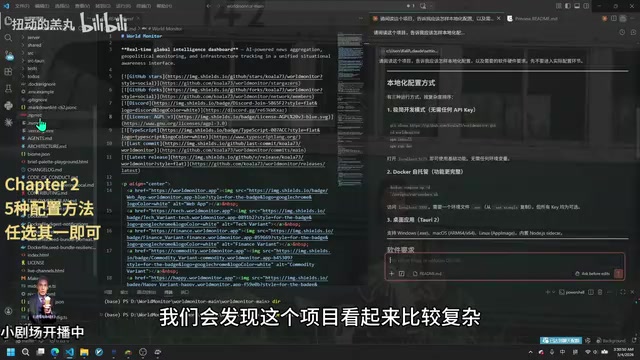
Method 1: Direct Web Access (Zero Configuration)
The simplest approach — just open the project's online link and start using it. No downloads required, and core features are accessible without logging in. The only downside is that opening new content may require some wait time, as plugins need to be loaded into memory for temporary use.
Method 2: Git Clone for Local Deployment
git clone [project URL]
cd [project folder]
npm install
npm run dev
This is the standard Node.js project deployment workflow, suitable for users with some development background. The npm install command automatically downloads all dependencies based on the package.json file in the project root, while npm run dev starts the development server, typically serving the application on local port 3000 or 5173.
Method 3: ZIP Package Deployment
If you don't have Git installed locally, you can click the "Code" button in the upper right corner of the GitHub project page and select "Download ZIP." After downloading and extracting, navigate to the core folder and run npm install followed by npm run dev.
Method 4: Docker Containerized Deployment
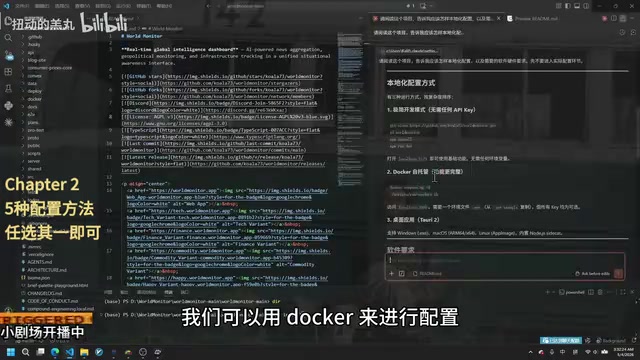
Docker is an OS-level virtualization technology that packages an application along with all its dependencies (runtime environment, system libraries, configuration files, etc.) into a standardized "container" image. Unlike traditional virtual machines, Docker containers share the host kernel, offering fast startup times and low resource consumption. For complex projects like WM that depend on a Node.js runtime and potentially a Python environment for AI modules, Docker ensures environment consistency — the classic "it works on my machine" problem is eliminated, avoiding compatibility issues between different operating systems and dependency library versions.
Deploying with Docker requires only entering the appropriate Docker commands, making it especially suitable for users who don't want to deal with environment configuration.
Method 5: Windows EXE Installer
The project also provides a Windows exe installation file — download and install it like any regular software. This is the most user-friendly option for non-technical users. Under the hood, this approach uses frameworks like Electron to package the web application as a desktop app, requiring no command-line knowledge whatsoever.
Pro Tip: Efficiently Reading README Documentation
Here's a useful tip worth sharing: after cloning a GitHub project locally, you can send the README document directly to an AI for interpretation (AI excels at processing Markdown format). Markdown is a lightweight markup language that uses concise syntax like # for headings, ** for bold, and ` for code — virtually all GitHub projects use it for documentation.
Additionally, I recommend installing a Markdown preview plugin in VS Code (such as "Markdown Preview Enhanced") for real-time compilation and preview, avoiding the need to constantly switch to a browser to view GitHub pages. VS Code's built-in Markdown preview can be opened with Ctrl+Shift+V, and side-by-side preview uses Ctrl+K V.
Conclusion
As an open-source global intelligence monitoring tool, World Monitor integrates news aggregation, real-time monitoring, AI analysis, and financial data onto a single platform, providing ordinary users with unprecedented global situational awareness. It represents the trend of OSINT tools transitioning from professional intelligence agencies to mainstream accessibility — in an era of ever-increasing information transparency, everyone has the opportunity to become their own "intelligence analyst."
Whether you're a current affairs enthusiast following international developments, a researcher needing a global perspective, or an investor concerned about geopolitical risks, this tool is well worth trying.
Key Takeaways
- WM is an open-source global intelligence monitoring tool with 50K+ stars on GitHub; over 90% of features are free with continuous updates
- Core features include an interactive world map, global TV livestreams, public webcams, AI strategic risk assessment, and real-time financial data
- Five deployment options available: direct web access, Git clone, ZIP download, Docker deployment, and Windows EXE installation
- AI generates regional instability assessments and strategic risk analyses, helping users quickly understand the global security landscape
- Integrates multi-dimensional intelligence covering military, cybersecurity, nuclear affairs, finance, and more into a unified platform
Related articles
 Tutorials
Cursor + Codex Dual-IDE Collaboration: A Practical Methodology for Open-Source Project Customization
A complete methodology for open-source project customization based on real-world experience, detailing the Cursor+Codex dual-IDE workflow, seven-stage process, MVP validation, and AI source code reading techniques.
 Tutorials
Cursor Multi-Agent in Practice: Building a Full-Stack Next.js Blog in 50 Minutes
Build a full-stack blog in 50 minutes using Cursor IDE's multi-Agent mode with Next.js, Clerk auth, and Supabase. Learn the 4-phase AI Agent workflow and key integration pitfalls.
 Tutorials
Building an AI Software Factory from Scratch: A Cursor Engineer's Hands-On Experience with Multi-Agent Collaboration
Cursor engineer Eric shares practical insights on building an AI software factory: automation levels, guardrail design, parallel Agent management, and scaling to 1000+ Agents for 24/7 development.