n8n + Claude Code: Build a Fully Automated AI Coding Assistant — Send a Slack Message, Get a PR Automatically
n8n + Claude Code: Build a Fully Autom…
Automate code PRs from Slack messages using n8n, Claude Code, and OpenAI workflows.
This article walks through an AI-powered automation project using self-hosted n8n with two coordinated workflows: one converts Slack messages into GitHub Issues via an OpenAI Agent, and the other triggers a local Python script that invokes Claude Code in Headless mode to auto-generate code and create Pull Requests. The solution enables non-technical team members to trigger code changes with natural language, ideal for startup teams seeking rapid iteration — though self-hosting maintenance and security considerations apply.
Introduction: Letting Non-Technical Team Members Trigger Code Changes
Imagine this scenario: you send a message in Slack saying "Create a minimal Flask app," and a few minutes later, a Pull Request with complete code automatically appears on GitHub, waiting for your review and merge. This isn't science fiction — it's an n8n automation workflow project shared by YouTube creator NeuralNine.
The core value of this project is: it lets non-technical team members trigger code changes through natural language. For startup teams, when a co-founder who doesn't code needs to modify UI details, they simply describe the requirement in Slack. The AI automatically handles the coding, committing, and PR creation — the technical lead only needs to do the final review.
Overall Architecture and Tech Stack
This project runs on two coordinated n8n workflows, involving the following core components:
- n8n (self-hosted version): Orchestrates the entire automation pipeline
- Claude Code (Headless mode): Serves as the actual AI coding engine
- OpenAI: Powers the Agent that converts Slack messages into GitHub Issues
- Slack: User interaction entry point
- GitHub: Code repository and Issue/PR management
- Python script: Locally executes Git operations and Claude Code invocations
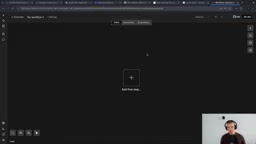
n8n is an open-source workflow automation platform, often called the "open-source Zapier." Unlike SaaS automation tools like Zapier and Make, n8n supports full self-hosting, meaning your data never leaves your server — and it can also execute local system commands, which is the key dependency for this project. n8n uses node-based visual orchestration where each node represents an operation (such as an HTTP request, database query, or API call), and nodes are connected through data flows. It comes with over 400 built-in integration nodes covering mainstream SaaS services. The community edition uses a fair-code license, making it free for individuals and small teams.
Division of Labor Between the Two Workflows
Workflow One: GitHub Issue → Auto-Coding → PR
When a new Issue is created in a GitHub repository, it triggers an n8n workflow that executes a local Python script, calls Claude Code to handle the coding, automatically commits and creates a Pull Request, and finally sends a completion notification via Slack.
Workflow Two: Slack Message → GitHub Issue
It listens for Slack channel messages, uses an OpenAI Agent to convert natural language into a structured Issue title and body, and automatically creates a GitHub Issue — which in turn triggers Workflow One.
The two workflows form a complete closed loop: Slack message → Issue → Coding → PR → Slack notification.
Environment Setup: Key Configuration for Self-Hosted n8n
This project must use the self-hosted version of n8n because it requires the "Execute Command" node to locally run Python scripts and Claude Code. The cloud version does not support local command execution.
Installing and Starting n8n
It's recommended to manage Node.js versions through NVM (Node Version Manager), then install n8n globally via npm:
nvm install 22
nvm use 22
npm install -g n8n
Several key environment variables need to be set at startup:
WEBHOOK_URL="https://your-ngrok-url" \
N8N_EDITOR_BASE_URL="https://your-ngrok-url" \
N8N_ENABLE_UNSAFE_CORE_NODES=true \
NODES_EXCLUDE="" \
N8N_RUNNERS_ENABLED=true \
n8n
The three most critical configurations:
WEBHOOK_URL: GitHub Webhooks require a publicly accessible URLN8N_EDITOR_BASE_URL: The base URL for the editorN8N_ENABLE_UNSAFE_CORE_NODES=true: Enables the Execute Command node
If developing locally, you'll need to use ngrok to create a tunnel for a temporary public address: ngrok http 5678.
A Webhook is a real-time server-to-server notification mechanism: when a specific event occurs in a GitHub repository (such as creating an Issue), GitHub sends an HTTP POST request to a pre-configured URL carrying detailed event data. This requires the receiver to have a publicly accessible URL. For scenarios where n8n runs on a local development machine, ngrok provides an elegant solution — it establishes an encrypted tunnel between your local port and the ngrok cloud service, generating a temporary public URL (e.g., https://abc123.ngrok.io). External requests are forwarded to the local service through this URL. The limitation of ngrok's free tier is that a new random URL is assigned each time it restarts, meaning you'll need to reconfigure the GitHub Webhook. In production environments, n8n is typically deployed on a cloud server with a fixed domain name, or you can use ngrok's paid tier for a fixed subdomain.
Core Script: handle_issue.py Explained
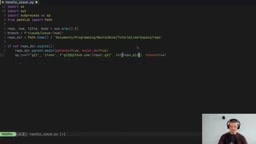
The project's coding intelligence is concentrated in a single Python script that accepts four parameters: repository name, Issue number, title, and body.
Script Execution Flow
import os, sys, subprocess as sp
from pathlib import Path

repo, num, title, body = sys.argv[1:5]
branch = f"claude-issue-{num}"
The script's core logic follows these steps:
- Clone the repository: If it doesn't exist locally, clone the GitHub repository via SSH
- Create a branch: Create a new branch
claude-issue-{number}based on the main branch - Invoke Claude Code: Run in Headless mode, passing the Issue title and body as instructions
- Git operations: add → commit → push, with the commit message referencing the Issue number
- Create PR: Use GitHub CLI (gh) to automatically create a Pull Request
The most critical line is the Claude Code invocation:
sp.run(["claude", "-p", f"Fix issue #{num}: {title}\n\n{body}",
        "--permission-mode", "accept-edits"], check=True)
Claude Code is a command-line AI coding tool from Anthropic that typically runs in interactive terminal mode, where developers can iteratively guide the AI to modify code through conversation. The -p parameter enables Headless mode, which removes the interactive interface and allows single-command invocation — pass in a prompt, and Claude Code automatically analyzes the project structure, understands the code context, generates or modifies files, then exits. This mode is particularly suited for CI/CD pipelines and automation script integration since it doesn't require a human waiting and responding at the terminal. The --permission-mode accept-edits parameter further relaxes file modification permissions, allowing Claude Code to write directly to the file system without individual confirmations. This is necessary in automation scenarios but also means it should only run in trusted environments.
n8n Workflow Configuration in Detail
Workflow One: Issue-Triggered Auto-Coding
GitHub Trigger Node: Listens for Issue creation events in the repository. You'll need to create a Fine-grained Personal Access Token on GitHub with read/write permissions for Webhooks, Pull Requests, Issues, and Contents.
GitHub's Fine-grained Personal Access Token is a next-generation authentication mechanism introduced in 2022. Compared to the traditional Classic Token, it supports access control down to individual repositories and individual permission dimensions. For example, you can create a Token that only has Issues read/write permission for a specific repository, rather than granting full permissions across all repositories under your account like a Classic Token. This principle of least privilege is especially important in automation scenarios — this project requires Webhooks (receiving event notifications), Issues (creating and reading Issues), Pull Requests (creating PRs), and Contents (reading and writing repository files). Fine-grained Tokens can precisely grant these permissions without exposing other sensitive operations.
Execute Command Node: Calls the Python script, extracting the repository full name, Issue number, title, and body from the Trigger's output as parameters:
python3 /path/to/handle_issue.py "{{repo_fullname}}" "{{issue_number}}" "{{issue_title}}" "{{issue_body}}"
Slack Send Message Node: After the script finishes executing, sends a notification message to the specified channel.
Workflow Two: Slack Message to Issue
Slack Trigger Node: Listens for new messages in a specified channel. You'll need to create an app on the Slack API, configure OAuth Scopes (channels:history, channels:read, chat:write), and enable Event Subscriptions.
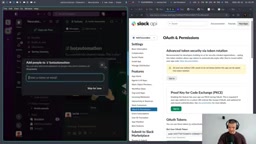
Slack's Event Subscriptions mechanism allows external applications to receive events happening in a Slack workspace in real time. When a user sends a message in a channel, Slack sends an HTTP POST request to the configured Request URL containing the message content, sender, channel, and other information. During configuration, Slack first sends a challenge verification request to the URL to confirm the server is actually listening. OAuth Scopes define the Bot's permission boundaries: channels:history allows reading public channel message history, channels:read allows fetching channel list information, and chat:write allows the Bot to send messages. This fine-grained permission model ensures the Bot can only access the data it needs, adhering to the principle of least privilege.
AI Agent Node: Uses an OpenAI model configured with structured output (JSON Schema) to convert natural language messages into a JSON object containing issue_title and issue_body. The system prompt is: "Turn the following Slack message into a GitHub issue with title and body."
Structured Outputs is an important feature introduced by OpenAI in 2024 that allows developers to define the exact format of model output through JSON Schema, ensuring the LLM's response strictly conforms to a predefined data structure. In this project, the AI Agent needs to convert a user's natural language Slack message (e.g., "Create a Flask to-do app") into a JSON object with issue_title and issue_body fields. Without structured output, the LLM might return inconsistently formatted text, causing downstream node parsing failures. Structured Outputs guarantee format consistency at the model level by specifying the response_format parameter and JSON Schema in the API call, rather than relying solely on format requirements in the prompt. This dramatically improves LLM reliability in automation pipelines and is one of the key technologies for integrating AI into engineering workflows.
GitHub Create Issue Node: Uses the Agent's structured output data to create an Issue in the target repository.
Slack Send Message Node: Returns a confirmation message with the Issue link, letting the user know their request has been received.
Live Demo Results
The author demonstrated two typical scenarios:
Simple task: Creating an Issue titled "Add the first 10 Fibonacci numbers to README.md" — a few minutes later, a PR was automatically generated containing the correct Fibonacci sequence.
Complex task: Sending "Create a minimal Flask to-do application" in Slack — the system automatically created an Issue, Claude Code generated complete app.py and index.html files containing a runnable Flask application, and the result was presented as a PR.
Throughout the entire process, the user never needed to touch the command line, an editor, or Git — they simply waited for the Slack notification to review and merge.
Use Cases and Limitations
Best Use Cases
- Startup teams: Non-technical co-founders can directly describe UI modification needs
- Simple code changes: README updates, configuration modifications, templated code generation
- Rapid prototype iteration: Quickly generate minimum viable code to accelerate product validation
Limitations to Keep in Mind
- Depends on Claude Code's coding capabilities; complex projects may require manual adjustments
- Self-hosted n8n requires maintaining server infrastructure
- ngrok's free tier URLs aren't fixed; production environments need a fixed domain or server deployment
- Security considerations: Unsafe core nodes are enabled, so make sure to run in a trusted environment
Conclusion
This project demonstrates a highly practical AI-powered automated coding workflow: n8n orchestrates the process, Claude Code handles the coding, and OpenAI understands user intent — stringing together the entire pipeline from "describing requirements in natural language" to "code PR ready for review." While the setup involves configuring multiple platforms (GitHub Token, Slack Bot, n8n environment variables, etc.), once deployed, it can significantly lower the collaboration barrier between non-technical members and code repositories. If your team is looking for a practical AI coding assistant solution, this n8n + Claude Code combination is worth trying.
Related articles
 Tutorials
Cursor + Codex Dual-IDE Collaboration: A Practical Methodology for Open-Source Project Customization
A complete methodology for open-source project customization based on real-world experience, detailing the Cursor+Codex dual-IDE workflow, seven-stage process, MVP validation, and AI source code reading techniques.
 Tutorials
Cursor Multi-Agent in Practice: Building a Full-Stack Next.js Blog in 50 Minutes
Build a full-stack blog in 50 minutes using Cursor IDE's multi-Agent mode with Next.js, Clerk auth, and Supabase. Learn the 4-phase AI Agent workflow and key integration pitfalls.
 Tutorials
Building an AI Software Factory from Scratch: A Cursor Engineer's Hands-On Experience with Multi-Agent Collaboration
Cursor engineer Eric shares practical insights on building an AI software factory: automation levels, guardrail design, parallel Agent management, and scaling to 1000+ Agents for 24/7 development.