Zen MCP: An Open-Source Tool That Lets Claude Orchestrate Multiple AI Models in Collaboration
Zen MCP: An Open-Source Tool That Lets…
Zen MCP lets Claude orchestrate multiple AI models collaboratively within a single conversation.
Zen MCP is an open-source project based on the MCP protocol that enables Claude Code to orchestrate multiple AI models—including Gemini, O3, and Flash—within a single conversation. Its core capabilities include intelligent automatic model selection, continuous context sharing, and breaking through single-model token limits. The article also covers a modification guide for using custom API proxies to reduce calling costs, though some debugging experience is required.
What is Zen MCP
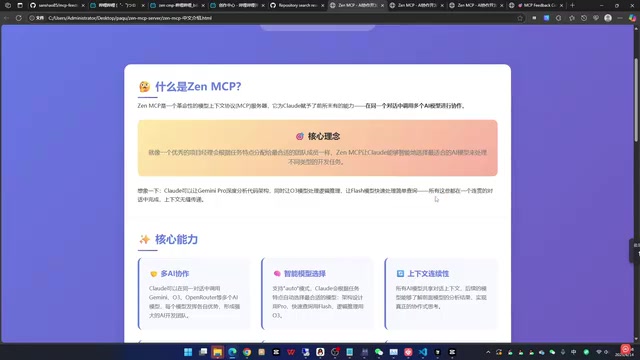
Zen MCP is an open-source server project based on the Model Context Protocol (MCP) that gives Claude the ability to call multiple AI models for collaboration within a single conversation. Its core philosophy is similar to an excellent project manager who assigns work to the most suitable team members based on task characteristics.
Model Context Protocol (MCP) Background: MCP is an open standard protocol introduced by Anthropic in late 2024, designed to solve the fragmentation problem of integrating AI models with external tools and data sources. Before MCP, every AI application needed to develop separate integration solutions for different tools, resulting in extremely high maintenance costs. MCP adopts a client-server architecture and defines a unified communication specification that enables AI models to invoke external capabilities in a standardized way—MCP Servers expose tools and resources, while MCP Clients (like Claude) discover and call these tools. This design is similar to how the USB standard unified hardware connections, allowing components in the AI ecosystem to be plug-and-play.
Specifically, Claude Code can achieve the following through Zen MCP:
- Have Gemini Pro perform deep analysis of code structure
- Have the O3 model handle logical reasoning tasks
- Have Flash models quickly process simple queries
All of this work seamlessly switches within a single coherent conversation. The project has currently earned 1.4K Stars on GitHub, with the author actively maintaining it.
Core Capabilities of Zen MCP
Multi-AI Model Collaborative Orchestration
Zen MCP's most fundamental capability is enabling Claude Code to call multiple models like Gemini, O3, and others within the same conversation. Each model leverages its respective strengths, forming a complete AI collaboration chain that implements a "one commander dispatching multiple experts" working model.
This "Commander-Expert" multi-model collaboration architecture is known as the "Orchestrator-Subagent" pattern in the AI engineering field, and is one of the core paradigms of Agentic AI system design. The primary model (Orchestrator) handles task decomposition, model selection, and result integration, while sub-models (Subagents) focus on executing specific subtasks. Compared to single-model solutions, this architecture can select the optimal model for different subtasks, avoiding cost waste from "using a sledgehammer to crack a nut." Its design philosophy shares remarkable similarities with the microservices architecture in software engineering.
Intelligent Automatic Model Selection
It supports an automatic mode where Claude automatically selects the most appropriate model based on task characteristics: Flash for quick queries, O3 for logical reasoning, and Gemini Pro for deep analysis. Developers don't need to manually specify—the system intelligently matches the optimal model.
The technical foundation of this scheduling strategy lies in the capability differences between models: Gemini Pro is Google DeepMind's flagship multimodal model, excelling in code comprehension and long document analysis; O3 is OpenAI's reasoning-enhanced model, trained with "chain-of-thought" reinforcement, far surpassing standard models in mathematical reasoning, logical analysis, and algorithm design; Flash series are lightweight models optimized for speed and cost, with low response latency and API call costs roughly one-tenth of Pro versions, suitable for high-frequency simple tasks.
Continuous Context Sharing
All AI models share context, allowing subsequent models to understand the analysis results from previous models, enabling true collaborative thinking. This means the entire workflow is coherent, with no information gaps. The context-sharing mechanism ensures that each sub-model's output can be understood and utilized by subsequent models, forming a true collaboration chain rather than isolated parallel computations.
Breaking Single-Model Token Limits
You can leverage Gemini's 1-million-token context window to process large projects, breaking through the context length limitations of a single model—ideal for analyzing large codebases.
The token context window is the maximum amount of text a large language model can process in a single inference, directly determining how much information the model can "remember." GPT-4's standard context window is approximately 128K tokens, while a medium-sized codebase (around 100,000 lines of code) often exceeds 2 million tokens, far exceeding single-model processing capacity. Gemini 1.5 Pro's 1-million-token window (approximately 750,000 English words) is currently the largest among mainstream models, capable of loading an entire medium-sized project at once. By routing large tasks to Gemini for processing, Zen MCP effectively bypasses Claude's own ~200K token context limitation, which is decisive for tasks like refactoring and auditing that require holistic understanding of large codebases.
Practical Workflow Demo: Refactoring a Complex Code Project
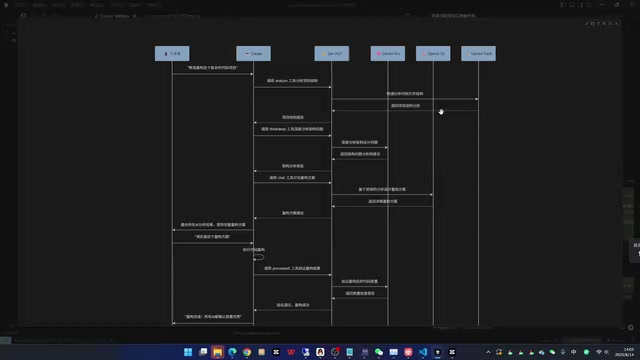
Using "refactoring a complex code project" as an example, here's Zen MCP's complete multi-model collaboration workflow:
- Developer submits request: Help me refactor this complex code project
- Claude calls Gemini Flash: Quickly analyzes project structure via Zen MCP, returns structural analysis results
- Claude calls Gemini Pro: Performs deep analysis of architectural issues in the code, returns problem analysis and optimization suggestions
- Claude calls O3: Based on previous analysis results, designs a detailed refactoring plan
- Claude integrates results: Consolidates all AI analysis results and provides a complete refactoring plan to the developer
- Implementation phase: After developer confirmation, Claude again uses Zen MCP to coordinate various models for implementing the refactoring
Reducing Usage Costs: Custom API Proxy Modification Guide
Why Modification is Needed
Directly using official APIs from OpenAI, Gemini, or OpenRouter comes with relatively high calling costs. If you have access to third-party API proxy channels, you can modify Zen MCP to use custom API endpoints, significantly reducing the cost of multi-model collaboration.
Core Modification Approach
An API proxy (API Proxy/Relay) is a proxy layer service set up between the client and the official API server. Its core principle is: the proxy is fully compatible with the official API request format (such as OpenAI's /v1/chat/completions interface specification), and the client only needs to replace the request address from the official domain to the proxy address—no other code changes required. Proxies typically achieve price advantages through bulk purchasing of API quotas, leveraging pricing differences across regions, or connecting to multiple providers.
Modifying Zen MCP to support custom endpoints essentially involves changing the HTTP client's base_url parameter while ensuring the Authorization Header format matches the target proxy. This type of modification is very common in the open-source AI tool ecosystem, with many projects reserving environment variables like OPENAI_API_BASE to support such customization.
Specific modification steps include:
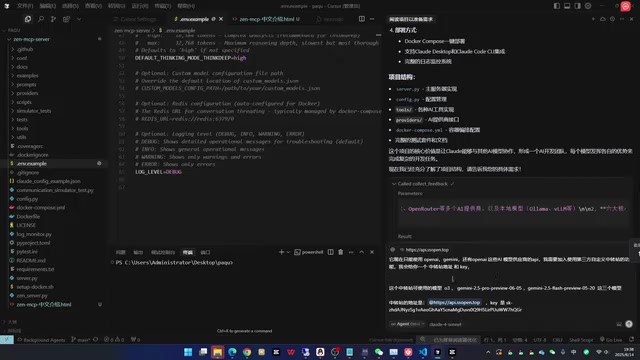
- Read the project source code: Have an AI assistant (like Cursor) fully understand the Zen MCP project structure
- State modification requirements: Inform the AI that you need to add a third-party custom proxy, providing the API address and key
- Modify configuration files: Create custom model configurations and add proxy provider classes
- Configure MCP: Generate MCP configuration files suitable for local running (non-Docker)
Common Issues During Modification
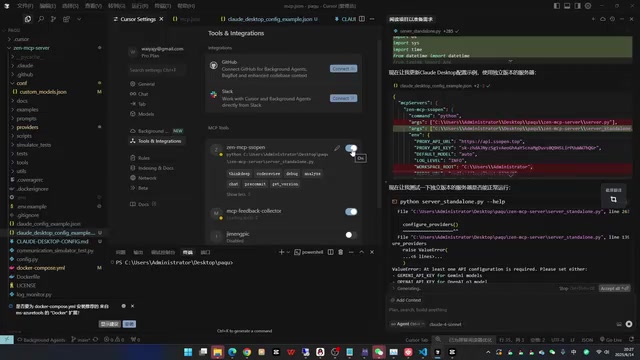
In practice, when performing modifications through Cursor, you may encounter the following issues:
- Need to modify provider type definitions in
base.py - Create new third-party proxy provider class files
- Handle Lifespan functionality compatibility issues
- Tool calls at the MCP protocol level may throw exceptions
Although MCP tools may be recognized and displayed in green (available status), actual calls may still have issues, requiring multiple debugging iterations to fully resolve.
Usage Recommendations and Summary
Zen MCP brings the concept of "AI multi-model collaboration" to life as a usable development tool. Here are recommendations for different types of developers:
- Official API users: Can directly use Zen MCP with Claude Code to experience the efficiency gains of multi-model collaboration
- Cost-sensitive users: Can try modifying it to use a custom proxy solution, though some debugging patience is required
- Architecture learners: Even without immediate use, Zen MCP's architectural design is worth studying—how to make one AI model serve as a "commander" orchestrating other models to work collaboratively
It's worth noting that custom modification is not yet a plug-and-play solution and requires some understanding of the MCP protocol and project source code. However, as the open-source community develops, more convenient configuration solutions will surely emerge.
Key Takeaways
- Zen MCP enables Claude to call multiple AI models like Gemini, O3, and Flash for collaborative task completion within a single conversation
- Core capabilities include intelligent model selection, context sharing, and breaking through token limits
- Usage costs can be significantly reduced by modifying it to use custom API proxies
- The modification process requires changes to provider classes, configuration files, etc., with some debugging difficulty
- The project has earned 1.4K Stars and is well-suited for development scenarios requiring multi-model collaboration
Related articles
 Tutorials
Cursor + Codex Dual-IDE Collaboration: A Practical Methodology for Open-Source Project Customization
A complete methodology for open-source project customization based on real-world experience, detailing the Cursor+Codex dual-IDE workflow, seven-stage process, MVP validation, and AI source code reading techniques.
 Tutorials
Cursor Multi-Agent in Practice: Building a Full-Stack Next.js Blog in 50 Minutes
Build a full-stack blog in 50 minutes using Cursor IDE's multi-Agent mode with Next.js, Clerk auth, and Supabase. Learn the 4-phase AI Agent workflow and key integration pitfalls.
 Tutorials
Building an AI Software Factory from Scratch: A Cursor Engineer's Hands-On Experience with Multi-Agent Collaboration
Cursor engineer Eric shares practical insights on building an AI software factory: automation levels, guardrail design, parallel Agent management, and scaling to 1000+ Agents for 24/7 development.