4 Lines of Config to Connect AI to Your Hard Drive: MCP Protocol in Practice

MCP turns local resources like hard drives and NAS into AI-callable tools with just a few lines of config.
The article explains how MCP (Model Context Protocol) solves AI's inability to directly access local hard drives, NAS, and soft routers. MCP wraps local hardware resources as tools AI can call; users only need about four lines in the client config file, and the AI handles the handshake, tool listing, and data retrieval. Over 10,000 MCP servers are public, with the spec updated in July 2026. The article covers MCP's universality—NAS SSH and router management interface configs are basically identical and reusable—and notes that capabilities depend on the server's exposed tools, with users responsible for security boundaries.
Why Can't AI Reach Your Hard Drive?
AI models can write code and answer questions, but by default they run in the cloud or in sandboxed environments and cannot directly access your local hard drive, NAS, or soft router. To let AI read local storage data, you usually need to write scripts by hand or set up API services—a fairly high bar. According to a Bilibili creator, the "missing link" here is MCP (Model Context Protocol). It aims to turn local hardware resources into tools that AI can call, in a unified way.
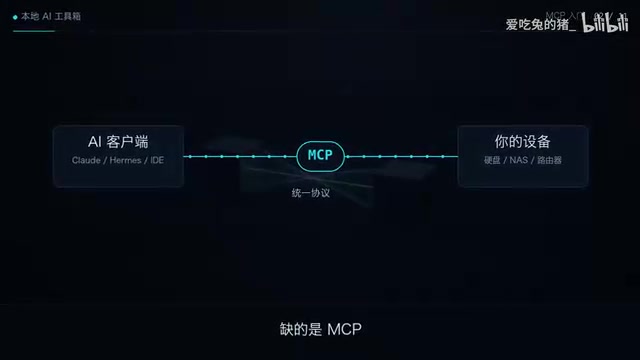
What Is MCP? Connecting Hardware with Four Lines of Config
MCP's logic is simple: turn hard drives, NAS, and soft routers into tools that AI can call. Write the configuration once, and every MCP-compatible client can use it directly. In the video, the creator demonstrates that you only need to add four lines to a config file and restart the client. Then ask the AI "how much space is left on the drive," and the AI will handle the handshake, list the available tools, and fetch the data—all without a single mouse click.
The advantage of this approach is its universality. Swap in a NAS SSH interface or a router's management interface, and the setup is basically the same—the config template can be reused directly. The creator says the template is in the video description for viewers to grab.

MCP uses a client-server architecture: an MCP-compatible AI client (such as an IDE or desktop assistant) acts as the Client and initiates a connection to a locally running MCP Server; the MCP Server encapsulates a specific resource or capability, such as a file system, SSH channel, database, or device management interface. The two sides communicate via JSON-RPC messages, first completing capability negotiation and an initialization handshake, after which the Server declares to the Client the tools, resources, and prompt templates it exposes. So the so-called "four lines of config" essentially register a Server's launch method and connection parameters on the client side. After that, the AI can discover and call these tools as needed—no need to write integration code repeatedly for each client.
MCP Ecosystem Status and Workflow
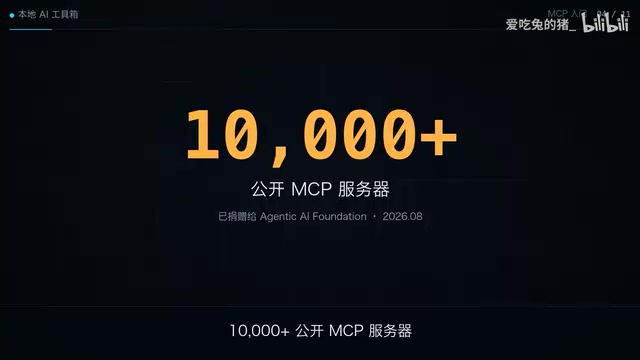
According to the creator, there are currently more than 10,000 publicly available MCP servers, and the protocol's spec was just updated in July 2026. This means MCP is moving from an experimental protocol toward a broader tool ecosystem. In actual interaction, the AI first performs a handshake with the MCP server, obtains the tool list, then calls the corresponding tool based on the user's question and returns the result—the entire process is transparent to the user.
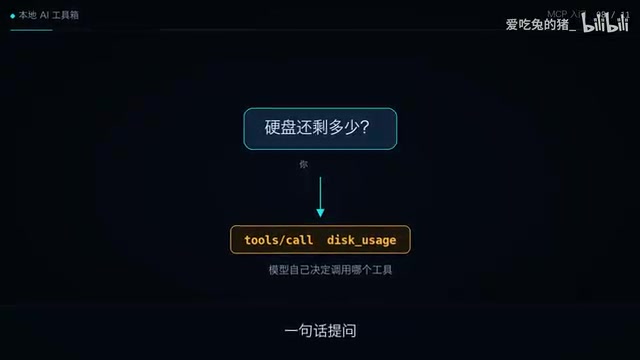
The value of this workflow is that it lowers the barrier for AI to access local resources. In the past, you had to write adapter code for each piece of hardware; now, as long as there's a corresponding MCP server on the hardware side, a few lines of config on the client side are enough. For home labs and small office environments, this lightweight approach is especially friendly.
MCP does not conflict with traditional Function Calling; the two are complementary. Function Calling describes "how the model expresses that it wants to call a function," while the actual implementation of the tool is still left to the application. MCP goes further by standardizing "where tools come from and how they are discovered and called," decoupling tool providers from AI applications. As a result, the same MCP Server can be reused by multiple clients, and the tool ecosystem can evolve independently. This is also why MCP is often compared to "the USB-C port of the AI tool world": a unified socket, not a unified device.
Use Cases and Limitations
MCP suits users who want AI to directly operate local storage or query device status—for example, having AI report remaining disk space, read file lists on a NAS, or check the running status of a soft router. Note, however, that MCP itself is only a protocol layer; what it can actually do depends on the tool capabilities exposed by the corresponding MCP server. In addition, when opening up local hardware access, users must manage the security boundary themselves.
At the end of the video, the creator previews that the next episode will cover how local large models can connect to MCP, forming a complete loop from model to hardware. For readers who want to build a local AI toolchain, MCP is worth following.
When opening local hardware to AI calls, the principle of least privilege is especially critical. It's recommended to use read-only or restricted accounts for the MCP Server and avoid directly exposing administrator credentials; restrict accessible directories and commands via allowlists, and disable unnecessary write and delete tools; for sensitive channels such as SSH and router management interfaces, listen on the local loopback address or intranet first—never expose them to the public internet. In addition, AI call behavior should be logged for auditing, and high-risk operations can be set to require manual confirmation. The protocol itself does not provide these security policies—boundary design falls entirely on the deployer.
One-line Summary
MCP turns local resources like hard drives and NAS into tools AI can call with just a few lines of config.
Paragraph Summary
The article explains how MCP (Model Context Protocol) solves the problem of AI being unable to directly access local hard drives, NAS, and soft routers. MCP's approach is to wrap local hardware resources as tools AI can call; users only need to add about four lines to the client config file, and the AI will automatically handle the handshake, list tools, and fetch data. There are currently more than 10,000 publicly available MCP servers, and the spec was updated in July 2026. The article also covers MCP's universality—config for NAS SSH interfaces and router management interfaces is basically the same, and templates can be reused—and notes that actual capabilities depend on the tools exposed by the server, and that users must manage the security boundary themselves when opening local permissions.
Related articles
AWS AgentCore Gateway: Connecting AI A…
AWS AgentCore Gateway: Connecting AI Agents to Enterprise Backends with MCP
How AWS AgentCore Gateway acts as a primary MCP server to aggregate REST APIs, Lambda, and existing MCP services? Analyzing its AST real-time mapping, zero cold start, semantic search for tool overload, session isolation, and key injection security design, plus the architectural approach to decoupling enterprise AI agents from backends.

One Link Gives Figma AI a New Skill: Hands-On with MCP Connectors
Paste one MCP server link and the AI Agent in Figma gains new tool capabilities. We break down the setup flow, 20+ one-click apps, read/write permissions and execution policies, and the public HTTPS requirement.

Cognition SWE-2 in Practice: One Prompt to Handle the Whole Product Launch Process
Analyzing a YouTube creator's prompt for using Cognition SWE-2 to launch a product: a landing page, seven-email sequence, and non-buyer follow-up tool, plus how the 'test and report' constraint changes AI delivery quality.