Agentic Engineering with Claude Code and Android CLI

Developers are becoming agent team managers—set up the environment, control context, and define done.
Based on a talk by Google's Android DevRel team, this article argues developers are shifting from writing code to managing agent teams. Agent failures should be treated as missing-information bugs, so build a full environment (docs, rules, decision history, devices, profilers) with Android CLI as the entry point. Keep conversations around 150K tokens via workflows like Grill Me and spec slicing, with agents.md under 250 lines. Tooling must divide labor: Hooks for determinism, Skills on demand, MCP for external services, CLI for local operations. The biggest gain: pre-defining "done" with failing tests raised Android Bench pass rates from 22% to 90%.
The developer's role is becoming "agent team manager"
Ben from Google Android Developer Relations and product manager Steven made a prediction in a technical talk: the developer's role is changing, and changing so fast that "the content of this talk may already be out of date." They demoed with Claude Code but stressed that the methodology is agent-agnostic—it's closer to a way of thinking than a set of tool tricks.
The core idea: when an agent fails to implement a feature, don't rush to conclude "AI can't do this yet." Instead ask the reverse—what piece of information is it missing? Treat agent failures as bugs. That's exactly how teams building agent harnesses develop internally. The real productivity gain comes from "running multiple agents in parallel," which requires you to first build an environment where an agent can succeed autonomously without you re-prompting it over and over.
Environment: give the agent all the context you have
"Environment" isn't just granting the agent access to code. The checklist from the talk includes: accurate documentation, project specs, project rules, team chat spaces (so the agent understands how decisions were made), historical decision records and PR comments, and a physical device or emulator.
"You wouldn't expect to write Android code without a device or emulator—so don't expect an agent to either." Likewise, if you want an agent to optimize performance, it needs to be able to run a profiler; if the app depends on backend services, the agent should ideally be able to talk to them too.
This is exactly the positioning of Android CLI. It's Google's new command-line tool for interfacing with all kinds of Android tooling: the SDK manager, launching emulators, connecting to backends like Crashlytics. It is not itself an AI product—it just sits in your shell, so it works with any agent.
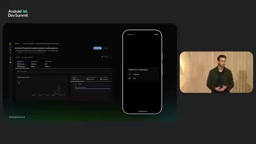
They demonstrated with their in-house tennis app, Sideline. After the team hooked Firebase Crashlytics into the dev environment, they found a problem they had known nothing about: an ANR on a foldable device that couldn't be reproduced on the emulator. Using Android CLI's device streaming capability, the agent connected itself to the problematic device to verify the fix—and the speaker didn't have that machine in hand at the time. It ended up being a two-line fix; PR filed, merged, released, and the issue disappeared in the 1.0 build.
Context: 150K tokens is the sweet spot
A year or two ago the industry was racing on context window sizes; some even tried stuffing all of developer.android.com into a prompt, with poor results. Today window sizes have basically plateaued around the 1M mark while model capability keeps rising—the Android Bench curves show context window flattening while model capability climbs.
The key point: context is a fixed budget. Most agent harnesses don't expose the full million-token window to users, because results get worse. The rule of thumb from the talk: keep the conversation to roughly 150K tokens to get the model's full capability without context rot.
Context isn't just what you type. System instructions, workspace info, installed skills, MCP tools, and the full message and tool-call history are all sent with every prompt. Gradle logs are the worst offender here: long, verbose, mostly useless. Big-vendor harnesses truncate automatically, but minimalist agents (like mini SWE agent) send the full log to the model, and costs balloon fast. A simple countermeasure is to use Gradle's quiet mode.
The way to stay within that window is workflow. The talk recommended a series of skills from Matt Pocock: first use "Grill Me" to have the agent interrogate you, squeezing fuzzy points out of your head and onto an issue; then generate a spec document and slice it into multiple issues, each roughly fitting into the 150K window; then run "build—verify—loop" per issue, clearing context when done.
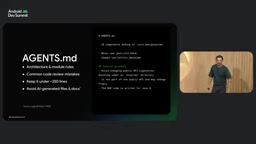
Trade-offs of agents.md
agents.md is for "always relevant" information: architecture and module rules (e.g., UI components belong to the design system module), common code review mistakes, preferences the team repeatedly emphasizes. It should stay under 250 lines.
A counterintuitive finding: research shows that letting the agent edit agents.md itself degrades performance by about 2–3% while raising cost by 20%. The alternative is to have the agent write a retrospective at the end of each PR, and let the team decide collectively at the retro meeting how to modify it. The speaker believes this file is becoming key infrastructure for team collaboration.
Also, such best practices change fast with model versions—writing "NEVER do this" in all caps used to be popular, then Anthropic said caps no longer help and lowercase is fine.
Context rot refers to the phenomenon where, as the context window fills toward its limit, the model's efficiency in using the information inside it actually declines—not "it doesn't fit" but "it fits but isn't used well." Typical symptoms include: attention decay on earlier content, oversensitivity to irrelevant noise, and degradation of instruction-following. That's also why most commercial agent harnesses don't expose the full million-token window directly to users, but instead keep effective context within a manageable range through automatic truncation, summary compression, and tool-result trimming. The Gradle log offender mentioned in the article is a classic trigger of context rot: long, highly repetitive logs crowd out useful information while lowering the model's ability to discern key signals. So the "150K token sweet spot" isn't a hard capability boundary of the model—it's an empirical balance point between signal-to-noise ratio and cost.
Tooling layer: how Hooks, Skills, and MCP divide the work
If you want to change agent behavior, don't stuff everything into agents.md.
Hooks add determinism. The agent exposes various events (session start/end, file read/write, etc.) and you can attach scripts. For example, "always run the linter after writing code" doesn't need to be a written rule—just a stop hook running a deterministic script; likewise, put a read/write hook on secret files that simply returns "not allowed."
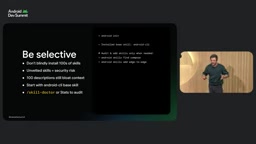
Skills load context on demand. A skill consists of a name, a description (capped at 1024 characters), and a body, which can be very large. The Android CLI skill's description is short, but its body is extremely long—loaded only when you actually need Android CLI. A security note here: don't blindly install those "100 agentic engineering skills" repos from the internet. First, you don't know what's in them; second, 100 descriptions times 1000 characters is 100K characters—a huge chunk of the window gone before you've written a line of code. The recommended approach: install only the Android CLI base skill, and let it search for and install appropriate skills on demand.
MCP and CLI are not substitutes. CLI is fast, composable, runs in your local shell at near-zero cost, and benchmarks like TerminalBench have made models very proficient at terminal operations. MCP is better suited to hooking up existing external services—GitHub, Figma, and Slack all provide MCP servers; install and go. Tools that have always run in the shell, like Perfetto, Gradle, and Android commands, are better kept local.
The Android Profiler command's performance on Sideline illustrates the point: the app demanded 30 fps in real time but measured only 20–22 fps. The agent used the profiler to record a system trace on the device, found the AI thread was being scheduled onto the slowest core, and proactively called Android documentation search to pull up official guidance on the Performance Hint API, ultimately optimizing system scheduling to hit the 30 fps target.
Agent harness refers to the runtime framework that wraps around the model and drives the agent to complete tasks. It typically includes several parts: organization of system prompts and tool definitions, management of message and tool-call history, tool execution and result return, context trimming and compression strategies, and permission and security controls. The same model can perform very differently under different harnesses—because the harness determines what the model sees, what it can do, and how it retries after failure. The recurring phrases in this article—"big-vendor harnesses truncate automatically" and "minimalist harnesses send the full log to the model"—describe exactly this layer of strategic difference. Understanding the existence of the harness helps explain a common confusion: why a model that performs mediocrely in one product shows markedly better capability after switching to another agent tool—what changes is often not the model, but the scaffolding around it.
Verification loop: the model doesn't lack capability, it lacks a "definition of done"
"Have the agent implement a big change, it comes back and says it's done, you install the app and tap around manually, then send the bugs back"—this loop has to stop. The speaker called this "stop being the agent's QA tester."
The classic anti-pattern is migrating the entire project to Navigation 3: the agent confidently declares the migration complete, but rotating the screen crashes, transition animations are all lost, and the Gradle files aren't cleaned up. The problem isn't capability—it's that "done" was never defined in advance.
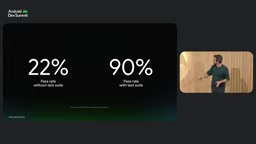
The data makes the gap clear: on Android Bench, a certain model scores 22% with a natural prompt like "migrate nav2 to nav3"; give it a pre-supplied suite of failing tests and the overall benchmark pass rate jumps to 90%. Note this isn't giving it the answer—it doesn't tell it how to migrate, just the acceptance criteria.
The verification loop doesn't have to be a full test suite. For UI work, you can require "render the Compose Preview, confirm it matches the Figma specs, and show me the result"—demand evidence rather than accepting "I'm done." For business logic, run unit tests; for crash fixes, verify on a real device via Remote Test Lab.
More effective is layered verification: first run the fastest unit tests and Compose Previews, then connected tests and Journeys once those pass, and only finally the time-consuming full remote device tests. With layered instructions, the agent loops through each layer rather than re-running everything every round.
The demo adding an XR glasses form factor to Sideline shows this vividly: between the first and second round, JVM tests defined six Compose Preview states with no emulator involved—very fast; between the second and third round, layout issues like long strings were caught and fixed before the emulator even started; only once the emulator loop kicked in did problems surface that the first two layers couldn't cover. Each layer of the loop hardens the app, in the order of fast first, slow last; weak first, strong last.
Finally, paired with Claude Code's schedule command you can set any cadence, letting two lingering Crashlytics crashes be automatically fixed, automatically verified, and submitted as a PR—forming an app that heals itself.
Android Bench is a benchmark suite Google built for Android development tasks, measuring model performance in realistic engineering scenarios, with tasks covering navigation migration, performance optimization, crash fixes, and more. What distinguishes it from general code benchmarks: tasks run in near-real Android project environments, and the criteria are whether the build passes, whether tests go green, and whether runtime behavior matches expectations—not mere code similarity. The 22% vs. 90% comparison in the article is convincing precisely because the benchmark itself has built-in executable acceptance signals—when the prompt includes a failing test suite, what the model gets isn't "the answer" but a verifiable definition of "what counts as success." This also explains why "write your own eval" was listed as a core recommendation by the speaker: general benchmarks only reflect average capability, while a team's real bottleneck tends to lie in a specific codebase and a specific workflow.
Practical advice
The speaker's conclusion was a single sentence: start treating the setup of the agent environment like software development. Conflicting advice online is normal; the best approach is to write your own eval and use data to judge whether something really works.
One detail worth noting: Sideline's agents.md deliberately keeps clear architecture definitions, because that saves both tokens and context length—the agent doesn't have to repeatedly dig through the codebase to infer things. For closed-source apps, since LLMs can't learn your architecture from public code, the return on continuously maintaining agents.md is even higher.
One-line Summary
Developers are becoming agent team managers; the core is setting up the environment, controlling context, and defining done.
Paragraph Summary
Based on a technical talk by Google's Android DevRel team, the article argues that the developer's role is shifting from writing code to managing agent teams. Three core arguments: first, agent failures should be treated as bugs of missing information rather than lack of capability, so you need to build a full environment for the agent—docs, architecture rules, decision history, real devices, and profilers—with Android CLI providing a unified entry point; second, context has a sweet spot of around 150K tokens that balances capability and cost, requiring workflows like Grill Me, spec slicing, and per-issue execution to control the window, with agents.md kept under 250 lines and maintained by the team; third, the tooling layer needs clear division of labor—Hooks provide determinism, Skills load on demand, MCP connects external services, and CLI handles local high-frequency operations. The biggest gain comes from defining "done" in advance: simply supplying a failing test suite raised Android Bench pass rates from 22% to 90%.
Related articles

Cord: Teaching Masked Diffusion Models to Learn Dynamic Decoding Order
Cord proposes a confidence-anchored order residual decoding strategy that dynamically adjusts reveal order in masked diffusion language models via geometric residuals, significantly boosting task success across benchmarks with minimal inference overhead.

No God Required: Can AI Religious Exemptions Redefine Faith Boundaries in the Workplace?
A University of Kentucky administrator won a religious exemption from using AI—without believing in God. This analysis examines how loose religious exemption definitions become an institutional exit for employees refusing AI, and what it means for employer compliance and management.

How Do Multi-Agent Medical Systems 'Launder' Bias? New Study Reveals Unfairness Beneath Consensus
New study reveals "disparity laundering" in clinical multi-agent systems: deliberation cannot eliminate bias but hides it. Learn how diverse-perspective ensembles reduce disparities.