AI Coding Agent Rankings: Claude Code, Codex, or Cursor — Which Is Stronger?

A Bilibili creator tested ten AI coding agents and ranked them by capability and cost, with tiered selection advice.
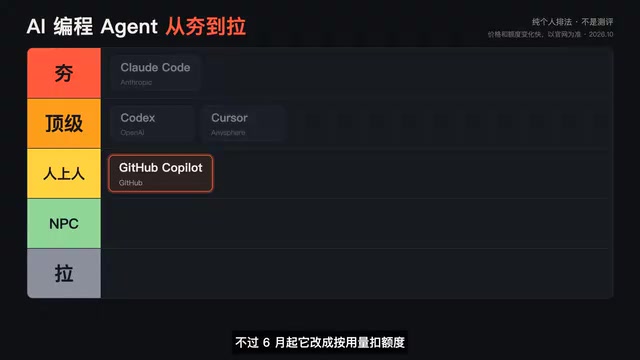
The article compiles Bilibili creator "From Solid to Trash"'s personal ranking of ten popular AI coding agents. Claude Code tops it for reliably completing dozens-of-steps long tasks — the creator used it to run a full video subtitle pipeline; Codex ranks top-tier for cloud-based parallel multitasking, included with a ChatGPT subscription. The second tier is Cursor for its editor feel and GitHub Copilot for ecosystem ties, though Copilot switched to usage-based credits in June, weakening its cost edge for heavy agent use. The third tier includes open-source BYO-API OpenCode and Client, free-but-limited Google AntiGravity, docs-first Amazon Kiro, and the renamed Devindex. Gemini CLI lands last because Google shut it down for individual users. The takeaway: choose by scenario and run cost tests with real tasks first.
The battle among AI coding agents has reached a fever pitch. A Bilibili creator, "From Solid to Trash," published a personal ranking, breaking down and ranking the ten hottest tools available today. This isn't a rigorous evaluation report — it's a hands-on summary from a heavy user who has run these tools on real projects. For anyone choosing a tool, this kind of first-hand experience is often more valuable than a spec sheet.
First Tier: The "Solid" Ones That Can Handle Long Jobs
Claude Code: The King of Long Tasks
The creator ranks Claude Code first, for one core reason: it can handle long jobs. Give it a task that requires dozens of steps, and it will work through the whole thing, even circling back to fix its own mistakes along the way. It works across terminal, desktop, and web, at the cost of needing a paid Claude subscription.
The strongest evidence comes from a real production scenario: the creator used it to run an entire video subtitle pipeline, handling everything from downloading, transcription, and translation to burning in the subtitles. This kind of stability across multi-step chained tasks is a key indicator of an agent's capability.
AI coding agents are fundamentally different from traditional code completion tools (like early Copilot): completion tools only suggest the next line while you type, whereas an agent can plan autonomously, call tools (read/write files, execute commands, search the web), and adjust its next action based on results. A so-called "long task" typically means a task chain requiring dozens of tool calls across multiple files or even multiple systems — for example, "download video → speech transcription → machine translation → generate subtitle file → burn into video." These tasks demand extremely high fault tolerance from the agent: if any step fails, it must be able to recognize the error, roll back, and retry a different way, rather than passing the error state along. That's why, when evaluating an agent, "single-step code quality" matters far less than "multi-step completion rate and self-healing ability."
Codex: The Cloud Parallelization Expert
OpenAI's Codex sits in the top tier, with its differentiating advantage being running multiple tasks in parallel in the cloud. According to the creator, "you go grab a coffee and come back to collect the results," and a ChatGPT subscription includes this capability. For scenarios requiring batch processing of small tasks, this parallel mode can significantly cut down waiting time.

Cloud agents differ from agents running inside a local IDE in ways that determine which task types they suit. Local agents run on your own machine and can directly access local files and your dev environment, but they can basically only handle one task at a time and occupy your terminal or editor. Cloud agents run tasks in remote sandbox containers, with each task isolated, so multiple can run in parallel without interfering with each other and hand back changes as branches or PRs when done. This mode is particularly suited to "batch small tasks" — like adding tests to ten modules at once, batch-upgrading dependency versions, or fixing multiple lint warnings in parallel. The trade-off is that differences between the cloud environment and your local environment can add debugging overhead, and tasks involving private dependencies or local data aren't a good fit.
Second Tier: The "Upper Crust" of Feel and Ecosystem
Cursor: The Handy Choice Inside the Editor
Cursor is an AI editor built on VS Code. The creator's verdict: "the smoothest feel when writing code," with support for freely switching between Claude, GPT, Gemini, and other models. For developers used to working in an IDE, Cursor has the lowest migration cost and the most fluid everyday coding experience.
GitHub Copilot: The Veteran With a Twist
GitHub Copilot's advantages are its cheapest entry price and its tight integration with the GitHub ecosystem — letting it edit code or do reviews directly in a PR is very convenient. But the creator points out an important change: starting in June, it switched to usage-based credit deductions, and credits drain pretty fast when running big tasks in Agent mode. That means light use is still a good deal, but the cost advantage for heavy agent scenarios is weakening.
Third Tier: The "Upper Crust" Where Freedom and Cost Coexist
Open Source BYO: OpenCode and Client
OpenCode is a terminal agent, and Client is a VS Code extension. Both are free themselves; users connect their own model API and pay for what they use. The upside is freedom; the downside is "you have to watch your wallet yourself" — the creator warns that running one big task can cost more than a subscription.
The bring-your-own-API-key (BYOK) model is the typical form of open-source agent tools: the tool itself is free, users plug in their own model API key, and pay the model vendor by token usage. The advantages are free choice of model, data that doesn't pass through a third party, and no subscription quota cap; the disadvantage is that costs are fully exposed and highly variable — when an agent runs a long task, it repeatedly reads context and calls tools many times, and it's not uncommon for a single task to consume hundreds of thousands or even millions of tokens. If model prices rise or it retries repeatedly, the bill can far exceed a fixed subscription fee. Moreover, BYOK means you bear responsibility for rate limits, key management, and availability issues yourself. For individual developers, it's advisable to first measure the token cost of a single task with a small task, then estimate whether the monthly budget is really lower than a subscription.
Google AntiGravity: Free but Limited
AntiGravity is free to use and easy to get started with, but quota limits often leave you stuck halfway through. The free strategy lowers the barrier but struggles to support sustained heavy use.
Amazon Kiro: Docs-First Thinking
Kiro's approach deserves a separate mention: have the AI write the requirements document first, then write code according to that document — suited to teams doing projects seriously. But it charges by credits, and a single feature can burn through a lot of them, so costs need to be calculated in advance.
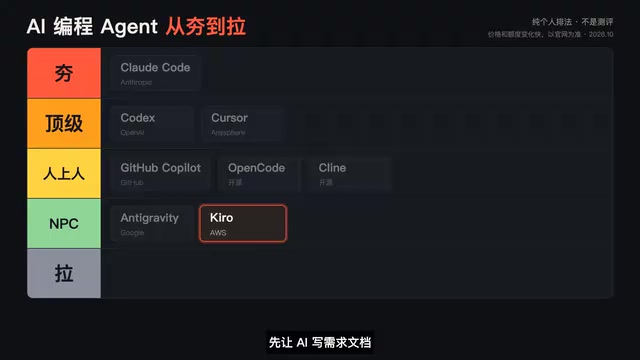
Spec-driven development is the core methodology behind Kiro: instead of letting the AI start writing code from a vague one-line requirement, it first generates a structured requirements document, a technical design document, and a task list, and after human confirmation, implements them item by item. This contrasts with "vibe coding"-style improvisation, aiming to solve the problems commonly seen in AI-generated code: requirement drift, architectural chaos, and difficulty maintaining it. The trade-off is that more human review and confirmation is needed up front, making the process heavier — not suited to one-off scripts or prototypes. The credit-based billing model means cost is strongly tied to process steps — documentation, design, and implementation each consume credits, and the more complex the feature and the more rework, the faster credits burn, so when choosing a tool you should factor process overhead into the budget.
Devindex: Name Change Brings Cognitive Confusion
Devindex is the former WinSurf, renamed this June, and its agent was swapped out too. The creator notes that many long-time users still haven't recognized it. The damage brand churn does to user recognition is very evident in this case.
Bottom: Gemini CLI, Dragged Down by Shutdown
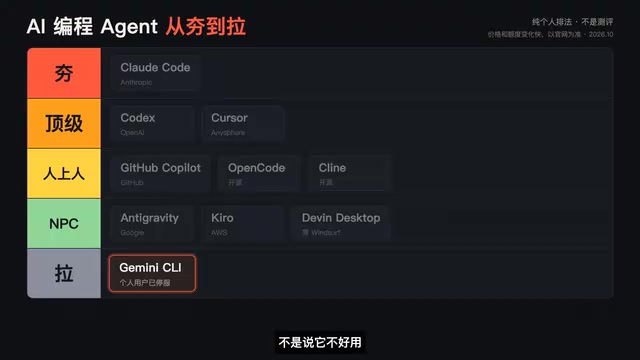
Gemini CLI ranks last — not because it's bad, but because starting June 18 this year, Google shut it down for individual users, forcing free users and Google AI subscribers alike to move to AntiGravity CLI. No matter how strong a tool's capabilities, if you can't use it, it lands at the bottom.
Selection Advice: Match the Tool to the Scenario
The creator's summary is direct: if you want AI to handle long tasks on its own, pick Claude Code; if you want to run a bunch of small tasks in parallel, pick Codex; if you want smooth writing inside the editor, pick Cursor; if you're budget-sensitive, start with Copilot or the open-source OpenCode and Client.
The value of this ranking isn't that it's absolutely correct, but that it weighs capability and cost together. Competition among agent tools has moved from "can it write code" to "can it reliably complete long workflows" and "how much does it cost to finish." For team selection, it's advisable to first run a round of cost testing with real tasks, then decide which tool to bet on.
Which one are you using? And which tier would you put it in?
One-line Summary
A Bilibili creator tested ten AI coding agents and ranked them by capability and cost, with selection advice by tier.
Paragraph Summary
The article compiles a personal ranking of ten popular AI coding agents by Bilibili creator "From Solid to Trash." Claude Code tops the list for reliably completing dozens-of-steps long tasks — the creator used it to run a complete video subtitle pipeline; Codex ranks top-tier for cloud-based parallel multitasking, included with a ChatGPT subscription. The second tier is Cursor for its editor feel and GitHub Copilot for its ecosystem ties, though Copilot switched to usage-based credits in June, weakening its cost advantage for heavy agent use. The third tier includes open-source BYO-API OpenCode and Client, free-but-limited Google AntiGravity, docs-first Amazon Kiro, and the renamed Devindex. Gemini CLI lands at the bottom because Google shut it down for individual users. The conclusion: choose by scenario, and run cost tests with real tasks first.
Related articles

GitHub Daily · October 30: Skills Ecosystem Explodes, Agents Start Provisioning Their Own Computers
GitHub Daily Oct 30: Skills ecosystem hits three layers (official, personal, vertical), agents get their own computers, and cross-session memory becomes essential.
AWS AgentCore Gateway: Connecting AI A…
AWS AgentCore Gateway: Connecting AI Agents to Enterprise Backends with MCP
How AWS AgentCore Gateway acts as a primary MCP server to aggregate REST APIs, Lambda, and existing MCP services? Analyzing its AST real-time mapping, zero cold start, semantic search for tool overload, session isolation, and key injection security design, plus the architectural approach to decoupling enterprise AI agents from backends.

One Link Gives Figma AI a New Skill: Hands-On with MCP Connectors
Paste one MCP server link and the AI Agent in Figma gains new tool capabilities. We break down the setup flow, 20+ one-click apps, read/write permissions and execution policies, and the public HTTPS requirement.