Android App Security in the Agent Era: Skills, Auditing, and Runtime Protection

Google's Android security team pairs skills with APIs to turn agent security audits from guesswork into reproducible workflows.
Google's Android security team addresses inefficient agent security audits with structured "skills" and runtime APIs. Skills give agents a security researcher's workflow, producing reviews with real line numbers and applicable diffs instead of warning floods. The Play Policy skill pre-checks compliance, Play Integrity verifies app, device, and account authenticity at runtime, and APIs like SMS Retriever, SMS User Consent, and Location Button replace broad permissions with low-friction alternatives while Advanced Protection Mode adds enhanced protection for high-risk users.
As AI agents begin to intervene in app development workflows, the efficiency problem of security auditing has become prominent. Google's Android security team shared their solution in a recent presentation: rather than making agents "smarter" at guessing, they use structured "skills" and runtime APIs to transform security judgment from exploratory reasoning into a reproducible process.
The Three Blind Spots of Agent Auditing
According to Google's Android security team, over the past year they paid more than two million dollars in rewards through the Android bug bounty program, with mobile-related rewards exceeding two hundred thousand dollars. This investment shows that vulnerabilities still genuinely exist, and developers are usually not security researchers—they are product engineers delivering features quickly.
When CI turns red at 4:30 PM on a Thursday, and the only error is a broadcast receiver without the export flag set, the developer's instinct is to throw the warning at an agent tool and ask for a fix. But an agent lacking project context has three structural blind spots: it may not know the app is composed of dynamic feature modules that are part of an APK bundle and are not standalone deliverables; it cannot trace the complete data flow from the Kotlin UI layer through KMP shared logic all the way to native C++ JNI calls, seeing only a single layer; and it doesn't understand your minSdk and build flavor differences.
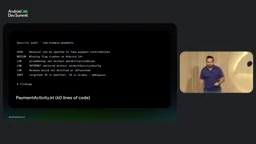
The team ran an experiment: having an agent perform a security audit on an app returned six findings. None of them were wrong—all were defensible—but only one was the bug the developer originally encountered. The rest were a mix of best-practice suggestions, leads worth further investigation, speculative conclusions, and issues that might not apply at all. When this pattern scales to real codebases and every pull request, developers either lean toward suppressing lint warnings to merge code, or simply miss the real vulnerabilities. The tool isn't careless—it's very careful—but careful doesn't equal useful.
The cost problem is equally obvious. Having an agent audit all exported components is an enormous task in a multi-module app. Without Android-specific guidance, the agent can only brute-force: reading modules that export nothing at all, re-deriving from first principles what makes an integration point exploitable, tracing paths that can never be reached. What you're paying for is exploration, not analysis.
Dynamic feature modules and APK bundles: Android App Bundle (AAB) is the publishing format recommended by Google Play, allowing apps to be split into multiple modules, including a base module and dynamic feature modules. Dynamic feature modules are not installed with the base APK but downloaded on demand when the user needs them. Therefore, during auditing, if an agent doesn't understand the modular structure, it may incorrectly treat dynamic feature modules as standalone deliverables or ignore their code paths, leading to missed or false reports.
KMP and JNI calls: Kotlin Multiplatform (KMP) allows sharing business logic across multiple platforms, while JNI (Java Native Interface) is the bridge between Java/Kotlin and native C++ code. Security auditing needs to trace the complete path of data from the Kotlin UI layer through KMP shared logic and ultimately through JNI calls to native code. If an agent analyzes only a single layer (e.g., only the Java layer), it will be unable to discover cross-layer data leaks or injection risks.
Filling in the Agent's Policy with "Skills"
The role of a skill is to provide the missing policy. Android security skills give agents instructions aligned with current security guidance, following the sequence of steps a security researcher would actually follow. The agent no longer rediscovers the rules because the skill already supplies them.
Two security skills have been released so far. The Intent security skill targets "what other apps can make your app do"—your app holds permissions and login sessions that other apps don't, so every exported component and every pending intent you send can be a doorway for someone else to walk in. The Permissions skill bridges the gap between "declared a permission" and "actually enforced the permission": helping write proper permission checks, identifying whether a provider with a wildcard path exposes the entire database rather than a single directory, and catching permission over-requests—such as requesting broad access when a photo picker would suffice.
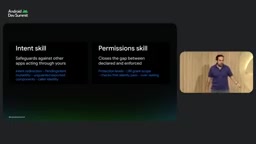
Using it is simple: with the Android CLI, just ask to "audit intent security"—no configuration, no rule tuning. The output is no longer a wall of warnings but a review: here's the problematic code, here's the part that actually matters for your app, here's the fix. The skill reads the build configuration, discovers minSdk is 26, and therefore chooses context compact so the fix compiles, providing real code paths, real line numbers, and an applicable diff.
Pre-flight Checks for Play Policy Compliance
Another category of problems is policy compliance. Take a new app being published to the Play Store—filling out the data safety form is an important step in the release process. The Play Policy skill performs static analysis on the codebase; if the app is already published, it also cross-references static analysis results against Play Store declarations, catching potential policy issues before submission rather than after, accelerating the submission process. The workflow is consistent with other skills: import the skill, then ask to "audit this app's Google Play policy."

Data safety form: Google Play requires developers to fill out a data safety form detailing what user data the app collects and shares and how it is handled. The form content must match the app's actual upload behavior, otherwise the app may be removed. The Play Policy skill statically analyzes the codebase to identify data collection points (such as permissions and API calls) and cross-references them against the form the developer filled out, catching inconsistencies before submission.
Runtime Defenses After the APK Leaves the Building
All the work above happens before release, but there's an entire category of threats that only exists once the APK enters the real world and runs on devices you don't control. The Play Integrity API answers three questions at runtime that your code cannot prove on its own: Is this a genuine, unmodified build? Is it running on a real device? Is it a real Play user account? It returns verdicts on app integrity, device integrity, and more. The new Protected with Play dashboard centralizes monitoring and configuration for integrity, distribution, and monetization protections, while Play Integrity API warm-up latency is being reduced, allowing these checks to be used in speed-sensitive user journeys and to block risky devices faster.
Play Integrity API: This is an anti-abuse API provided by Google to verify the integrity of the app's runtime environment. It answers three core questions by returning a set of verdicts: app integrity (whether it's a genuine, unmodified version), device integrity (whether it's Google-certified), and account integrity (whether it's a real Play user). Developers can use these to decide whether to allow sensitive operations. For example, when a rooted device or tampered app is detected, features can be restricted or additional authentication required.
API Design That Reduces Permission Friction
On the user-facing side, Google offers several paths to reduce broad permission requests. The SMS Retriever API allows apps to automatically verify OTPs without broad SMS permissions: by appending an 11-character hash identifying the app to a message, the system hands only that one message to the app. If you can't control the message format, the SMS User Consent API shows a one-time system prompt; after the user taps allow, you get that single message—again without broad SMS permissions.
One-time precise location has high user friction, so developers sometimes switch to requesting broader permissions instead. Location Button is an embeddable, customizable Android UI element that lets users grant one-time precise location access with low friction. The first alpha version of the location button Jetpack library was released in June; the manifest must declare the standard location permission, the only-for-location-button flag, and the dedicated permission required for the system's remote rendering service.
SMS Retriever and SMS User Consent: The SMS Retriever API allows apps to automatically retrieve SMS messages containing a specific 11-character hash for phone number verification without requesting READ_SMS permission. The SMS User Consent API provides a one-time system dialog; after the user consents, the app can read a single SMS message, likewise avoiding broad permissions. Both are suitable for OTP autofill scenarios, but the former requires the app to control the SMS format, while the latter is more flexible.
Location Button: This is a UI component provided by Google Play services that, when tapped by the user, grants one-time precise location permission without needing to declare ACCESS_FINE_LOCATION in the manifest. It reduces the user's psychological burden of authorization while meeting the app's temporary need for precise location. Developers need to add specific permissions in the manifest and integrate the Jetpack library.
Enhanced Protection Mode for High-Risk Users
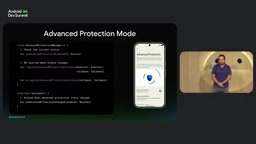
Take a banking app as an example: everyday transfers don't mandate additional multi-factor authentication because ordinary users dislike extra friction; but if a user wants maximum protection, the app can automatically require biometric authentication for every transfer. Advanced Protection Mode provides a set of predefined configurations to enhance device protection. Integration works as follows: request permission, query enhanced protection mode, check whether the user has enabled it themselves via the AdvancedProtectionModeManager system service, and register a callback to listen for runtime changes.
From Guessing to a Reproducible Process
The core idea behind this toolset is consistent: transform security judgment from the agent's free exploration into a guided, reproducible process aligned with build configuration. Before release, use skills for intent auditing, permission checks, and policy pre-flight; after release, use Play Integrity for runtime verdicts, replace broad permissions with more granular APIs, and offer optional enhanced protection for high-risk scenarios. For product engineers, this means when CI turns red, they don't have to choose between suppressing warnings and missing vulnerabilities.
One-line Summary
Google's Android security team introduces a combination of skills and APIs that turns agent security auditing from exploratory guessing into a reproducible process.
Paragraph Summary
In response to the inefficiency of agents in security auditing, Google's Android security team proposes structured "skills" and runtime APIs. Skills inject the security researcher's inspection workflow into agents, so their output is a review with real line numbers and applicable diffs rather than a flood of warnings. The Play Policy skill enables pre-flight policy compliance checks, and the Play Integrity API verifies app, device, and account authenticity at runtime. Additionally, APIs like SMS Retriever, SMS User Consent, and Location Button replace broad permissions with low-friction alternatives, while Advanced Protection Mode offers enhanced protection for high-risk users. The overall idea is to shift security judgment from free exploration to a guided, reproducible process.
Related articles
AWS AgentCore Gateway: Connecting AI A…
AWS AgentCore Gateway: Connecting AI Agents to Enterprise Backends with MCP
How AWS AgentCore Gateway acts as a primary MCP server to aggregate REST APIs, Lambda, and existing MCP services? Analyzing its AST real-time mapping, zero cold start, semantic search for tool overload, session isolation, and key injection security design, plus the architectural approach to decoupling enterprise AI agents from backends.

One Link Gives Figma AI a New Skill: Hands-On with MCP Connectors
Paste one MCP server link and the AI Agent in Figma gains new tool capabilities. We break down the setup flow, 20+ one-click apps, read/write permissions and execution policies, and the public HTTPS requirement.

Cognition SWE-2 in Practice: One Prompt to Handle the Whole Product Launch Process
Analyzing a YouTube creator's prompt for using Cognition SWE-2 to launch a product: a landing page, seven-email sequence, and non-buyer follow-up tool, plus how the 'test and report' constraint changes AI delivery quality.