Bilibili's 748-Episode Vibe Coding Course: A Six-Step Path from Beginner to Pro in AI Programming

Bilibili's 748-episode Vibe Coding course breaks down a six-step path to teach beginners to build products with AI.
The article introduces a Bilibili tutorial series titled Vibe Coding: From Beginner to Mastery, claiming 748 episodes. It notes that most people fail at using AI to write code not because the tools are unusable, but due to a lack of tool proficiency and prompt expression ability, leading to code that won't run and even a messed-up computer environment. The course splits the learning path into six steps—tool usage, prompt writing, project practice, fancy ways to use skills, large projects, and exclusive secrets—emphasizing building a foundation before complex projects. Positioned as not requiring you to become a programmer first, it focuses on mastering the process of delivering products with AI, covering tools from Claude Code to Coze, and recommends advancing in batches rather than binge-watching.
AI programming and Vibe Coding are terms that come up more and more in discussions, but when it comes to actually getting started, many people get stuck at the very first step: they don't know how to use the tools, the AI's output is poor, and they even end up making a mess of their computer environment. A Bilibili tutorial series titled Vibe Coding: From Beginner to Mastery, claiming 748 episodes, is designed precisely for these pain points. According to the creator, this content isn't about teaching the usage of any single coding AI—it's about teaching people to use AI to build products and get work done.
Why Most People Fail at Using AI to Write Code
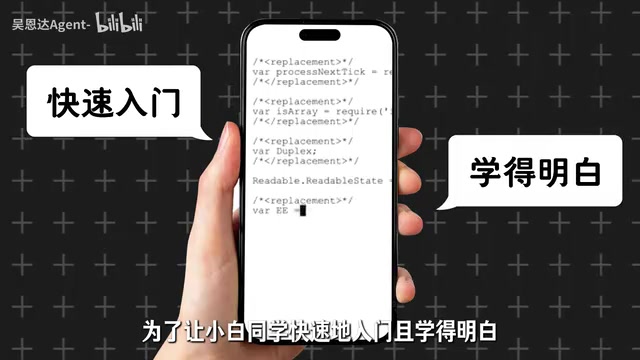
The tutorial opens by pointing directly at a common phenomenon: people writing code with AI for the first time often find that they don't know how to use the AI tools, the results are poor, and the AI even messes up their computer. According to the video description, these problems cause a large number of learners to give up before they've even gotten started.

This observation deserves serious attention. The barrier to AI programming seems very low—just open a chat box and type in your requirements—but real product development involves environment setup, dependency management, debugging and iteration, and so on. Without constraints, AI easily produces code that won't run or modifies unrelated files. The tutorial attributes these failures to "giving up before even getting started" rather than to the tools themselves being unusable, and this judgment actually highlights the importance of learning path design.
Environment setup and dependency management are the areas where AI programming beginners most easily stumble. Environment setup refers to installing a programming language runtime (such as Python or Node.js), a package manager (such as pip or npm), and an editor or IDE on your local computer, and ensuring the versions are mutually compatible; dependency management refers to the third-party libraries a project references and their version control. When generating code, AI often assumes a certain version of the runtime environment, and if the local environment doesn't match, you get the situation where "the code looks fine but won't run." Even more troublesome is that AI sometimes suggests globally installing dependencies or modifying system configuration files—which is the main source of what the tutorial calls "making a mess of your computer." A common industry response is to use virtual environments (such as venv or conda) or containers (such as Docker) to isolate projects, and to clearly state the current environment version in the prompt so that the generated code matches local conditions.
The Six-Step Learning Path: From Tools to Large Projects
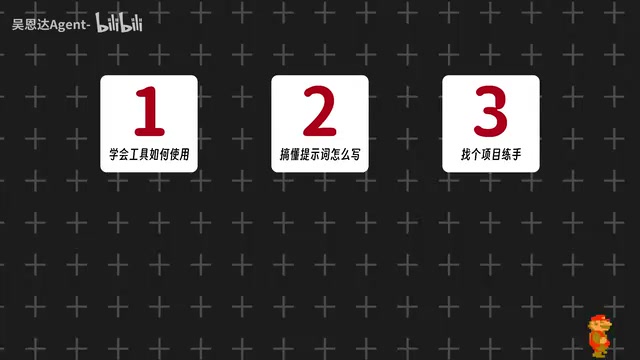
To make it understandable for absolute beginners, the creator breaks Vibe Coding into six progressive steps. According to the video, these six steps are: first, learn how to use the tools; second, understand how to write prompts; third, find a project to practice on; fourth, learn the fancy ways to use skills; fifth, build a large project; sixth, take away the creator's exclusive secret techniques.
The reasonableness of this structure lies in its order: first build tool proficiency, then solve the prompt problem of communicating with AI, then gain positive feedback through small projects, and only then move on to large projects. Many tutorials skip the first two steps and go straight to project case studies; learners can copy them and get things running, but get stuck as soon as the requirements change—and the root cause is often right here.
The Watershed at Step Four: The Fancy Ways to Use Skills
What's rather special among the six steps is the fourth, "learn the fancy ways to use skills." Judging from the screenshot, this step is emphasized separately, indicating that the tutorial believes that after mastering the basics, how to combine and extend AI capabilities is the key to standing out.
This step corresponds to the transition from "knowing how to use tools" to "knowing how to use tools to build products." Prompts are just the entry point; the real efficiency difference comes from the combined use of tool capabilities—for example, chaining code generation, debugging, and documentation into a workflow. The tutorial places it before the large project, logically letting learners experiment and make mistakes in low-risk scenarios first.
Prompt engineering is the core of the second step, referring to making AI accurately understand a task through structured expression. Unlike everyday chatting, prompts in programming scenarios usually need to include elements such as role setting, task goals, input/output format, tech stack constraints, and acceptance criteria. For example, rather than saying "help me write a login feature," it's better to specify "using the Python Flask framework, implement email-password login, the password must be encrypted with bcrypt, return JSON format, and provide corresponding unit tests." Prompt quality directly determines the usability rate of generated code, which is also why the tutorial places it after tool usage and before project practice—without stable expressive ability, subsequent projects will only be reworked over and over. Common techniques also include few-shot examples, chain-of-thought decomposition, and having the AI restate the requirements before starting.
Course Positioning: You Don't Need to Be a Programmer First
The creator makes a premise clear in the video: you don't need to become a programmer first, but you must finish watching this content before AI writes code for you. This positioning distinguishes the course from traditional introductory programming courses—the goal is not to master language syntax, but to master the process of delivering products with AI.
In terms of content coverage, the tutorial claims to cover tools such as Claude Code and Coze, spanning different types from local code assistants to no-code agent platforms. For beginners who want a systematic introduction to AI programming, content that breaks things down step by step and emphasizes a hands-on path is more valuable as a reference than scattered tool reviews. Of course, the volume of 748 episodes also means the learning period won't be short; it's recommended to advance in batches according to the six-step structure rather than binge-watching from beginning to end.
If you're currently troubled by "the code AI wrote won't run," you can first check against these six steps to see which link you're stuck at—in most cases, the problem isn't the AI, but tool proficiency and prompt expression.
The Claude Code mentioned in the article is a command-line AI programming tool launched by Anthropic. It runs in the terminal and can directly read project files, execute commands, and modify code, belonging to the "local code assistant" category; Coze (Kouzi) is a no-code agent-building platform launched by ByteDance, where users build AI applications by visually orchestrating conversation flows, plugins, and knowledge bases without writing code. The two represent opposite ends of the AI programming spectrum: one end is code-level collaboration deep in the developer's workflow, and the other is application-level building aimed at non-technical people. The tutorial covering both types of tools means its goal is not to train users of a particular tool, but to let learners understand the general methods of "delivering products with AI" at different levels of abstraction, so they can flexibly choose tool combinations according to task complexity.
One-line Summary
Bilibili's 748-episode Vibe Coding course breaks down a six-step path to teach beginners to build products with AI.
Paragraph Summary
The article introduces a Bilibili tutorial series titled Vibe Coding: From Beginner to Mastery, claiming 748 episodes. It points out that the reason most people fail at using AI to write code isn't that the tools are unusable, but a lack of tool proficiency and prompt expression ability, which leads to code that won't run and even messes up the computer environment. The tutorial divides the learning path into six steps: tool usage, prompt writing, project practice, fancy ways to use skills, large projects, and exclusive secret techniques, emphasizing building a foundation before moving on to complex projects. The course is positioned as not requiring you to become a programmer first, with the focus on mastering the process of delivering products with AI. Its content covers different tools ranging from code assistants to no-code platforms, such as Claude Code and Coze, and recommends advancing in batches according to the six-step structure rather than binge-watching from start to finish.
Related articles

beacon.sh: Giving AI Coding Assistants a Self-Evolving Memory
beacon.sh is an open-source, self-evolving memory layer for AI coding agents, supporting Claude Code, Cursor, Codex and 20+ harnesses—turning agent sessions into a compounding knowledge layer.

Xmind 2027 Launches: Mind Mapping Evolves into an AI Thinking Partner
Xmind 2027 launches on Product Hunt as an "AI thinking partner." It adds Xmind Agent for research with local documents and mind maps, and connects mind map context to ChatGPT, Claude, and other AI workflows via MCP. This article analyzes its product logic, differentiation, and open questions.

Display 1.0: Build Docs and Apps with Any Agent
Display 1.0 launches on Product Hunt, letting any Agent create docs, prototypes, and apps in one workspace, organized via Spaces and Folders into a team knowledge base with flat pricing.