Building an Audio-First Experience for Smart Glasses with Gemini Nano 4

Google engineers break down how to build an audio-first, hands-free AI experience for smart glasses with Gemini Nano 4 and ML Kit.
Based on a tech talk by Google engineers Amy and Alice, this article systematically explains how to build audio-first AI apps for smart glasses. It covers hardware forms and the Jetpack projected development entry point, ML Kit GenAI text-to-speech and earcons for output, basic and Gemini Nano-enhanced speech recognition for input, and the fully local three-model XR Language Teacher case study, distilling three engineering lessons: two-pass latency optimization, XML tag routing for multilingual TTS, and structured output for vocabulary cards.
Title
Building an Audio-First Experience for Smart Glasses with Gemini Nano 4
Meta Description
A detailed guide on building an audio-first experience for smart glasses with Gemini Nano 4 and ML Kit: Jetpack projected connection management, on-device speech synthesis and recognition, a two-pass low-latency architecture, XML-tag streaming TTS routing, and hands-on lessons from structured output.
Article Content
Smart glasses are moving from geek novelty to everyday wearable, and audio-first interaction is becoming the most natural usage paradigm for these devices. In a recent tech talk, Google engineers Amy and Alice broke down how to use Gemini Nano 4 and ML Kit to build hands-free AI experiences for smart glasses, and shared a complete open-source example — XR Language Teacher.
Hardware Forms and Development Entry Points for Smart Glasses
Smart glasses here refer to lightweight glasses that can be worn all day, covering both display and non-display forms. The hardware typically includes a touchpad (supporting taps and swipes), a speaker, a camera, and a microphone. For audio-only glasses, voice is the sole user interface, which defines the core logic of interaction design.
On the development side, Android developers have a natural advantage: existing Android apps can project voice notifications and other content to the glasses over Bluetooth, and to go further, they need to use the Jetpack projected library to create an Activity dedicated to the glasses. In the Manifest, you declare XR projected as a required display category and add the XR projected launcher intent category, so that Gemini can discover the app and let users launch it hands-free.
For connection management, the isProjectedDeviceConnected method continuously monitors the glasses' state — not just pairing or powering on, but confirming that the glasses are actually being worn and are ready. Developers can also check device capabilities through the projected device controller, such as whether it includes visual UI capability, so they can tailor the experience for display glasses versus audio glasses. Note that when accessing hardware like the glasses camera, even if the phone already has permission, you still need to re-request permission on the glasses side through the projected Activity. Google has introduced a projected hardware skill for this, which helps configure the permission workflow in the Android CLI and Android Studio.
Jetpack projected and the XR projected display category
Jetpack projected is the dedicated Android library for XR and smart glasses; its core idea is to project an Activity rendered on the phone or host device onto the glasses. The XR projected display category declares that the Activity is only suitable for running on projected devices like glasses, so the system hides its entry point on the phone's home screen and only shows it when glasses are connected. The XR projected launcher intent category, meanwhile, lets the glasses-side launcher (for example, Gemini's hands-free launch entry) discover and launch the Activity. Both are needed together to achieve the "put on glasses, wake hands-free" experience. If you declare only one, the app may not be discoverable by the glasses launcher, or an unwanted icon may appear on the phone.
Building Voice Output and Audio Cues with ML Kit
The core interactions of an audio-first experience include three parts: voice output, earcon (audio icon) cues, and user input handling.
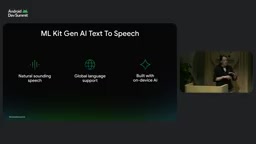
ML Kit's newly launched GenAI text-to-speech library is currently in alpha and available on select Pixel and Samsung devices. It solves the pain point of traditional system TTS voices not sounding natural enough, while avoiding the latency and extra cost of cloud-based voice solutions. The library offers 8 voices with distinct characteristics and support for 21 locales; after the initial download it runs entirely on-device, and the model is shared by the system so it doesn't increase APK size.
The code flow is fairly straightforward: initialize the speech synthesizer and set the locale, check download status and select a voice, construct and play the request, and monitor status and collect errors. The example uses firstOrNull to get a voice; if it returns null, the device is incompatible and you need a fallback ready, such as falling back to system TTS or playing pre-recorded audio.
Earcons are audio icons — short sound effects that convey information. Android Design Hub already provides standardized sounds for app open, close, error prompts, mute toggling, and more, and developers can also customize them. A few design lessons are worth following: avoid overuse that causes listening fatigue, use familiar pitches and rhythms, and avoid complex sounds that need explanation — that kind of information is better delivered via voice.
The concept of Earcon and its design constraints
Earcon (audio icon) refers to auditory symbols that replace visual icons with extremely short sound effects; it was first proposed in human-computer interaction research to convey state changes without interrupting the speech stream. Its division of labor with voice announcements is: earcons are suited to binary or categorical information like "saved," "error," or "muted," while voice is suited to content that needs semantic explanation. On audio-first glasses, earcons are the only means of providing immediate feedback without occupying the voice channel, so rhythm, pitch, and duration need to be consistent, and the same meaning must keep the same sound throughout the app — otherwise users can't form a conditioned reflex.
Speech Recognition: Basic Mode and Gemini Nano-Enhanced Mode
On the input side, besides touchpad gestures, you can also enable a conversational UI. ML Kit's GenAI speech recognition API is also in alpha and comes in two modes: the basic mode uses traditional on-device speech recognition and supports Android devices at API level 31 and above; the advanced mode is powered by Gemini Nano and offers better quality and language coverage on Pixel 10 and above devices.
The recognition flow returns four types of results: partial for hotword detection in the real-time stream, final for the final text after full analysis, completed to indicate the end of speech, and error for collecting exceptions.
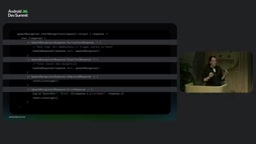
A typical use is a voice command to save content: the user says any keyword like save, bookmark, or remember, and once the recognizer detects it, it saves the content, stops recognition, plays a custom earcon, and tells the user via TTS that it's been saved.
Constrained Decoding and @Generable / @Guide
Constrained decoding is a class of inference-time techniques: at each token generation step, candidates that don't match the target structure are masked out, so the output naturally satisfies a given schema instead of being patched afterward with regex or JSON parsing. ML Kit's structured output API is based on this mechanism: data classes annotated with @Generable are compiled into a schema, and @Guide applies constraints to individual fields (value range, description, nullability). Compared with writing "please output JSON" in the prompt, constrained decoding guarantees format validity at the sampling level, making it suitable for reliably converting conversation text into dictionary fields in the background. Nullable fields give explicit expression to the "no new word taught" case, preventing the model from forcing content.
Case Study: How XR Language Teacher Works
Alice's motivation came from a real pain point: seeing something you want to buy in a Tokyo market but not being able to name it — and that moment is when motivation to learn is strongest. What she wanted was to walk around wearing smart glasses, ask about whatever she saw, and by the time she returned to the hotel at night, everything she'd asked about had become vocabulary cards on her phone.
The architecture of this demo is a fully local three-model chain: microphone input goes into speech recognition, camera frames and transcribed text go together into Gemini Nano 4, and the model output is handed to speech synthesis and played through the speaker. Gemini Nano 4 is built on the open-source Gemma 4 model and is called directly through ML Kit APIs on supported flagship Android devices; model delivery is handled by the Android system, so the app doesn't need to bundle the model.
There are three reasons for choosing Gemini Nano 4: it can see and understand in a single pass, without chaining detectors, classifiers, and translators; its training covers more than 140 languages and can handle idioms and formal versus informal registers; and it follows system prompts closely, so you can give it a teacher persona and lower the psychological barrier to speaking practice.
There's also a clever design touch: while a conversation is happening in glasses mode, the app silently generates vocabulary cards in the background, including the word, translation, example sentence, and a photo from the moment the question was asked. Audio-first doesn't mean audio-only — the glasses carry curiosity, and the phone carries afterward review.
Three Engineering Lessons from the Field
First, use a two-pass design to guarantee real-time latency. On audio glasses, every second of silence is amplified. Each interaction turn needs two things: an immediate spoken answer and a structured vocabulary card. If you have the model generate both at once, every token of background data generation delays the first sentence of speech. So the team split each turn into two passes: the first pass only streams the spoken reply, triggering TTS as soon as the first sentence is complete; since the chip generates a short reply far faster than TTS can finish playing it, there's an idle window of several seconds. The second pass sends the first pass's text reply (no image needed) back to the idle chip to extract structured data. By the time the teacher finishes speaking, the vocabulary card is already generated.
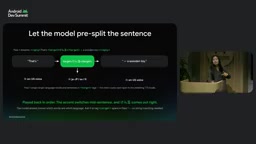
Second, use lightweight XML tags in streaming output. In an early version, the model correctly identified the Japanese toy kendama, but when the whole sentence was sent to the English TTS, it was read as something like "kenmi" — because kendama is written with a mix of hiragana and kanji, and the English TTS completely failed on the kanji part. Similar problems appeared in Spanish and French. The solution was to have the model, in the first pass, wrap each target-language word in a target tag in the streaming output; the client splits by tag, routes each segment to the TTS session for the corresponding locale, and seamlessly concatenates them, achieving mid-sentence accent switching.
Third, switch to structured output when saving data. During conversation, users may ask follow-up questions without introducing new words, and the database needs clean dictionary fields. Rather than parsing the first-pass text with brittle regex, have the second pass extract the save object in the background through ML Kit's structured output API, which uses constrained decoding under the hood. Developers only need to annotate the data class with @Generable, annotate fields with @Guide, and use a nullable card field to distinguish "taught a new word" from "pure conversation."
The Path from Prototype to Your Own App
XR Language Teacher has been released with the Google AI Edge Gallery app, so you can download and try it directly, and the full implementation is open-sourced on GitHub. The codebase also shows how the same experience adapts to a phone-only mode, and how to reach other platforms through the LiteRT runtime and MediaPipe Tasks API, or plug in other open-source on-device models.
Alice listed extension directions for this approach: museum guides, cooking assistants you use while looking at the stove, repair instructions, accessibility narration, and on-site inspection tools. The models, runtime, open-source implementation, and toolchain are all ready.
For teams that already have a mobile app, the most pragmatic starting point is to review your existing product: which core features would be better as hands-free operations? Adding a projected Activity to your existing APK is the first step toward a glasses experience.
One-line Summary
Google engineers break down how to build an audio-first, hands-free AI experience for smart glasses with Gemini Nano 4 and ML Kit.
Paragraph Summary
Based on a tech talk by Google engineers Amy and Alice, this article systematically explains how to build audio-first AI apps for smart glasses. On the hardware side, it covers forms like touchpads, speakers, cameras, and microphones, while the development entry point relies on the Jetpack projected library, the XR projected display category and launcher intent category, and isProjectedDeviceConnected and the projected device controller for connection and capability adaptation. On the interaction side, it uses ML Kit GenAI text-to-speech (8 voices, 21 locales, offline operation, system-shared models) and earcon sound effects, with input handled by basic speech recognition or the Gemini Nano-enhanced mode. The case study XR Language Teacher uses a fully local three-model chain and distills three engineering lessons: two-pass latency optimization, lightweight XML tag routing for multilingual TTS, and structured output for saving vocabulary cards.
Related articles
AWS AgentCore Gateway: Connecting AI A…
AWS AgentCore Gateway: Connecting AI Agents to Enterprise Backends with MCP
How AWS AgentCore Gateway acts as a primary MCP server to aggregate REST APIs, Lambda, and existing MCP services? Analyzing its AST real-time mapping, zero cold start, semantic search for tool overload, session isolation, and key injection security design, plus the architectural approach to decoupling enterprise AI agents from backends.

One Link Gives Figma AI a New Skill: Hands-On with MCP Connectors
Paste one MCP server link and the AI Agent in Figma gains new tool capabilities. We break down the setup flow, 20+ one-click apps, read/write permissions and execution policies, and the public HTTPS requirement.

Cognition SWE-2 in Practice: One Prompt to Handle the Whole Product Launch Process
Analyzing a YouTube creator's prompt for using Cognition SWE-2 to launch a product: a landing page, seven-email sequence, and non-buyer follow-up tool, plus how the 'test and report' constraint changes AI delivery quality.