Claude Catches Mac Miner: AI Kills Malware While Fixing a Bug

Claude Code accidentally found xmrig mining at 1175% CPU on a Mac while building a temperature monitor.
A Reddit user asked Claude Code to write a Mac temperature monitoring app. While debugging sensor data, Claude noticed abnormally high readings, proactively checked CPU usage, and uncovered xmrig mining at about 1175% CPU (~12 cores). The discovery was coincidental—Claude wasn't running a security scan but traced from the temperature anomaly to system processes. The article covers xmrig's Monero mining background and macOS delivery channels, noting AI coding assistants can help spot system anomalies but can't replace routine security protection.
A Temperature Monitor Build Turns Into an Accidental Security Audit
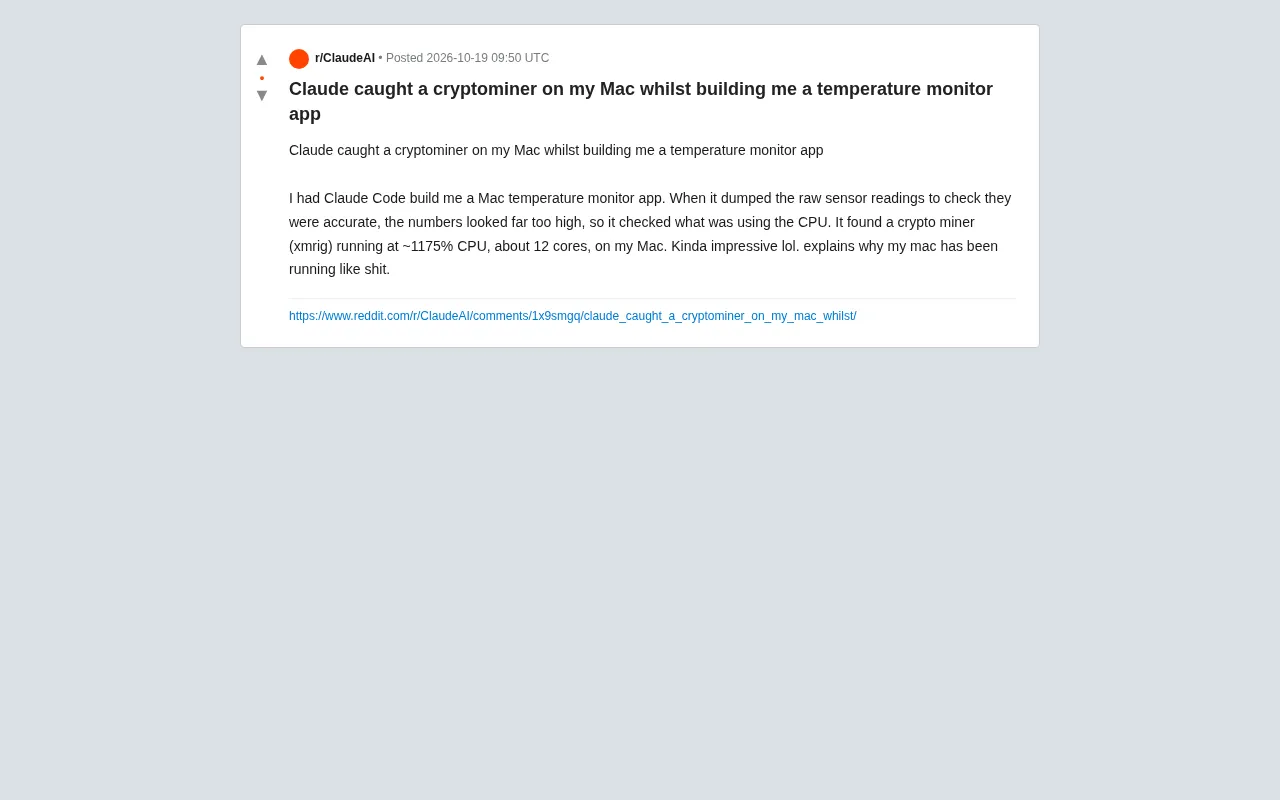
A Reddit user shared a rather darkly comic experience: they asked Claude Code to help write a Mac temperature monitoring app, just wanting to check whether CPU temperatures were normal. Unexpectedly, during development, Claude found the sensor readings absurdly high, so it proactively checked CPU usage—and uncovered a mining program called xmrig, running wild at about 1175% CPU, equivalent to consuming roughly 12 cores. In the author's words, this explained why their Mac had been so sluggish lately.
How Did AI "Incidentally" Find the Miner While Writing Code?
The interesting part is that Claude wasn't asked to do a security scan. It was merely debugging a temperature monitoring feature: reading raw sensor data and verifying whether the values were reasonable. When it found the values abnormally high, it didn't stop at the assumption that "the code might be wrong"—it went further and checked system processes. This behavior of working backward from symptom to root cause let it bypass the usual line of thinking about "a faulty temperature sensor" and run straight into the real culprit.
From a technical perspective, the high load caused by a mining program directly drives up CPU temperature, and a temperature monitoring app happens to be the entry point most likely to expose such an anomaly. Claude's behavior effectively turned the development process into a real-time performance and security check—albeit unintentionally.
What Is Xmrig? Why Would It Appear on a Mac?
Xmrig is an open-source Monero mining program often used by attackers for cryptojacking. It doesn't necessarily come from a "mining app" you deliberately downloaded—malicious npm packages, cracked software, phishing installers, and even some browser extensions can all serve as delivery channels. Although macOS is relatively closed, it isn't immune: once a user grants admin privileges or bypasses Gatekeeper, a mining program can run quietly in the background.
1175% CPU usage is a very typical signal. In Mac's Activity Monitor, a single fully loaded core shows as 100%, and 12 cores near full load will exceed 1000%. This level of usage usually means the system is severely overloaded, with common symptoms including fans roaring, battery life plummeting, and apps stuttering. The author's description of their "mac running like shit" matches this exactly.
You might not have noticed that this discovery was somewhat coincidental. If Claude hadn't happened to verify the sensor data, this miner might have kept lurking. This also reminds us: while AI-assisted development can boost efficiency, treating it as a routine security defense isn't realistic.
Monero and Cryptojacking
Monero is a cryptocurrency focused on privacy and anonymity. Its blockchain design makes transaction amounts and sender/receiver addresses untraceable by default, which is why it's often favored by malicious miners. Cryptojacking refers to attackers occupying a victim's computing resources to mine cryptocurrency for the attacker without the victim's knowledge. Unlike ransomware, cryptojacking typically pursues long-term stealth and low-noise operation rather than instant destruction, making it more dependent on users' sensitivity to changes in system performance. Xmrig, as an open-source tool, is legal in itself, but because it's cross-platform, easy to compile, and supports CPU multi-thread optimization, it has become one of the most common payloads in cryptojacking.
macOS Gatekeeper and Permission Boundaries
Gatekeeper is macOS's app notarization and source verification mechanism, which by default blocks running apps that aren't notarized by Apple or distributed through the Mac App Store. However, Gatekeeper isn't impossible to bypass: users can temporarily allow a single app by right-clicking "Open," or disable the "Allow applications downloaded from" restriction in System Settings. In addition, malicious npm packages, browser extensions, and cracked software installers often exploit the moment when users voluntarily grant admin privileges to write mining programs into user directories or LaunchAgents for startup persistence. Once execution permission is obtained, Xmrig can run in the background with high-priority threads, making it very difficult for ordinary users to notice directly from daily use.
AI Coding Assistants' New Role: From Writing Code to Checking the System
This post sparked discussion in the community because Claude's behavior went beyond "code generation." It demonstrated that AI coding assistants, during debugging tasks, are capable of proactively exploring system state—checking processes, analyzing resource usage, and correlating anomalous symptoms. This ability is especially useful when troubleshooting performance issues: developers don't need to manually run top or Activity Monitor; AI can directly connect the clues.
But we should also recognize the boundaries. Claude stumbled upon xmrig by chance in a specific context, rather than actively detecting it through malware signatures or behavior analysis. If the miner process were better disguised, or its CPU usage were capped at a lower level, the single clue of "abnormal temperature values" might not have been enough to trigger the discovery.
From a more practical perspective, this incident serves as a reminder for Mac users: if the system inexplicably slows down and heats up severely, don't just blame system updates or poor app optimization—open Activity Monitor and check the CPU rankings, and you might find something unexpected. Mining processes like Xmrig usually have arbitrary names, but their abnormally high CPU share is hard to hide.
Security Advice: Don't Let AI Do Security "Incidentally" for You
The author described this experience with a bit of humor—"pretty impressive lol." Indeed, AI catching a mining program while fixing a bug sounds like a joke. But relying on such coincidence for security isn't reliable.
More sensible practices include: regularly checking Activity Monitor for abnormal processes; avoiding installing software and npm packages of unknown origin; being wary of installers that request admin privileges; and, if you suspect your system is infected, running a scan with tools like Malwarebytes. AI coding assistants can serve as an entry point for discovering problems, but systematic security protection still requires dedicated measures.
This time, Claude played the role of "accidental security auditor." Next time, it might not be so lucky.
One-line Summary
Claude Code accidentally discovered xmrig mining program running at 1175% CPU on a Mac while developing a temperature monitor.
Paragraph Summary
A Reddit user asked Claude Code to write a Mac temperature monitoring app. While debugging sensor data, Claude noticed abnormally high readings and proactively checked CPU usage, uncovering an xmrig mining program running at about 1175% CPU and consuming roughly 12 cores. This discovery was coincidental: Claude wasn't performing a security scan but worked backward from the temperature anomaly to system processes and happened to run into the culprit. The article introduces xmrig's Monero mining background and macOS delivery channels, and points out that AI coding assistants can help discover system anomalies but cannot replace routine security protection—users still need to watch for abnormal processes and suspicious permission requests.
Related articles

Will GitHub Die? Open Source Maintainer Burnout and the Collaboration Crisis in the AI Era
Lex Fridman podcast discussion on open source maintainer burnout and GitHub's predicament: massive pull requests overwhelm core maintainers, and AI worsens code bloat. Using math journal peer review and Poincaré conjecture verification as analogies, the article analyzes why verification in knowledge production must be deliberately slow, and how open source communities can avoid the failure mode of maintainers exiting.

Stop Building Cookie-Cutter AI Websites: 3 Tools That Transform Your Coding Agent
Three tools that boost AI coding agents: FFmpeg skill for local video editing in Claude Code and Cursor, Hallmark's 50 design themes to fix cookie-cutter AI sites, and Jailbreaks' 25+ model prompts.

How America's Gerontocracy Squeezes the Younger Generation
Americans over 55 hold nearly three-quarters of national wealth, alongside an 80-year-old president and elderly congressional leaders. The Atlantic's Idrees Kahloon explains how gerontocracy drives up housing costs, squeezes opportunities for the young, and explores zoning reform and child poverty reduction as practical fixes.