Claude Code v2.1.311 Update Analysis: Long-Context Compaction and MCP Stability Fixes

Claude Code v2.1.311 focuses on stability, fixing many issues in compaction, MCP interruptions, subagents, and cloud sessions.
Claude Code v2.1.311 is a stability-focused update with no major new features, but its fix list covers the issues users report most. Standard sessions no longer interrupt with a 1M context error past 200K tokens, instead compacting automatically; after compaction the model no longer reads stale MEMORY.md and CLAUDE.md. The interrupt key now takes effect immediately, subagents can use MCP servers that connect later, the SubagentStop hook no longer fires at high frequency, isolated worktrees are not deleted prematurely, and large-file edit stalls and false 0-line-change reports are fixed. It also adds self-hosted runner parameters, corrects MCP command scoping and duplicate error codes, and improves VS Code extension highlighting, loading states, lost selections, and Remote Control/cloud session resilience.
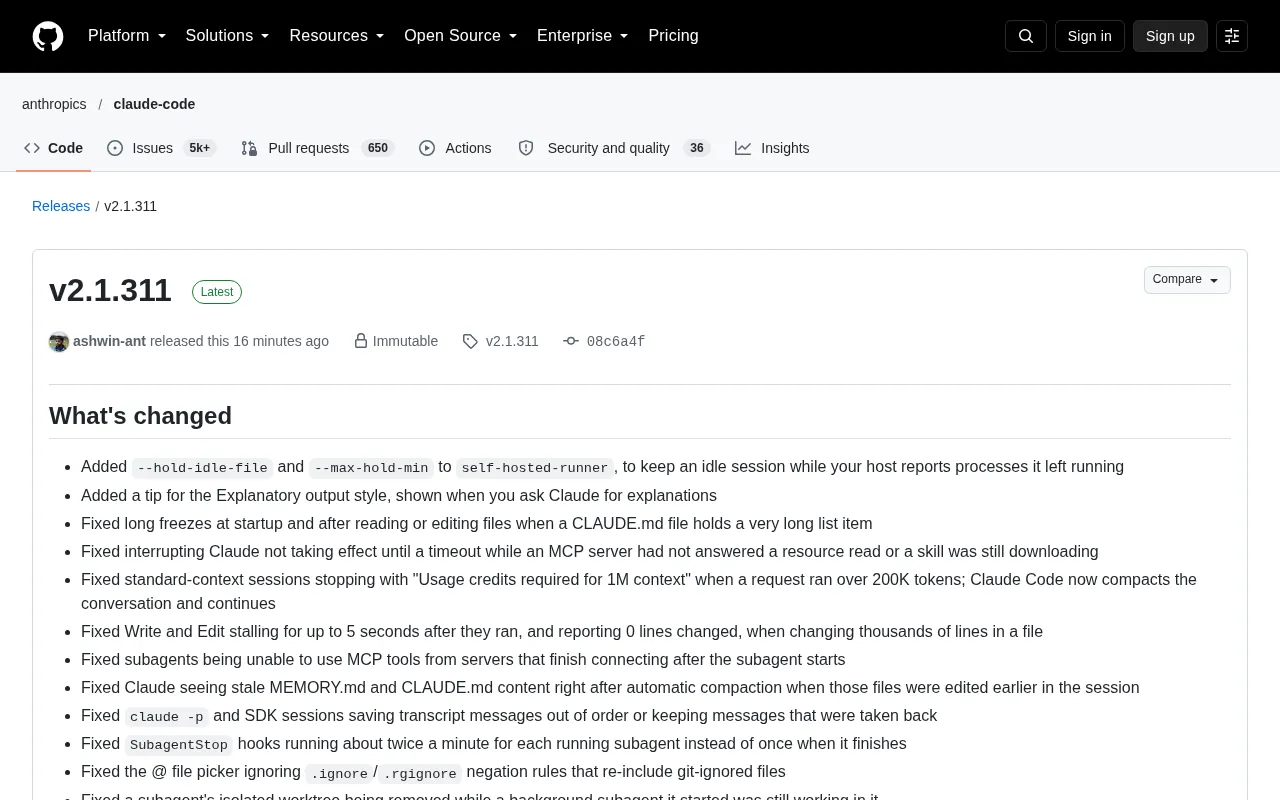
Claude Code has released v2.1.311, a version update centered on "stability." It doesn't introduce any major new feature modules, but the fix list is long enough to require several screens of scrolling, covering almost all the categories of issues users have complained about most over the past period: startup lag, MCP connection hangs, frozen edits on large files, unavailable subagent tools, and various edge cases in cloud and remote control sessions.
Substantive Improvements to Long-Context and Compaction Logic
Automatic compaction after exceeding 200K tokens
One of the most noteworthy fixes is that standard-context sessions no longer stop working with a "Usage credits required for 1M context" error when a request exceeds 200K tokens. Claude Code now proactively compacts the conversation and continues execution. For developers who routinely work with large repositories and long documents, this eliminates an interruption point that previously required manual intervention.
What the 1M context and the 200K token threshold mean
The "context window" of a large model refers to the maximum number of tokens the model can see at once in a single request. A token is the basic unit into which the model splits text for processing, roughly corresponding to word fragments in English or individual characters in Chinese. The Claude family has historically been divided into standard context (about 200K tokens) and an extended long-context mode of up to 1 million tokens. Long context is not enabled by default and usually requires extra billing or authorization under a specific plan; without authorization, a request that crosses the 200K threshold returns an error like "Usage credits required for 1M context" and is interrupted.
Compaction is the conventional means of bypassing this hard limit: when a conversation approaches the window limit, the client first has the model summarize the existing history into a condensed summary, then replaces the original message sequence with it, freeing up space to continue working. Combined, the two mean that even without long-context authorization, as long as the compaction strategy is reliable enough, very long tasks can proceed continuously—at the cost of some historical detail being replaced by the summary.
File freshness after compaction
Another subtle but real problem: after automatic compaction, Claude would see stale MEMORY.md and CLAUDE.md content—especially if those files had been edited earlier in the session. With the fix, compaction no longer lets the model make judgments based on an old snapshot. At the same time, when the model's reply does not include a summary, Claude Code now typically requests a summary once more before replacing the conversation, making compaction quality more controllable.
MCP, Subagent, and Interruption Behavior Fixes
Interruptions no longer wait for timeouts
Previously, if an MCP server did not respond to a resource read request, or if a skill was still downloading, pressing the interrupt key would not take effect until a timeout elapsed. The fix in this version makes interruption take effect immediately. The same batch of fixes also includes: subagents can now use tools provided by MCP servers that finished connecting after the subagent started.
MCP resource reads and connection lifecycle
MCP (Model Context Protocol) is an open protocol proposed by Anthropic that uses a unified client-server model to connect external tools, data sources, and prompt templates to AI applications. Servers can expose three types of capabilities: tools (functions that can be called), resources (data that can be read, such as files and database records), and prompts (preset prompt templates). The protocol is based on JSON-RPC; a connection must go through an initialization handshake and capability negotiation before entering the normal request phase.
The "resource read request" mentioned in the article corresponds to the resources capability, while "skill still downloading" is an intermediate state in which the connection is not yet ready. Because RPC requests are asynchronous, earlier implementations kept a blocking state while waiting for a response, so after the user triggered an interruption, resources were not released until the underlying timeout elapsed. Making interruption take effect immediately essentially means propagating the cancellation signal to in-flight RPC calls rather than letting them time out naturally.
Subagent hooks and worktrees
The SubagentStop hook previously fired about twice per minute for each running subagent instead of once when it completed—an obvious waste of resources. In addition, when a background agent started by a subagent was still working in an isolated worktree, that worktree is no longer deleted prematurely. Background agents in automatic mode also no longer start a new main conversation turn on every wake-up.
Subagents, hooks, and isolated worktrees
A subagent is an independent execution unit spawned from the main conversation, with its own context and tool permissions, used to handle subtasks such as search and refactoring in parallel without polluting the main conversation history. A hook is an event callback mechanism provided by Claude Code that allows users to inject custom scripts at specific points in the session lifecycle (such as before and after tool calls, or when a subagent ends), commonly used for formatting, auditing, or notifications. SubagentStop is the event triggered when a subagent ends, and it should fire once per completion rather than being polled periodically.
An isolated worktree borrows Git's worktree concept: creating independent working directories and branches under the same repository so that a background agent's changes do not interfere with the main workspace. Deleting a worktree prematurely causes processes still running in it to lose their filesystem backing, so the deletion timing must be strictly aligned with the agent lifecycle.
Editing lag on large files
Performing Write and Edit on files containing thousands of lines of changes could previously stall for up to 5 seconds and incorrectly report 0 lines changed. This experience issue has been fixed in this update.
Self-Hosted Runner and Command-Line Tools
New idle session hold parameters
The self-hosted runner has added two parameters, --hold-idle-file and --max-hold-min, used to keep idle sessions when the host machine reports that leftover processes are still running. This provides finer-grained control for self-hosted CI or long-running task environments.
MCP command and configuration fixes
When claude mcp add, claude mcp remove, and /mcp were run below the repository root, they previously incorrectly named the current folder instead of the project entry in ~/.claude.json that holds local-scope servers. The issue where claude mcp list and claude mcp get displayed error codes twice on connection failure (e.g., ENOENT: ENOENT: …) has also been corrected.
Configuration scopes and local-scope servers
MCP server configurations in Claude Code are divided into several scopes: user (user level, effective for all projects), project (project level, shared with the team along with the repository), and local (effective only for the current project on this machine). Different scopes write to different configuration files; user-level configuration is stored in ~/.claude.json in the home directory.
What makes local-scope servers special is that their entries are indexed in the configuration file by project path as the key. The previous defect was that when the command was run from a subdirectory of the repository, the program treated the current folder path as the key, so add, remove, and list operations could not find the existing entry, producing the phenomenon of "added but not visible." The key to the fix is to resolve upward to the repository root before matching the project entry, so that configuration reads and writes remain consistent with project identity regardless of the execution directory.
Output and startup behavior adjustments
--output-format jsonandstream-jsonnow write DEL, C1 control characters, and Unicode format characters in strings as\uXXXXescapes; the parsed value is unchanged.- The non-functional
[1m]suffix and its label have been removed from model names and IDs, but the suffix is still accepted. - Startup arguments consisting only of options and their values (such as
claude --model opus) now start faster. - Pro and Max accounts that start within one hour of the last check now skip two network requests, speeding up startup.
Interaction Experience and IDE Integration
ultrathink behavior in the interactive terminal has been adjusted: it runs the turn at xhigh effort via the Anthropic API on Opus 5.5, Sonnet 5.5, Haiku 5.5, and Fable 5.1; typing it while Claude is working raises the effort level for the rest of that turn. The rainbow effect now appears only when the keyword will actually raise the effort level, and is not displayed when wrapped in quotes or located in a file path.
On the VS Code extension side, code blocks now have syntax highlighting (covering light, dark, and high-contrast dark themes), and loading states and screen reader announcements have been added for slow-executing UserPromptSubmit hooks. It also fixes the issue where sending custom skills and slash commands from the VS Code or JetBrains panel lost the currently open file or selected lines (#102799), as well as the issue where the extension host froze when login shells on macOS and Linux read PATH while executing startup files.
Remote Control and cloud sessions have also received several patches: when a network proxy blocks startup requests, Remote Control sessions no longer get stuck at "Connecting" for about two minutes; for attachments sent via Remote Control or cloud sessions that cannot be saved because the disk is full, Claude is now told the reason for the failure; and it is also notified when more than 20 attachments are omitted. WebFetch and WebSearch no longer hang indefinitely on stalled responses; incomplete requests now fail after 300 seconds.
A Noteworthy Signal
Judging by the density of fixes, the theme of this version is "keep complex scenarios from breaking." MCP timeout interruptions, subagent tool discovery, file consistency after compaction, and the connection resilience of cloud sessions—these are all problems that only heavy users encounter, and they are precisely the key to whether a tool can stay in the workflow over the long term. For teams that have already embedded Claude Code in their daily development, upgrading is clearly worthwhile; for new users, this version lowers the probability of hitting pitfalls.
The complete changelog is available on the release page.
One-line Summary
Claude Code v2.1.311 focuses on stability, fixing a large number of issues involving compaction, MCP interruptions, subagents, and cloud sessions.
Paragraph Summary
Claude Code v2.1.311 is a stability-focused update that introduces no major new feature modules, but its fix list covers the categories of issues users report most. On the long-context side, standard sessions no longer interrupt with a 1M context error when a request exceeds 200K tokens, instead automatically compacting the conversation and continuing; after compaction, the model no longer reads stale MEMORY.md and CLAUDE.md. On the MCP and subagent side, the interrupt key takes effect immediately, subagents can use tools from MCP servers that connect later, the SubagentStop hook no longer fires repeatedly at high frequency, isolated worktrees are not deleted prematurely, and the editing stalls and false 0-line-change reports on files with thousands of lines have been fixed. It also adds self-hosted runner parameters, corrects MCP command scoping and duplicate error code display, and improves VS Code extension highlighting, loading states, and the lost-selection issue, as well as the connection resilience of Remote Control and cloud sessions.
Related articles

WorkBuddy in Action: How a Desktop Agent Automates Your Work
WorkBuddy is a desktop-level AI agent workbench that drives computers via command line, connects external tools, and automates file processing, data organization, and document generation. This article analyzes its working principles, complex task processing flow, and a practical path from getting started to taking orders.

Turning AI Intruders Against Themselves: A Hands-On Look at AgentCapture
AgentCapture is an AI countermeasure honeypot platform that integrates with existing networks and reverse proxies, using lossless deployment, AI agent identification, attacker profiling, and session replay to turn automated intruders against themselves.

WorkBuddy In-Depth: The Leap from Conversational AI to Office Automation
What is WorkBuddy? Tencent's AI agent desktop tool understands Chinese commands and directly operates computer files, handling office automation from resume sorting to scheduled reports. This article analyzes its fundamental differences from conversational AI like ChatGPT, its core capabilities, and applicable scenarios.