Codex + TanStarter in Practice: Ship an AI Product in One Hour

Build and ship an AI video product in one hour using Codex, TanStarter, and the Cloudflare stack.
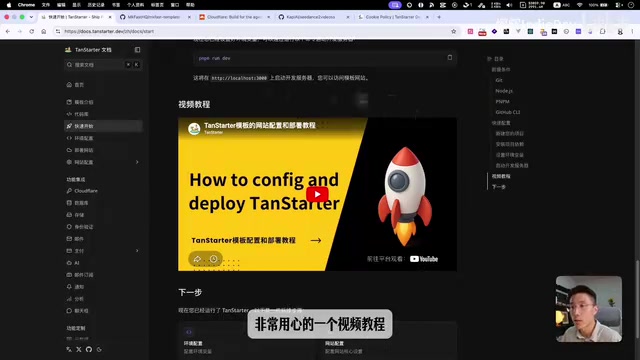
This hands-on guide walks through building CDance2Videos — an AI storyboard video generator — using Codex and the TanStarter template on Cloudflare Workers, D1, and R2. It covers environment setup, Stripe payment integration, async task handling for long-running AI jobs, and production deployment, with a cost comparison showing why Cloudflare beats Vercel + Supabase for indie developers.
Why Choose the TanStarter + Cloudflare Stack
When building products for global markets, your tech stack directly determines development efficiency and operating costs. TanStarter is a paid template built on the TanStack Start framework, and its core value is best captured by the official hero copy: Ship faster with TanStack, cost less with Cloudflare.
Compared to the traditional Next.js + Supabase + Vercel setup, the TanStarter + Cloudflare combination offers several notable advantages:
- Better developer experience: TanStack Start is leaner than the increasingly bloated Next.js, and it's not tightly coupled to any specific deployment platform
- Dramatically lower costs: Cloudflare's D1 database, R2 object storage, Workers deployment, email service, and more are far cheaper than the Vercel + Supabase stack
- Ready out of the box: Auth, payments (Stripe/Creem), database, object storage, email, blog, SEO — all pre-configured
- Security you can trust: A battle-tested template validated by many developers, avoiding common pitfalls of purely AI-generated code like secret key leaks and API abuse
The Project: AI Storyboard Video Generator
The product built in this walkthrough is called CDance2Videos. Its core flow is: user inputs a story description → calls ChatGPT Image2 to generate storyboard images → then uses CDance 2.0 to produce a 15-second video. This type of AI video generation tool is hugely popular on social media and works great for use cases like restaurant promotional videos.
The entire development process uses the Codex App as the coding tool. Excluding time spent waiting for AI generation, it takes roughly one hour to go from initial setup to a live deployment — all built on the TanStarter template.
Architecture Overview
| Module | Technology |
|---|---|
| Framework | TanStack Start (full-stack) |
| Deployment | Cloudflare Workers |
| Database | Cloudflare D1 |
| Object Storage | Cloudflare R2 (stores generated images and videos) |
| Authentication | Better Auth (email/password + Google OAuth) |
| Payments | Stripe (Creem also supported) |
| Cloudflare Email Service | |
| AI Services | KIE (calls ChatGPT Image2 and CDance 2.0) |
Environment Setup and Configuration
Cloudflare Account and API Token
Start by creating an API Token in the Cloudflare dashboard with the following permissions:
- D1 - Edit
- Workers R2 Storage - Edit
- Workers AI - Read
- Workers Scripts - Edit
- Email Sending - Edit (domain level)
Important: The API token is only shown once — make sure to save it before confirming.
Database Setup (D1)
Create local and remote databases via the CLI. TanStarter includes pre-built migration commands. Once created, fill in the database name and ID in wrangler.json, and add the Database ID to your .env file. The template also integrates Drizzle Studio, making it easy to inspect your database schema locally.

Object Storage Setup (R2)
Create an R2 bucket via the CLI to store generated images and video files. These large files don't belong in a database — a dedicated object storage service is the right tool for the job.
Authentication and Email
Authentication is handled by Better Auth, which supports email/password and Google login out of the box. Google OAuth requires creating a project in Google Cloud Console and configuring an OAuth client. Email is handled by Cloudflare Email Service (requires the Workers paid plan at just $5/month) — far cheaper than running your own mail server.

Stripe Payment Configuration
Here's a time-saving trick for payment setup: install the Stripe plugin for Codex, then let the AI read your project's price environment variables and automatically create the corresponding products and prices in the Stripe dashboard — no manual entry needed.
Pay special attention to Webhook configuration. After a successful Stripe payment, the Webhook notifies your backend to update the user's subscription status. The endpoint URL format is yourdomain.com/api/webhook/stripe.
Building Core Features with Codex
Landing Page Customization Tips
The template's landing page needs to be tailored to your product. Here are a few practical tips:
- Theme color: Use the shadcn/ui theme site to pick a color scheme and install it with a single command
- AI-generated images: Codex natively supports ChatGPT Image2, so you can have the AI generate landing page visuals directly (remember to compress image sizes)
- Professional icon set: Use lobehub's icon-set, which covers logos for all major AI companies — it makes your site look polished and credible
- OG image: Don't forget to replace the OG image used for social sharing previews
Core Feature Development
Place the KIE API documentation (ChatGPT Image2, CDance 2.0, task query) in your project's docs/api directory, configure the API Key environment variables, then write a detailed prompt to have Codex implement the entire feature.
Key elements to include in your prompt:
- Description of the three-step generation flow
- Panel component placement (below the Hero section + Dashboard page)
- Credit system design (Pro: 1,200 credits/month; image generation: 8 credits/image; video generation: 450 credits/video)
- Technical constraints (client-side polling to avoid Worker timeouts)
- Data storage strategy (records go to the database, files go to R2)

Handling Workers Timeout
Cloudflare Workers have execution time limits, and video generation can take several minutes — waiting synchronously will cause a timeout. The solution: return a task ID immediately after creating the task, then have the frontend poll the database on a timer to check generation status, fetching the result once the task completes. This async pattern is the standard approach for handling long-running tasks in serverless architectures.
Deployment and Key Considerations
Deployment Process
TanStarter supports both manual builds and automated builds via GitHub Actions. The core steps are:
- Update the project name and custom domain in
wrangler.json - Create a
.env.productionfile for production environment variables - Sync environment variables to GitHub Secrets using the GitHub CLI
- Run the deploy command to bundle and upload to Workers
You can even have Codex handle the entire flow — database migration, code commit, and deployment — all in one go.
Production Security Warning
Always replace Stripe's Secret Key, Webhook Secret, and price IDs with your real production values. If you accidentally use sandbox keys in production, users can pay with test cards for free and burn through your actual AI service credits, resulting in real financial losses.
Cost Comparison and Takeaways
The cost advantage of the Cloudflare all-in-one stack is substantial: the Workers paid plan is just $5/month, D1 has a generous free tier, and R2 storage is very affordable. For developers running multiple global products simultaneously, this stack can save a significant amount compared to Vercel + Supabase.
Even if you don't purchase the TanStarter template, mastering the Cloudflare D1 + R2 + Workers stack is genuinely valuable on its own. The more projects you're running, the more this low-cost approach pays off.
Related articles

Will GitHub Die? Open Source Maintainer Burnout and the Collaboration Crisis in the AI Era
Lex Fridman podcast discussion on open source maintainer burnout and GitHub's predicament: massive pull requests overwhelm core maintainers, and AI worsens code bloat. Using math journal peer review and Poincaré conjecture verification as analogies, the article analyzes why verification in knowledge production must be deliberately slow, and how open source communities can avoid the failure mode of maintainers exiting.

Stop Building Cookie-Cutter AI Websites: 3 Tools That Transform Your Coding Agent
Three tools that boost AI coding agents: FFmpeg skill for local video editing in Claude Code and Cursor, Hallmark's 50 design themes to fix cookie-cutter AI sites, and Jailbreaks' 25+ model prompts.

How America's Gerontocracy Squeezes the Younger Generation
Americans over 55 hold nearly three-quarters of national wealth, alongside an 80-year-old president and elderly congressional leaders. The Atlantic's Idrees Kahloon explains how gerontocracy drives up housing costs, squeezes opportunities for the young, and explores zoning reform and child poverty reduction as practical fixes.