DeepSeek Harness Penetration Mode in Practice: Automated SRC Vulnerability Discovery with AI Agents
A complete hands-on workflow for automated vulnerability discovery against an authorized lab using the DeepSeek Harness penetration mode plugin.
Based on a Bilibili creator's hands-on demo, the article covers configuring penetration mode in the DeepSeek Harness desktop client and running automated vulnerability discovery against a local teaching lab. It explains why DSH was chosen (general Agent tools are constrained by model safety guardrails), details installation, permissions, model selection, the three plugin install methods and the web/desktop distinction, and shows how the DeepAgent architecture splits work across parallel sub-Agents for port scanning and web enumeration. It concludes with three judgments: permissions are a double-edged sword, sub-Agent decomposition determines the capability ceiling, and the plugin ecosystem is not yet mature.
AI Agents are changing the way security testing gets done. Compared with manually digging through logs and probing ports one by one, letting an Agent with tool-calling capabilities autonomously handle reconnaissance, validation, and report generation offers an order-of-magnitude efficiency gap. This article is based on a hands-on demo by a Bilibili creator and walks through the complete workflow of configuring penetration mode in the DeepSeek Harness (hereafter DSH) desktop client and running automated vulnerability discovery against a teaching lab environment.
One thing needs to be stated upfront: this kind of usage targets authorized scopes only (the creator used a local teaching lab at 192.168.10.140). Unauthorized penetration testing is illegal in any jurisdiction.
Why Security Work Warrants a Dedicated Agent
At the start of the video, the creator raises a practical problem: there are already plenty of general-purpose AI Agent tools—Claude Code, Codex, OpenClawAd, Hermes Agent, plus domestic options like WorkBuddyAd and Tongyi Qianwen Office—but the built-in safety guardrails of large models will outright refuse requests related to offensive security testing. Getting them to participate in penetration testing usually requires "jailbreaking"—using prompt engineering to bypass built-in restrictions.
That path is neither stable nor elegant. The actual reason for choosing DSH is quite simple: DeepSeek models have relatively looser restrictions in the cybersecurity domain, and combined with a dedicated penetration mode plugin, you can achieve the goal in a more standardized way rather than through repeated adversarial fights against guardrails.
Model safety guardrails are refusal mechanisms that large model vendors layer into the model alignment stage and inference pipeline, typically covering high-risk categories such as cyberattacks, malicious code, and weapons manufacturing. Their triggering depends on intent classifiers and policy rules, so requests with ambiguous boundaries like "penetration testing" tend to produce two kinds of misclassification: first, blanket refusal of compliant testing within authorized scope; second, being bypassed when faced with carefully crafted prompts. This also explains why, in the security testing field, practitioners prefer models with relatively looser guardrails rather than burning energy on endless prompt adversarialism.
DSH Desktop Installation and Basic Configuration
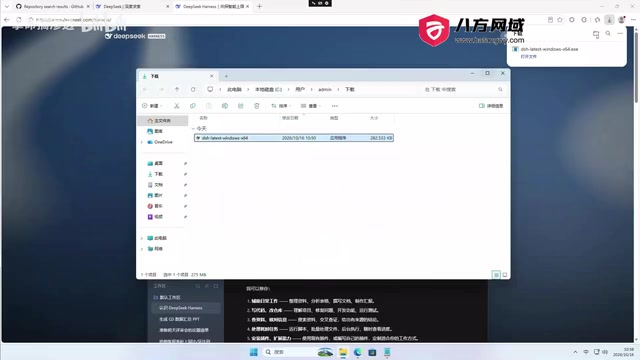
The installation process has no technical barrier. The official download page offers Windows 64-bit and macOS versions—double-click the installer, choose the install path, and click install now. First launch brings up a login page; register with a phone number and verification code, and new users receive a 6.00 CNY credit balance to offset model calls.
After entering the main interface, a few settings are worth noting:
- Permission settings: You can choose to only view modifications within the workspace, or open it up to full permissions. When doing automated testing, permissions that are too narrow will cause the Agent to frequently request authorization.
- Model selection: The demo uses DeepSeek V4.1 Flash.
- Agent presets: The default is Standard mode; there are also PTC mode, Minimal mode, and Creative mode. Penetration mode is not in the default list and must be installed separately.
Control of security boundaries also happens here. The creator specifically warns that if you let the Agent hunt for every vulnerability without constraints, it may create test users, modify permissions, and cause real impact on the target system. So when giving instructions, you should clearly define scope—for example, stop after finding the first vulnerability, and don't perform user-creation-type operations.
Installing the Penetration Mode Plugin
Penetration mode comes from an open-source project on GitHub. The author states its positioning in the repository description: a penetration testing mode for DSH that, within authorized scope, records target exploration threads, validation results, assets, and vulnerabilities, and presents them in a web interface as exploration chains, vulnerability views, and asset views. The repository has since been set to read-only, but it can still be installed and used normally.
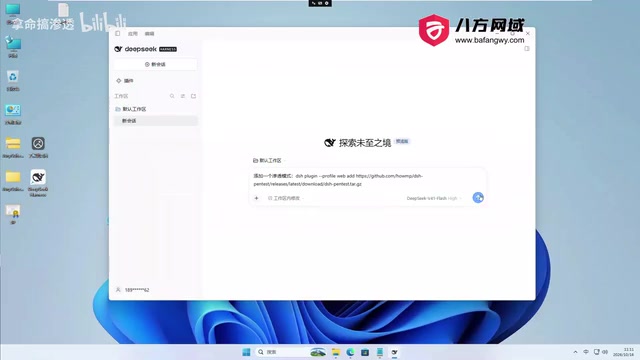
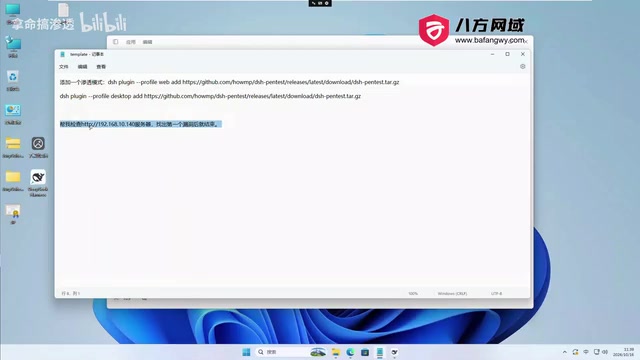
There are three installation methods: local npm install, install from a release URL, and download the file then install locally. The creator used the approach of handing the release URL directly to DSH for automatic execution.
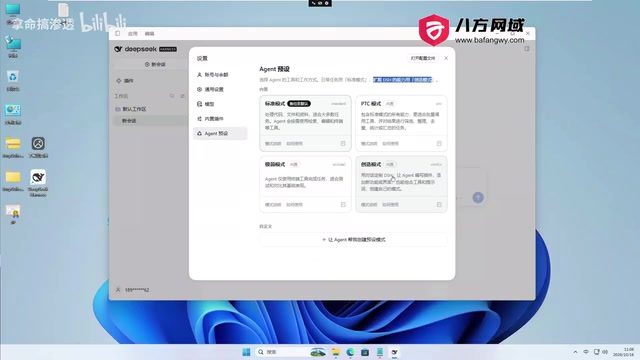
Here's an easy pitfall: the install command differs between the web version and the desktop version. If you're using the desktop client but run the web version's install command, the plugin won't be shared. During installation, the Agent will pop up a permission request—just click allow; if you don't want to authorize repeatedly, you can switch permissions to full. After installation, you must restart DSH for penetration mode to register in new conversations. To verify, go to Settings → Agent Presets; if you can see the "Penetration Mode" option, it succeeded.
DSH plugins and Agent presets are two different layers of mechanism. A preset is essentially a packaged set of system prompts, tool whitelists, permission policies, and workflow templates that determines the Agent's default behavior in a conversation; a plugin is an extension distributed as an npm package or release package that needs to be installed into the local runtime directory via a package manager or URL. Installing a plugin merely places code on disk, while preset registration happens at the stage when the client reads configuration at startup—so newly added presets only appear in the settings list after a restart. The reason web and desktop versions can't share plugins is that their runtime dependency directories and host process environments differ, and the same plugin code resolves to different paths in different hosts.
Running an Automated Bug Hunt with Penetration Mode
After configuration, create a new conversation. The instruction can be very brief, for example "go check this server for me and stop after finding the first vulnerability." After sending, the Agent first records the target and authorization information, then spawns two sub-Agents to divide the work: one handles host port scanning and service fingerprinting, the other handles web enumeration and attack surface validation.
Behind this mechanism is DeepSeek's DeepAgent architecture, which advances tasks in parallel across multiple threads. Each sub-Agent has an independent role definition and task assignment, and you can observe their execution status in the background task panel. This is also why it's better suited to penetration scenarios than single-turn conversational tools—reconnaissance, enumeration, and validation can naturally be split into parallel subtasks.
After both sub-Agents wrap up, the main Agent consolidates conclusions and outputs a report. The "Penetration" view in the interface presents targets, objectives, intents, facts, vulnerabilities, assets, and other information; the exploration chain, vulnerability view, asset view, and test report can all be viewed directly.
The report from this demo run showed no vulnerabilities found. The reason isn't the tool itself but that the authorized scope was set too small—the instruction limited it to "stop after finding the first vulnerability" while also constraining deep testing behavior, so naturally the Agent wouldn't exhaustively enumerate. The creator's advice is to grant sufficient authorization in future use so the Agent has enough room to expand testing.
The DeepAgent architecture is an Agent organization approach for long-running tasks; its core is decomposing a complex goal into multiple sub-Agents scheduled by a main Agent, each with its own context, role prompt, and toolset, advancing in parallel on independent threads. The benefit is avoiding a single context window being flooded by massive scan output, while letting different subtasks retry without interfering with each other. The cost is that the main Agent must handle result consolidation and conflict resolution, and whether the task decomposition is reasonable directly determines overall coverage. In penetration scenarios, port scanning and web enumeration can naturally run in parallel, which fits this architecture well.
A Few Practical Judgments
Several lessons worth remembering can be drawn from this demo. Permissions are a double-edged sword: full permissions let the Agent run more smoothly, but they also mean it can make real changes to the target system, so in real SRC scenarios they should be used together with scope limitations. The parallel structure of sub-Agents determines the capability ceiling: whether it can cover enough attack surface depends on whether the task decomposition is reasonable, not on the length of a single model output. The plugin ecosystem is still early: penetration mode depends on community repository maintenance, and the repository going read-only itself shows that sustainability is uncertain.
For security practitioners, the value of such tools isn't replacing humans but handing repetitive reconnaissance and enumeration to machines while leaving judgment to the tester. In SRC vulnerability discovery, what's truly scarce is always the understanding of business logic and attack surface—Agents can't yet replace that layer.
One-line Summary
A complete hands-on workflow for automated vulnerability discovery against an authorized lab using the DeepSeek Harness penetration mode plugin.
Paragraph Summary
Based on a hands-on demo by a Bilibili creator, this article walks through the complete workflow of configuring penetration mode in the DeepSeek Harness desktop client and running automated vulnerability discovery against a local teaching lab. The author first explains why DSH was chosen: general-purpose Agent tools are constrained by model safety guardrails and require "jailbreaking" to participate in offensive testing, while DeepSeek has relatively looser restrictions in the security domain. It then covers installation and basic configuration, permission and model selection, the three installation methods for the penetration mode plugin and the distinction between web and desktop versions, and how to verify presets after a restart. In the hands-on section, the Agent uses the DeepAgent architecture to split out two parallel sub-Agents responsible for port scanning and web enumeration respectively, ultimately outputting exploration chains, vulnerability, and asset views. The demo found no vulnerabilities because the authorized scope was too narrow, from which the article draws three judgments: permissions are a double-edged sword, sub-Agent decomposition determines the capability ceiling, and the plugin ecosystem is not yet mature.
Related articles

Will GitHub Die? Open Source Maintainer Burnout and the Collaboration Crisis in the AI Era
Lex Fridman podcast discussion on open source maintainer burnout and GitHub's predicament: massive pull requests overwhelm core maintainers, and AI worsens code bloat. Using math journal peer review and Poincaré conjecture verification as analogies, the article analyzes why verification in knowledge production must be deliberately slow, and how open source communities can avoid the failure mode of maintainers exiting.

Stop Building Cookie-Cutter AI Websites: 3 Tools That Transform Your Coding Agent
Three tools that boost AI coding agents: FFmpeg skill for local video editing in Claude Code and Cursor, Hallmark's 50 design themes to fix cookie-cutter AI sites, and Jailbreaks' 25+ model prompts.

How America's Gerontocracy Squeezes the Younger Generation
Americans over 55 hold nearly three-quarters of national wealth, alongside an 80-year-old president and elderly congressional leaders. The Atlantic's Idrees Kahloon explains how gerontocracy drives up housing costs, squeezes opportunities for the young, and explores zoning reform and child poverty reduction as practical fixes.