Dify 1.8 Complete Guide: Deployment and Building AI Applications

Dify 1.8.0 is a no-code, Docker-deployable enterprise AI app platform ready in minutes.
Dify is a visual, low-code AI application development platform supporting five app types: chatbots, text generation, Agents, workflows, and Chatflows. Compared to tools like Coze and n8n, Dify leads in both feature completeness and usability, making it the top choice for enterprise AI deployment. Version 1.8.0 drastically simplifies Docker setup to just three steps — extract, rename the .env file, and run `docker compose up -d` — with a ~6 GB image that's up and running in minutes. The platform offers four core modules: Explore, Studio, Knowledge (RAG-based), and Tools, catering to users at every skill level.
What Is Dify: An Enterprise-Grade AI Application Development Platform That Requires No Coding
Dify is a development platform purpose-built for creating AI applications. Contrary to what many people might expect at first glance, building AI applications with Dify requires virtually no coding — which is one of the key reasons it has gained rapid adoption among enterprises.
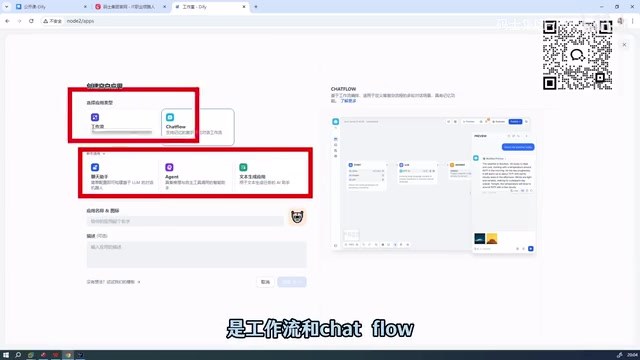
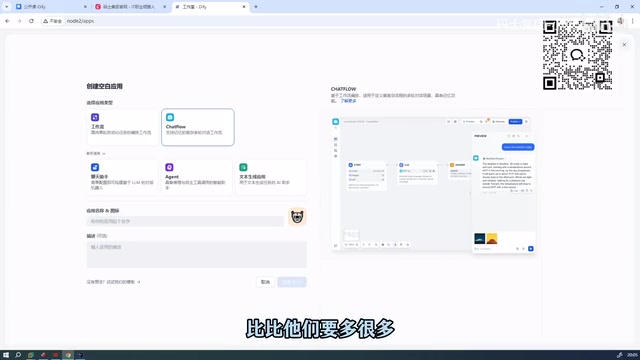
In short, Dify is a visual platform that lets you build AI applications quickly. It supports five main application types:
- Chatbot: Conversational AI interaction applications
- Text Generation: Content generation driven by prompts
- Agent: AI agents capable of autonomous decision-making
- Workflow: Automated task orchestration
- Chatflow: Workflow with built-in conversational capabilities
By comparison, some similar tools (such as Coze) support fewer application types, typically covering only Agents and email-based applications.
You might not have noticed that Workflow and Chatflow are essentially the same category — both are workflows — but Dify separates them to serve different use cases. This design strikes a balance between flexibility and accessibility for new users.
Why Choose Dify Over Other AI Orchestration Tools?
The major AI application orchestration tools on the market today include Dify, Coze, RagFlow, and n8n. In real-world enterprise deployments, Dify consistently ranks first in recommended priority, with Coze coming in second.
The Competitive Edge of Domestic AI Development Platforms
Compared to foreign counterparts, domestic platforms like Dify have matured considerably. Looking at two key dimensions:
- Feature coverage: Dify supports significantly more features than many foreign competitors, spanning knowledge bases, tool integrations, and complex workflow orchestration.
- Usability and accessibility: In terms of user experience and friendliness toward beginners, Dify leads the industry.
In other words, once you've mastered Dify, you can largely set aside most similar tools — there's little need to invest time learning them separately.
Deploying Dify 1.8.0 with Docker: A Practical Walkthrough
This guide is based on the latest Dify 1.8.0 release. Compared to older versions, the deployment process has been significantly streamlined, eliminating much of the tedious extra configuration.
Local Deployment in Three Steps
Here is the complete local deployment process:
Step 1: Navigate to the directory and extract the archive
cd into the Dify directory and extract the installation package.
Step 2: Enter the Docker directory
Once extracted, navigate into the docker folder within the project.
Step 3: Rename the environment variable file
You'll find a .env.example file in the directory. Simply rename it to .env. This file already contains all the required environment variables.
Key note: In older versions, you had to manually perform additional environment configuration. In version 1.8.0, almost no extra configuration is needed — just rename the file and you're ready to go.
Step 4: Launch all services with a single command
Run the following command to start all containers:
docker compose up -d
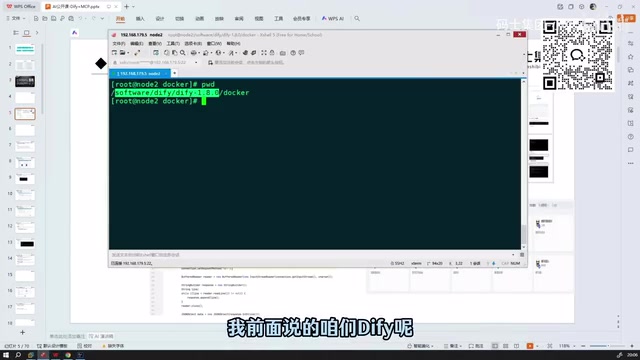
Image Size and Download Speed
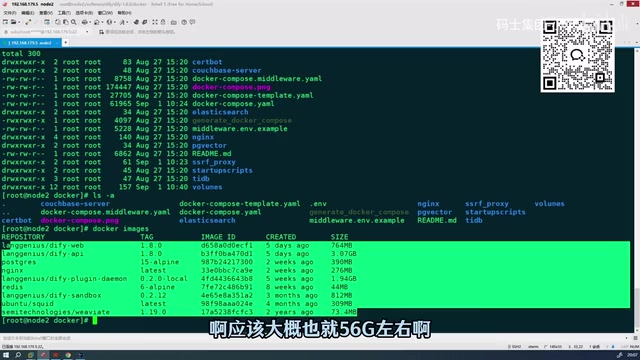
Regarding resource usage, the total Docker image size for version 1.8.0 is approximately 6 GB, staying well under 10 GB — so disk space requirements are modest and easily handled by a standard development machine.
In terms of download speed, switching to updated image mirrors has noticeably improved pull times compared to earlier versions. All images can typically be downloaded and the service fully started within just a few minutes. This release also fixes numerous bugs present in older versions, resulting in better overall stability.
A Tour of the Interface Modules After Login
Once the service is running, you can access Dify's web interface by visiting the address of your deployment node and logging in.
The post-login interface is broadly consistent with earlier versions and includes the following core modules:
| Module | Description |
|---|---|
| Explore | Browse and experience community templates and sample applications |
| Studio | The central area for creating and managing AI applications |
| Knowledge | Build the data foundation for RAG (Retrieval-Augmented Generation) |
| Tools | Manage external tools and plugins that can be called by your applications |
Creating Your First AI Application
In the Studio, click Create Blank App to start building an AI application from scratch. You can choose any of the five application types mentioned above and quickly prototype something based on your actual needs.
Dify Learning Path: From Beginner to Production
For those just getting started with AI application development, the following learning path is recommended:
- Set up your environment: Get the local Docker deployment running and confirm the environment is working.
- Basic applications: Start with simple chatbots and text generation apps to understand fundamental prompt orchestration logic.
- Advanced orchestration: Dive deeper into Workflow and Chatflow to master complex multi-node, multi-branch orchestration.
- Production deployment: Combine knowledge bases and tool integrations to build complete AI applications that work in real business scenarios.
As a mature and user-friendly domestic AI application platform, Dify — paired with the simplified deployment process introduced in version 1.8.0 — has become the go-to choice for individual developers and enterprises looking to rapidly validate AI ideas. Whether you're a complete beginner or an experienced developer, Dify makes it efficient to integrate AI capabilities into real-world business workflows.
Related articles

Will GitHub Die? Open Source Maintainer Burnout and the Collaboration Crisis in the AI Era
Lex Fridman podcast discussion on open source maintainer burnout and GitHub's predicament: massive pull requests overwhelm core maintainers, and AI worsens code bloat. Using math journal peer review and Poincaré conjecture verification as analogies, the article analyzes why verification in knowledge production must be deliberately slow, and how open source communities can avoid the failure mode of maintainers exiting.

Stop Building Cookie-Cutter AI Websites: 3 Tools That Transform Your Coding Agent
Three tools that boost AI coding agents: FFmpeg skill for local video editing in Claude Code and Cursor, Hallmark's 50 design themes to fix cookie-cutter AI sites, and Jailbreaks' 25+ model prompts.

How America's Gerontocracy Squeezes the Younger Generation
Americans over 55 hold nearly three-quarters of national wealth, alongside an 80-year-old president and elderly congressional leaders. The Atlantic's Idrees Kahloon explains how gerontocracy drives up housing costs, squeezes opportunities for the young, and explores zoning reform and child poverty reduction as practical fixes.