Doubao Agent Practical Tutorial: 28 Key Points from Chat to Intelligent Agent

Nanny-level Doubao Agent tutorial: 28 key points teaching zero-foundation beginners to turn AI into an office intelligent agent.
The article introduces the "Doubao Agent Nanny-Level Tutorial" polished over about three months by a Bilibili UP host, aimed at beginners with zero programming background, addressing the problem that most people only use Doubao as a chat box, wasting its intelligent agent capabilities. The tutorial is divided into four modules—Getting Started, Case Studies, Advanced, and Industry—with 28 key points, progressing from building awareness of intelligent agents to real office scenario breakdowns, then workflow building and industry implementation. It also includes a companion Doubao user manual and hands-on materials to lower the barrier to entry. The article emphasizes Doubao's low access cost and its ability to connect with office software like documents and spreadsheets, and that the tutorial's core value lies in teaching people to truly put the tool to use and hand repetitive, tedious work over to AI.
In domestic office scenarios, AI tools keep emerging, but few can truly take root and do the work for you. Doubao Agent (intelligent agent) is one of them—no need to wrestle with network environments, no strict computer configuration requirements, and it can connect with commonly used office software. Just download the client and log in to get started; it can interface with everyday tools like documents and spreadsheets. Tasks that used to require switching back and forth between multiple software programs—like organizing materials, writing documents, and analyzing spreadsheets—can now all be handled by a single intelligent agent with one sentence. Simply put, it's not just an AI that chats with you; it's an intelligent agent that can genuinely shoulder your workload.
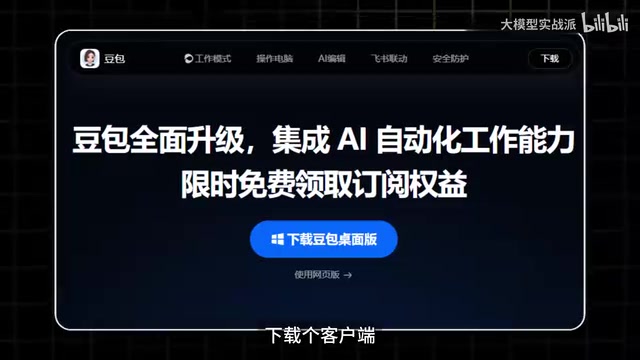
The problem is that many people still treat Doubao as just a chat box after opening it, turning such powerful capability into an ordinary Q&A tool. The "Doubao Agent Nanny-Level Tutorial" released by a Bilibili UP host addresses exactly this pain point: it took nearly three months to polish, is aimed at beginners, requires no programming knowledge whatsoever, and doesn't matter if you've never touched AI before—just follow along with hands-on practice and you can hand repetitive, tedious work over to AI.
Course Structure: Four Major Modules, 28 Key Points
The entire course is divided into four modules—Getting Started, Case Studies, Advanced, and Industry—totaling 28 key points. From the most basic onboarding to case breakdowns of real work scenarios to building advanced workflows, it walks you through step by step.
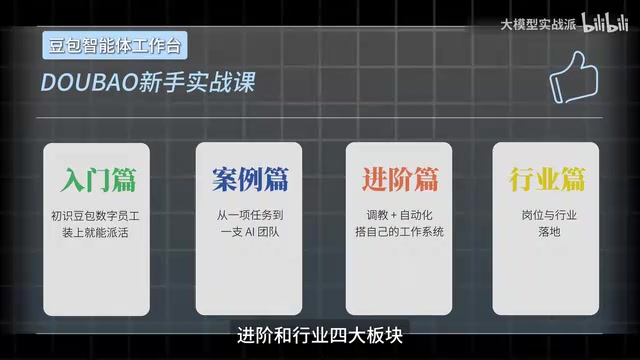
This structure is quite beginner-friendly: first establish a basic understanding of intelligent agents, then use cases to ground abstract concepts in concrete tasks, and only then move on to workflow building. Many tutorials jump straight into workflow nodes, and beginners easily get stuck on "why connect it this way"; this course places cases before the advanced section, which is equivalent to first letting you see what problems intelligent agents can solve, then learning how to make them solve them automatically.
Getting Started Module: From Chat Box to Intelligent Agent
The getting-started section addresses the question of "how to use it." Most people only input questions and wait for answers when they open Doubao, which actually only uses its Q&A capability. The getting-started module introduces you to the basic form of an intelligent agent—what distinguishes it from ordinary conversation is that it can call tools and execute multi-step tasks. In the video, the UP host emphasizes that an intelligent agent "can genuinely shoulder your workload," which captures the core: shifting from "asking it" to "letting it do."
So-called "intelligent agent" (Agent), in the AI field, typically refers to a system that can perceive its environment, make autonomous decisions, and call tools to execute multi-step tasks to achieve goals. Compared with traditional Q&A chatbots, the key difference of an intelligent agent is its capacity for action: it can break down complex instructions, sequentially call external tools such as search, document processing, and spreadsheet calculation, and adjust strategies based on intermediate results during execution. This capability relies on the reasoning and function calling mechanisms of large language models, enabling the model to no longer merely generate text but to trigger actual operations. Doubao Agent encapsulates this capability into office scenarios—users simply describe goals in natural language, and the intelligent agent automatically plans steps and completes them. Understanding this concept helps clarify why the tutorial emphasizes shifting from "asking it" to "letting it do."
Case Studies Module: Real Work Scenario Breakdowns
The case studies section places intelligent agents into specific office scenarios. Repetitive work like document organization, spreadsheet analysis, and material compilation is exactly where intelligent agents demonstrate the most value. The tutorial uses real scenario breakdowns to let beginners see what happens behind "handing it over with one sentence," rather than staying at the demonstration level.
Advanced Module: Workflow Building
The advanced section covers workflows. Workflows are the key to intelligent agents moving from "single execution" to "automation"—stringing multiple steps together so AI completes an entire process in sequence, rather than manually triggering each time. This section has a barrier for those with zero programming background, which is why the tutorial places it after the case studies—so you can get a feel for task decomposition before diving in.
Workflow, in the context of AI intelligent agents, refers to an automated process that connects multiple task nodes in a preset logic sequence. Each node can be a tool call, a model inference, or a conditional judgment, and nodes form a complete chain through data transfer and sequential control. For example, a document processing workflow might include four nodes: "read file → extract key information → generate summary → write to spreadsheet." The value of workflows lies in standardizing repetitive tasks, reducing manual triggers, and enabling batch and unattended processing. Building workflows typically requires understanding input-output relationships between nodes, variable passing, and exception handling—which is also the main barrier for zero-background users. The tutorial places workflows after case studies precisely so learners can first accumulate task decomposition experience before understanding the necessity of node connections.
Industry Module: Landing in Specific Industries
The industry module applies what you've learned to specific industry scenarios. Workflows vary greatly across industries, and this section helps you see how general methods can adapt to your own business.
Supplementary Materials: Manual and Hands-on Materials
In addition to video courses, the UP host has also put together a companion Doubao user manual covering four major areas in detail: installation and onboarding, case breakdowns, performance customization, and industry implementation. Several of the most commonly used skills are also selected, along with a bunch of hands-on materials you can use directly.
For beginners, the value of the companion manual is that it can be consulted independently of the videos—videos are good for following along once, while the manual is good for looking things up while you work. Hands-on materials lower the psychological barrier of "starting from scratch"; practicing directly with ready-made materials makes it easier to get into the flow than imagining scenarios.
Why It's Worth the Time
The bottleneck for AI tools in domestic office scenarios often isn't model capability but access cost. Requiring special network environments, being picky about configuration, and failing to connect with commonly used office software—these all keep tools at the "trial" stage. Doubao's advantage is its low access barrier: download the client, log in, and you can use it; documents and spreadsheets all connect seamlessly. A low barrier means more people can actually put it to use, rather than installing it and letting it sit.
That's also where the value of this tutorial lies: it doesn't pursue deep technical principles but thoroughly explains "how to actually use it." 28 key points, four major modules, a companion manual, and materials form a path from zero to being able to get work done. If you still only chat when you open Doubao, this course is worth going through.
According to the UP host, the course took about three months to polish and is aimed at zero-foundation beginners; by following along with hands-on practice, you can gradually hand repetitive, tedious work over to AI. If you find it useful, the UP host also asks viewers to give it a like, coin, and favorite.
Related articles

Get Started with Hermes Agent in 20 Minutes: Build Your AI Assistant with Zero Code
Zero-code tutorial to get started with Hermes Agent in 20 minutes: deploy a VPS with Hostinger in one click, connect Nels Portal models, link Telegram for notifications, and set up scheduled monitoring tasks and cross-session memory preferences to build an always-on personal AI assistant.

Download Folder a Dumping Ground? Auto-Archive It in Two Seconds with a Local AI Script
A Bilibili creator shares using a local large model to write a Python script that auto-archives the download folder: zero third-party dependencies, classifying only by extension with the os and shutil libraries, sorting over two hundred files in two seconds, and letting the AI adjust rules anytime.
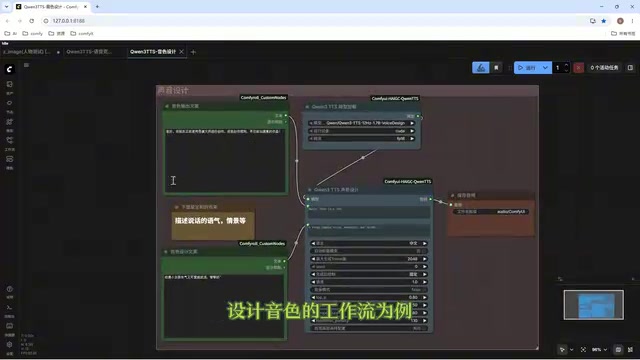
Director Master Tutorial: Full Workflow for AI Character Voice Design and Binding
Based on a Bilibili tutorial, this guide details how to design and bind AI character voices in Director Master: uploading voices, generating them via ComfyUI workflows, producing voice profiles alongside character design, and automatically inheriting voices in storyboard prompts.