fswitcher: Reinventing the Command-Tab Experience for Mac Power Users
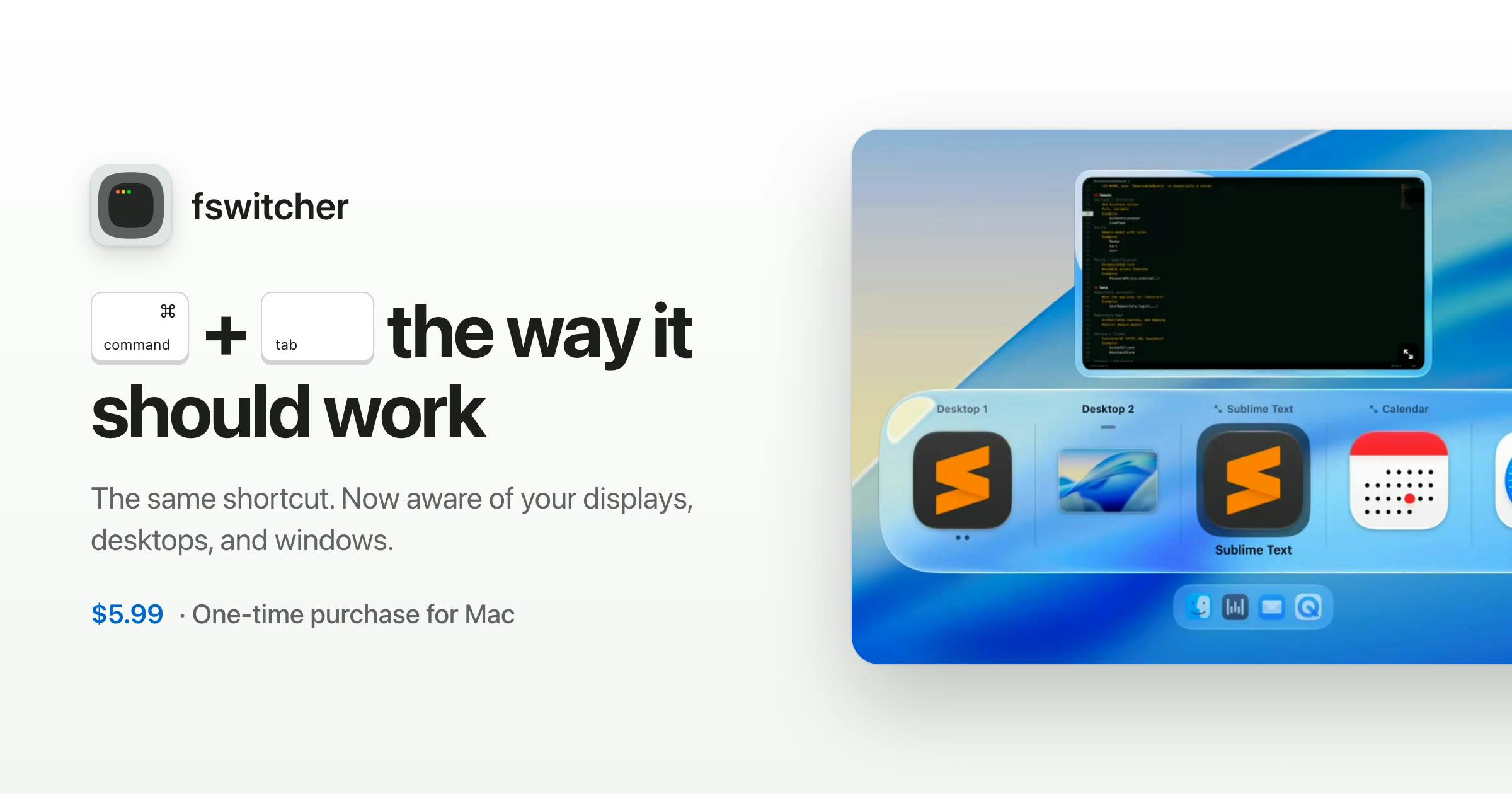
fswitcher aims to unify app, window, desktop, and multi-monitor switching with a familiar Command-Tab experience.
fswitcher is a Mac productivity tool on Product Hunt positioned as an enhanced Command-Tab alternative. It integrates app, window, desktop, and multi-monitor switching into one familiar interface, targeting power users who use multiple monitors and desktops. With 77 upvotes and only 2 comments, community validation remains limited.
Command-Tab on Mac is a shortcut every user relies on daily, but its capabilities haven't changed in years: it can only switch between applications, not jump directly to a specific window, desktop, or display. fswitcher, newly launched on Product Hunt, targets exactly this pain point—attempting to unify app, window, desktop, and multi-monitor management into a single switcher while preserving the intuitive feel users already expect.
Why Command-Tab Needs a Redesign
Command-Tab was designed to quickly switch between applications, but modern Mac workflows have long outgrown that scope. A browser might have a dozen windows open, an IDE might span multiple desktops, and an external monitor scatters windows across different spaces. The native switcher is nearly powerless in these scenarios, forcing users to rely on Mission Control, trackpad gestures, or third-party tools to fill the gap.
fswitcher's positioning is clear: it targets power users who want more from cmd+tab. Rather than inventing a new interaction language, it claims to "look, feel, and behave exactly like you expect." This means the learning curve is deliberately kept low—users don't need to memorize a new set of shortcut logic to gain stronger switching capabilities.
Mission Control is macOS's built-in multitasking interface, triggered by a three-finger swipe up on the trackpad or pressing F3. It displays all open windows, desktop spaces, and full-screen apps simultaneously, allowing users to drag windows between spaces. It solves the "macro view" problem—letting users see the distribution of all windows—but each check requires leaving the current work context, and it lacks the keyboard-driven rapid cycling that a switcher provides. fswitcher attempts to compress some of Mission Control's space management capabilities into a keyboard-driven switcher, reducing how often users need to enter and exit Mission Control.
One Switcher, Four Object Types
According to the product description, fswitcher naturally handles four types of objects: applications, windows, desktops, and multiple monitors. These four correspond precisely to the dimensions most frequently fragmented in Mac multitasking.
Traditional Command-Tab only handles "application-level" switching, while fswitcher pushes granularity down to the window level and incorporates spatial dimensions (desktops and displays) into the same operation set. For developers and designers who frequently jump between multiple full-screen apps, virtual desktops, and external screens, this integration can significantly reduce trips to Mission Control.
The product is categorized under Mac, Productivity, and Developer Tools—confirming its target audience: professionals who are efficiency-sensitive and willing to invest in workflow tooling.
Window-level switching versus application-level switching is key to understanding fswitcher's value. Application-level switching (native Command-Tab) operates on a per-process basis, treating all windows of the same app as a single unit; window-level switching treats each window as an independent target, allowing users to jump directly to a specific browser tab window or IDE project window. macOS natively provides Command-`` (backtick) to cycle through windows within the same app, but that shortcut only works when the current app is active and cannot locate windows across applications. fswitcher treats windows as first-class switching targets, meaning users can select specific windows across apps in a unified interface—this requires reading macOS's Accessibility API or window management interfaces to enumerate and focus windows.
Design Philosophy: Familiarity First
Many productivity tools try to attract attention with entirely new interaction paradigms, at the cost of forcing users to rebuild muscle memory. fswitcher takes the opposite approach—it replaces a system-level shortcut, so it must feel "native" enough for users to trust it with a high-frequency daily operation.
The phrase "looks, feels, and behaves exactly like you expect" is the product's core promise and also its hardest to deliver. Replacing Command-Tab means maintaining high consistency with macOS system behavior while establishing clear hierarchical relationships among apps, windows, desktops, and displays—otherwise users will lose their bearings during switching.
System-level shortcut replacement on macOS presents both technical constraints and UX challenges. macOS does not allow third-party apps to directly hijack Command-Tab, so tools like fswitcher typically need to register global hotkeys or use Accessibility permissions to intercept and simulate switching behavior. This has two consequences: first, users must grant Accessibility or Input Monitoring permissions, raising the installation barrier; second, switching animations and responsiveness are constrained by the app's own rendering pipeline, making it difficult to achieve the zero-latency experience of the native switcher. The promise to "look, feel, and behave exactly like you expect" is effectively an acknowledgment of this technical constraint—aiming to mimic native behavior in visuals and interaction logic as closely as possible to minimize cognitive friction.
Who Should Try fswitcher
Based on currently available information, fswitcher is best suited for three types of users: those using multiple monitors, where windows moved between screens become hard to locate quickly; those who use multiple desktops to isolate work contexts and want to switch spaces alongside apps; and developers who frequently jump between editor, terminal, browser, and documentation, where window-level switching better matches actual needs than app-level switching.
On Product Hunt, 77 upvotes and 16th place indicate it has caught the attention of some productivity tool enthusiasts. However, with only 2 comments, community feedback remains very limited—whether the actual experience is truly as natural as described still needs validation from more users.
The Fragmented Battlefield of Productivity Tools
The Mac productivity tool market has never lacked products challenging system interactions. fswitcher chooses to start from the most fundamental Command-Tab, where risk and opportunity coexist: the opportunity lies in it being a high-frequency entry point triggered countless times daily—once a habit forms, it's hard to replace; the risk lies in users' extremely low tolerance for system shortcut issues, where any lag or inconsistency could lead to uninstallation.
For Mac users pursuing the ultimate workflow, fswitcher is worth watching. Whether it can truly deliver on its promise to "naturally handle applications, windows, desktops, and multiple monitors" will determine whether it becomes a long-term productivity component or just another experiment forgotten after a brief trial.
Product Hunt's voting and ranking mechanism deserves a brief explanation: Product Hunt ranks products daily by upvote count, so 77 votes at 16th place means the product sits in the upper-middle tier of that day's launches but still lags behind top performers. With only 2 comments reflecting limited community engagement depth—on Product Hunt, highly upvoted products typically come with dozens of comments and discussions; few comments may indicate the product description failed to spark sufficient curiosity or trial feedback. For productivity tools, the density of early community feedback often predicts iteration direction and real demand alignment better than vote count, so fswitcher's current community signals should be viewed as "initial attention but insufficient validation."
One-line Summary
fswitcher aims to unify app, window, desktop, and multi-monitor switching through a familiar Command-Tab experience.
Paragraph Summary
fswitcher is a Mac productivity tool on Product Hunt positioned as an enhanced Command-Tab replacement. It addresses the native switcher's limitation of only switching apps—not jumping directly to specific windows, desktops, or displays—by integrating applications, windows, desktops, and multiple monitors into a single switcher. The product emphasizes matching user expectations in look, feel, and behavior to lower the learning cost of replacing a system shortcut, targeting power users like developers and designers who use multiple monitors and desktops to isolate work contexts. Currently at 77 upvotes and 16th place on Product Hunt with only 2 comments, community validation remains insufficient—whether the actual experience feels natural awaits verification from more users.
Related articles
AWS AgentCore Gateway: Connecting AI A…
AWS AgentCore Gateway: Connecting AI Agents to Enterprise Backends with MCP
How AWS AgentCore Gateway acts as a primary MCP server to aggregate REST APIs, Lambda, and existing MCP services? Analyzing its AST real-time mapping, zero cold start, semantic search for tool overload, session isolation, and key injection security design, plus the architectural approach to decoupling enterprise AI agents from backends.

One Link Gives Figma AI a New Skill: Hands-On with MCP Connectors
Paste one MCP server link and the AI Agent in Figma gains new tool capabilities. We break down the setup flow, 20+ one-click apps, read/write permissions and execution policies, and the public HTTPS requirement.

Cognition SWE-2 in Practice: One Prompt to Handle the Whole Product Launch Process
Analyzing a YouTube creator's prompt for using Cognition SWE-2 to launch a product: a landing page, seven-email sequence, and non-buyer follow-up tool, plus how the 'test and report' constraint changes AI delivery quality.