Koishi Plugin Development Deep Dive: Four Core Structures, Lifecycle States, and Publishing

Complete guide to Koishi plugin development: structures, lifecycle, dependency injection, and publishing.
Starting from the "everything is a plugin" kernel-free philosophy, this article breaks down the full Koishi plugin development workflow. Plugins consist of four structures — name, inject, Config, and apply — and pass through six lifecycle states: pending, loading, active, failed, unloading, and disposed. The realm isolation rule is critical: service publishers must be inside the realm, while consumers must remain outside. Configuration spans four layers and two planes (host and agent). Finally, plugins are distributed by publishing to npm with proper package metadata.
In the previous article, we introduced Koishi — the "everything is a plugin" framework — and walked through its basic installation and setup. This article goes deeper into the complete plugin development workflow: from the four core structures and lifecycle states, to the service dependency injection mechanism, and finally to packaging and distribution. Whether you want to build custom features for your own workflow or understand the design philosophy behind this kernel-free framework, this guide will take you through the entire development pipeline.
The Philosophy Behind "Everything Is a Plugin": A Kernel-Free Architecture
Koishi's most fundamental design principle is: "no kernel — everything is a plugin." The framework ships with around 195 built-in plugins, covering Tools, LLM integration, Adapters, Session management, WebUI, and Sandbox functionality, among others. The biggest advantage of this approach is extreme extensibility — virtually any feature you need can be implemented by writing or replacing a plugin.
As a quick demo, the author wrote a plugin called hello. When triggered with the prompt "say hello to Laowu Talks Tech using the hello plugin," the system returned "Hello, Laowu Talks Tech" — a response generated directly by the plugin. Once this end-to-end flow works, developers can follow the same pattern to add whatever functionality fits their use case.
The Four Essential Structures of a Plugin
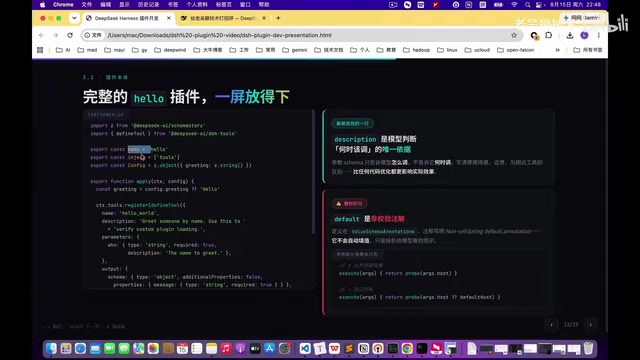
To understand a Koishi plugin, start with its four core building blocks. These are also the "entry points" you should look for when reading any plugin's source code:
- name: The plugin's unique identifier
- inject: Declares which services this plugin depends on
- Config: Defines configuration options via schema
- apply: The sole execution entry point — all core logic lives here, typically including registration methods like
tools.register
In other words, when you encounter an unfamiliar plugin, just locate these four things — name, inject, Config, apply — and you'll quickly understand its skeleton.
Lifecycle: Six Runtime States
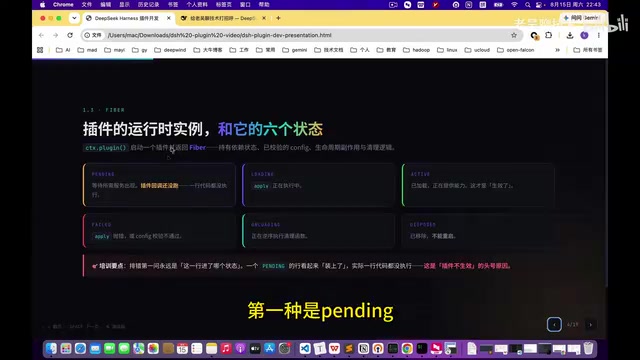
Plugins pass through multiple states during execution. Understanding these states is essential for debugging. Koishi defines six primary runtime states:
| State | Meaning |
|---|---|
| pending | Not ready; dependencies not satisfied |
| loading | apply is executing; plugin is loading |
| active | Fully loaded and active |
| failed | Threw an error and failed |
| unloading | Currently being unloaded |
| disposed | Removed |
When something goes wrong with a plugin, the first thing to check is which state it's currently in. For example, being stuck in pending means a dependency is unmet, while failed means an error was thrown during the apply execution.
Services and Dependency Injection
Koishi provides three ways to inject services, and real-world development often uses a mix of all three:
- Hard dependency (
inject): Theinjectfield mentioned above — a declarative, strong dependency context.get: Fetches a service on demand at runtimecontext.inject: Injects a service within a specific context
The Realm Isolation Mechanism
There's a critical rule that's easy to overlook — service isolation. It can be summed up in two points:
Lines that publish a service must operate inside a realm. Lines that only consume a service must remain outside the realm.
This rule enforces scope boundaries for services, ensuring correct isolation and cleanup between plugins. Understanding "who goes into the realm and who stays outside" prevents a large class of bizarre bugs caused by scope confusion.
Four Ways to Clean Up Resources
Plugins must properly clean up resources when unloaded; otherwise you risk memory leaks or duplicate event bindings. Koishi provides four cleanup mechanisms:
context.on: Binds event listeners; usenextto ensure middleware chains propagate correctlycontext.effect: Manages side effectscontext.setTimeout: Cleans up timerscontext.setInterval: Cleans up recurring tasks
Configuration: Four Layers and Two Planes
The Four-Layer Configuration Structure
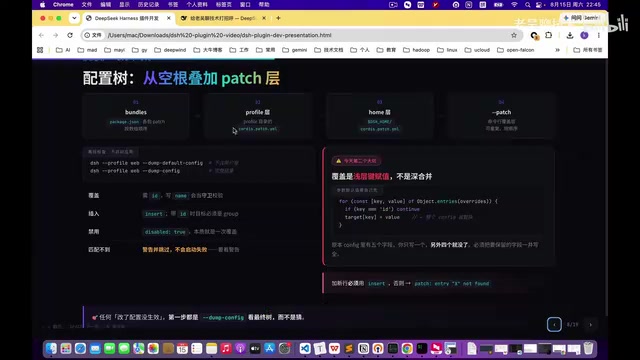
Koishi's configuration is organized hierarchically, from top to bottom:
- bundle layer: Top-level build configuration
- profile layer: Environment configuration
- home layer: User directory configuration
- codespatch: Code distribution configuration
A CLI tool is also available to validate configuration correctness, which is extremely useful when debugging complex setups.
Two Planes: host and agent
Koishi distinguishes between two runtime planes — keep these straight:
- host (process-level): One configuration per process, written in the profile's codespatch
- agent / preset (session-level): Session-scoped configuration, written in the agent preset directory under the home folder
A simple way to remember: one is "for the process," the other is "for the session." There are also rules around how presets are organized — if you're publishing a package online, you must use the bare package name; local references require an absolute path, though relative paths are also supported.
Full Development Workflow and Debugging Tips
When building a complete Koishi plugin, start by scaffolding the four essential structures (name, inject, Config, apply), then fill in your core logic inside apply.
One thing worth emphasizing is the importance of the description field: the description is what the model uses to make decisions. How the model identifies the plugin, what capabilities it has, and when it should be invoked — all of this is communicated through the description. Simply put, how well you write the description directly determines whether the model will call the plugin correctly. Don't treat this field as an afterthought.
The Four-Layer Loading Structure in the UI
When you click something in the UI, four layers of loading happen under the hood:
- Module loading layer: Loads the relevant modules
- Unit layer: Constructs Context-related units
- Mount layer: Patches the plugin into the system
- End-to-end layer: The step that actually consumes the model API
Understanding this layering helps you pinpoint performance bottlenecks — actual API costs only occur at the final layer.
AI-Assisted Debugging
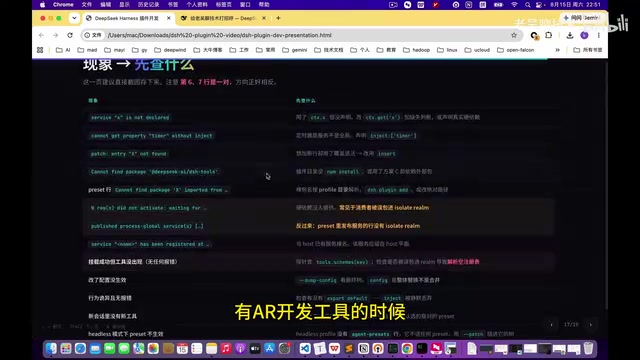
Errors are inevitable during development. A practical tip: with modern AI development tools, debugging plugins is no longer difficult. When you hit an error, just paste the error message into an AI assistant — it can usually identify and fix the issue automatically.
Packaging and Distributing Plugins
Once your plugin is developed and validated, the final step is distributing it. The full publishing workflow is:
- Prepare the package: Fill in
package.jsonwith the repository URL, keywords, export declarations, and other metadata - Publish: Run
npm publish --access publicto push the plugin to npm - User installation: Users can install it with the appropriate command (e.g.,
... profile ... add)
From the user's perspective, installation is reduced to a few commands — and that simplicity is exactly what makes a kernel-free plugin ecosystem thrive.
Summary
Looking back at this article, three points are worth remembering:
First, the four plugin structures: named exports for name, inject dependencies, Config schema, and the apply entry point. When reading any Koishi plugin, look for these four things first.
Second, the bidirectional realm isolation rule: lines that publish a service must be inside the realm; lines that consume a service must remain outside it.
Third, the complete distribution flow: from filling out package metadata, to npm publish, to a user installing it with a single command.
This "everything is a plugin" architecture breaks complex functionality into standardized, composable units. Once you've internalized plugin structure, lifecycle states, and the dependency injection mechanism, you can assemble your own workflow like building with LEGO blocks.
Related articles

WorkBuddy in Action: How a Desktop Agent Automates Your Work
WorkBuddy is a desktop-level AI agent workbench that drives computers via command line, connects external tools, and automates file processing, data organization, and document generation. This article analyzes its working principles, complex task processing flow, and a practical path from getting started to taking orders.

Turning AI Intruders Against Themselves: A Hands-On Look at AgentCapture
AgentCapture is an AI countermeasure honeypot platform that integrates with existing networks and reverse proxies, using lossless deployment, AI agent identification, attacker profiling, and session replay to turn automated intruders against themselves.

WorkBuddy In-Depth: The Leap from Conversational AI to Office Automation
What is WorkBuddy? Tencent's AI agent desktop tool understands Chinese commands and directly operates computer files, handling office automation from resume sorting to scheduled reports. This article analyzes its fundamental differences from conversational AI like ChatGPT, its core capabilities, and applicable scenarios.