Moji: A Lightweight Open-Source Markdown Reader That Opens .md Files Like PDFs

Moji is an open-source Markdown reader that lets you open .md files just like PDFs.
Moji is a newly launched open-source, cross-platform Markdown reader and editor built around one idea: open Markdown files as effortlessly as PDFs, no raw syntax in sight. It offers live preview, native Mermaid diagram rendering (flowcharts, sequence diagrams, and more), and export to PDF, HTML, and PNG. Available on Windows, macOS, and Linux, it's fully open-source on GitHub. With no cloud sync or bidirectional linking, Moji stays focused on elegantly opening and reading individual Markdown files — perfect for developers and technical writers who deal with READMEs and docs daily.
When Markdown Meets a Document-Grade Reading Experience
For developers, technical writers, and knowledge management enthusiasts, Markdown has long become the standard format for everyday note-taking. But a persistent pain point remains: reading Markdown files is often a fragmented experience — you either stare at a screen full of hash symbols and asterisks in a code editor, or you rely on various plugins just to get a barely acceptable rendered output.
The open-source tool Moji, recently launched on Product Hunt, aims to solve exactly this problem. Its core idea is simple and direct: open a Markdown file the same way you'd open a PDF.
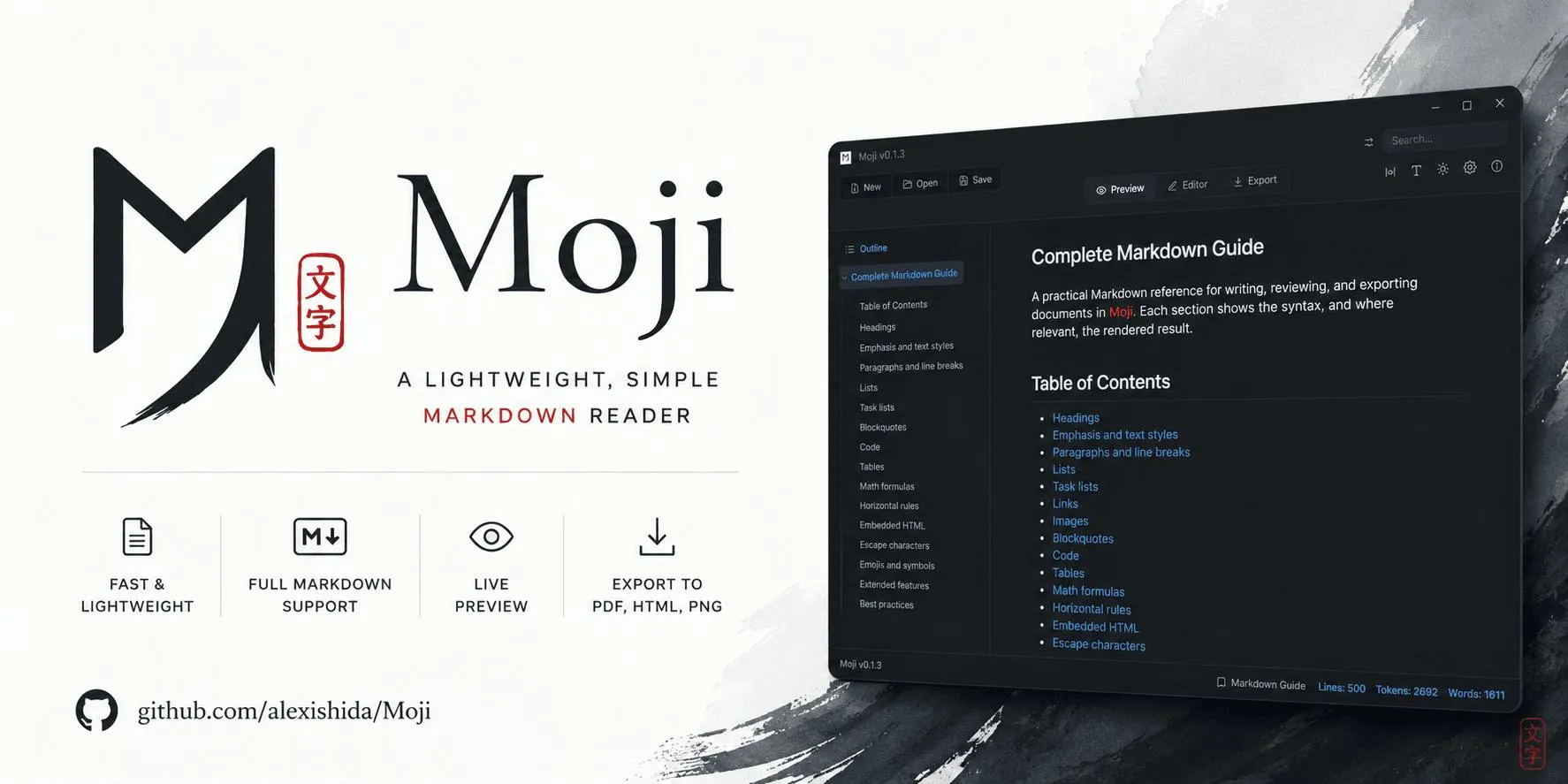
Since launching, Moji has received 87 upvotes and ranked 11th on the daily chart, categorized under PC tools, productivity, open source, and GitHub. While the numbers aren't viral, it hits a real and frequently encountered use case.
A Deep Dive into Moji's Core Features
Fast, Clean, and Distraction-Free Markdown Reading
Moji positions itself as a lightweight Markdown reader and editor, with a design philosophy centered on being "fast, clean, and distraction-free." This stands in sharp contrast to the feature-bloated note-taking apps so common today. When you double-click a .md file, Moji presents a beautifully typeset document — not raw text you need to process further.
This "document-first" approach essentially transforms Markdown from a writing format into a reading format. For users who receive README files, technical notes, or project documentation from others, there's no need to think about the underlying syntax — you get a polished, PDF-like reading experience right away.
Live Preview and Mermaid Diagram Rendering
Moji includes built-in live preview, so you can see the rendered output in real time as you edit. Even more noteworthy is its native support for Mermaid diagrams — flowcharts, sequence diagrams, Gantt charts, and more can be defined directly in the document using plain text syntax and rendered without any external diagramming tools.
For technical documentation, the value of Mermaid is clear. It keeps diagrams as plain text within Markdown, making them easy to version-control while maintaining content portability. Moji integrates this capability out of the box, lowering the barrier to technical writing.
Multi-Format Export: PDF, HTML, and PNG
Moji supports exporting Markdown to PDF, HTML, and PNG — covering most document distribution scenarios:
- PDF export: Ideal for formal document delivery and archiving
- HTML export: Great for web publishing or embedding into other systems
- PNG export: Convenient for sharing single-page content on social media or in chat apps
This export flexibility makes Moji more than just a Markdown reader — it's also a lightweight document publishing tool.
Cross-Platform Coverage and Open-Source Advantages
Supports Windows, macOS, and Linux
Moji runs on all three major desktop platforms: Windows, macOS, and Linux. For developers, cross-platform consistency is critical — many people switch between operating systems regularly, and a unified Markdown tool significantly reduces cognitive overhead. This also aligns with the "works everywhere" spirit that Markdown tools should embody.
The Core Value of Being Open Source
Moji is an open-source project hosted on GitHub. This brings several direct benefits:
- Transparency and trust: Users can review the code and confirm the tool isn't snooping on local documents
- Customizability: Developers can extend functionality or fix issues on their own
- Community-driven: Feature iteration isn't solely dependent on a single maintainer's commercial decisions
In an era of growing data privacy concerns, a fully local, open-source Markdown document tool has natural appeal for privacy-conscious users.
Who Is Moji For?
From a product positioning standpoint, Moji's target user profile is quite clear:
- Developers: Frequently reading project READMEs, API docs, and technical notes
- Technical writers: Need to quickly switch between Markdown and finished documents
- Knowledge managers: Use Markdown as their primary note format and want better reading presentation
- Privacy-conscious users: Prefer local, open-source tools
It's worth noting that Moji doesn't try to become a heavyweight knowledge base system like Obsidian or Notion. Instead, it focuses on the specific action of "opening and reading a single Markdown file." This restrained product philosophy actually makes it more effective in targeted scenarios.
Moji's Scope and Limitations
As a newly launched tool, Moji currently presents a well-defined but relatively basic feature set. It doesn't touch multi-document management, bidirectional linking, cloud sync, or other advanced features — which reflects deliberate product restraint, though some users may see this as a limitation.
In other words, if you need a full-featured knowledge management system, Moji probably isn't enough. But if you just want to elegantly open and read a Markdown file, or quickly export notes to PDF to send to a colleague, Moji fills that gap perfectly. It strikes a solid balance between simplicity and sufficiency.
Conclusion
Moji represents a tool philosophy worth paying attention to: do one thing well rather than trying to do everything. Against the backdrop of Markdown becoming a universal language in the tech world, a lightweight, cross-platform, open-source reader that supports Mermaid diagrams and multi-format export can genuinely improve the smoothness of daily workflows. For anyone who regularly works with Markdown files, Moji is worth a try.
Related articles

GitHub Daily · October 30: Skills Ecosystem Explodes, Agents Start Provisioning Their Own Computers
GitHub Daily Oct 30: Skills ecosystem hits three layers (official, personal, vertical), agents get their own computers, and cross-session memory becomes essential.
AWS AgentCore Gateway: Connecting AI A…
AWS AgentCore Gateway: Connecting AI Agents to Enterprise Backends with MCP
How AWS AgentCore Gateway acts as a primary MCP server to aggregate REST APIs, Lambda, and existing MCP services? Analyzing its AST real-time mapping, zero cold start, semantic search for tool overload, session isolation, and key injection security design, plus the architectural approach to decoupling enterprise AI agents from backends.

One Link Gives Figma AI a New Skill: Hands-On with MCP Connectors
Paste one MCP server link and the AI Agent in Figma gains new tool capabilities. We break down the setup flow, 20+ one-click apps, read/write permissions and execution policies, and the public HTTPS requirement.