Nexus: Untangling All Your Project Dependencies in One Visual Graph
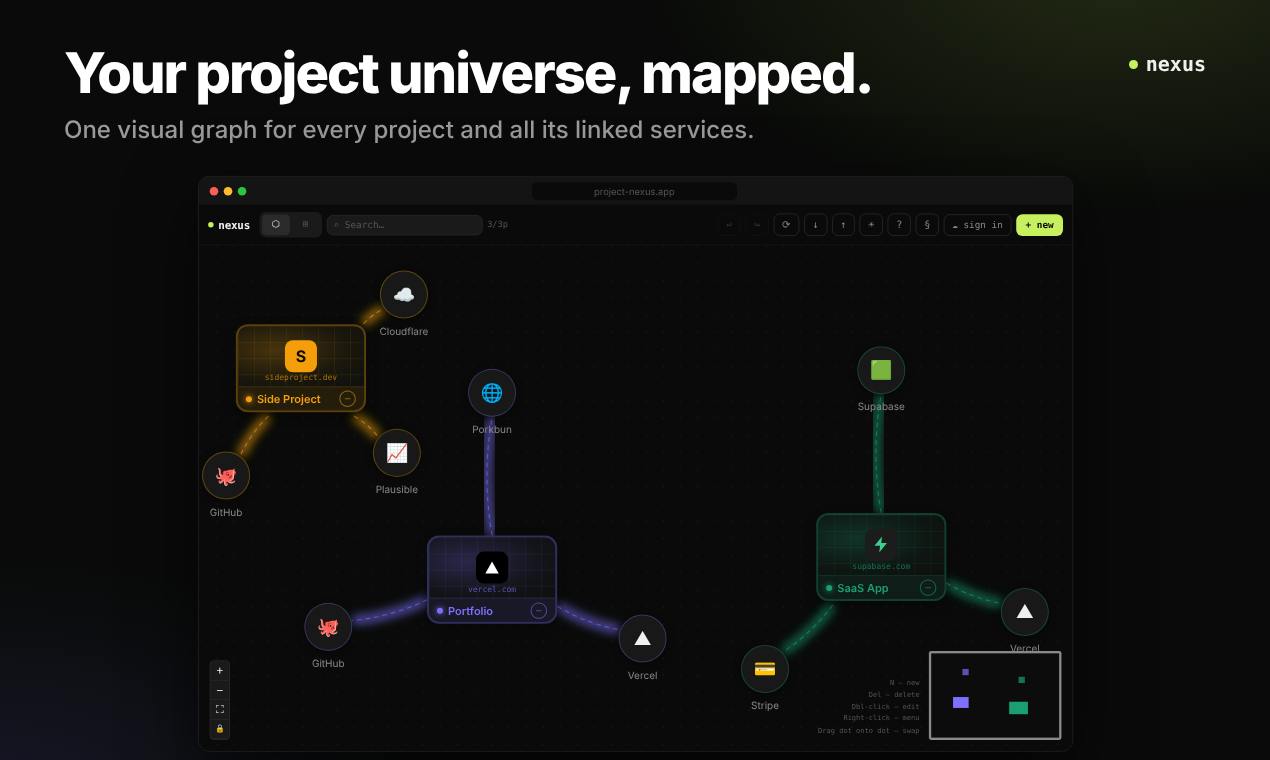
Nexus maps projects and their dependent services in one visual graph with click-to-dashboard nodes, local data storage, and no account.
Nexus is a Product Hunt developer tool pitched as "One visual graph for all your projects." It renders all software projects and their dependent services as a clickable node graph, where clicking a node opens its dashboard, reducing context switching across consoles and docs. It emphasizes privacy: no account registration and data stored locally in the browser, though that means no cross-device sync and limited team collaboration. It uses a freemium model with a free tier of up to 3 projects, received 76 upvotes, ranked 20th for the day, and is still early-stage. The article notes that manual graph maintenance may become a burden as projects grow, and automatic dependency discovery will be key to its long-term value.
When Project Dependencies Become a Tangled Mess
Modern software projects are rarely isolated. Behind a single frontend application there may be an API gateway, a database, a message queue, third-party SaaS, or even another internal service. Developers have to switch back and forth between multiple repositories, consoles, and documents just to piece together a picture of the whole system. Nexus, newly launched on Product Hunt, tries to solve this problem—it maps all your projects and the services they depend on into a single visual graph, and clicking any node opens its corresponding dashboard.
The Core Idea: One Graph, Click to Reach Anything
Nexus's positioning is refreshingly direct: One visual graph for all your projects. It draws every software project and every service it depends on as nodes, with connecting lines representing relationships. The advantage of this interaction model is that you don't need to remember which menu a particular service is buried in—the graph itself is the navigation.
Based on the product description, it targets developers' everyday pain point of "context switching." When troubleshooting, you can jump straight from the problematic service node to its dashboard; when mapping out architecture, the graph exposes dependency relationships more intuitively than documentation. The click-a-node-to-open-a-dashboard interaction compresses the two actions of "viewing the topology" and "checking the details" into a single step.
Privacy First: Data Stays in the Browser, No Account Required
Nexus makes a clear trade-off in its privacy design: no account registration required, data stored locally in the browser. This means your project structure and dependency information are never uploaded to any server.
For teams handling sensitive system architectures, this is appealing. Much internal service topology is inherently information that shouldn't be shared externally, and a purely local tool lowers both the compliance burden and the psychological barrier. However, this choice comes at a cost: data is tied to a single browser, so switching devices or clearing the cache requires reconfiguration, and the ability for teams to collaborate and share graphs across multiple people is also limited. The product currently makes no mention of cross-device sync or multi-user collaboration solutions.
Browser local storage (LocalStorage / IndexedDB) is a mechanism by which web applications persist data on the user's device; data is not automatically uploaded to a server. What Nexus claims as "data stored locally in the browser" is typically implemented on top of such technology. Its advantages are strong privacy and no need for a backend account system; its limitations are also obvious: data is bound to a specific browser profile, and clearing the cache, switching devices, or using private browsing mode can all lead to data loss, plus it cannot naturally support multi-device sync or real-time multi-user collaboration. To overcome these limitations, an optional encrypted cloud sync or export/import mechanism would typically need to be introduced.
Free Tier and Target Users
Nexus uses a freemium model, with the free version supporting up to 3 projects. That quota is enough for an individual developer organizing side projects, or for a small team dipping a toe in, but once the number of projects grows, a paid plan becomes a consideration.
Based on Product Hunt data, it received 76 upvotes and 4 comments, ranking 20th for the day, categorized under Productivity, Software Engineering, and Developer Tools. This level of traction shows the concept resonates, but the volume of discussion isn't high, and the product is still in an early stage. The maker is Florian Himmelbauer.
The Potential and the Boundaries of This Kind of Tool
Visualizing project dependencies is not a new concept; the infrastructure space already has various topology diagram and service catalog tools. Nexus's differentiator is being lightweight and local—it doesn't require connecting to a cloud platform or an account system, which lowers the barrier to entry.
What's worth watching is how it defines the boundaries of a "service," and whether it can automatically discover dependencies rather than relying entirely on manual entry. If the graph requires manual maintenance, upkeep costs will become a drag on usage as projects grow; if relationships can be generated automatically from configuration files or code, its value would increase significantly. The product page currently doesn't disclose these implementation details, so actual trial use is needed to verify.
For developers tired of jumping between multiple consoles, Nexus offers a low-cost organizational approach: draw it out first, then click in. The free three-project threshold is enough to judge whether it fits your workflow.
Service Catalog and automated dependency topology discovery are two related practices in the infrastructure space. A service catalog centrally registers metadata for each service, such as owners, documentation, and dashboard links; dependency topology describes the call or data flows between services. Mature solutions often automatically generate dependency graphs by parsing configuration files (such as Kubernetes YAML or Docker Compose), scanning code import relationships, or collecting runtime call chains. If Nexus relies entirely on manually entering nodes and connections, the initial cost is low, but as the number of projects and services grows, the graph easily becomes outdated, and maintenance burden will offset the benefits of visualization. Therefore, whether it supports automatically importing relationships from existing configurations or code is a key dimension for evaluating the long-term value of this kind of tool.
One-line Summary
Nexus maps projects and their dependent services in one visual graph, with click-to-dashboard nodes, local data storage, and no account required.
Paragraph Summary
Nexus is a developer tool that appeared on Product Hunt, pitched as "One visual graph for all your projects." It draws all software projects and their dependent services as a clickable node graph, where clicking any node opens the corresponding dashboard, aiming to reduce the context cost of developers switching between multiple consoles and documents. The product emphasizes privacy first: no account registration is required and data is stored locally in the browser, but the trade-off is no cross-device sync and limited team collaboration. It uses a freemium model, with the free version supporting up to 3 projects. The product received 76 upvotes and ranked 20th for the day, and is still in an early stage. The article notes that if the graph relies on manual maintenance, it may become a burden as projects grow, and whether it can automatically discover dependencies will be key to increasing its value.
Related articles

Gemini 4 Neon In-Depth: How to Get the Most Out of the Pro Plan's Strongest Model
Gemini 4 Neon replaces Argon on Google AI Pro, outscoring Carbon on several tests while API pricing flips in December. We break down the three models, thinking-level cost strategies, coding and office benchmarks, and selection advice.

Gemini 4's Three Coding Models Compared: How to Choose Between Neon, Hydrogen, and Argon
How to choose among Gemini 4's Neon, Hydrogen, and Argon coding models? This article compares official positioning, API pricing and the price-increase date, coding benchmark scores from Artificial Analysis and Cursor, and summarizes developer feedback to offer scenario-based selection advice.

Gemini 4 Neon Hands-On: Crushes Opus at Coding, but the Free Agent Hides Three Major Pitfalls
Gemini 4 Neon tops the Coding Agent Index, beating Carbon and Opus 5.5 in four real code battles—but hidden reasoning tokens bill at $15 and free Tasks silently fails.