Ollama Local LLM Deployment Pitfall Guide: From Installation to Running in Just a Few Steps

Run DeepSeek and Qwen locally with three Ollama commands—zero cost, works offline.
The article presents a zero-barrier local LLM deployment path using Ollama, which packages downloading, configuration, and running into one ollama run command. After installation, set OLLAMA_MODELS to move large model files off the system drive and OLLAMA_HOST=0.0.0.0 to share compute across the LAN. Model size depends on VRAM—1.5B/7B for no discrete GPU, 32B for a 24GB P40. Use ollama list, ps, and rm for management, with ps showing whether the model runs on GPU or CPU; add Open WebUI or Chatbox for a web-like experience.
Title
Ollama Local LLM Deployment Pitfall Guide: From Installation to Running in Just a Few Steps
Meta Description
A step-by-step guide to deploying local LLMs with Ollama: how to set OLLAMA_MODELS and OLLAMA_HOST environment variables after installation to avoid filling up your system drive and to share compute across your LAN, how to pull models like DeepSeekAd and Qwen with ollama run, plus the three essential management commands list, ps, and rm, and Open WebUI graphical interface configuration.
Article Content
After painstakingly building a compute server, many people's local LLM journey stalls at the first boot when they see nothing but a black command-line screen. Bilibili creator Lao Zhang demonstrates a near-zero-barrier onboarding path in his video: as long as you can press Enter, you can run DeepSeek and Qwen on your own machine, fully offline, with zero token cost.
The core of this workflow is a local model runtime tool called Ollama. It packages downloading, environment configuration, and model loading—tasks that previously required manual tinkering—into a single command, making it quite friendly to hardware enthusiasts without a deep learning background. Below are the key steps from the video, along with the easily overlooked details at each stage.
Installation: Watch for the Little Llama Icon
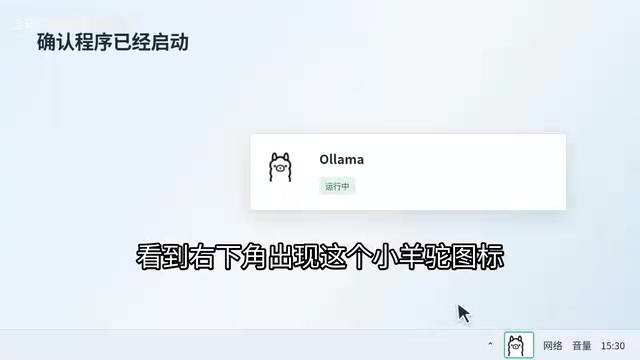
The first step is to go to the Ollama official website and click Download. Installation packages are available for Windows, macOS, and Linux; after downloading, just click Next all the way through. Once installed, a little llama icon will appear in the bottom-right corner—seeing it means the foundation is in place.
In the video, Lao Zhang specifically emphasizes that installation itself is not difficult—what really trips people up is the two environment variables below. It's recommended to handle these before pulling any models.
Two Environment Variables: One Saves Disk Space, One Unlocks Compute
Move the Model Directory Off the System Drive
By default, Ollama stores model files on the system drive, and a single model can easily be tens of gigabytes—within two days your C drive will be red. The solution is to create a new system environment variable named OLLAMA_MODELS and point the path to a data drive or large-capacity hard disk with plenty of space. The earlier you make this change, the better; otherwise, models already downloaded will need to be pulled again.
Open Compute to the Local Network
The second variable is OLLAMA_HOST, with the value set to 0.0.0.0. The video calls this step "worth its weight in gold"—it means this server's compute is open to the entire local network. Other computers and phones in the same studio can directly call the models on this machine, effectively turning one machine into a shared inference backend for the team.
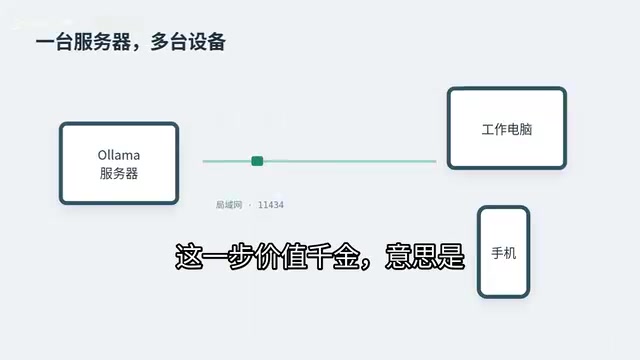
OLLAMA_HOST=0.0.0.0 means letting Ollama's HTTP service listen on all network interfaces on the machine, rather than binding only to 127.0.0.1 (accessible only locally). Ollama by default provides an OpenAI-compatible REST API on port 11434; after setting this variable, other devices on the same LAN can call the models via http://server-IP:11434.
A word of caution: doing this exposes the inference interface to the entire intranet. Ollama itself does not provide authentication, so any device that can access the port can call, and even pull or delete, models. In a home or trusted office network this is not a big issue, but if the server is on a public network or the port is mapped to the public internet by a router, it's advisable to add a layer of protection with firewall rules or a reverse proxy (such as Nginx with Basic Auth).
Pull and Run: A Single Command
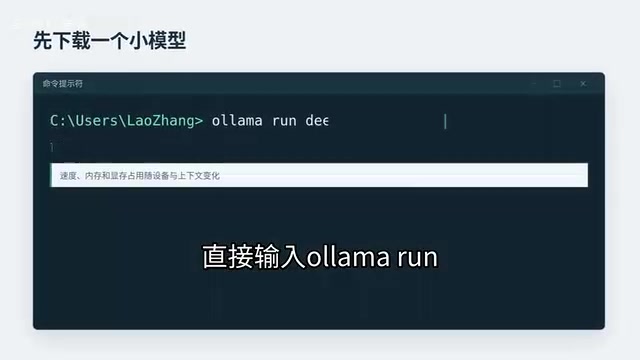
After setting the variables, press Win+R, type cmd to open a command-line window, then use ollama run plus the model name to start. No code needs to be written—after pressing Enter, the tool automatically downloads the model and configures the environment. Once the input box appears, you can chat directly, and it responds instantly even when offline.
Model choice depends on your hardware. On an old laptop without a discrete GPU, or with a cheap mining card like the P106, running the 1.5B or 7B version of DeepSeek-R1 is more realistic; if you have a P40 with 24GB of VRAM, you can go straight to the 32B version.
This highlights an often-overlooked trade-off: the barrier to local deployment isn't the software—it's VRAM. Larger parameter models perform better but demand exponentially more hardware, so being realistic about your resources is more practical than blindly chasing size.
The 1.5B, 7B, and 32B mentioned in the article refer to the model's parameter count, measured in billions (B). Parameter count roughly determines the model's expressiveness and required compute: 1.5B is a lightweight model that can run on an ordinary laptop, 7B is the common threshold for consumer-grade GPUs, and 32B and above typically require 24GB or more of VRAM. Note that Ollama's default quantization format (such as Q4_K_M) compresses each parameter to about 4 bits, so VRAM usage can be roughly estimated as "parameter count × 0.6GB"—a 7B model needs about 4-5GB of VRAM, while 32B approaches 20GB or more. This is why VRAM—not CPU performance—becomes the core bottleneck for local deployment.
Also, the smaller versions of DeepSeek-R1 such as 1.5B and 7B are not official originals but dense models distilled from R1 (Distill). They inherit some of the reasoning-chain style, but their capabilities differ significantly from the original 671B MoE model—choose based on your actual task requirements.
The first time you run ollama run, it automatically pulls the corresponding model from Ollama's official model library. Model names use the "name:tag" format, such as deepseek-r1:7b or qwen2.5:14b; if no tag is specified, it pulls latest by default. After downloading completes, the command enters an interactive chat interface directly—type /bye to exit, /? to view built-in slash commands.
If you need to provide an API for other programs to call, you don't need to enter the chat—just start the background service with ollama serve. Understanding that "run serves both as pull and run" can help avoid re-downloading the same model and makes it easier to troubleshoot issues like "it says not found even though I pulled it" caused by tag mismatches.
Daily Management: Remember Three Commands
Maintenance after the model is running is equally simple. The video summarizes the three most commonly used commands:
ollama list: view which models are already installed on the diskollama ps: check whether the current model is running on the GPU or falling back to the CPUollama rmplus the model name: delete models you no longer need to free up space
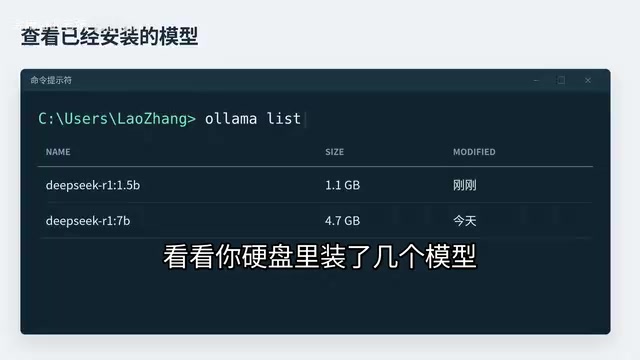
Among these, ollama ps is worth checking frequently. If you find that the model is actually running on the CPU, it means VRAM is insufficient or the driver isn't configured properly, and inference speed will drop noticeably. In that case, either switch to a smaller model or check the GPU environment.
Add a Web Interface for an Experience Close to Online Products
If the black window feels too plain, you can add a graphical interface like Open WebUI or Chatbox, fill in this server's IP and port 11434, and get a private AI assistant that looks almost identical to the online web version. Combined with the earlier OLLAMA_HOST setting, other devices on the LAN can simply open a browser to use it.
From installing software to changing variables to pulling models, not a single step in the entire workflow requires understanding code logic. For hardware enthusiasts who have already built their server, there are really only two things to think through in advance: which disk to store model files on, and whether to share this machine's compute with other devices on the same network. Once these two points are settled, all that's left is pressing Enter.
One-line Summary
Run DeepSeek and Qwen locally with three Ollama commands—zero cost, works offline.
Paragraph Summary
The article introduces a zero-barrier local LLM deployment path demonstrated by Bilibili creator Lao Zhang. The core tool is Ollama, which packages model downloading, environment configuration, and running into a single ollama run command—no programming background required. After installation, two environment variables should be prioritized: OLLAMA_MODELS moves tens of gigabytes of model files off the system drive, and setting OLLAMA_HOST to 0.0.0.0 opens compute to other devices on the LAN for shared use. Model size is constrained by VRAM: without a discrete GPU, choose DeepSeek-R1's 1.5B/7B; a P40 with 24GB VRAM can run 32B. For daily management, use the three commands ollama list, ps, and rm—ps tells you whether the model runs on GPU or CPU. Add Open WebUI or Chatbox for a web experience close to online products.
Related articles

Anthropic Files S-1: The Truth Behind $16.3B Revenue and $80.7B Loss
Anthropic's S-1 reveals $16.3B revenue and $80.7B net loss in H1 2026, with $72.4B from accounting effects. The filing also discloses $265.6B compute commitments, cloud deal details, and a 50.1% founder voting control structure, while IPO pricing remains blank.

Anthropic Financials Leaked: Revenue Far Exceeds Compute Costs, Claude Inference Gross Margin Hits 68%
Leaked Anthropic financials show revenue roughly twice total compute costs, Claude inference gross margin at 68%, while frontier training burns $2.8B per quarter. This article breaks down the two accounts and analyzes shifts in AI company valuation logic.

JetBrains Open-Sources ThinkRail: A Visual AI Coding Workbench
JetBrains' open-source ThinkRail embeds an AI coding assistant into a visual dev environment with isolated workspaces, side-by-side chat and code diffs, and requirements docs alongside code.