OpenAI Dev Day's New Moves: Codex Cloud and Dots Intelligent Agents Star in a Cooking Show of Programming

Hands-on with new tools after OpenAI Dev Day: Dots persistent agents, Codex Cloud collaboration, and UltraFast rapid prototyping.
Based on the "Cooked from OpenAI" show, this article analyzes the hands-on experience of new tools after Dev Day, including Dots, Codex Cloud, Spaces, and Codex CLI. Dots, as an always-on persistent agent, can proactively perform tasks like email reminders in the background; Codex Cloud provides customizable cloud environments where tasks continue after closing the laptop; Spaces visualizes the agent's thinking process to facilitate human-machine collaboration. The Codex CLI update brings capabilities such as a full-screen interface and forking conversations into work trees. The live building of a ramen simulator game on Mod Retro with UltraFast demonstrates the potential of AI-assisted rapid prototyping. Among community works, Astra's decoding of Napoleon's letter was rated the best. The article concludes by discussing implementation issues such as the permission and privacy boundaries of persistent agents and the cost and governance of cloud environments.
Article Content
After OpenAI Dev Day, how the various new tools actually perform has become the topic developers care about most. The first episode of the YouTube channel "Cooked from OpenAI" used a unique "kitchen cooking show" format to demonstrate the collaborative potential of new products like Dots, Codex Cloud, and Spaces, and even built a ramen simulator game on Mod Retro using UltraFast live on air. This article, based on the show's content and community reactions, analyzes the core capabilities and potential application scenarios of these tools.
Dots: An Always-On Persistent Agent
The show opened with hosts Dani and Alex introducing an always-on persistent agent called "Dot." It is not a traditional chatbot, but an assistant that runs continuously in the background and proactively intervenes in tasks. On the show, Dot was responsible for checking on guests, sending emails, and even preparing ingredients based on image recipes. Guest Matthew shared his experience: after connecting multiple services, Dot would push important email reminders before bedtime, such as "You just received an email that might be useful for tomorrow's shoot." This proactive task management shifts the agent from passive response to active collaboration.
Dot's persistence means it can maintain context over the long term, rather than starting over with each conversation. For developers or teams that need to track multiple threads, this design can significantly reduce the cost of repeated communication. However, the show did not delve into the permission boundaries and privacy issues of persistent agents, which are unavoidable considerations in actual deployment.
Analysis: The core difference between a persistent agent and an ordinary chatbot lies in state management. Traditional dialogue systems are typically stateless, processing each request independently with context limited to the current session window; a persistent agent maintains a long-term memory store that can accumulate user preferences, task progress, and environmental information across sessions. In implementation, this usually relies on vector databases or structured memory stores to retrieve historical interactions, combined with periodically triggered background tasks (such as scheduled email checks) to achieve proactivity. The challenges brought by this architecture include memory consistency, cleanup of outdated information, and isolation in multi-user scenarios.
Codex Cloud and Spaces: Cloud Environments and Collaborative Spaces
Another highlight of Dev Day was Codex Cloud. According to the show, Codex Cloud allows you to work in your own environment in the cloud, which teams can fully set up and customize, so that tasks can continue after you close your laptop. This solves the disconnect between local development environments and cloud collaboration—developers no longer need to worry about local machine sleep or network interruptions affecting long-running tasks.
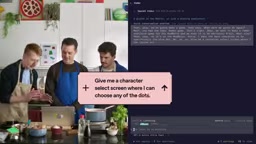
Complementing Codex Cloud is Spaces. Spaces provides a place for Dot to "write down ideas" and also serves as a space for humans and Dot to collaborate. On the show, Dot prepared cooking steps in a Space, and the host simply followed the steps. This design visualizes the agent's "thinking process," making collaboration more transparent. For teams, Spaces could become a hub for sharing context and tracking task progress, rather than having information scattered across chat logs.
Analysis: Cloud development environments (CDEs) are not a new concept; products like GitHub Codespaces and Gitpod have long offered similar capabilities. Codex Cloud's differentiator lies in deeply embedding the AI coding agent into the environment lifecycle: the environment is not just a code execution container but also carries the agent's context and task state, so "tasks continue after closing the laptop" means the agent process and file system state need to be persistently retained in the cloud. Spaces is similar to a shared workspace or project board, but oriented toward human-machine hybrid collaboration; its design needs to address conflict resolution between agent operations and human edits, as well as how to present the agent's reasoning process in an auditable manner.
Sponsor Segment: Codex CLI Interface Update
Midway through the show, a humorous "sponsor" ad introduced the refreshed Codex CLI. The new version brings a full-screen interface, tab-based agent management, the ability to fork conversations into separate work trees, and direct conversation with the terminal. These improvements point to a trend: command-line tools are absorbing the interaction advantages of graphical interfaces while retaining scriptability and composability. For developers accustomed to terminal workflows, forking conversations into separate work trees is particularly useful, allowing exploration of different approaches without polluting the main branch.
Live Challenge: Building a Ramen Game on Mod Retro with UltraFast
The most interesting part of the show was the live coding challenge. The guest was asked to build a ramen simulator game on Mod Retro hardware using UltraFast, with ingredients including fresh ginger and more. The game needed to include a character selection screen (any Dot could be chosen), ingredient collection, and the goal of assembling ramen. After the host described the requirements live, code began to generate and the game gradually took shape.

From the demonstration, the generation process was not one-click but required continuous adjustment and confirmation. For example, character movement, refrigerator interaction, and ingredient collection were added step by step. The final game included options for selecting noodles, miso broth, soft-boiled egg, chashu, and more, as well as actions like stirring clockwise. This "chat while building" programming style demonstrates the potential of AI-assisted development for rapid prototyping, especially suitable for game jams or proof of concept.
Analysis: UltraFast in the show plays the role of a low-latency code generation model or toolchain, emphasizing rapid iteration from natural language descriptions to runnable code. Mod Retro is a retro game hardware or simulation platform, typically with limited graphics and input capabilities, suitable for rapid prototyping. Combining the two means developers can progressively refine requirements through conversation, and the model generates code snippets that are immediately verified on the target hardware, forming a short loop of "describe-generate-playtest-adjust." This workflow is entirely different from the traditional game development pipeline (design documents, art assets, coding, testing) and is better suited for scenarios like game jams where time is tight and concept validation is key.
Community Works Review: Cooked or Undercooked?
The show included a community works review segment, with Fede, a member of the OpenAI developer community, bringing three works solicited on Twitter, LinkedIn, and Instagram, and the hosts voting with "Cooked" (well done) or "Undercooked" (needs more work) cards.
The first work was a retro game built with GPT 6.1, rich in detail and with an authentic retro atmosphere. The host commented "cooked just right" and said he wanted to recreate it at home. The second work used Astra to decode a message from the Napoleonic era that had remained unsolved for two to three hundred years; the video received nearly 5 million views. The host believed it "opened the door of history to a broader audience" and it was unanimously rated Cooked. The third work was a horse racing game where players draw horses that affect speed, which had gone viral. The host gave it a "Double Cooked" rating, the first double cooked in the show.

In the final "Catch of the Day" segment, the Napoleon letter decoding work won. These community cases show that AI tools are lowering the barrier to creative implementation, enabling individual creators in fields like historical research, retro games, and interactive entertainment to quickly produce shareable works.
Analysis: The case of Astra decoding a Napoleonic-era letter involves AI-assisted decipherment of historical manuscripts. Such tasks typically combine high-resolution image recognition, ancient script models, and language models for speculative completion, as historical letters may contain abbreviations, ciphertext, or damage. The value of AI lies in rapidly generating candidate interpretations and cross-validating them, rather than directly providing definitive answers, which still require review by historians. The high dissemination of this work reflects public interest in "AI + humanities" crossover applications and also highlights the model's capability boundaries in low-resource historical languages.
Dev Day Product Matrix from Multiple Perspectives
Combining the show content and community discussion, several directions of OpenAI's product matrix after Dev Day can be outlined. Dots represents persistent, proactive agents; Codex Cloud and Spaces point to cloud collaboration and context management; the Codex CLI update strengthens terminal workflows. Together they form a chain from personal assistant to team collaboration.
Guests on the show mentioned that after Dot's launch, they "used it a lot," especially the proactive reminder feature after connecting multiple services. This aligns with community discussions about persistent agents: the value is not in how smart a single answer is, but in long-term companionship and context accumulation. However, some views hold that the reliability of persistent agents depends on the quality of connected services and permission design, and excessive proactivity may cause interference. The show did not elaborate on this, but it is an unavoidable trade-off in actual adoption.
Conclusion
"Cooked from OpenAI" uses a lighthearted cooking show format to tie together several Dev Day announcements: Dots handles background errands, Codex Cloud provides customizable cloud environments, Spaces carries collaborative context, and Codex CLI updates the terminal experience. The live building of a ramen game with UltraFast demonstrated the possibilities of rapid prototyping. For developers, what is worth watching is how these tools combine into workflows, not just individual features. The show's lingering questions—the permission and privacy boundaries of persistent agents, and the cost and governance of cloud environments—will be important issues in the next phase of actual implementation.
One-line Summary
Hands-on with new tools after OpenAI Dev Day: Dots persistent agents, Codex Cloud collaboration, and UltraFast rapid prototyping.
Paragraph Summary
Based on the "Cooked from OpenAI" show, this article analyzes the hands-on experience of new tools after Dev Day, including Dots, Codex Cloud, Spaces, and Codex CLI. Dots, as an always-on persistent agent, can proactively perform tasks like email reminders in the background; Codex Cloud provides customizable cloud environments where tasks continue after closing the laptop; Spaces visualizes the agent's thinking process to facilitate human-machine collaboration. The Codex CLI update brings capabilities such as a full-screen interface and forking conversations into work trees. The live building of a ramen simulator game on Mod Retro with UltraFast demonstrates the potential of AI-assisted rapid prototyping. Among community works, Astra's decoding of Napoleon's letter was rated the best. The article concludes by discussing implementation issues such as the permission and privacy boundaries of persistent agents and the cost and governance of cloud environments.
Related articles

Will GitHub Die? Open Source Maintainer Burnout and the Collaboration Crisis in the AI Era
Lex Fridman podcast discussion on open source maintainer burnout and GitHub's predicament: massive pull requests overwhelm core maintainers, and AI worsens code bloat. Using math journal peer review and Poincaré conjecture verification as analogies, the article analyzes why verification in knowledge production must be deliberately slow, and how open source communities can avoid the failure mode of maintainers exiting.

Stop Building Cookie-Cutter AI Websites: 3 Tools That Transform Your Coding Agent
Three tools that boost AI coding agents: FFmpeg skill for local video editing in Claude Code and Cursor, Hallmark's 50 design themes to fix cookie-cutter AI sites, and Jailbreaks' 25+ model prompts.

How America's Gerontocracy Squeezes the Younger Generation
Americans over 55 hold nearly three-quarters of national wealth, alongside an 80-year-old president and elderly congressional leaders. The Atlantic's Idrees Kahloon explains how gerontocracy drives up housing costs, squeezes opportunities for the young, and explores zoning reform and child poverty reduction as practical fixes.