Palm-Sized Device Deploys LLMs with One Click: Token Router Hands-On
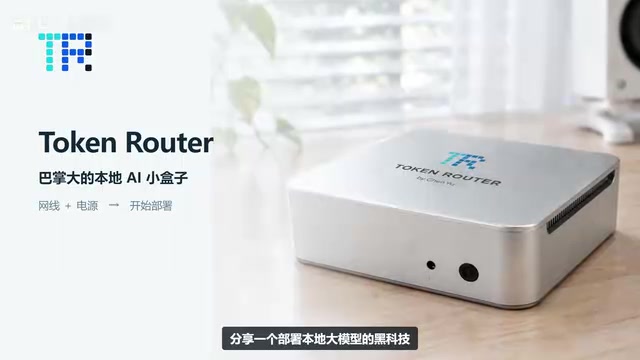
Palm-sized Token Router uses natural language dialogue to handle open-source model selection, deployment, and app integration.
The article covers the Token Router solution circulating on Bilibili: a palm-sized dedicated device that runs multiple open-source models for chat, image generation, video, and voiceover once connected to Ethernet and power. It addresses three local deployment pain points—model selection, environment dependencies, and app integration—by packing them into a small box: models are categorized and auto-install on click; users describe needs in natural language and the device recommends based on host conditions; it generates integration details, demonstrated with WorkBuddy setup and image verification. The author praises conversational deployment for turning an engineering problem into an interaction problem, while noting hardware limits on model scale, the need to verify compatibility app by app, and that promotional rules are subject to official announcements.
Local LLM deployment is often a headache—spending days trying to get something running is the norm. A "black tech" solution recently circulating on Bilibili: a palm-sized device called Token Router that, once connected to Ethernet and power, can run various open-source models for chat, image generation, video, voiceover, and more. More importantly, from model selection to installation to app integration, the entire process can be completed through natural language conversation.
What Pain Points Does a Palm-Sized Deployment Host Solve?
The difficulties of traditional local deployment center on three areas: model selection, environment dependencies, and app integration. Token Router's approach is to pack all three steps into a small box. According to the Bilibili video demo, the device is palm-sized and works once connected to Ethernet and power. Models are organized by use case—chat, image generation, video, voiceover—and selecting a model and clicking once triggers automatic installation.
The trade-off of this form factor is clear: replace software configuration complexity with dedicated hardware. For users who don't want to touch the command line or deal with CUDA dependencies, this is an almost zero-barrier path.
CUDA dependencies are one of the most common pitfalls in traditional local deployment. CUDA is NVIDIA's parallel computing platform and programming interface, and the vast majority of open-source models rely on it for GPU inference. But CUDA drivers, the CUDA Toolkit, PyTorch build versions, and GPU compute architectures must match strictly—one version mismatch can produce errors that are hard to trace. Add Python virtual environments, system-level C++ libraries, and model weight download sources, and a single model often requires dozens of packages to get running. The value of dedicated devices like Token Router is essentially that these dependencies are locked down and validated at the factory, so users no longer face the version matrix.
VRAM constraints in model selection are also worth expanding on. The relationship between an open-source model's parameter count and VRAM usage is not linear: a 7B model at FP16 precision needs roughly 14GB of VRAM, and with KV Cache and inference framework overhead the actual requirement is higher; quantizing to 4-bit can compress it to 4–6GB, but image quality and stability degrade. Image-generation models (such as the Stable Diffusion series) and video models have completely different VRAM requirements, with the latter often needing 16GB or more. The so-called "recommendations based on host conditions" essentially means performing this matching calculation of parameter scale, quantization precision, and VRAM on the user's behalf.
No Need to Understand Parameters for Selection—Just Ask
The real barrier is often the first step—which model should I install? The method shown in the video is not to consult tables or compare benchmarks, but to ask the device directly: I want to deploy a model that can generate images, which one is suitable?
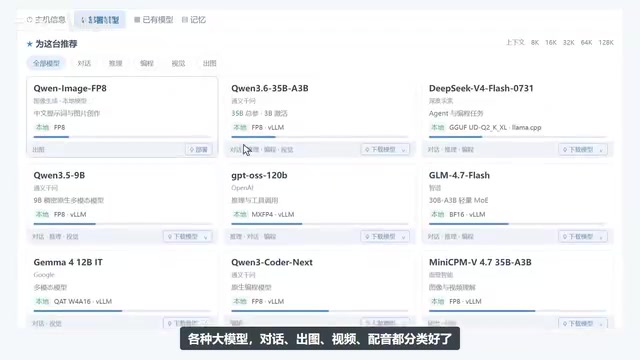
The device recommends based on the user's needs and host conditions. After the user confirms and replies "install this one," they simply wait for deployment to complete.

What's commendable here is the "based on host conditions" layer. Open-source models vary enormously in VRAM and compute requirements, and the pitfall beginners most easily fall into is choosing a model that won't run. Letting the device judge hardware compatibility is far more reliable than having users read model cards themselves.
App Integration: Making the Model Actually Useful
Installing the model is just the beginning; whether it can be connected to everyday tools is the dividing line. The demo uses WorkBuddyAd as an example: simply ask "I want to connect to WorkBuddy, give me the information I need to fill in," and the device organizes the required integration details.
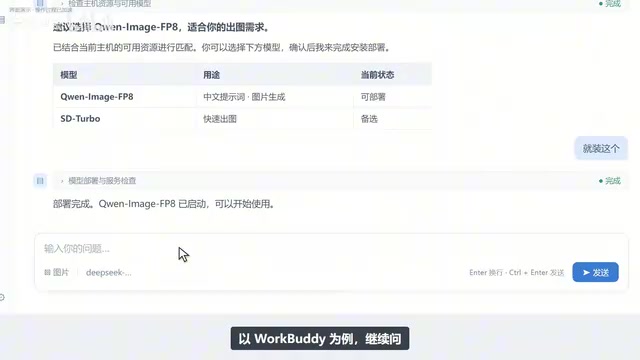
Add the model to WorkBuddy using the organized information, then enter "draw a Shiba Inu wearing a red knit hat" to verify the result. Getting this chain working means ordinary users can embed local models into their workflows, rather than stopping at the "it runs" demo stage.
Integrating apps with local models typically follows two paths: first, an OpenAI-compatible API, where the local service exposes an endpoint like http://localhost:port/v1/chat/completions and the app fills in the Base URL and API Key; second, local model directory scanning or custom Provider configuration supported by some apps. In the demo, the device "organizes the information to fill in," most likely these two types of fields—endpoint address, model name, and key. Once users understand this, they can judge what to fill in when switching to other apps without relying on the device to adapt to each one.
A Few Sober Assessments
The video demonstrates a smooth path, but several variables still warrant attention in actual use. First, the model scale the device can handle is constrained by hardware limits, and not all large-parameter models can run locally. Second, the demo covers only one integration case, WorkBuddy; compatibility with other apps needs to be verified one by one using the same Q&A approach. Third, "a million Tokens waiting for you" is promotional activity information, and specific rules are subject to official announcements.
For users who want to put open-source models to use without spending time on environment configuration, the approach of this kind of "conversational deployment" device is worth watching—it turns deployment from an engineering problem into an interaction problem.
One-line Summary
Palm-sized Token Router uses natural language conversation to complete open-source model selection, deployment, and app integration.
Paragraph Summary
The article introduces the Token Router solution circulating on Bilibili: a palm-sized dedicated device that, once connected to Ethernet and power, can run multiple types of open-source models for chat, image generation, video, and voiceover. Targeting the three major pain points of local deployment—model selection, environment dependencies, and app integration—it packs the process into a small box: models are organized by category and installed automatically on click; users describe needs in natural language and the device recommends suitable models based on host conditions; it also generates integration information, with the demo using WorkBuddy to complete setup and verify image generation. The author affirms the "conversational deployment" idea of turning an engineering problem into an interaction problem, while noting that model scale is constrained by hardware limits, multi-app compatibility needs individual verification, and activity rules are subject to official announcements.
Related articles
AWS AgentCore Gateway: Connecting AI A…
AWS AgentCore Gateway: Connecting AI Agents to Enterprise Backends with MCP
How AWS AgentCore Gateway acts as a primary MCP server to aggregate REST APIs, Lambda, and existing MCP services? Analyzing its AST real-time mapping, zero cold start, semantic search for tool overload, session isolation, and key injection security design, plus the architectural approach to decoupling enterprise AI agents from backends.

One Link Gives Figma AI a New Skill: Hands-On with MCP Connectors
Paste one MCP server link and the AI Agent in Figma gains new tool capabilities. We break down the setup flow, 20+ one-click apps, read/write permissions and execution policies, and the public HTTPS requirement.

Cognition SWE-2 in Practice: One Prompt to Handle the Whole Product Launch Process
Analyzing a YouTube creator's prompt for using Cognition SWE-2 to launch a product: a landing page, seven-email sequence, and non-buyer follow-up tool, plus how the 'test and report' constraint changes AI delivery quality.