Publishing Local Services with AI Agents in One Prompt: An Orbit Proxy Hands-On Experience
Orbit Proxy uses AI Agents to reduce publishing a local service to a single natural language prompt.
Orbit Proxy has launched a new capability that lets users publish local HTTP services via natural language prompts through AI Agents and vibe coding tools. The flow includes copying a prompt, the Agent auto-discovering running services, user confirmation, automatic client installation and authorization, and finally obtaining a public URL. No command-line operations are needed, lowering the barrier to intranet tunneling. It suits quick demos but is not a replacement for production deployment, and compatibility varies across AI tools.
Sharing a locally developed service with colleagues or clients traditionally means setting up intranet tunneling, applying for a public IP, or deploying to a cloud server — a cumbersome process that requires some networking knowledge. Now, with AI Agents and vibe coding tools, this process can be compressed into a natural language prompt. A recently launched capability from Orbit Proxy makes "conversational publishing" possible.
From Copying a Prompt to Getting a Public URL: Publishing in Four Steps
According to a demo shared on Bilibili, the whole process starts in the Orbit Proxy control center. The user clicks to copy the prompt, then opens an AI coding tool such as WorkBuddy, Cursors, or Cloud Code and pastes the prompt into the chat box. From there, the AI Agent takes over.
The key to this design is that users don't need to manually find the ports of services running on their machine, nor do they need to understand intranet tunneling configuration parameters. The AI Agent automatically inspects the environment and identifies the services currently running on the machine.

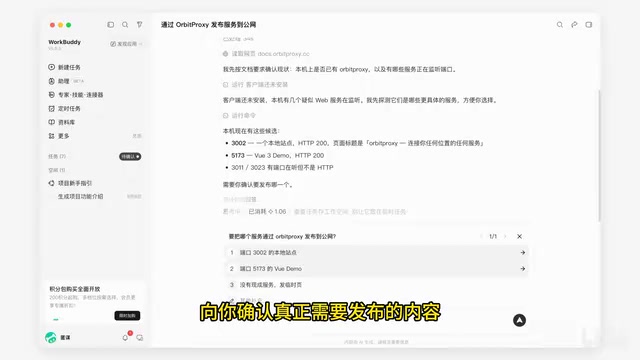
Once identified, the Agent confirms with the user which services actually need to be published. This step keeps a human confirmation in the loop to avoid accidentally exposing unrelated local services. After confirmation, the Agent automatically installs the client — no commands to type at any point.
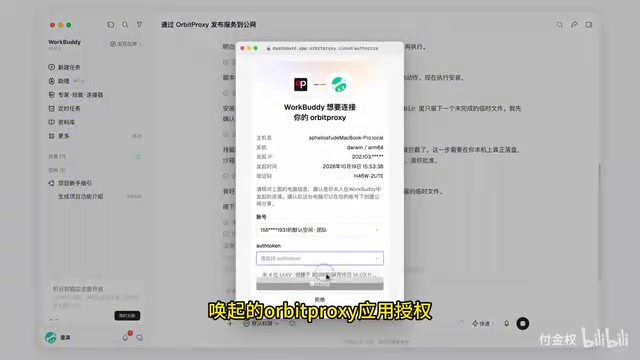
The AI Agent then automatically launches the Orbit Proxy app, and the user only needs to complete authorization. Once the AI finishes its work, the local service has a public URL.
The Role of AI Agents in the Developer Toolchain
Unlike traditional code completion tools, AI Agents can autonomously execute multi-step operations: reading environment information, invoking command-line tools, installing software, and launching applications. In this scenario, the Agent first needs to detect services running on the machine (typically by scanning processes and ports), then determine which services are suitable for exposure to the public internet, and finally complete the client installation and authorization flow automatically.
This "intent-driven" interaction model frees users from specific operational steps — they only describe the goal, and the Agent plans and executes. Tools like WorkBuddy, Cursors, and Cloud Code all provide Agent execution environments, so the same prompt can be reused across different tools. However, detection accuracy and the scope of operational permissions vary by tool, which is why the article mentions compatibility differences.
Why This Workflow Is Worth Paying Attention To
Traditional intranet tunneling tools such as ngrok and frp are powerful but have a clear barrier to entry. Users need to understand concepts like tunnels, port mapping, and auth tokens, and the configuration process is error-prone. Orbit Proxy shifts this cognitive burden to the model via the AI Agent — users only need to express the intent "I want to publish this service."
This interaction model represents a practical path for AI Agents in the developer toolchain: not replacing developers in writing code, but replacing developers in carrying out tedious configuration processes. For front-end developers and API developers who frequently demo local services, this efficiency gain is tangible.
Technical Background: Intranet Tunneling and Port Mapping
The core problem intranet tunneling solves is that services on private networks cannot be accessed directly from the public internet. A local development server typically listens on localhost:port, an address that is only valid on the current machine. Tunneling tools establish a tunnel on a public server and forward external requests to the local port, enabling cross-network access.
This process involves several key concepts: port mapping binds a public port to a local port; auth tokens verify client identity and prevent tunnel abuse; and the tunnel protocol determines how data is transmitted. Tools like ngrok and frp require users to understand and manually configure these parameters, which is a high barrier for developers unfamiliar with networking. Orbit Proxy encapsulates these configurations behind an AI Agent — users only express intent, and the model handles environment detection and parameter filling. In essence, it uses AI to lower the cognitive cost of network configuration.
Use Cases and Boundaries
Based on the demo, this feature is suited to quickly sharing local HTTP services — for example, showing a prototype to a remote colleague, demoing an API to a client, or testing a local page on a mobile device. It is not a replacement for production deployment: the stability, security, and lifecycle management of public URLs still need to be evaluated by users according to their actual needs.
In addition, the feature relies on the AI Agent's ability to recognize the local environment, and compatibility and performance may differ across tools. The demo mentions tools like WorkBuddy, Cursors, and Cloud Code, but does not provide detailed comparison data for all of them.
Conclusion
This Orbit Proxy update wraps the operation of "publishing a local service" into a natural language conversation. The AI Agent handles environment checks, service discovery, client installation, and authorization prompts, while the user only needs to copy the prompt and confirm. For developers who value efficiency, this is a workflow worth trying.
One-line Summary
Orbit Proxy uses AI Agents to reduce publishing a local service to a single natural language prompt.
Paragraph Summary
Orbit Proxy has launched a new capability that lets users publish local HTTP services via natural language prompts through AI Agents and vibe coding tools. The flow includes copying a prompt, the Agent automatically inspecting the environment and discovering running services, the user confirming the publishing target, automatic client installation and app authorization, and finally obtaining a public URL. No command-line operations are needed, lowering the barrier to intranet tunneling. It suits quick demos and sharing local services but is not a replacement for production deployment, and compatibility varies across AI tools.
Related articles

Nvidia CEO Removal Saga: Trump Intervenes Over the Weekend, Jensen Huang Reinstated Monday
Vergecast podcast reveals Nvidia CEO drama: earnings call said he wouldn't return and a new CEO was being sought; Trump intervened over the weekend, with J.D. Vance brokering a security guarantee to the board; Jensen Huang reinstated at 9 a.m. Monday.

Semantic Caching Explained: Reusing the Same Answer for Similar Questions
Semantic caching uses embeddings to judge whether queries are similar in meaning and reuses cached results for similar prompts. This article explains how it works, the difficulty of threshold tuning (such as the risk of misjudging negations), and its applicable boundaries.

How Did Trump Personally Turn Nvidia into the "Twelfth Board Member"?
A YouTube political commentary offers a sharp view: behind Nvidia's market cap milestone, Trump's deep involvement earns him the title of "twelfth board member." The article breaks down the commentator's logic on stock market achievements, the break from small-government tradition, and power display.