Stop Gambling with AI Video! Use Local LLMs to Write HTML for Screen-Recorded Videos — Safe and Controllable

Generate single-file HTML with local LLMs, record screen instead of rendering, for controllable and secure video asset production.
The article introduces a video asset production approach from a Bilibili creator: hand presentation outlines and prompts to a local LLM, generate single-file HTML animations with 3D parallax effects, then record and edit in CapCut — bypassing the uncontrollability of AI video generation. The author covers four common pitfalls (code truncation, mobile layout collapse, offline failure from external resources, screen recording frame drops) and their prompt solutions: segmented output, forced responsive design, no external fonts/images, and fullscreen 60fps recording. The core advantages are frame-by-frame control and local data privacy, suitable for sensitive commercial scenarios; but it only excels at motion graphics and intros, requiring some frontend troubleshooting skills.
AI video generation is often compared to "opening a blind box" — you input a prompt, wait for rendering, and the result is full of randomness. A Bilibili creator, in "Strata Productivity Episode 2," proposes another approach: have a local LLM write single-file HTML, and use screen recording instead of rendering to achieve precisely controllable video asset production. This approach not only bypasses the uncontrollability of AI video but also keeps data security in your own hands.
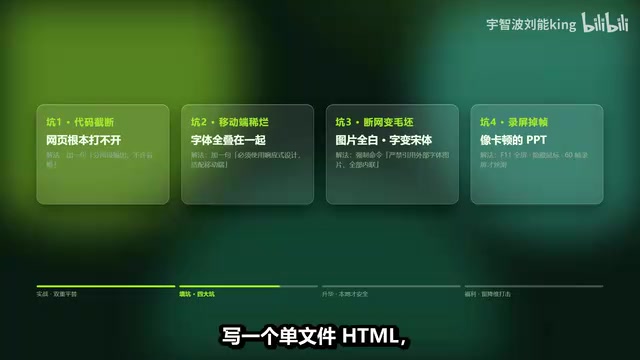
Core Approach: Hand the Outline to an LLM, Generate a Recordable Webpage
The creator's method is minimal: hand the presentation outline to an LLM along with a "magic spell" prompt, requiring it to generate single-file HTML with 3D parallax effects, rejecting external dependency code. Save the code as a webpage, open it, and you have a smooth demo animation.
The same applies to video intros — swap in a prompt for a glitch-style text entrance animation, generate it, record it with screen recording software, and drop it into CapCut for editing. The creator's exact words: "Others spend hours pulling gacha, you spend three minutes screen recording and you're done."
The value of this workflow lies in precise control: change the text and you change the visuals; every frame is yours to decide. Compared to AI video generation where each frame is uncontrollable, making videos with HTML is more like "drawing storyboards with code," suitable for scenarios with clear visual expectations.
Single-file HTML means writing the HTML structure, CSS styles, and JavaScript scripts all into one .html file — no splitting, no external file dependencies. The benefit is copy-and-use, double-click to open, no need to set up a server or install dependencies — perfect for having an LLM generate in one shot. 3D parallax effects use CSS's transform: perspective() and translateZ(), or listen to mouse/scroll position to change the displacement speed of different layers, creating a stereoscopic depth with foreground and background separation. It's computationally light, highly compatible, and doesn't require heavy libraries like WebGL or Three.js, so under the constraint of "rejecting external dependencies," it becomes a common technique for LLMs to generate demo animations. Understanding these two points explains why prompts emphasize "single file" and "no external dependencies" — together they ensure the output can be reproduced offline and stably on any machine.
Four Inevitable Pitfalls and Their Corresponding Fix Prompts
The creator, self-described as a "pitfall buddy," has personally experienced four high-frequency problems, each with a prompt-level solution:
Pitfall 1: Code truncation, webpage won't open. LLMs tend to omit code midway when outputting long code. The solution is to add to the prompt: "Output in two parts, no omissions allowed."
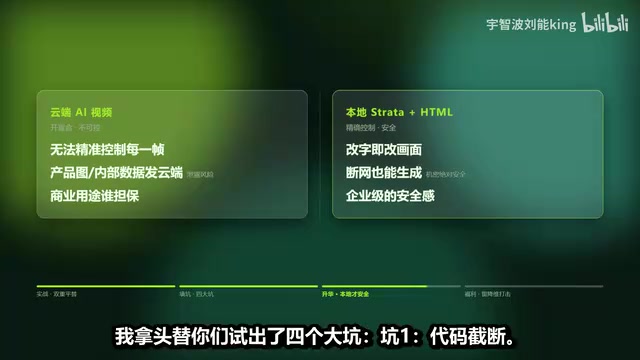
Pitfall 2: Gorgeous on desktop, terrible on mobile. Fonts all overlap, layout collapses. The solution is to mandate "must use responsive design, adapt to mobile."
Pitfall 3: Blank on offline. Webpage images all white, fonts revert to Times New Roman, because of external resource references. The solution is to command the LLM: "Strictly forbidden to reference any external fonts and images, all built-in inline."
Pitfall 4: Screen recording drops frames, looks like a laggy PPT. The solution is to press F11 for fullscreen in the browser, hide the mouse, and use 60fps screen recording for smoothness.
These four pitfalls cover the entire pipeline from code generation to recorded output — essentially all about "making implicit requirements explicit." If you don't say it, the LLM will default to being lazy.
Why Not Use Cloud AI Video? Security Is the Dividing Line
Some may ask: since both make videos, can't I just use online AI generation tools?
The creator's answer hits the mark: "AI video is opening a blind box — you can't precisely control every frame." More critically, in commercial scenarios — who guarantees data security when you send company product images and internal data to the cloud?
The difference with HTML video making is that it can run locally. For example, if a company wants to make an internal promotional video or a demo of an unreleased new product, running code with a locally deployed LLM can generate it even offline.
The creator draws a broader point from this: this is why big companies must build their own local compute power — only local LLMs can provide enterprise-grade security. "As long as you don't understand code, the LLM is the top-tier frontend engineer you've hired."
Local LLM deployment means downloading open-source models (such as Llama, Qwen, DeepSeekAd series) onto your own GPU or workstation, providing interfaces through tools like Ollama, LM Studio, vLLM, with inference not passing through any third-party server. In contrast, cloud APIs require uploading prompts, product images, and internal documents to vendor servers, posing data retention and compliance risks. The core trade-off of local deployment: upfront investment in GPU hardware and maintenance costs, and model capability is usually slightly inferior to top cloud models, but in exchange you get data sovereignty, offline availability, and unlimited calls. For enterprises, this is the practical significance of "building your own compute power" — sensitive materials are generated in a closed-loop environment, cutting off leakage paths from the source.
Where This Method's Boundaries Lie
It's important to be clear-headed: HTML screen recording is not a panacea. It excels at text animations, data visualizations, demo-style intros — structured content. For live-action footage, complex human motion, and realistic lighting scenes, traditional filming or AI video generation is still needed. The clips the creator demonstrates are also concentrated in the motion graphics demo domain.
Another hidden cost is prompt debugging. The solutions to the four pitfalls seem simple, but in actual production, responsive adaptation, inline resources, and segmented code splicing can all introduce new compatibility issues, requiring some frontend troubleshooting ability. The creator's "three sets of motion effect prompts plus four fix-it commands" lowers the barrier, but there's still a gap to "zero-basis production."
However, for teams with clear visual requirements who also care about data privacy, this path offers a pragmatic middle ground: more flexible than PPT templates, more controllable than AI gacha, cheaper than outsourcing development.
Background Notes
External resource dependency is the root cause of webpages failing offline. Many webpages use <link> to import web fonts like Google Fonts, or use <img src="https://..."> to reference online image hosts; once offline or cross-origin restricted, fonts fall back to the system default Times New Roman, and images display as blank. Inlining is the solution: fonts can use @font-face with Base64-encoded woff2 data embedded in CSS, images can be converted to Base64 data: URIs written directly into src, and icons can be switched to inline SVG. The cost is larger file size and reduced readability, but in exchange for fully self-contained, offline-usable — which precisely fits the localization and data-not-leaving-intranet requirements.
One-line Summary
Use local LLMs to generate single-file HTML, record screen instead of rendering, achieving controllable and secure video asset production.
Paragraph Summary
The article introduces a video asset production approach proposed by a Bilibili creator: hand the presentation outline and prompts to a local LLM, generate single-file HTML animations with 3D parallax effects, record with screen recording software, then edit in CapCut — bypassing the "blind box" uncontrollability of AI video generation. The author summarizes four high-frequency pitfalls — code truncation, mobile layout collapse, external resources causing offline failure, and screen recording frame drops — and provides corresponding prompt solutions: segmented output, forced responsive design, strictly no external fonts/images, and fullscreen 60fps recording. Compared to cloud AI video, the core advantages are frame-by-frame control and data not leaving local, suitable for commercially sensitive scenarios; but its boundaries are also clear — it only excels at motion graphics demos and intros, not live-action or complex human scenes, and still requires some frontend troubleshooting ability.
Related articles
AWS AgentCore Gateway: Connecting AI A…
AWS AgentCore Gateway: Connecting AI Agents to Enterprise Backends with MCP
How AWS AgentCore Gateway acts as a primary MCP server to aggregate REST APIs, Lambda, and existing MCP services? Analyzing its AST real-time mapping, zero cold start, semantic search for tool overload, session isolation, and key injection security design, plus the architectural approach to decoupling enterprise AI agents from backends.

One Link Gives Figma AI a New Skill: Hands-On with MCP Connectors
Paste one MCP server link and the AI Agent in Figma gains new tool capabilities. We break down the setup flow, 20+ one-click apps, read/write permissions and execution policies, and the public HTTPS requirement.

Cognition SWE-2 in Practice: One Prompt to Handle the Whole Product Launch Process
Analyzing a YouTube creator's prompt for using Cognition SWE-2 to launch a product: a landing page, seven-email sequence, and non-buyer follow-up tool, plus how the 'test and report' constraint changes AI delivery quality.