Using Git Worktrees to Enable Parallel AI Agent Development Without Interference

Use Git worktrees to give each AI agent an isolated environment for truly parallel development.
The article discusses the environment isolation challenges of running multiple AI agents in parallel, noting that serial waiting severely slows development. Based on a Bilibili technical video, the core solution is using Git worktrees to create independent working directories for each agent—sharing repository history but separated physical paths—avoiding code, dependency, and port conflicts. It contrasts the inefficiency of cloning, stresses unique port planning, criticizes fragile database reuse, and advocates scripting initialization and cleanup for a fully automated, reproducible agent runtime. Ultimately, parallel efficiency is capped by engineering infrastructure, and teams can start with two or three worktrees and gradually improve.
Running multiple AI agents serially—prompt, wait for results, prompt again, wait again—is quietly eating up development time. True parallelism isn't about opening more agent windows; it's about giving each agent a clean, isolated, reproducible runtime environment. Otherwise, they'll trample over each other's code, environment variables, and dependencies. A technical video from Bilibili (creator Orca, with Chinese/English subtitles) offers a solution based on Git worktrees, and the core approach is worth understanding for any developer who heavily uses AI for coding.
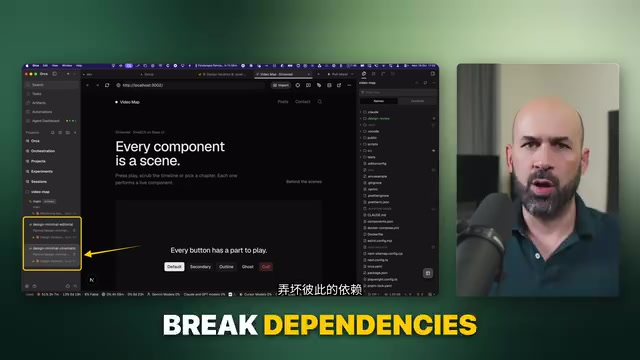
Why Parallel Agents Are Hard: Isolation
Starting multiple AI agents isn't difficult in itself. The hard part is giving each one its own "universe." The video gives a very concrete example: a project includes a server and a database. The server listens on one port, the database on another, and they communicate with each other. If you run three such environments in parallel on the same machine, port conflicts, dependency versions, and environment config files all become sources of conflict.
According to creator Orca, without isolation, agents will break each other's code, environment variables, and dependency relationships. In other words, the root cause of failed parallel development is often not model capability but the lack of proper partitioning in the engineering environment.
Git Worktrees: Better Than Cloning Repos for Parallelism
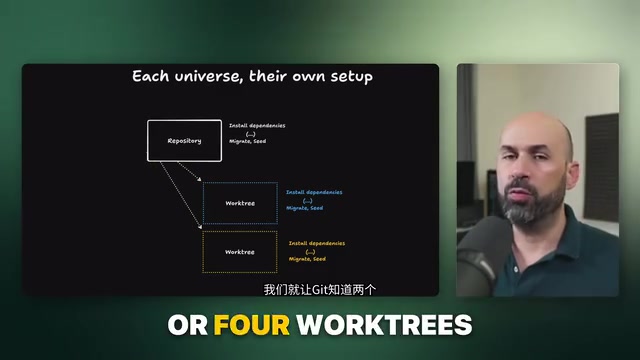
The most intuitive approach is to clone the repository twice locally. But the video points out that the two cloned copies are disconnected from each other and can only sync through the remote repository—which is very inefficient for parallel development that requires frequent branch merges.
Git worktrees offer another mechanism: set up another location outside the main directory, managed by Git, but with a different physical path. In the video's approach, two to four worktrees are each treated as a "different world," with each world independently completing initialization steps like dependency installation and database configuration. The key difference is that these worktrees still share the same Git repository's version history, making merging and cleanup more natural.
Ports Must Be Unique
When running multiple application instances on the same machine, ports must never be duplicated. The system cannot assign two programs to the same port, so having each instance use a different port is something the application itself must handle—port planning needs to be done when initializing the worktree.
Git worktree is a feature introduced in Git 2.5 that allows multiple working directories to be checked out from the same repository simultaneously. Each worktree corresponds to an independent branch or commit, has its own filesystem path, but shares the underlying object database and refs. This means commits, branch creation, and merge operations in any worktree are immediately reflected in other worktrees without going through a remote repository. Compared to cloning, worktrees save disk space and network overhead, and branch merges happen directly within the local repository, avoiding the delay of "cloned copies can only sync via push/pull." Use git worktree add <path> <branch> to create and git worktree remove to clean up. Note that the same branch cannot be checked out to two worktrees simultaneously—which conveniently forces each agent to work on an independent branch, naturally fitting parallel development.
A port is a logical number assigned by the operating system to network processes. Under the same protocol (TCP/UDP), the same port can only be listened on by one process at a time, otherwise an "Address already in use" error is triggered. In containerized or local multi-instance scenarios, a common practice is to have applications read configuration through environment variables (such as PORT, DB_PORT) rather than hardcoding port numbers. When initializing worktrees, you can assign a port range to each instance (for example, 3000-3003 for four worktrees) and inject it through .env files or startup scripts. Ports in database connection strings also need to be adjusted accordingly. If using Docker, you can also map fixed container ports to different host ports through port mapping for further isolation. Port planning should be automated in the worktree creation script to avoid conflicts from manual allocation.
The Fragile Reuse Approach vs. a More Robust Path
The video also mentions a simpler but fragile automation approach: reuse the same database software, create independent databases for each worktree, and destroy them after tasks complete. This is quick to get started with and suitable for early validation, but the creator explicitly categorizes it as "brittle automation" and does not recommend it as a long-term solution.
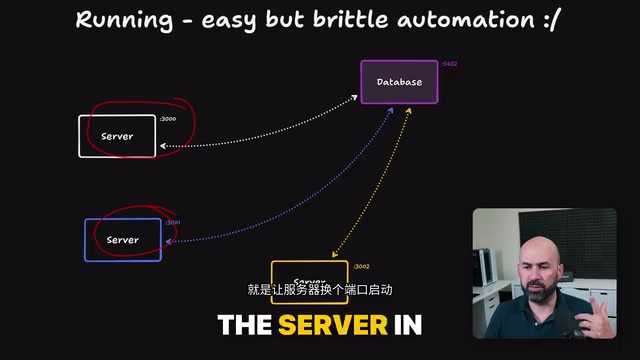
A more robust path is to solidify the entire initialization and cleanup process. Cleanup after tasks complete is equally important: merge differences, delete files generated by the worktree, databases, and services, and clear all traces of startup. Writing these steps into scripts—having the agent generate bash files—makes them shareable and reproducible.
Ready on Startup
The video ends with a practical detail: when running worktrees, you can directly open multiple tabs and let the relevant processes start automatically. This way, developers are already in a working state when they enter the environment, reducing manual preparation steps.
"Brittle automation" refers to scripts or processes that work on the ideal path but easily fail when the environment changes slightly. For example, reusing the same database software and creating independent databases for each worktree seems to save resources but carries multiple risks: the database instance becomes a single point of failure, and one agent's mistake could affect other databases; if cleanup scripts aren't executed correctly, residual databases accumulate and consume resources; different worktrees may have conflicting requirements for database versions or extensions. In contrast, a more robust approach is to provide each worktree with a completely independent runtime (such as starting a dedicated database container via Docker Compose) and manage the lifecycle with idempotent scripts—create on initialization, destroy after task completion. Scripts should include error handling and status checks to ensure repeatable execution. Putting such scripts under version control also allows team members and agents to share the same environment definition, improving reproducibility.
Implications for AI Coding Workflows
The value of this approach isn't limited to any single tool. It reveals an easily overlooked fact: the upper limit of AI agent parallelism is often determined by engineering infrastructure. Worktrees solve isolation at the filesystem and version control level, port and database solutions solve runtime isolation, and scripting solves reproducibility. Only when all three are combined do you get what the video calls an "fully automated, reproducible under ideal conditions" agent runtime environment.
For teams experimenting with multi-agent collaboration, you can start with two to three worktrees, solidify the initialization process with scripts, and then gradually replace the fragile database reuse approach. Compared to continuing to serially wait for each agent to return results, the return on investment for this transformation is considerable.
One-line Summary
Use Git worktrees to provide an isolated environment for each AI agent and achieve true parallel development.
Paragraph Summary
The article explores the environment isolation challenges faced when multiple AI agents work in parallel, noting that serial waiting severely slows development efficiency. Based on a solution from a Bilibili technical video, the core is using Git worktrees to create independent working directories for each agent—sharing the same repository history but with separated physical paths—thereby avoiding conflicts in code, dependencies, and ports. The article contrasts the inefficiency of cloning repositories, emphasizes that ports must be uniquely planned, criticizes the fragile approach of reusing databases, and advocates solidifying initialization and cleanup processes through scripts to achieve a fully automated, reproducible agent runtime environment. Finally, it points out that the upper limit of parallelism is determined by engineering infrastructure, and teams can start with two or three worktrees and gradually transform their setup.
Related articles

Android Tracing 2.0: A Tracing Revolution with 7x Speedup and Context Propagation
Android Tracing 2.0 explained: 7x faster tracing API with cross-coroutine and thread context propagation, custom metadata, pluggable backends. Wyze sped up startup 45%, R8 25%, Compose 1.13 recomposition tracing now available.

Reddit Discussion: Real-World AI Agent Use Cases Shared for Business School Classrooms
A Reddit business school lecturer seeks real AI Agent use cases for classroom teaching. This article compiles typical AI Agent applications in professional and personal scenarios and offers three analytical dimensions for selecting classroom cases, helping readers understand the practical value and limitations of AI Agents.

Multi-LLM Provider API Integration: Standardization Challenges and Compliance Headaches
Explore the current state and challenges of multi-LLM provider API standardization, analyze enterprise data compliance pain points, and share community practices and router limitations for data governance in multi-model architectures.