Voice Cursor Hands-On: The AI Voice Dictation Tool That Lets You Write Code With Your Mouth

Voice Cursor goes beyond speech-to-text, rewriting, adjusting tone, and translating by command to turn spoken words into usable output.
Voice Cursor is a voice input product that goes beyond traditional dictation tools: it not only transcribes but also rewrites selected text, adjusts tone, and translates into about a hundred languages based on voice commands. Through a controlled experiment on a calorie-tracking app development request, the article shows that dictation is faster than manual typing and makes it easier to enter a natural state of expression. It also introduces core features such as select-and-edit, per-app tone configuration, and custom replacement word lists. The author compares it with WhisperFlow and finds Voice Cursor more comprehensive in tone customization, translation, and replacement word lists—though the comparison is a subjective evaluation from a single source. The core value lies in directly converting spoken language into usable finished products rather than merely increasing input speed.
The speed advantage of voice input has long been underestimated—some argue that people speak about four times faster than they type. But the problem with traditional voice dictation tools is that they only convert sound into text, leaving the burden of thinking on you. Voice Cursor tries to change this: it doesn't just transcribe—it can also rewrite, adjust tone, and even translate what you just said, all based on voice commands.
The Real Efficiency Gap in Voice Programming
The video's author ran a controlled experiment using a calorie-tracking app development request: on the left, manually typing out the full product requirements description; on the right, directly dictating the same content. Manual input not only took longer but also involved repeated rewording along the way. In contrast, after dictating through Voice Cursor, the tool automatically organized the content into a clearly structured prompt that covered all three core features at once: manual calorie logging, a visualization dashboard, and AI-generated meal plans.
The key to this comparison isn't "speed"—it's that when speaking, people more easily enter a natural state of expression and pour out their ideas completely, rather than agonizing over word choice while typing. Voice Cursor takes on the job of organizing spoken language into executable text.
The difference between speech-to-text and voice-command editing: Traditional voice dictation tools (such as built-in system dictation or basic Whisper transcription) only perform acoustic signal-to-text conversion, outputting a verbatim transcript that users still need to organize logically, fix typos in, and adjust tone for. Voice Cursor layers a natural language command layer on top of this: it first sends the dictated content to a large model to understand intent, then rewrites, condenses, or translates it according to the command, ultimately outputting ready-to-use finished text. So the efficiency gap isn't just about input speed—it's that the latter also outsources the cognitive step of "editing" to the tool.
Select and Edit: Turning Editing Into a Single Sentence
Voice Cursor's interaction logic is straightforward: select any text, hold a hotkey and speak, and the tool will modify the selected content according to your command. The author demonstrated several typical scenarios:
- Changing "Deploy the app to the cloud tonight at 17:00 and notify Michael" to "Deploy at 19:00 and notify Bob"—just select the original text and say a single modification request
- Rewriting a message to a colleague that was too blunt into a more professional expression
- Organizing scattered spoken project updates into social media copy suitable for posting on X
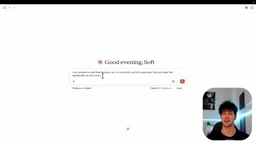
The value of these operations lies in reducing the cognitive burden of "switching to edit mode and modifying character by character." Especially for users who frequently write prompts or converse with AI, repeatedly fine-tuning wording is a high-frequency action, and voice commands can compress this process into seconds.
Prompt Engineering: The practice of carefully designing instructions for large language models so their output better matches expectations. The repeated fine-tuning of wording mentioned throughout this article is the everyday form of prompt engineering—the same request phrased differently can yield vastly different results from a model. Voice Cursor's "select and edit" essentially simplifies prompt engineering into spoken commands: users don't have to manually rewrite an entire prompt; they just select the unsatisfactory part and state their modification request, and the tool automatically generates a new prompt variant. For users who frequently converse with AI, this means lower iteration costs and a faster trial-and-error rhythm.
Per-App Tone Configuration: Slack and Gmail Speak Differently
Voice Cursor lets you create separate tone configurations for each app. The author set up a casual, conversational style for Slack and a formal business style for Gmail, writing corresponding tone prompts for each. In practice, when dictating team updates in Slack, the tool automatically adds expressions—even emoji—that match everyday communication habits; when dictating client emails in Gmail, the same spoken content is converted into formal wording.
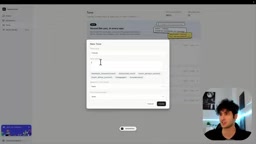
The practical value of this design is that users don't need to manually switch styles before each input—the tool automatically matches presets based on the currently active foreground app. For people working across multiple communication channels simultaneously, what's saved is the cost of frequent context switching.
Frontmost App Detection: Operating systems provide APIs that let tools know which application currently has focus. Voice Cursor uses this capability to determine whether the user is typing in Slack or Gmail, thereby automatically loading the corresponding tone configuration. This mechanism eliminates the step of manually switching modes, but it also requires the tool to continuously monitor app-switching events in the background, which involves certain privacy and permission considerations. For users, understanding this principle helps assess: whether tone configurations only apply to registered apps, and whether there is latency or misjudgment when switching apps.
Translation and Custom Replacements
Beyond rewriting and tone adjustment, Voice Cursor also supports translating selected text into other languages. The author mentions it can translate into about a hundred languages, with the use case being sending messages to team members who aren't proficient in English—simply dictate in Chinese and let the tool output the target language.
Another detail feature is a custom replacement word list. Users can add proper nouns, AI tool names, and other words that are easily misheard, ensuring correct recognition and spelling every time they dictate. The author uses the names of AI tools they frequently use as examples to illustrate the value of this feature for technical users—model names, product names, and code terminology are often where ordinary speech recognition makes the most mistakes.

Comparison with WhisperFlow
The author explicitly compares Voice Cursor with WhisperFlow and offers their own judgment:
- Tone customization: Voice Cursor lets users describe the desired tone in natural language and save it as a configuration; WhisperFlow only offers presets like Formal and Casual
- Translation capability: Voice Cursor supports multilingual translation; WhisperFlow lacks this feature
- Custom replacements: Voice Cursor supports adding a replacement word list; WhisperFlow only supports simple name replacements
The author also acknowledges that WhisperFlow "does a good job" at speech transcription but believes Voice Cursor covers more ground in the extended scenarios of editing, rewriting, and translation. It should be noted that this is a subjective comparison from a single source, and WhisperFlow's actual experience may vary depending on the use case.
WhisperFlow: A dictation tool based on OpenAI's Whisper speech recognition model, focused on high-accuracy transcription and system-level voice input. It offers preset tone options like Formal and Casual but does not support custom tones in natural language, multilingual translation, or complex replacement word lists. The comparison in this article is a subjective evaluation from a single source; actual choices should also consider recognition accuracy, latency, system compatibility, and price. The positioning difference between Voice Cursor and WhisperFlow is that the former leans toward "voice-driven text editing and generation," while the latter focuses on "high-quality speech-to-text."
Who Should Use It
Based on the demo content, Voice Cursor's core user profile is: people who frequently write prompts in conversation with AI, people who need to switch tones across multiple communication channels, and people who are accustomed to dictating ideas and then organizing them into text. What it solves isn't the old problem of "speech-to-text" but the new problem of "how to turn spoken content directly into usable finished products."
The tool offers a free plan, with paid plans providing a trial period. For knowledge workers who input large amounts of text every day, whether the time saved by such tools is worth paying for depends on individual input volume and proficiency with voice expression.
Related articles

LangGraph Workflows and Agents: A New Approach to Enterprise AI Orchestration
What is the core difference between LangGraph workflows and agents? This article explains the three elements of the state graph (state, nodes, edges), explores how workflows orchestrate complex AI business, and discusses coordination strategies in LangChain 1.0 enterprise applications.

4 Habits That Are Stealing Your Claude Code Quota (With a Diagnostic Prompt)
Burning through Claude Code quota too fast? Here are 4 common habits that waste it—vague requirements, verbose logs, careless sub-agents, and day-long sessions—plus a diagnostic prompt to find your personal top three.

Claude Code Token-Saving Guide: Say Goodbye to Weekly Limit Anxiety
Claude Code weekly limit running low? Learn to use /usage to pinpoint consumption, /clear between tasks, lower /effort, skip 7x agent teams, and Graphify code maps to cut tokens up to 70x.