Voyager: Putting an AI Agent Inside the File Browser to Reshape macOS Workflows
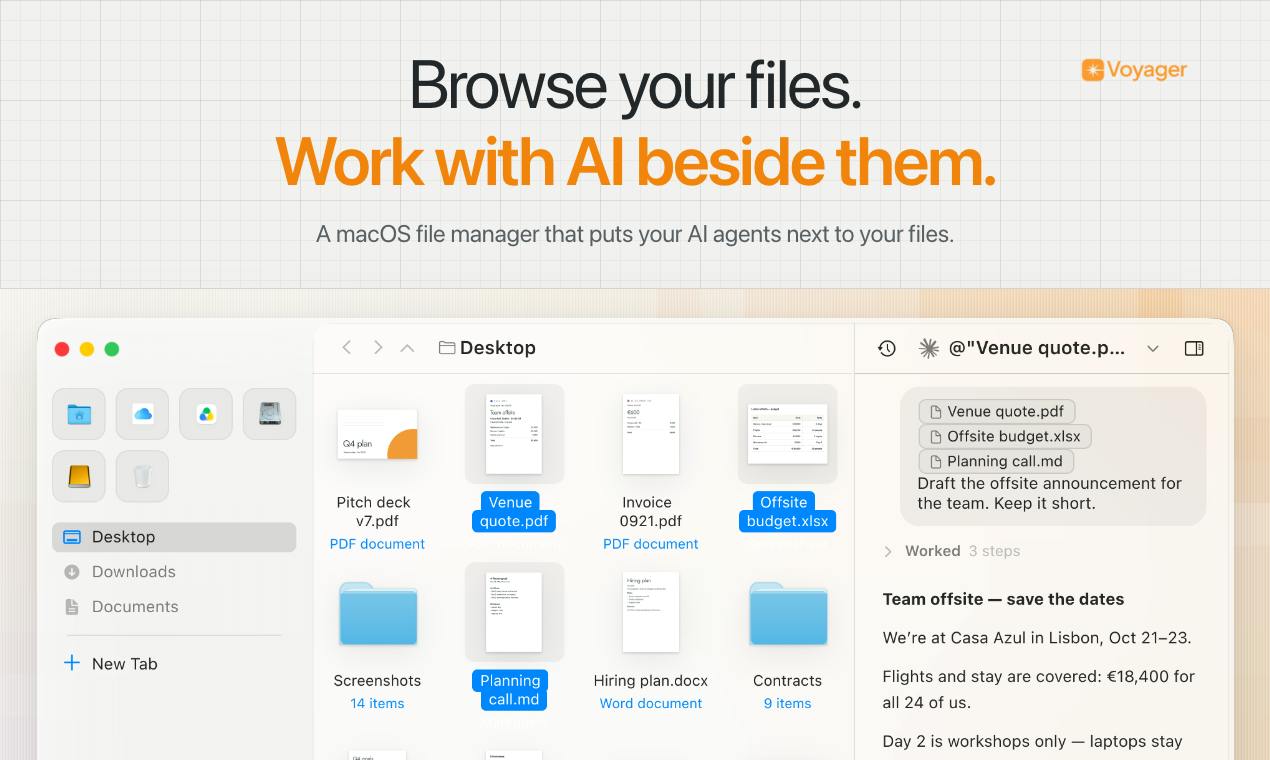
Voyager embeds an AI Agent into the macOS file browser, making files the context for AI work.
Voyager is a macOS agentic file browser that debuted on Product Hunt. It embeds an AI Agent into the familiar file browser interface, turning files from static storage into working material AI can invoke directly. By preserving traditional file-browser interaction and layering AI on top, it lowers switching costs and targets developers, researchers, and content creators.
File management has always been a core part of the desktop operating system experience, but in the AI era, the traditional file browser seems a bit outdated. Voyager, which debuted on Product Hunt, aims to change this: it embeds an AI Agent directly into the file browser, letting you both quickly find files in a familiar interface and have AI work with those files as context.
The leap from "finding files" to "using files"
Voyager's positioning is clear: an agentic file browser for macOS. Traditional file browsers solve the problem of "where is the file," while Voyager aims to solve "what can the file do." It brings an AI Agent into everyday file work—you can hand selected files to the Agent as context, and the entire process happens within the file browser, with no need to switch back and forth between multiple applications.
Behind this design approach is a rethinking of workflows. Files are no longer static storage objects but working material that AI can directly invoke. For developers, researchers, and content creators, this means the gap between finding information and processing it is dramatically narrowed.
A familiar interface lowers the barrier to entry
Voyager emphasizes a "familiar file browser." This is worth noting. Many current AI tools, in order to highlight their intelligence, tend to adopt entirely new interaction paradigms that require users to relearn a set of operating logic. Voyager goes the opposite way, preserving users' existing understanding of the file browser and layering AI capabilities on top as an enhancement.
For macOS users, this strategy means lower switching costs. You don't need to change your file-finding habits—you just invoke the Agent when you need AI to step in. The product received 78 votes and ranked 11th on Product Hunt, suggesting this "gentle enhancement" approach has some market recognition.
The Agent as a consumer of file context
Voyager's core mechanism is treating files as context for an AI Agent. This aligns with a clear trend in current AI applications: beyond model capability, the quality of context often determines the quality of output. Your local files contain a wealth of personalized, project-specific information that general-purpose chatbots cannot access. By turning these files into Agent input, Voyager effectively opens up a private, structured information repository for AI.
In terms of product categories, Voyager is classified under Productivity, Developer Tools, and Artificial Intelligence, which suggests its target users lean toward professionals with heavier file-processing needs. Developers need to consult code and documentation, researchers need to organize literature—these are typical use cases where files serve as context.
Context Window is the upper limit on the total number of tokens a large language model can receive in a single inference pass, measured in text units including prompts, file content, and conversation history. The larger the context window, the more material the model can "see" at once; but file content directly consumes this quota, and a single long document can take up a large amount of space. Therefore, how an Agent selects, chunks, and compresses file content often affects results more than simply stacking files. When Voyager hands local files to the Agent as context, it actually faces this very engineering problem: retaining enough information while organizing input within the window limit.
Retrieval-Augmented Generation (RAG) is a technical approach in which the model first retrieves relevant passages from external sources before generating an answer, then inserts those passages into the context. Unlike stuffing an entire file into the prompt, RAG typically chunks and vector-indexes files first, then recalls the most relevant paragraphs based on the question. This mechanism makes "files as context" feasible even when there are many files, and also explains why the value of a file browser isn't just storing files but also providing structured local corpora for retrieval.
Will the file browser become an AI entry point
The question Voyager raises is more interesting than the answer it provides: will the file browser become an important entry point for personal AI? We spend a great deal of time in the file system every day, and files are the most natural carrier of work context. If an AI Agent can seamlessly plug into this layer, then the act of "opening a file" itself becomes "starting an AI workflow."
Of course, this path also faces challenges. Files are highly privacy-sensitive, and how the Agent handles local data and where the boundaries lie are questions users will inevitably care about. The source material does not disclose Voyager's specific data processing approach, which will require further observation in actual use. In addition, the discussion volume of 3 comments also indicates that the product is still in an early exposure stage, with community feedback not yet sufficient.
Voyager's value lies in demonstrating a product philosophy: rather than pursuing a disruptive new interface, embed Agent capabilities into work scenarios users are already familiar with. For users who want to connect file management and AI workflows on macOS, this is a new option worth watching.
Agentic refers to a system that goes beyond passively responding to a single instruction—it can break down goals, invoke tools, execute over multiple steps, and decide on its next action on its own. In the file browser context, agentic means that after the user gives a goal such as "organize this batch of documents" or "extract key points from these materials," the Agent can autonomously read multiple files, decide the processing order, and produce results, rather than just answering a question. This characteristic also brings new trust issues: the more steps there are, the harder it is for users to predict which files the Agent accessed and what operations it performed, making permission boundaries and operation traceability key design points for such products.
One-line Summary
Voyager embeds an AI Agent into the macOS file browser, making files the context for AI work.
Paragraph Summary
Voyager is a macOS agentic file browser that debuted on Product Hunt. Its core idea is to embed an AI Agent directly into the familiar file browser interface, turning files from static storage objects into working material that AI can directly invoke. It preserves the interaction style of traditional file browsers and layers AI capabilities on top as an enhancement, so users can invoke the Agent when needed without relearning the operating logic. The product is classified under productivity, developer tools, and artificial intelligence, targeting professionals with high file-processing needs such as developers, researchers, and content creators. The article argues that its real value lies in demonstrating a "gentle enhancement" product approach and raises the idea that the file browser could become an important entry point for personal AI, while noting early-stage risks such as undisclosed local data privacy practices and insufficient community feedback.
Related articles

Codex and AI Coding Agents in Practice: A Complete Guide from Prompts to MCP
A Codex-centered guide to agentic coding: Task-Context-Output prompts, AGENTS.md project memory, plan mode, skills, characterization vs. spec tests, permissions and config.toml, MCP tool calls, plus secrets safety and context management.

GPT-6 Security Model and the AI Attack-Defense Escalation: This Week in AI
This week in AI: OpenAI's GPT-6 Saber found 948 Linux kernel root-escalation paths; Cursor deploys full apps from one sentence; Binance details a social engineering attack; C++26 fails ISO vote.
KIKUmap: Manage Your Claude and ChatGPT Conversations with Mind Maps
KIKUmap is a macOS menu bar app that visualizes Claude and ChatGPT conversations as mind maps with real-time status. Free and open source.