AI Super App Showdown: A Comprehensive Comparison of Cursor, Codex, Claude, and Anti-Gravity
A comprehensive comparison of Cursor, Codex, Claude, and Anti-Gravity across 11 key dimensions.
This in-depth review evaluates four major AI Super Apps — Cursor, Codex, Claude Desktop, and Anti-Gravity — across 11 dimensions including model options, coding workflow, knowledge work, automation, and more. Cursor leads with the most well-rounded experience, followed by Codex for its powerful GPT models, Claude for knowledge work, while Anti-Gravity remains an early-stage prototype.
What Is an AI Super App?
The tech world has been buzzing about AI Super Apps — tools that go far beyond being just an AI coding assistant. These are comprehensive platforms that cover multiple types of knowledge work: writing code, building applications, creating spreadsheets, making presentations, generating motion graphics and videos — virtually anything.
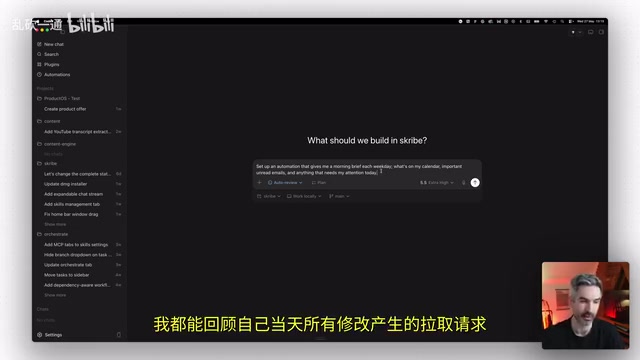
The four major AI Super Apps currently on the market are: OpenAI's Codex, Anthropic's Claude desktop app, Cursor, and Google's Anti-Gravity. Chris, a senior product designer with 15 years of app design and startup consulting experience, conducted a thorough evaluation of all four tools.
A qualified AI Super App must meet five core criteria: support for AI Agent collaboration, multi-project and multi-Agent orchestration, ability to create everything from apps to spreadsheets, workflow automation capabilities, and mobile remote management support.
Evaluation Dimensions and Scoring Method
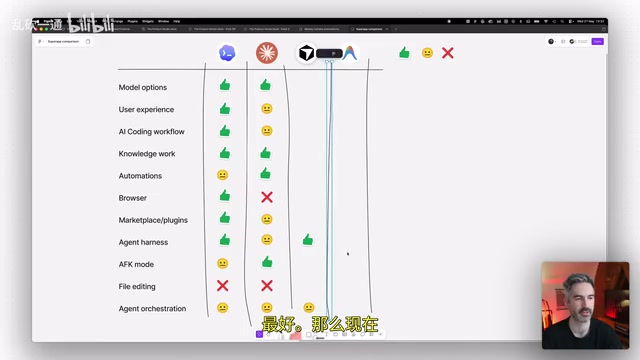
This review scores all four tools across 11 dimensions, with ratings of Excellent (green), Average (yellow), and Poor (red):
- Model Options: Number and quality of available AI models
- User Experience: Interface design and daily workflow smoothness
- AI Coding Workflow: Ease of executing development tasks
- Knowledge Work: Non-coding capabilities like spreadsheet analysis and document processing
- Automation: Support for scheduled tasks and automated workflows
- Browser Functionality: Completeness of the built-in browser
- Plugin Ecosystem: Richness of marketplace plugins and ease of installation
- Agent Engine: Actual performance of Agents executing tasks
- Offline Mode: Mobile experience when away from your computer
- File Editing: Ability to directly edit project files
- Agent Orchestration: Multi-Agent and multi-project management capabilities
Codex Review: Powerful Coding Model, But Missing File Editing
Codex's Core Strengths
Codex currently runs GPT 5.5 — considered one of the strongest coding models available today. While it natively only supports the GPT series, its built-in terminal lets you run other AI Agents like Claude Code or Factory Droid via the command line, effectively providing multi-model support.
In terms of coding workflow, Codex performs excellently. It supports CodeRabbit code review integration — you can @CodeRabbit directly in chat to perform code reviews, then commit to Git and create Pull Requests. You can also set up automated tasks, such as daily automatic reviews of uncommitted code changes with PR generation.
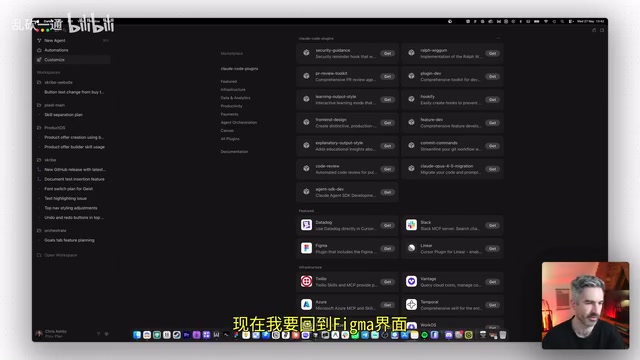
Codex's plugin marketplace is also quite rich, including tools like Expo and CodeRabbit that can be added to your development environment with a single click.
Codex's Major Shortcomings
Codex's biggest weakness is that it doesn't support direct file editing — you can only view file contents, and any modifications must be made through chat instructions for the AI to execute on your behalf. This is extremely inconvenient for knowledge work scenarios. Additionally, its cloud Agent implementation isn't as mature as other tools, and branch management visualization isn't intuitive enough.
Claude Desktop App Review: Excellent Knowledge Work, Ecosystem Needs Improvement
Unique Three-Mode Interaction Design
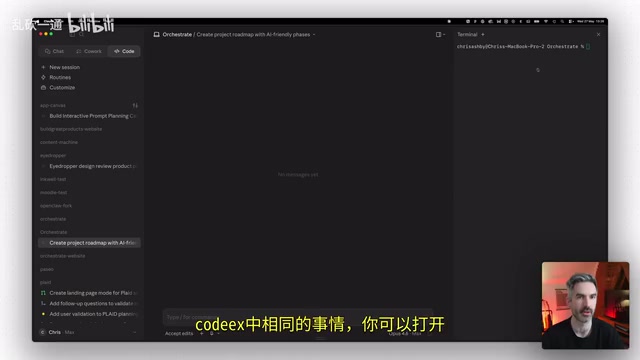
The Claude desktop app features a Chat/Co-work/Code tab design, corresponding to conversation, knowledge work, and programming respectively. This separation has sparked debate — why not handle all work in a unified view like Codex?
Claude's Strengths in Knowledge Work
Co-work mode excels at knowledge work. Combined with Claude's powerful language understanding, document processing, research analysis, and content creation all feel very smooth. Claude also offers an excellent mobile experience, supporting remote control of Claude Code terminal sessions on the desktop.
Automation features are also noteworthy, supporting both manual configuration and letting Claude automatically create automation tasks, with the ability to connect to Claude's hosted Agent products.
Claude Desktop App's Notable Weaknesses
- Browser: Only supports local dev server preview, cannot access external websites
- Agent Engine: According to Terminal Bench tests, Claude Code's Agent execution performance falls behind Cursor
- Plugin Ecosystem: Lacks convenient @-tag plugin invocation, less intuitive than Codex and Cursor
- File Editing: Also doesn't support direct file editing
- UI Stability: Has interface bugs like cursor flickering and disappearing when adjusting panels
Cursor Review: The Most Well-Rounded AI Super App
Why Does Cursor Rank First?
Cursor received excellent ratings across nearly all evaluation dimensions. Its core advantages include:
Highest Model Selection Freedom: Supports virtually all mainstream models — GPT, Claude, Gemini, Grok — plus its proprietary Composer 2.5 model, balancing speed and cost efficiency.
Polished User Experience Design: Color-coded work modes (Plan/Debug/Multitask/Ask/Build) let you instantly see your current work state. The right panel supports flexible switching between terminal, browser, file editor, and GitHub PRs.
Full Built-in Browser: Not just a full-featured browser, but one with integrated DevTools and design mode. You can directly select page elements and submit modification prompts — a feature none of the other three tools offer.
Only Tool Supporting Direct File Editing: You can edit project files directly in the right panel without going through chat instructions.
Deep GitHub Integration: No need to jump to the GitHub website — view PRs, code review results, commit history, and merge status directly within Cursor.
Cloud Automation Execution: Automated tasks run in the cloud and continue executing even when your computer is shut down — a major advantage over Codex and Claude.
Cursor's Only Current Weakness
Cursor's mobile experience currently only offers a web interface with no native mobile app. However, a native mobile app is reportedly coming soon, which will address this gap.
Anti-Gravity Review: Google's Early Exploration
Google's Anti-Gravity currently lags significantly behind competitors across all dimensions:
- Limited model selection, with some older model versions
- No terminal access, unable to invoke other AI Agents
- No browser functionality, no plugin marketplace
- No file editing support
- Weak Git/GitHub integration
- No mobile support
Overall, Anti-Gravity currently feels more like an early prototype product that needs substantial feature iteration before it can compete with the other three tools.
Final Rankings and Recommendations
| Rank | Tool | Best For |
|---|---|---|
| 🥇 | Cursor | Developers and knowledge workers seeking an all-in-one experience |
| 🥈 | Codex | ChatGPT subscribers who want access to top-tier coding models |
| 🥉 | Claude Desktop App | Claude Max subscribers focused on knowledge work scenarios |
| - | Anti-Gravity | Not recommended as a daily primary tool yet |
One additional note: the AI Super App space is still in its early stages, and all tools are iterating at breakneck speed. If Codex adds file editing support, combined with GPT's subscription cost advantages, it could very well overtake Cursor. If Claude improves its browser and Agent performance, it also has significant room to grow.
For most users, Cursor is currently the best AI Super App to use as your primary tool. That said, keep a close eye on Codex updates — its pace of catching up may exceed your expectations.
Related articles

Claude Code for Test Development in Practice: An AI Programming Workflow That Doubles Your Efficiency
A practical guide to Claude Code for test development: auto-generating test scripts, Plan Mode workflows, MCP + Playwright integration, and Subagent parallel tasks to build systematic AI-assisted workflows.

Hermes Agent Hands-On Review: An AI Efficiency Revolution for Indie Game Developers
Indie game developer reviews Hermes Agent vs OpenClaude: intelligent context compression, real-time Memory, remote control via Telegram, and practical use cases in game dev, social media, and email.

Vibe Coding Beginner's Guide: Tool Selection Across Three Categories with Practical Examples
A comprehensive guide to Vibe Coding's three tool categories: Agent frameworks, CLI Coding, and IDE tools, with practical examples including Snake game and data analysis workbench.