Complete Cursor Beginner's Guide: From Installation & Setup to Efficient AI-Powered Programming

A complete guide to Cursor AI programming tool from setup to efficient real-world usage.
This article systematically introduces the usage framework for the AI programming tool Cursor, covering core concepts (context length limits and Tokens), mainstream tool comparisons (Cursor recommended for comprehensive model support), installation and configuration, three conversation modes (Agent/Ask/Manual), billing rules (always disable Max mode to avoid rapid quota depletion), and practical tips (precise context specification, effective requirement descriptions, and leveraging Rules)—helping beginners quickly get started and use Cursor efficiently.
After the official release of Cursor 1.0, a massive wave of users has flooded into the AI programming space. But for first-time users, the array of concepts—model selection, billing rules, conversation modes—can be overwhelming. This article walks you through everything from core concepts to practical tips, helping you build a complete framework for using Cursor and quickly get up to speed with today's hottest AI programming tool.
What Is AI Programming? Understanding the Core Concepts
Traditional programming requires technical professionals to learn specific programming languages to write programs. The essence of AI programming is conversation + large model = code. You simply describe your requirements in natural language, and the AI model generates the code for you.
But there's a critical limitation to keep in mind: context length is finite. When you're chatting with AI, there's an upper limit to how much it can "remember." For example, if you've exchanged ten thousand characters, the model might only retain five thousand of them.
This limitation stems from the Transformer architecture underlying large language models—the computational complexity of its attention mechanism grows quadratically with sequence length, making infinite context expansion prohibitively expensive in terms of computing power and cost. The basic unit of text processing is the Token (roughly 4 characters in English; in Chinese, one character typically corresponds to 1-2 Tokens). Early GPT-3 had only a 4K Token context window; current mainstream models have expanded to 100K-200K Tokens, but when facing real-world project codebases with tens or even hundreds of thousands of lines, this still falls short. Managing context effectively has become the core challenge of AI programming—and its current weak point.
The company behind Cursor continues to release new models and support new modes. Beyond making models smarter, expanding context length support is also a key development direction.
Comparing Mainstream AI Programming Tools: Why Choose Cursor?
There are several AI programming IDEs available today, each with distinct characteristics:
Cursor (Top Recommendation): $20/month, supports virtually all mainstream models including Claude series, Google series, and OpenAI, with the fastest onboarding of new models. Ideal for professional developers or users with a strong interest in development. Payment supports Alipay.

Windsurf: $15/month, previously comparable to Cursor in functionality, but recently banned by Claude's parent company from using Claude series models. Some background: Claude is a large language model developed by Anthropic, a company founded by former core OpenAI members, with an excellent reputation in code generation. The Windsurf ban essentially reflects commercial control by model providers over the application layer, exposing the fragility of model licensing relationships in the AI tools market. Having been acquired by Google, Windsurf will likely pivot toward Gemini models going forward. This development has driven a large number of users to Cursor.
ByteDance Trae: Available in international and domestic versions. The international version starts at $3 for the first charge, then $10/month, supporting both domestic and international mainstream models with notable improvements. The domestic version is completely free but only supports Doubao and DeepSeek series with limited capabilities—suitable for introductory exploration.
Alibaba Lingma: Supports Qwen and DeepSeek series, entered the market relatively late, and results are still unsatisfactory.
Payment Advice: Go monthly rather than annual. Since AI programming tools depend on third-party large models, partnership relationships carry uncertainty (Windsurf is a cautionary tale). Monthly payments cost slightly more per unit but are much safer.
Critical Settings After Installing Cursor
Cursor is built on top of VS Code, which is worth elaborating on. VS Code (Visual Studio Code) is Microsoft's open-source code editor that has become one of the world's most popular development tools thanks to its massive plugin ecosystem and cross-platform capabilities. Cursor is built on VS Code's open-source core, fully inheriting its plugin marketplace, keyboard shortcuts, and interface layout. This allows VS Code users to migrate at virtually zero cost while Cursor focuses all its R&D efforts on deep AI integration.
After installation, you'll need to complete several key steps:
Basic Configuration
- Localization: Search for and install the "Chinese" language pack, then restart (or your preferred language)
- Plugin Migration: VS Code usage habits, keyboard shortcuts, and plugins can all be directly migrated
- Interface Orientation: File explorer on the left, code area in the center, conversation panel on the right
Model Configuration
If you find certain models aren't visible, go to the model list in settings and manually enable them. Key recommended models include:
- Claude 4 Sonnet (daily driver)
- Claude 4 Sonnet Thinking (deep thinking mode)
- Claude 3.7 (backup option)
- Gemini Pro 0506+ (enhanced programming capabilities)
- DeepSeek R1 0528 (new version quickly supported)
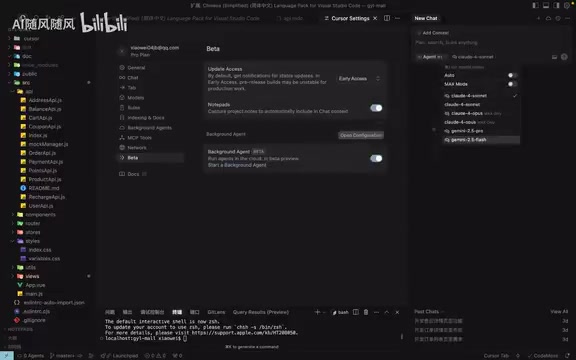
Version Update Settings
In Beta settings, you can select "Early Access" to get the latest versions, but be aware you may receive unstable test builds.
Cursor's Three Conversation Modes Explained
Cursor offers three conversation modes, and understanding their differences is crucial:
Agent Mode (Recommended as Default): The most powerful mode—capable of cross-file code editing, MCP tool invocation, script execution, and automatic error fixing. MCP (Model Context Protocol) is an open protocol standard proposed by Anthropic, similar to a "USB port" for the AI world, allowing AI models to connect in a standardized way to databases, browsers, file systems, and other external tools, dramatically expanding AI programming capabilities. If you're a beginner, just go with Agent mode.
Ask Mode: Pure Q&A mode—AI only answers questions and won't modify any code files. Ideal for learning and understanding code logic.
Manual Mode: Falls between the two—can answer questions and modify the current file, but won't perform cross-file operations.
Agent mode also has two practical options: Auto Run (automatically executes terminal commands) and auto-fix errors. Beginners can enable both; professional developers should disable them and review manually.
Cursor Billing Rules: The Key to Avoiding Pitfalls
This is where beginners most commonly make mistakes. Cursor has two billing modes: Normal Mode and Max Mode:
Normal Mode (Default): 500 fast requests per month with fixed billing—regular conversations consume 1 request, Thinking mode consumes 2 requests. After exhaustion, you're downgraded to a slow queue mode.
Max Mode: Longer context, stronger model capabilities, but variable consumption calculated by Token. To understand this: Tokens are the basic units models use to process text, and longer context inputs combined with larger model parameter scales lead to exponential growth in Token consumption. This explains why in real-world testing, generating roughly 10 files for a module consumed 2 requests in Normal mode but 25 requests in Max mode.
⚠️ Important Reminder: When using Cursor for the first time, make sure Max mode is turned OFF! Many users report "running out of quota after just four conversations"—this is almost certainly because Max mode was accidentally enabled. There's a color-coded toggle in the interface; confirm it's in the off position.
Practical Tips for Efficient AI Programming
Use @ Commands to Precisely Specify Context
When you need to modify a specific page, drag the file directly into the conversation box and tell Cursor exactly what to change. This is far more efficient than letting AI search the codebase on its own.
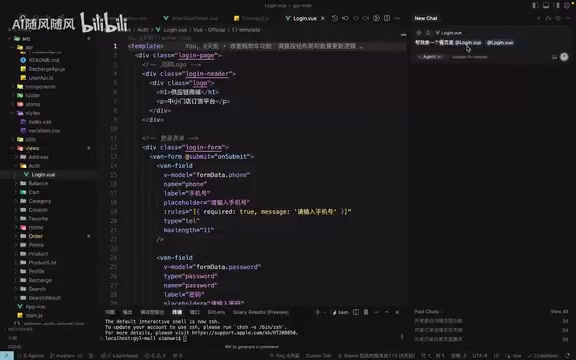
But be careful: don't drag in oversized folders. If the content exceeds the context limit, you'll get a "can't fit" warning, and results will degrade. Precisely specifying 1-2 relevant files is best practice.
The Golden Rules of Requirement Descriptions
A vague description like "make me a login page" will produce results, but they probably won't be what you want. Effective requirement descriptions should include:
- Functional description: What needs to be validated when users click login
- Specific requirements: Input field styles, border colors, pixel sizes
- Exclusions: No dark mode needed, etc.
Also, don't waste Agent mode's capabilities—having it change just one tiny thing per conversation is wasteful. Aim for 2-3 feature points per conversation. Too few wastes request quota; too many exceeds context limits and degrades code quality.
Screenshots are also an effective communication method. Providing reference UI screenshots for AI to emulate typically reproduces about 70% of the desired effect.
Cursor Rules: Making AI Automatically Follow Your Coding Standards
If you find AI repeatedly making the same mistakes (like table widths always being wrong), it's time to use Rules.
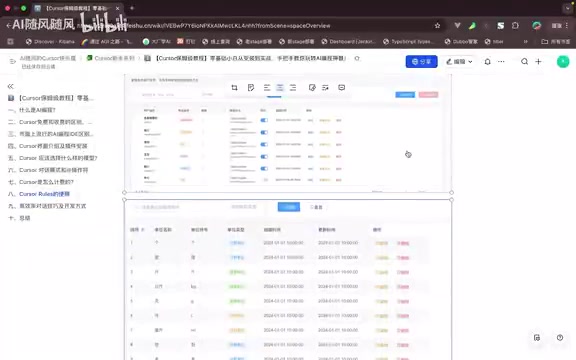
Rules are essentially preset global rules that AI automatically follows when generating code. For example, setting "all el-table tables must be 100% width" means every table generated afterward will automatically meet this requirement—no need to repeat the reminder in every conversation.
This feature extends to code style, naming conventions, tech stack constraints, and more—a powerful tool for boosting development efficiency.
Final Thoughts: Maintain Realistic Expectations
The emotional journey of using Cursor typically goes like this: At first, you'll feel omnipotent, capable of building any software; but soon you'll discover that AI sometimes acts like "someone with amnesia," repeatedly delivering unsatisfactory results no matter how you explain things.
This is completely normal. Simple projects can be fully delegated to AI, but complex projects still require programming fundamentals to manage architecture, component design, and API specifications. Cursor is your programming assistant, not your replacement. As large models continue to evolve, this barrier will keep lowering—but for now, learning to collaborate efficiently with AI is the most important skill.
Key Takeaways
- Cursor supports mainstream models including Claude, Gemini, and DeepSeek with the fastest new model integration, at $20/month with Alipay payment support
- Always disable Max mode to avoid rapid quota depletion: Normal mode consumes 1-2 requests per conversation, while Max mode bills by Token and can consume 25+ requests
- Agent mode is the most powerful conversation mode, supporting cross-file editing, MCP tool invocation, and auto-execution—beginners should use it directly
- Dragging files to specify context, using Rules for presets, and including 2-3 feature points per conversation significantly boost development efficiency
- Windsurf lost users after being banned from Claude models; when choosing tools, monthly payments are recommended to mitigate risks from model licensing changes
Related articles
 Tutorials
Cursor + Codex Dual-IDE Collaboration: A Practical Methodology for Open-Source Project Customization
A complete methodology for open-source project customization based on real-world experience, detailing the Cursor+Codex dual-IDE workflow, seven-stage process, MVP validation, and AI source code reading techniques.
 Tutorials
Cursor Multi-Agent in Practice: Building a Full-Stack Next.js Blog in 50 Minutes
Build a full-stack blog in 50 minutes using Cursor IDE's multi-Agent mode with Next.js, Clerk auth, and Supabase. Learn the 4-phase AI Agent workflow and key integration pitfalls.
 Tutorials
Building an AI Software Factory from Scratch: A Cursor Engineer's Hands-On Experience with Multi-Agent Collaboration
Cursor engineer Eric shares practical insights on building an AI software factory: automation levels, guardrail design, parallel Agent management, and scaling to 1000+ Agents for 24/7 development.