OpenSpec in Practice: Write Specs Before AI Codes, Boost Efficiency by 70%

OpenSpec solves intent alignment in AI programming by having AI write specs before code.
OpenSpec is a lightweight CLI tool whose core philosophy is generating specification documents before AI writes code to align developer intent. It provides a complete Propose→Continue→Apply→Archive workflow, supports DeltaSpec incremental changes (reducing spec output by 70%), and offers complete archiving capabilities. With pure Markdown storage and zero intrusion, it has earned 4.1K Stars and supports over 30 AI coding tools.
Why AI Programming Needs "Specs Before Code"
When using AI coding assistants, the most common pain point isn't that AI can't write code—it's that what it writes doesn't match what you want. Endless revisions and starting over waste all your time on communication and alignment.
This problem is known as "Intent Alignment" in software engineering. All mainstream AI coding assistants—whether GitHub Copilot, Cursor, Windsurf, or Cline—face the same challenge: the requirements in a developer's mind are often vague and implicit, while AI needs explicit instructions to generate accurate code. This information asymmetry leads to extensive "ping-pong" interactions: the developer describes requirements, AI generates code, the developer finds it wrong, revises the description, AI regenerates... This cycle can repeat dozens of times for complex requirements. Research shows that in AI-assisted programming, developers often spend more time on communication and corrections than on actual coding.
OpenSpec is a lightweight CLI tool built to solve exactly this problem. Its core idea is simple: Before AI writes code, have it write specification documents first, align on intent, then proceed. This philosophy aligns with Specification-Driven Development (SDD)—SDD emphasizes completing detailed specification documents before coding, similar to the "write tests before code" approach in Test-Driven Development (TDD). In traditional software engineering, requirements documents and design documents have always been important parts of the development process, but many teams weakened the documentation step in pursuit of speed during the agile development wave. However, with the rise of AI coding assistants, the value of specification documents has been rediscovered: AI needs precise context to generate high-quality code, and specification documents are the most structured context carriers.
OpenSpec has already earned 4.1K Stars, supports over 30 AI coding tools, requires no API Key, stores everything as pure Markdown in your code repository, with zero intrusion.

OpenSpec's Core Workflow
OpenSpec provides a complete command system: Propose → Continue → Apply → Archive, covering the entire process from requirement understanding to archiving.
Propose: Generate Four-Layer Spec Files at Once
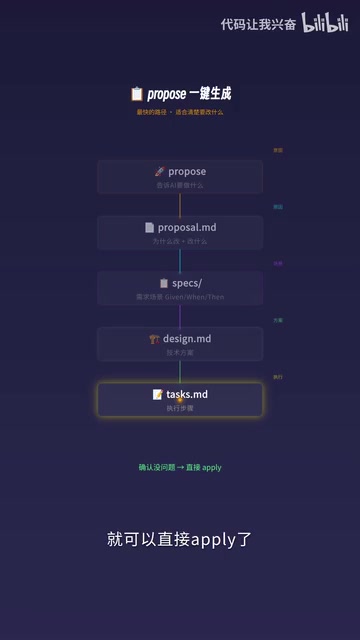
The simplest usage is to run the Propose command directly. You tell AI what you want to do, and it generates 4 files at once, progressively layered:
- Proposal.md: Explains why and what to change (intent layer)
- Specs: Contains requirement scenarios in Devon document format (requirements layer)
- Design.md: Describes the technical approach (design layer)
- Task.md: Lists execution steps (execution layer)
The Devon document format is a structured requirement description format designed specifically for AI coding tools, enabling AI to precisely understand preconditions, operation steps, and expected results in requirement scenarios. It's similar to the Gherkin syntax (Given-When-Then pattern) in Behavior-Driven Development (BDD), but better adapted for AI comprehension. The core value of this format lies in eliminating ambiguity in natural language descriptions, elevating requirements from "humans can understand" to "AI can accurately parse" level.
From intent to execution, everything is aligned. Once confirmed, you can directly Apply—this is the fastest path, suitable for scenarios where you know exactly what to change.
Continue: Step-by-Step Review for Complex Requirements
But complex requirements aren't done once generated—you need to confirm with AI at each step. For example, after Proposal.md is generated, if you find the requirement understanding is off, provide feedback directly; after AI corrects it, proceed to generate Specs; if the scenarios in Specs aren't comprehensive enough, continue supplementing. Confirm each step is correct before moving forward—that's what Continue does.
If you're clear about the requirements, you can use FF (fast-forward) mode to skip intermediate steps and jump directly to Tasks, saving time. Use FF for simple requirements, use Continue for step-by-step review of complex ones—choose flexibly.
Explore: Diagnostic Mode for Vague Ideas
There's another common scenario: you're not sure exactly what code to change, you just have a vague idea, like "performance seems a bit slow." In this case, use Explore mode to let AI freely explore your codebase, helping you analyze architecture, locate bottlenecks, and understand existing designs.

During Explore, you might discover the real problem is completely different from what you thought. Once you've figured it out, start from Propose to formally plan changes. Diagnose first, then prescribe—don't act blindly—this approach is extremely practical in real development.
Two Core Highlights of OpenSpec
Most Specification-Driven Development (SDD) tools rewrite the entire Spec with every change and lack incremental change and complete archiving capabilities. OpenSpec builds both into its core—this is what distinguishes it from similar tools.
DeltaSpec: Write Only Changes, Not the Full Document
Each change doesn't rewrite the entire specification—it only describes changes: edit for additions, modify for modifications, remove for deletions. Like a renovation checklist—you don't redraw the entire building's blueprints, you just write "paint the living room white."
The results are significant: Spec output compressed from 800 lines to 250 lines, 70% shorter than traditional approaches. This not only reduces AI Token consumption but more importantly makes change intent crystal clear, dramatically improving review efficiency.
To understand the significance of this optimization, you need to understand the Token mechanism of Large Language Models (LLMs). Tokens are the basic units LLMs use to process text—every interaction with AI consumes Tokens for both input prompts and generated output. While current mainstream models like GPT-4o and Claude have expanded context windows to 128K or even larger, Token consumption directly impacts response speed and API costs. More critically, models processing extremely long texts tend to suffer from "attention dilution"—overlooking key information in massive contexts. DeltaSpec, by transmitting only the changed portions, both reduces costs and helps AI focus more on the content that actually needs attention.
Complete Archiving: Full Traceability
During Apply, the source Spec and DeltaSpec are automatically merged into the latest version, keeping the Spec always up to date. Archive then packages and preserves the entire change process:
- Proposal records why the change was made
- Design records how to make the change
- Task records the order of changes
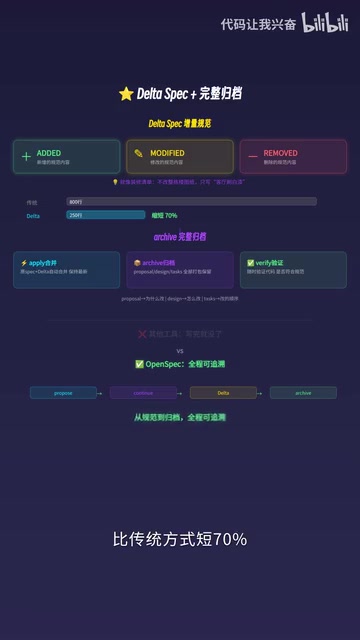
Combined with the Verify command, you can validate code against specs at any time. The complete decision-making process is always accessible and fully traceable. This is enormously valuable for team collaboration and long-term maintenance—three months later, you can clearly understand why a particular decision was made.
Practical Example: Adding Dark Mode to a Project
Let's look at a complete workflow example. Suppose you want to add dark mode to your project:
- Propose: Tell AI "add dark mode support," generating a Proposal that clarifies the scope of changes—primarily involving the color system, theme switching logic, and user preference storage
- Continue: Confirm each layer of specs step by step, ensuring complete scenario coverage
- Apply: Execute according to the checklist, source Spec and DeltaSpec merge automatically, Spec always shows the latest state
- Archive: Package Proposal, Design, and Task all together for archiving, with the complete decision process accessible anytime
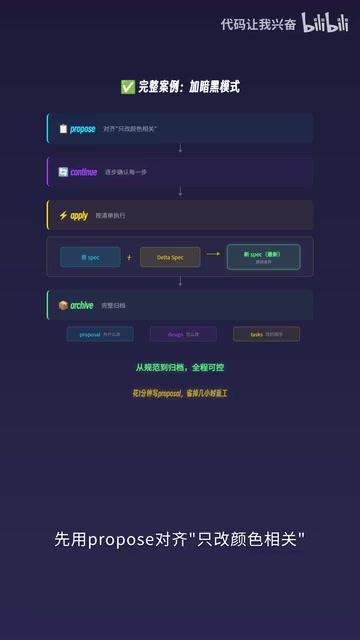
Spend one minute writing a Proposal, save hours of rework. That's the core value of specification-driven development.
Use Cases and Recommendations
OpenSpec isn't needed for every scenario. Here are some usage recommendations:
- Simple bug fixes: Just let AI fix it directly, no need for the full workflow
- Medium feature development: Use Propose + FF fast-forward mode for quick alignment then execution
- Complex architectural changes: Use Explore to diagnose first, then Propose + Continue for step-by-step review
- Team collaboration projects: Archive capability is particularly valuable, making decision processes transparent and traceable
Interestingly, OpenSpec is a pure Markdown solution stored in your code repository, with no dependency on external services. Choosing Markdown as the storage format for specification documents is no accident—Markdown is a lightweight markup language natively supported for rendering by virtually all code editors, Git platforms (GitHub, GitLab, etc.), and documentation tools. Storing specification documents as Markdown in a code repository means they benefit from all version control capabilities Git provides: branching, merging, diff comparison, Pull Request reviews, and more. This "Docs as Code" philosophy has been widely adopted in the DevOps field, and OpenSpec extends it to specification management for AI programming. Specification documents are managed and reviewed alongside code, naturally integrating into existing development workflows.
Summary
OpenSpec represents an important evolutionary direction in the AI programming toolchain: Not making AI write code faster, but making AI understand what you want more accurately. DeltaSpec's incremental changes and Archive's complete archiving solve two long-standing pain points in specification-driven development. For developers who frequently use AI coding assistants, it's worth taking the time to learn and try.
Next time before using AI to write code, try running Propose first and experience the development rhythm of "align intent before taking action."
Related articles
 Tutorials
Cursor + Codex Dual-IDE Collaboration: A Practical Methodology for Open-Source Project Customization
A complete methodology for open-source project customization based on real-world experience, detailing the Cursor+Codex dual-IDE workflow, seven-stage process, MVP validation, and AI source code reading techniques.
 Tutorials
Cursor Multi-Agent in Practice: Building a Full-Stack Next.js Blog in 50 Minutes
Build a full-stack blog in 50 minutes using Cursor IDE's multi-Agent mode with Next.js, Clerk auth, and Supabase. Learn the 4-phase AI Agent workflow and key integration pitfalls.
 Tutorials
Building an AI Software Factory from Scratch: A Cursor Engineer's Hands-On Experience with Multi-Agent Collaboration
Cursor engineer Eric shares practical insights on building an AI software factory: automation levels, guardrail design, parallel Agent management, and scaling to 1000+ Agents for 24/7 development.