SparkWinShape Tutorial: A Detailed Guide to Windsurf Unlimited Multi-Instance Account Switching Tool
A comprehensive guide to SparkWinShape, a tool for Windsurf multi-instance launching and automatic account switching.
SparkWinShape is a third-party tool that enables unlimited multi-instance launching and automatic account switching for the Windsurf AI code editor. It uses a passive probe mechanism to detect quota exhaustion and seamlessly switch accounts, along with device code reset and process isolation for multi-instance management. While technically capable, the tool carries significant compliance, security, and legal risks.
Overview
Recently, a third-party tool called "SparkWinShape" (星火WinShape) has attracted widespread attention in the developer community. This tool enables unlimited multi-instance launching and automatic account switching for the Windsurf editor, allowing users to seamlessly switch to a new account when their Claude quota is exhausted, thereby achieving continuous usage. This article provides a detailed breakdown of SparkWinShape's core features and complete usage workflow, along with an objective analysis of its compliance implications.
Windsurf Editor Background
Windsurf is an AI-powered code editor developed by Codeium, deeply customized on top of the VS Code architecture, with integrated AI code completion and conversational programming capabilities. It has built-in support for calling large language models such as Claude (developed by Anthropic), enabling users to generate and modify code through natural language descriptions. Windsurf uses a credits/quota-based billing model — free users receive a certain amount of AI call quota per month, and must pay or wait for the next monthly reset once it's exceeded. This limitation mechanism is precisely the core pain point that third-party tools like SparkWinShape attempt to circumvent.
SparkWinShape Core Feature Analysis
Automatic Account Switching Mechanism
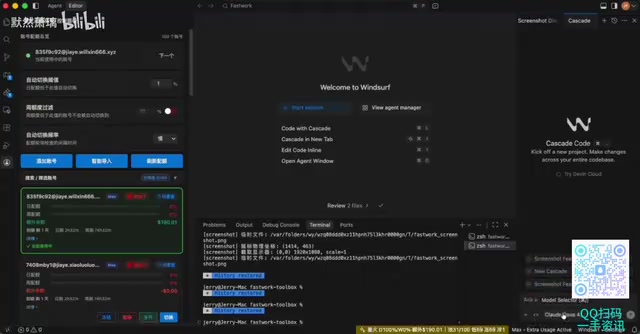
SparkWinShape's most critical feature is passive automatic account switching. Unlike actively querying account balances, the tool employs a unique "probe" mechanism — when it detects that the current account's quota is exhausted or rate-limiting has been triggered, the system automatically switches to the next available account.
The so-called "probe" mechanism is essentially a passive state monitoring technique. Unlike active polling, passive probes typically determine account status by intercepting API responses. When Windsurf sends a request to the backend, if the returned HTTP status code is 429 (Too Many Requests) or a specific error message (such as insufficient quota), the probe captures these signals and triggers the switching logic. The advantage of this design is that it doesn't generate additional API request overhead and is less likely to be detected by the platform's anomaly detection systems, since it merely "listens" to response results during the normal usage flow.
The specific workflow is as follows:
- Users pre-import multiple Windsurf accounts
- The tool monitors the current account status in real-time via probes
- When zero quota or rate-limiting is detected, switching is automatically triggered
- Switching speed can be set to "ultra-fast," "normal," or "slow"
- During switching, the device code is automatically reset to avoid platform identification
The device code (Device ID/Machine ID) is fingerprint information used by software to identify a unique device, typically generated from a combination of hardware serial numbers, MAC addresses, operating system UUIDs, and other factors. SaaS tools like Windsurf bind device codes to accounts to detect abnormal behavior on the same device (such as frequent account switching). Device code reset implementation typically involves modifying locally stored identification files, clearing registry entries, or simulating different hardware environments through virtualization technology. This prevents the platform from correlating the usage behavior of multiple accounts to the same physical device.
Windsurf Multi-Instance Cloning Feature
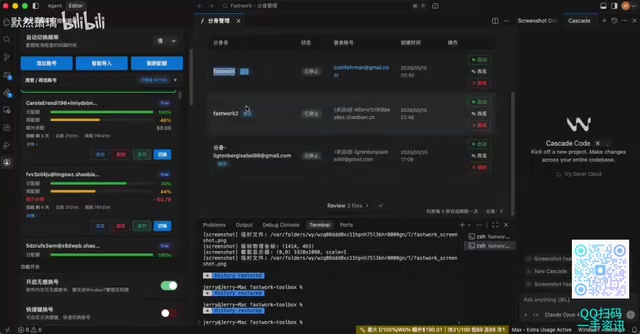
The tool supports binding different accounts to different "clone" instances, enabling multi-process parallel work:
- Assign independent accounts and processes to each project
- Run multiple Windsurf instances simultaneously without interference
- Manage the running status of all clones from a unified software interface
- Suitable for team multi-project management or individual multi-tasking scenarios
The technical implementation of multi-instance cloning typically relies on process isolation and file system virtualization. Each Windsurf instance requires an independent User Data Directory, independent configuration file paths, and independent network sessions. On Windows systems, this can be achieved by creating independent AppData copies for each instance, similar to Chrome browser's multi-Profile mechanism. Each clone instance has independent Cookies, Tokens, and device fingerprints, appearing from the platform's perspective as completely different users operating on different devices.
Auxiliary Features Overview
In addition to the core account switching and multi-instance features, SparkWinShape also provides the following practical capabilities:
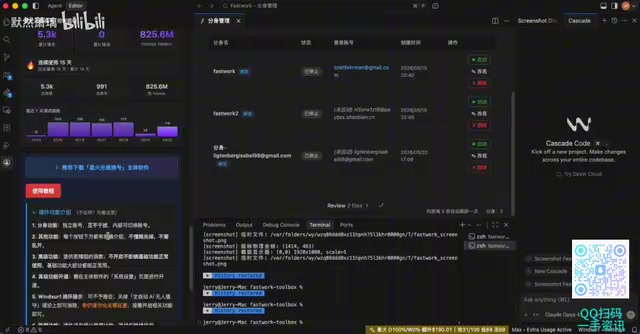
- Auto-accumulate on rate limit: Automatically sends accumulation requests when rate-limiting occurs
- Credits claiming: One-click credit quota claiming for eligible accounts
- Device code reset: Resolves rate-limiting issues, typically executed automatically during account switching
- Auto-continue patch: Once applied, automatically handles conversation interruption issues
- Usage statistics: View detailed data on quota consumption, models used, etc. for each account
- Minimal mode: Collapses detailed information on account cards to simplify the interface
SparkWinShape Usage Tutorial
Basic Setup Steps
- Open the SparkWinShape main interface
- Check available accounts and click "Credits Claim" to claim credits
- Filter accounts with remaining quota (e.g., accounts with $190 in quota as shown in the demo)
- Set switching speed (normal or slow is recommended for better stability)
- Enable "Auto-accumulate on rate limit" and "Auto-switch on trigger" features
Multi-Instance Configuration Method
- Select the accounts to use (exclude accounts with outstanding balances)
- Click the green button to launch multi-instance processes
- Manage each clone instance in the process list
- Each clone binds to a different account and runs independently
Plugin and Software Combined Usage
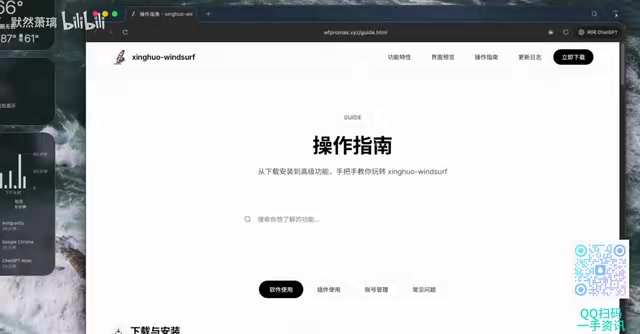
According to official documentation, SparkWinShape's plugin and software can be used independently or in combination. Using the plugin alone enables basic account switching functionality, while combining it with the software provides a more complete multi-instance management experience. The current latest version is 8.4.4.
Risk and Compliance Analysis
Potential Risks of Using This Tool
While SparkWinShape does address the pain point of Windsurf's quota limitations from a functional standpoint, using such tools carries the following obvious risks:
- Terms of Service violations: Multi-account usage and automatic account switching almost certainly violate the user agreements of both Windsurf and Anthropic
- Account security concerns: Entrusting multiple account credentials to a third-party tool poses credential leakage risks
- Account ban risk: The platform may identify bulk usage behavior through behavioral pattern recognition, resulting in all associated accounts being banned
- Legal risk: Circumventing payment restrictions may implicate computer fraud-related regulations
The Pricing Dilemma of AI Coding Tools
The emergence of such tools has deep-rooted industry causes. The current AI coding tools market faces a structural contradiction: the inference cost of large language models remains relatively high (taking Claude 3.5 Sonnet as an example, API call costs are approximately $3 per million input tokens and $15 per million output tokens), while developers use AI-assisted programming at extremely high frequencies — an active developer may generate dozens or even hundreds of AI interactions per day. This forces platforms to set quota limits to control costs, but this conflicts with developers' need for a smooth workflow experience. Products like GitHub Copilot, Cursor, and Windsurf are all exploring how to find a balance between user experience and commercial sustainability.
A Rational Perspective
The emergence of such tools reflects the developer community's dissatisfaction with AI coding tool pricing and quota restrictions. From a user needs perspective, developers genuinely need more flexible usage options. However, in the long run, obtaining sufficient quota through legitimate channels (such as purchasing team or enterprise plans) is the sustainable and secure choice. As model inference costs continue to decline and competition intensifies, pricing strategies across platforms are constantly adjusting, and quota restrictions may gradually be relaxed in the future.
Conclusion
As a third-party management tool targeting Windsurf, SparkWinShape demonstrates strong engineering capabilities in its technical implementation — passive probe detection, automatic device code reset, and multi-process management are all relatively mature feature designs. However, its essence is circumventing platform restrictions through multi-account rotation, and users need to fully recognize the compliance risks and security concerns involved. Developers are advised to prioritize Windsurf's official paid plans after evaluating their own needs.
Key Takeaways
Related articles
OpenAI Codex Cloud Task Delegation: The Complete Workflow from VS Code to PR
A detailed guide to OpenAI Codex extension's cloud task delegation, covering the complete workflow from initiating cloud coding tasks in VS Code to reviewing changes and creating Pull Requests.
Coze Workflow in Practice: Complete Tutorial for AI One-Click Product Promo Video Generation
Step-by-step guide to building a Coze workflow for AI product promo videos, integrating HappyHours and Jimeng across 12 nodes with nine-grid storyboards and polling loops.
Getting Started with Claude Code: 5 Key Differences from Traditional AI Chatbots
Explore 5 key differences between Claude Code and traditional AI chatbots like ChatGPT, covering interaction, context, execution, memory, and tool integration.