The Complete Guide to Codex Super Agent: From Installation to Multi-Task Parallel Execution
A comprehensive guide to mastering OpenAI Codex as a super Agent for multi-task automation.
This guide breaks down OpenAI's Codex desktop application — a super Agent that goes beyond chat to read/write local files, connect external tools via Plugins, standardize workflows with Skills, and run multiple tasks in parallel. From installation and Agent.md configuration to real-world demos like Gmail automation, iOS app development from a design mockup, and video generation, it covers everything needed to get started.
OpenAI's Codex desktop application is redefining how we use AI. It's no longer just a "you ask, I answer" chat tool — it's a super Agent that can directly read and write local files, connect to Gmail, control browsers, and run multiple complex tasks in parallel. This article provides a comprehensive breakdown of Codex, from installation and configuration to core features and hands-on project walkthroughs.
How Codex Fundamentally Differs from Traditional AI Tools
Before diving into features, it's important to understand a fundamental difference: the ChatGPT, Gemini, or Claude web interfaces you currently use are essentially AI giving you suggestions — you ask, it answers, and the rest is still up to you.
Codex is entirely different. It's installed on your computer and can directly read and write local files, connect to tools like Gmail, Calendar, and Canva, and run multiple tasks simultaneously without you needing to babysit it. Most importantly, you don't need any programming background — you just need to describe what you want.
Put simply: ChatGPT gives advice; Codex delivers results.
There's a key concept to understand here: Agent. Agents represent one of the most critical directions in AI development today. Unlike traditional conversational AI, an Agent has the ability to autonomously plan, invoke tools, and execute tasks. An Agent can break down complex goals into multiple sub-steps, call different tools sequentially or in parallel, and dynamically adjust its strategy based on intermediate results. Leading companies like OpenAI, Google, and Anthropic are all heavily investing in Agent ecosystems, and the industry widely regards Agents as the key leap from "AI assistant" to "AI employee." Codex is the desktop implementation of this vision.
Download, Installation & Interface Walkthrough
Installation and Login
Search for "Codex" on Google and open the official website. The system will automatically detect your operating system and provide the corresponding download link. After installation, Codex offers two login methods:
- ChatGPT account login (recommended to try first)
- OpenAI API Key login (also supports third-party proxy APIs for calling other large models)
Backend Interface Layout
The post-login interface is divided into three core areas:
- Left side: Feature menu, conversation list, settings button (where you can check your quota)
- Center: The main workspace for interacting with Codex — the core interface for directing the Agent
- Right side: Preview area that displays the Agent's work output in real time
Several key features in the dialog box are worth noting: the plus icon on the left lets you add images or documents for the Agent to process; Plan Mode is ideal for conducting extensive research and planning when starting a new project; the bottom-right corner lets you select the GPT model version (e.g., GPT-5.5), processing speed (standard/1.5x fast), and intelligence level (recommended: "High" or "Ultra High").

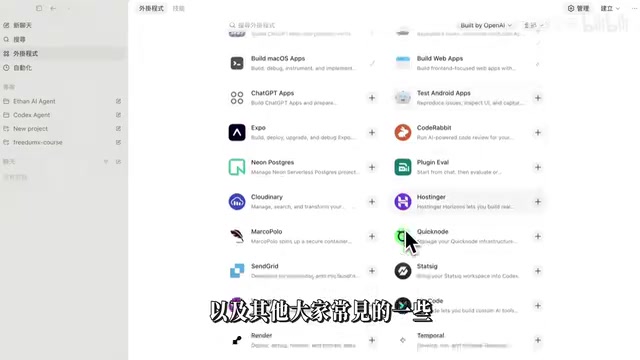
Plugins: Codex's Secret Weapon
This is a unique feature that sets Codex apart from competitors like Claude Code. Plugins don't define specific work steps — instead, they connect external tools and software, dramatically expanding Codex's capabilities. Think of Plugins as the Agent's "sensory extensions" — each Plugin you connect gives the Agent a new way to interact with the outside world.
The Existing Plugin Ecosystem
Codex currently offers Plugins across multiple domains:
- System Control: Computer Use (control your computer), Browser Use (control your browser)
- Office Tools: Spreadsheets (Excel), Presentation (slides)
- Development & Deployment: Vercel (website deployment), GitHub, database tools
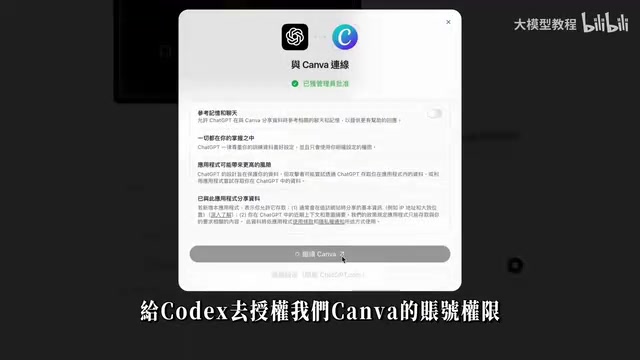
- Design Tools: Canva, Figma
- Google Suite: Gmail, Google Calendar, Google Drive
- App Development: Build iOS App, Build Web App, Build MacOS App
Vercel deserves special mention — it's one of the world's most popular frontend deployment platforms, founded by the creator of the Next.js framework. It supports one-click web application deployment and automatically handles domain binding, CDN acceleration, SSL certificates, and other DevOps details. For non-technical users, Vercel's value lies in drastically simplifying the complex process of turning code into an accessible website. With the Vercel Plugin integrated into Codex, users only need to describe the website functionality they want, and the Agent automatically handles everything from code writing to live deployment — truly achieving "describe it and it goes live."
Plugin in Action: Gmail Business Inquiry Organization
Here's a practical example demonstrating Plugin power. Enter the prompt: "What advertising and business collaboration invitations have I received in my Gmail recently?" Codex will automatically search emails within the specified time range, extract business inquiry information, organize it into a structured summary report, and provide links to the original emails. If you're interested in any of them, you can even have the AI reply on your behalf.
Skill System: Standardizing Your Work Output
The difference between Skills and Plugins is this: a Skill defines an entire complex, standardized workflow (SOP) as a reusable capability, ensuring consistent quality and standards in every output. If Plugins solve the "can it be done" problem, Skills solve the "is it done well and consistently" problem.
Pre-built Skills
Codex comes with several practical built-in Skills: PDF generation, Doc document generation, Playwright browser automation, image generation, iOS App development, Android development, and even thinking model Skills like the Feynman Thinking Framework.
Regarding the Feynman Thinking Framework: it originates from the learning methodology proposed by Nobel Prize-winning physicist Richard Feynman. The core idea is "if you can't explain a concept in simple language, you don't truly understand it." The method involves four steps: choose a concept, try to teach it to someone in simple language, identify gaps in your understanding, and go back to learn and simplify. After Codex packages this into a Skill, users can have the AI break down and explain any complex topic using the Feynman framework, automatically generating accessible learning materials — perfect for content creators producing educational content.
Creating Custom Skills
Creating a Skill is straightforward — just tell Codex what you need. For example:
"Create a Skill for me that generates Instagram copy. Requirements: Traditional Chinese, conversational tone, each post limited to 150 characters, must end with a call to action. Use Skill Creator to create this file."
Codex will automatically generate a Skill Markdown document and save it to the project folder. The reason Markdown format is used is that Markdown is a lightweight markup language that uses simple symbols (like # for headings, * for bold) to format text, and is widely used in technical documentation and knowledge bases. It's both easy for humans to read and edit and can be precisely parsed by AI — this "bidirectionally readable by humans and machines" characteristic makes it the ideal format for AI workflow configuration.
Afterward, typing /IG文案 in the dialog box generates content following the standardized SOP. In testing, the post titles and accompanying images (generated via ChatGPT Image) produced after invoking the IG Skill were quite impressive, and could be further imported into Canva for editing.
Project Management & Agent.md: The AI Employee's Onboarding Manual
Creating a Project
The first step in using Codex is creating a dedicated project. Different types of work should have separate project folders to keep context clear.
The Critical Role of Agent.md
Agent.md is the key to Codex's overall work quality. It serves as the AI employee's onboarding manual, placed in the project root directory. Codex reads this file before starting any work.
A good Agent.md should include:
- Who you are: Channel positioning, content series, audience profile
- Output requirements: Language, format, writing style (e.g., "direct, punchy, no fluff")
- Work principles: List a plan before executing, report which files were generated after completion
- Directory conventions: Root directory agreements, naming conventions
Creating one is simple: feed Codex your accumulated prompts and related files, and let it automatically generate the Agent.md. You can also set up automated tasks to review work history daily and optimize this document.
The design philosophy behind Agent.md aligns with the software engineering concept of "Configuration as Code" — solidifying work standards that would otherwise be communicated verbally or recorded haphazardly into a structured, version-manageable document. As you continuously refine this file, the Agent's work quality keeps improving, creating a positive feedback loop.
Fork Chat Branching
When you need to handle different tasks in parallel from the same context, use the Fork Chat feature. Click the dialog box and select "Fork to local" to generate two conversation windows that share historical context but develop independently going forward, preventing context pollution from multi-task mixing.
Context Pollution is a common issue in AI applications. Large language models rely on conversation history (the context window) to understand current intent. When multiple unrelated tasks are mixed into the same conversation, the model may incorrectly apply information from Task A to Task B, degrading output quality or even producing errors. For example, if you first ask the AI to write marketing copy and then technical documentation in the same conversation, the AI might unconsciously carry the exaggerated marketing tone into the technical document. The Fork Chat feature solves this problem at the architectural level by creating independent conversation branches.
Advanced Practice: Video Generation & App Development
Connecting Video Generation via CLI
Codex can connect to external video generation tools via CLI. CLI stands for Command Line Interface, a way of interacting with software through text commands, as opposed to clicking in a graphical user interface (GUI). Many professional tools (such as video generation engines and deployment platforms) offer CLI versions that allow other programs to invoke their functionality via command line. Codex leverages the CLI mechanism to "chain" external tools into its workflow for automated invocation, so users don't need to manually operate these tools' interfaces.
For example, after connecting to Jimeng or LibTV's CLI, you only need to provide a storyboard frame and a prompt to automatically generate video clips and stitch them into a complete production.

An important note: the Agent itself has no concept of credit conservation and will launch many tasks in parallel, consuming credits quickly. This is because when executing complex tasks, the Agent autonomously breaks down steps, and each step may call an external API. Video generation APIs typically charge per call at relatively high unit prices. It's recommended to write dedicated Skills to control consumption (e.g., limiting the maximum number of video clips per task) or use cheaper third-party APIs.
Developing an iOS App from a Single Design Mockup
This is one of Codex's most impressive capabilities. Provide a design sketch of a music player along with the prompt "Reference the design style in the screenshot and generate a similar iOS music player app for me," and Codex will:
- Outline the development plan and confirm with you
- Complete feature development and generate preview images
- Invoke the Xcode simulator to deploy a preview environment
- Provide a testable App experience
In testing, the generated music player not only played and skipped tracks normally but also implemented a dopamine-color-style effect that changed with each song, faithfully reproducing the visual style of the design mockup. The technical chain behind this is quite complex — from visual recognition of the design mockup, SwiftUI code generation, and audio playback logic implementation to Xcode project configuration. In a traditional development workflow, this would require at least one UI designer and one iOS developer collaborating for several days, yet Codex compressed the entire process to a matter of minutes.
Multi-Task Parallelism: A True Efficiency Revolution
Codex's most powerful capability is multi-task parallel processing. You can have the Agent execute tasks simultaneously across different project folders and multiple conversation windows within the same project: Instagram copy, YouTube scripts, social media graphics, calendar weekly reports, short video production, web application development… all running in the background in parallel.
Previously, handling any single task might take two to three hours, but the Agent can compress all tasks into twenty to thirty minutes of simultaneous completion. You just need to grab a cup of coffee, and everything will be ready when you return.
The essence of this parallel capability lies in Codex's architectural design — each conversation window is backed by an independent Agent instance with its own context and execution environment. They share resources in the project folder (such as Agent.md and Skill files), but their execution processes don't interfere with each other. This represents a fundamental departure from traditional single-threaded conversational AI and is the core reason Codex is called a "super Agent" rather than a "super chatbot."
Three Steps to Get Started Today
- Install Codex today: Search for Codex App and download the version for your operating system
- Create your first Project and Agent.md: Tell Codex who you are, what you do, your output requirements, and your work habits
- Create your first Skill: Think about the most repetitive, time-consuming task in your week, clearly define the requirements, and let Codex automate it
You don't need to complete all three at once, but every step forward puts you ahead of those still manually copying and pasting.
Key Takeaways
Related articles

AI Large Model Learning Roadmap Breakdown: Three Stages from Application Development to Model Fine-Tuning
Deep breakdown of a popular AI large model learning roadmap covering LangChain, RAG, Agent, and LoRA fine-tuning across three stages, with analysis of its strengths and limitations for career changers.

AI Agent Development: A Complete 6-Week Systematic Learning Roadmap
A 6-week systematic learning roadmap for AI Agent development, covering core architecture, ReAct principles, multi-agent collaboration, RAG integration, and deployment.
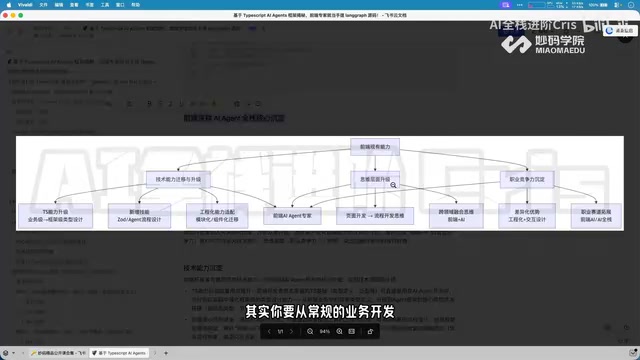
Four Core Advantages Frontend Developers Have When Transitioning to AI Agent Development
Frontend developers have key advantages for AI Agent development: TypeScript ecosystem fit, low-barrier full-stack bridging, and state management isomorphism. Learn the transition path here.