What Is Cursor? Core Advantages and Complete Usage Guide for the AI-Native Programming Tool
What Is Cursor? Core Advantages and Co…
A comprehensive guide to Cursor, the AI-native IDE built on VS Code that revolutionizes programming with intelligent code generation.
Cursor is an AI-native IDE built on a deeply modified VS Code that integrates top LLMs like Claude and DeepSeek directly into its core architecture. Unlike traditional IDEs with AI plugins, Cursor offers intelligent code generation, deep context awareness via RAG technology, and multi-model support. This guide covers its four core features, compares it with traditional IDEs across six dimensions, and analyzes who benefits most from using it.
What Is Cursor?
Cursor is an AI-native programming tool built on a deeply modified version of VS Code. It's not simply VS Code with an AI plugin bolted on—it was designed from the ground up for AI-powered programming. In simple terms, Cursor is an intelligent IDE that can write code and teach you how to program.
From a technical implementation perspective, while Cursor forked VS Code's open-source code (VS Code is open-sourced under the MIT license), it has deeply modified the editor's core. Traditional IDEs provide plugin extensibility through Extension APIs, where AI features run as plugins in a sandboxed environment with limited access to the editor's internals. Cursor's AI module, however, can directly access the AST (Abstract Syntax Tree), LSP (Language Server Protocol) data streams, and file system indexes, enabling deeper code comprehension and generation capabilities. This is the fundamental difference between "AI-native" and "AI plugin" approaches.
Similar to Trae (a domestic Chinese AI programming tool by ByteDance), Cursor has built-in access to the world's top large language models, including DeepSeek (free) and Claude 3.5/3.7/4.0 (paid)—currently among the most capable models for programming. The reason these LLMs can generate high-quality code is that they were pre-trained on massive open-source code repositories (such as billions of lines of code on GitHub), learning programming language syntax rules, design patterns, and common business logic. When users input natural language descriptions, the model maps natural language intent to code space through the Attention Mechanism, generating code that is both syntactically and logically correct. Users can interact with the AI using natural language, having it assist with the entire workflow—code writing, debugging, error detection, refactoring, and more.
Cursor's Four Core Features
AI-Native Design
Cursor's biggest differentiator is its "AI-native" philosophy. Unlike IDEs that integrate AI capabilities through plugins after the fact, Cursor embedded AI into its foundational architecture from day one. This means AI isn't an add-on feature—it's the core driving force behind the entire development experience.
AI-Native is a software design philosophy that means designing from the lowest level of product architecture around AI capabilities. For Cursor specifically, this means its file indexing system, code parsing engine, and editor interaction layer are all specially optimized for AI inference. For example, when you open a project, Cursor automatically builds a semantic index of the project in the background, analyzing inter-file dependencies. This information is available for the AI module to call at any time, without requiring users to manually specify context.
Intelligent Code Generation
Traditional IDE code generation relies on preset templates and code snippets, while Cursor can generate complete business logic code from natural language descriptions. For example, you simply say "write me a login endpoint," and it understands the requirement and outputs well-structured code.
The technical principle behind this: models like Claude have seen massive amounts of login functionality implementation code during training. They can synthesize this knowledge and generate code that matches the style of your project's current tech stack (whether it's Node.js + Express or Python + FastAPI). More importantly, Cursor provides your project's existing database models, middleware configurations, and other information as context to the model, ensuring the generated code integrates directly into your existing project rather than existing in isolation.
Context Awareness
A common bottleneck with current large language models is context understanding—when conversations get too long, they tend to "forget" earlier information. Cursor has made targeted optimizations in this area, understanding the project's overall structure and relationships between variables, providing real-time suggestions that align with the project context during coding.
From a technical perspective, Cursor uses RAG (Retrieval-Augmented Generation) technology to overcome the limitations of model context windows. The context window refers to the maximum number of tokens a model can process in a single pass (e.g., Claude 3.5 supports 200K tokens), which directly determines how much code the AI can "see." Cursor builds a vector index of the entire project (converting code into high-dimensional vectors for storage). When users ask questions or request code generation, the system first retrieves the most relevant code snippets through semantic similarity and injects them into the prompt, giving the model the most critical project information within its limited context window. Additionally, Cursor uses code graph analysis technology to trace function call chains and dependency relationships, ensuring generated code is consistent with the project's overall architecture.
Multi-Model Support
Cursor supports free switching between multiple top-tier AI models, including the Claude series, Google's models, and more. Users can choose the most suitable model for different task scenarios, offering extremely high flexibility.
The practical significance of this multi-model strategy is that different models excel at different tasks. For example, the Claude series excels in code reasoning and long-context understanding (thanks to Anthropic's specialized optimization in code reasoning and instruction following), while DeepSeek has advantages in Chinese language understanding and cost-effectiveness. Developers can choose Claude 4.0 for maximum reasoning capability when writing complex algorithms, and switch to the free DeepSeek for simple code formatting tasks to save quota.
Cursor vs Traditional IDEs: A Six-Dimension Comparison
Code Completion Capability
Traditional IDE code completion is based on syntax analysis, only suggesting function names or variable names you've used before. Cursor can "predict" what you're going to do next, performing intelligent completion based on understanding your coding intent—the two are on completely different levels of intelligence.
Code completion technology has gone through three generations of evolution: the first generation was based on word frequency statistics and syntax rules (like early IntelliSense), only completing declared variables and method names; the second generation was based on machine learning models (like early versions of TabNine), predicting the next token based on code patterns; the third generation uses large language models for semantic-level completion, understanding the developer's coding intent and predicting the next several lines or even dozens of lines of code logic. Cursor belongs to the third generation—its Tab completion feature not only predicts the current line but anticipates the developer's next intended action. For example, if you just finished writing parameter validation for a function, it can predict you're about to write the business logic portion and directly offer suggestions.
Problem Solving and Error Handling
In traditional development, when encountering errors, programmers need to rely on search engines and documentation to troubleshoot. Cursor's built-in AI assistant can directly analyze error messages, combining code context to provide fix suggestions and detailed explanations. This is especially friendly for beginners—experienced programmers rely on accumulated experience to quickly locate problems, while Cursor gives beginners similar problem-solving capabilities.
Specifically, when code throws an error, Cursor not only interprets the Stack Trace but also analyzes the root cause by combining it with your code logic. For example, with a "TypeError: Cannot read property of undefined" error, the traditional approach requires you to step through and check which variable is undefined, while Cursor can directly pinpoint which data flow path caused the null value propagation and provide a defensive programming fix.
Code Refactoring and Optimization
Code refactoring has always been work that heavily depends on developer experience. Junior programmers write junior-level code; only senior programmers can write elegant code. But with Cursor, junior programmers only need to describe their optimization requirements, and the AI can provide refactoring solutions based on best practices. It's like giving every developer an experienced "code mentor."
Code refactoring best practices include: SOLID principles (Single Responsibility, Open-Closed, and other object-oriented design principles), the DRY principle (Don't Repeat Yourself—eliminating duplicate code), and appropriate application of design patterns. This knowledge typically takes developers years of practice to internalize, but AI models have already learned these patterns from massive amounts of high-quality open-source projects during training. When you ask Cursor to refactor a piece of code, it might suggest splitting a bloated function into multiple small functions with single responsibilities, or abstracting repeated logic into reusable utility classes.
Development Efficiency and Learning Curve
Traditional IDEs require memorizing numerous keyboard shortcuts and feature locations, creating a steep learning curve. Cursor dramatically lowers the barrier to entry through natural language interaction—you don't need to remember complex operation paths, just describe what you want to do in plain language.
This shift in interaction paradigm is profoundly significant. The traditional IDE learning path is: memorize shortcuts → familiarize with menu structure → master configuration file syntax → learn debugging tool usage. Cursor simplifies all of this into conversational interaction: you can say "help me configure ESLint rules," "run tests and explain why they failed," or "rewrite this component from a class component to a function component." This "intent-driven" development approach lets developers focus their cognitive resources on business logic itself, rather than tool operations.
Domestic vs International AI Programming Tool Ecosystem
The AI programming tool landscape currently features competition between Chinese and international players:
- International representatives: Cursor (the subject of this article), currently leading in feature integration and intelligence level
- Chinese representatives: ByteDance's Trae, Alibaba's Tongyi Lingma, and others
The AI programming tool space has heated up rapidly since GitHub Copilot's release in 2022. The global market has formed several camps: the Microsoft ecosystem (GitHub Copilot, based on OpenAI models, with the largest user base), independent startups (Cursor, developed by Anysphere, valued at over several billion dollars in 2024 with remarkable growth), and self-developed products from major tech companies. In the Chinese market, ByteDance's Trae focuses on a free strategy and domestic network friendliness (no VPN required), Alibaba's Tongyi Lingma deeply integrates with the Alibaba Cloud ecosystem, and Baidu's Comate is tied to the ERNIE model. The core competitiveness in this space comes down to three dimensions: the upper limit of model programming capability, the depth of context understanding, and the degree of integration with development workflows.
While domestic tools are also iterating rapidly, Cursor still maintains a certain lead in overall intelligence level, which is why it's worth studying in depth.
Who Should Use Cursor?
Cursor's target audience is extremely broad:
- Senior developers: Delegate repetitive simple code to AI generation, focusing on architecture design and core logic to dramatically boost development efficiency
- Junior programmers: Leverage AI assistance to rapidly improve code quality, learning best practices by comparing AI-generated code with their own
- Complete beginners with zero programming experience: By describing requirements in natural language, they can have Cursor generate runnable code
It's worth emphasizing that Cursor isn't meant to replace programmers—it serves as a powerful "programming assistant." Users still need to understand business requirements and possess basic code reading ability to effectively leverage this tool. This is similar to how calculators haven't replaced mathematicians—tools amplify human capabilities, but judgment, creativity, and systems thinking remain irreplaceable core competencies of human developers.
Conclusion
Cursor represents a paradigm shift in programming tools from "assisted editing" to "intelligent collaboration." Its core value lies not only in increasing coding speed but also in leveling the capability gap between developers of different experience levels. For any programmer looking to boost development efficiency, mastering AI programming tools like Cursor is no longer optional—it's essential.
From a broader perspective, the proliferation of AI programming tools is reshaping the talent structure and work methods of the entire software development industry. Future developers may no longer be measured by "how many languages they can write" but rather by "how efficiently they can transform business requirements into reliable software systems." In this transition, developers who master AI programming tools earlier will be better positioned to gain advantages in the new competitive landscape.
Related articles
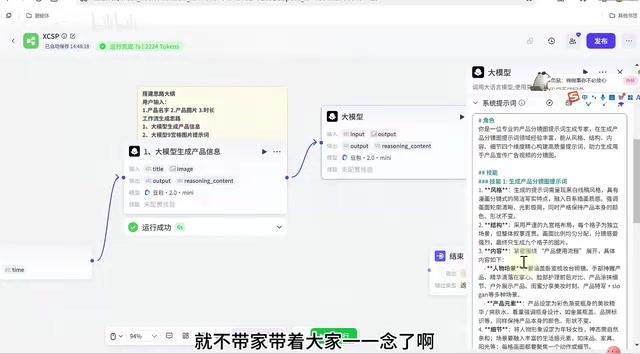
Coze Workflow in Practice: Complete Tutorial for AI One-Click Product Promo Video Generation
Step-by-step guide to building a Coze workflow for AI product promo videos, integrating HappyHours and Jimeng across 12 nodes with nine-grid storyboards and polling loops.
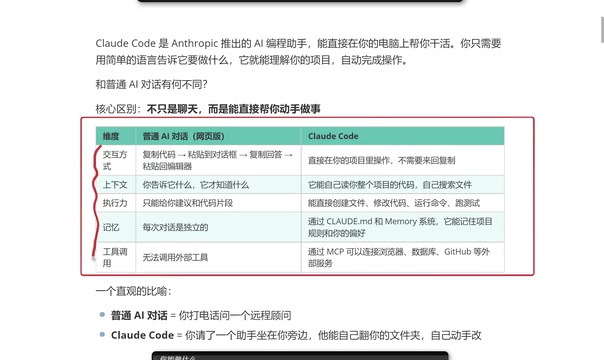
Getting Started with Claude Code: 5 Key Differences from Traditional AI Chatbots
Explore 5 key differences between Claude Code and traditional AI chatbots like ChatGPT, covering interaction, context, execution, memory, and tool integration.

Your Pension Forced to Buy AI Bubble Stocks: The Truth Behind Nasdaq's Rule Changes
Nasdaq's fast-track rule changes may force your 401K and pension funds to buy SpaceX, OpenAI, and Anthropic stock. Analysis of the $4T valuation bubble and what investors can do.