1FlowBase in Practice: Adding Vision Tools to DeepSeek V4 for Multimodal Capabilities
Use 1FlowBase to give text-only DeepSeek V4 vision capabilities by mounting MIMO 2.5 as a tool.
This guide walks through building a multimodal pipeline using 1FlowBase, where MIMO 2.5 is mounted as a vision tool on DeepSeek V4. The architecture leverages Function Calling to let the text model automatically invoke the vision model when images are present, with conditional triggering to minimize costs. The modular design allows easy model swapping and demonstrates the "composition over omnipotence" paradigm in AI development.
Can a Text-Only Model See Images? A Multimodal Breakthrough for DeepSeek V4
DeepSeek V4 is one of the most talked-about large language models right now, but it remains a text-only model without native image understanding capabilities. For use cases that require multimodal interaction, this is a clear limitation.
There's a notable technical divide in the current LLM landscape: text-only models versus multimodal models. Text-only models like DeepSeek V4 are built on the Transformer architecture and only process tokenized text sequences. Multimodal models (such as GPT-4o and Gemini), on the other hand, integrate vision encoders (typically ViT variants) at the architecture level, converting image patches into embeddings that share the same vector space as text tokens. This architectural difference means text-only models simply can't "see" images — they lack the encoding pathway to transform pixel information into semantic representations.
Is there a way to give DeepSeek V4 image processing capabilities without waiting for an official update? The answer is yes — by using 1FlowBase to build a composite model setup, mounting the vision model MIMO 2.5 as an external tool on top of DeepSeek V4 to create a Fusion multimodal endpoint. A Bilibili creator shared the complete build process, and this article breaks down the architecture design and implementation steps in detail.
Core Architecture: Tool Orchestration Logic for DeepSeek V4 + MIMO 2.5
The core logic behind this approach isn't complicated, but it's quite elegantly designed:
- DeepSeek V4 handles text reasoning and response generation — it's the "brain" of the entire pipeline
- MIMO 2.5 is mounted as a vision tool, dedicated to image understanding
- 1FlowBase serves as the orchestration layer in between, chaining the capabilities of both models together and publishing a unified API endpoint
MIMO 2.5 is a multimodal model focused on visual understanding, with core capabilities in Image Captioning, Visual Question Answering (VQA), and OCR recognition. Unlike end-to-end multimodal models like GPT-4V, MIMO 2.5 is better suited to be called as a standalone visual understanding component — it takes image input and outputs structured text descriptions. This "vision-to-text" workflow makes it an ideal "pair of eyes" for a text-only model, translating visual information into a language form that the text model can understand and reason about.
When user input includes an image, DeepSeek V4 automatically triggers a vision tool call, letting MIMO 2.5 first "see" and describe the image, then passes the description back to DeepSeek for comprehensive reasoning. The beauty of this architecture is that each model only does what it's best at, achieving seamless collaboration through the tool-calling mechanism.
The tool calling (Tool Use / Function Calling) mechanism here is a key capability of modern LLMs. The principle works as follows: during training, the model learns to recognize when it needs help from external tools and outputs tool call requests in structured JSON format (including function names and parameters). The orchestration system captures this request, executes the corresponding external tool, and injects the tool's returned results back into the model's context, allowing the model to continue generating responses based on this new information. DeepSeek V4's support for Function Calling is the technical prerequisite that makes this entire approach possible — without it, the text model couldn't "proactively" decide when to invoke the vision tool.
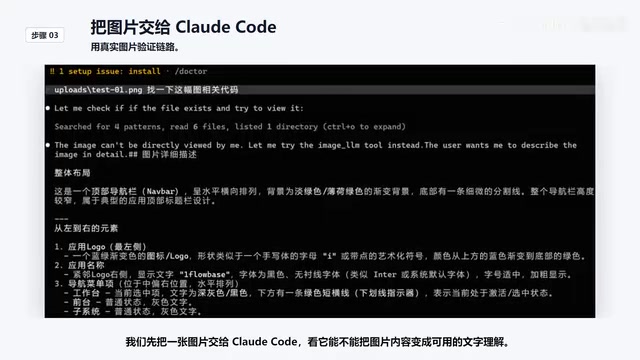
From actual test results, Cloud Code can already analyze and answer questions about image content after connecting to this composite model, no longer limited to text-only processing.
Complete Steps for Building a Multimodal Pipeline in 1FlowBase
Step 1: Create an Application and Configure the Start Node
Create a new application in 1FlowBase, with the goal of configuring it as a publishable middleware service. 1FlowBase is an AI application orchestration platform (similar to Dify, Coze, etc.), and its core value lies in providing visual workflow orchestration capabilities. This allows developers to chain multiple AI models, tools, and data sources into complete application pipelines without writing extensive glue code. These platforms typically offer node-based flow designers with support for conditional branching, variable passing, API publishing, and more. In this solution, 1FlowBase plays a role similar to an API Gateway + Orchestrator in a microservices architecture, handling request routing, model scheduling, and result aggregation.
The Start Node is responsible for receiving external requests — specifically the prompts, context, and various parameters that Cloud Code will pass in later. This node is the entry point of the entire workflow, ensuring that external information flows correctly into subsequent processing steps.
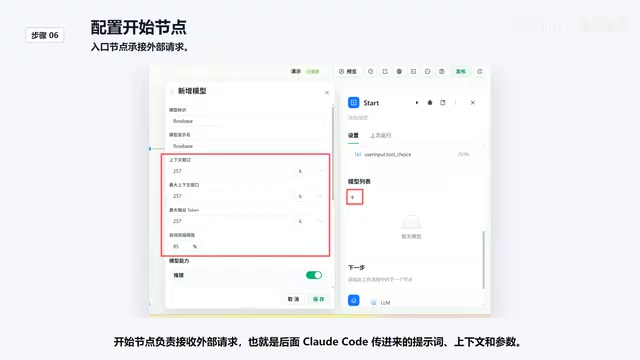
Step 2: Configure the LM Node (Select DeepSeek V4)
In the LM node, select DeepSeek as the text model responsible for final reasoning and response generation. There are a few key configurations to note:
- System prompt variable injection: Inject system prompt variables into the LM node to ensure that role settings passed from external clients aren't lost in the middleware layer
- Reasoning intensity settings: Select "Follow external request" so that the thinking intensity parameters from Cloud Code continue to be passed to the LM node, maintaining consistent reasoning behavior
Step 3: Enable Tool Mounting — The Key Step for Vision Capabilities
This is the core operation that gives the text-only model vision capabilities. After enabling tool mounting, tool-calling capabilities appear below the LM node, allowing DeepSeek to trigger the vision tool based on conditions.
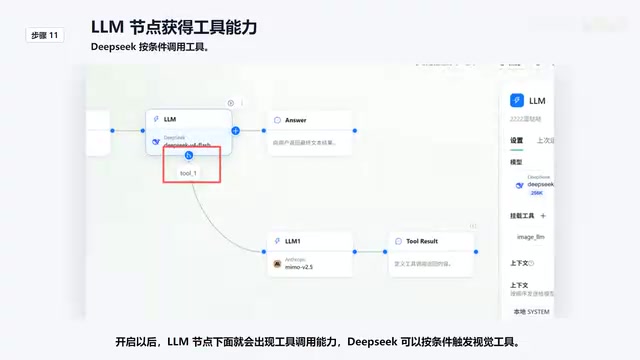
In the tool configuration, there are several important settings:
- Pre-interception rules: Require that requests must carry image parameters; otherwise, the vision tool won't be called, avoiding unnecessary model invocation costs. Pre-interception rules are essentially request-level routing strategies that hold significant importance in AI application engineering. Each call to the vision model incurs additional API costs and latency (image understanding inference typically takes 2-5x longer than text-only). Without interception conditions, even pure text requests would trigger the vision tool's call chain, causing unnecessary resource waste. This "on-demand invocation" design pattern is a variant of the "Circuit Breaker" pattern in microservices architecture and is standard practice for controlling costs and latency in production environments.
- Vision model selection: Use MIMO 2.5, and History must be enabled; otherwise, the vision model won't have access to context information from previous chat turns. In multi-turn conversation scenarios, "enabling History" means passing the previous conversation history (including user messages and model replies) along to the called tool model. This is crucial for the vision model: if a user sends an image in the third turn and asks "How does this relate to the plan I mentioned earlier?", the vision model needs to not only understand the image content but also know what "the plan I mentioned earlier" refers to. Without History, the vision model is like an amnesiac observer — it can see the image but has no understanding of the conversational context, resulting in descriptions that lack relevance.
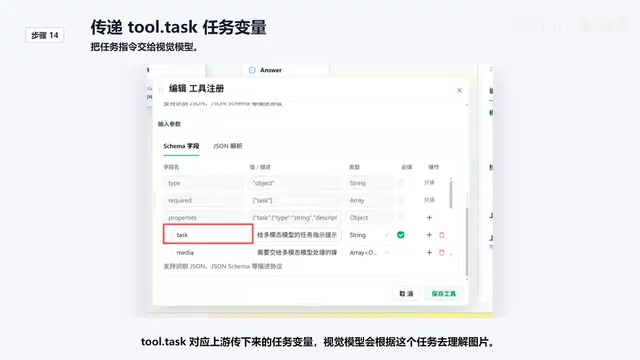
- ToolTask variable binding: Corresponds to the task variables passed down from upstream; the vision model uses this task description to understand the image content
Step 4: Customize Tool Return Results
Tool return results need custom handling — the image description generated by the vision model must be passed back to DeepSeek for use. This step ensures that visual understanding results can be properly consumed by the text model, forming a complete reasoning loop. From a technical implementation perspective, the tool's returned results are inserted into DeepSeek's context window as a special "tool response" message. In subsequent generation, DeepSeek treats this visual description as reliable factual evidence, using it for logical reasoning, summarization, or answering the user's specific questions.
Step 5: Publish the Composite Model and Connect to Cloud Code
After completing all configurations, publish the composite model. 1FlowBase will generate a callable API endpoint. Configure this API in Cloud Code, and from then on, when users input images, requests will automatically flow through the multimodal pipeline you just configured.
Architecture Advantages and Use Case Analysis
Flexibility Through Modular Design
The biggest highlight of this approach is its modularity and replaceability. The text model and vision model are decoupled — if a stronger vision model emerges in the future, you only need to swap out the tool node in 1FlowBase without redesigning the entire workflow. Similarly, if DeepSeek natively supports multimodal capabilities in the future, you can easily switch over. This design philosophy aligns with the "Separation of Concerns" principle in software engineering — each component handles a single responsibility and communicates through standardized interfaces, achieving a system architecture with high cohesion and low coupling.
Conditional Triggering Reduces Invocation Costs
The pre-interception mechanism is a commendable design choice. The vision tool is only triggered when the request contains an image; pure text requests go directly to DeepSeek without incurring additional latency or cost. This on-demand invocation strategy is extremely important in real production environments.
Typical Use Cases
This Fusion multimodal approach is particularly well-suited for:
- Projects already using DeepSeek V4 that need to temporarily add image understanding capabilities
- Developers who want to flexibly combine different model capabilities
- Users doing AI-assisted development through tools like Cloud Code who need multimodal input support
Conclusion: Capability Orchestration Over All-in-One Models
Through 1FlowBase's orchestration capabilities, we can combine DeepSeek V4's powerful text reasoning with MIMO 2.5's visual understanding into a unified multimodal endpoint. The core of the entire solution lies in the tool mounting mechanism — allowing the text model to automatically call the vision tool when needed, obtain image descriptions, and then continue completing reasoning tasks.
This "armor up your model" approach is essentially a paradigm of capability orchestration. It doesn't rely on any single model being all-powerful; instead, through thoughtful architecture design, it lets each model play to its strengths. This philosophy has a broad foundation in industry practice — from early LangChain Agents to OpenAI's Function Calling ecosystem, to the rise of various AI orchestration platforms, "composition over omnipotence" is becoming the mainstream paradigm in AI application development. For developers who value flexibility and controllability, this is an approach well worth trying.
Related articles
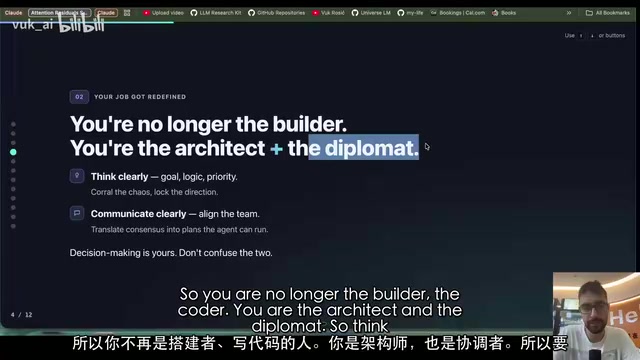
DeepSeek Researcher Summarizes 10 Rules for Using AI Agents
A DeepSeek researcher shares 10 universal rules for using AI agents, covering the shift from execution to judgment, memory file systems, human-AI collaboration boundaries, and more.
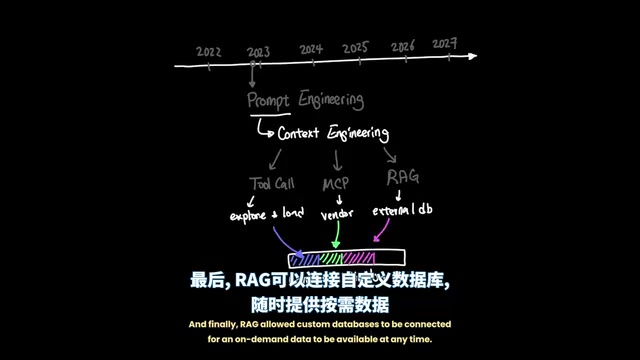
Agent Harness: A New AI Agent Paradigm from Prompt Engineering to Execution Environment Orchestration
Deep dive into Agent Harness Engineering: how loop execution and context isolation overcome the bottlenecks of prompt and context engineering in modern AI coding agents like Cursor.
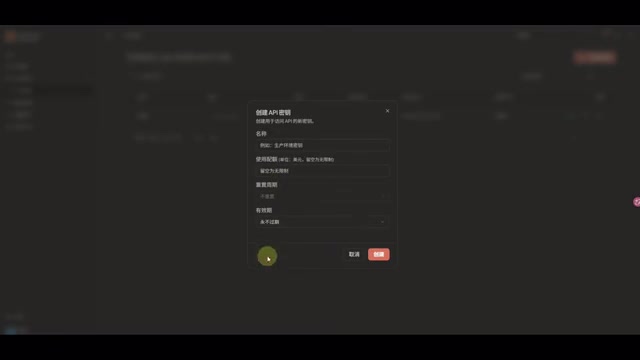
DeepSeek V4 Flash Free Usage Guide: Configuration for Cherry Studio and CC Switch
DeepSeek V4 Flash is free for a limited time with zero token charges. Learn how to register on OpenModel and configure it in Cherry Studio and CC Switch.