Full Breakdown: Building an APP with AI and Publishing to the App Store in 45 Minutes
Full Breakdown: Building an APP with A…
An ordinary person used Cursor AI to develop and publish an iOS APP to the App Store in just 45 minutes.
A Bilibili creator with zero iOS development knowledge used the Cursor AI code editor to build an English homophone translation app called "Checklish" in just 45 minutes, which then passed App Store review. The core skill wasn't programming but requirements expression — through providing complete function descriptions, API documentation, and context to communicate efficiently with AI, combined with version management tools to prevent code regression, the entire workflow from backend API setup to iOS frontend interface generation was completed.
Introduction: The Barrier to AI Programming Has Dropped to Zero
How long does it take to develop an APP with AI? A week? A month? Bilibili creator Xiaobai Ya proved with action: 45 minutes is enough. Even more surprisingly, the app called "Checklish" — an English homophone translation app — not only was successfully developed but passed App Store review in less than 24 hours after submission.
The significance of this case isn't about how complex the APP itself is, but rather how it demonstrates that an ordinary person with zero iOS development knowledge can complete the entire process from concept to App Store listing through conversations with AI. This article breaks down the key steps and methodology behind this process.
Tool Preparation and Environment Setup
Core Tool: Cursor AI Code Editor
The core tool for the entire development process is Cursor — an AI code editor powered by large language models. Cursor is developed by Anysphere and built on VS Code's open-source framework, but with deep integration of large language models like GPT-4 and Claude. Unlike traditional IDE code completion tools (such as GitHub Copilot, which can only predict the next line of code), Cursor's key differentiator is its Agent mode — it doesn't just complete single lines of code but understands the entire project's context, performing cross-file code generation, refactoring, and debugging. This capability stems from its architectural design of feeding the entire code repository as context window input to the large model, enabling the AI to understand inter-file dependencies and overall project structure.
After downloading and installing from the official site cursor.com, there's an easily overlooked detail: the language setting requires manually typing "中文" (Chinese), which makes the AI use Chinese for code comments and responses — very friendly for Chinese-speaking users.
Regarding Cursor's cost, the author suggests that if the 14-day free trial limitations are too restrictive, you might consider obtaining shared accounts through other channels. Additionally, you'll need:
- Xcode: Apple's official development tool for creating projects and running simulators. Xcode is the only official tool for developing iOS, macOS, watchOS, and other Apple platform applications, with built-in interface designers, performance analysis tools, and iOS simulators. iOS development currently primarily uses the Swift language and SwiftUI framework — SwiftUI is Apple's declarative UI framework launched in 2019, describing interfaces with more concise syntax, making it very suitable for AI generation.
- SourceTree: A code version management tool that allows rollback when AI breaks the code. SourceTree is a Git graphical client developed by Atlassian. Git is currently the most mainstream distributed version control system. In AI programming scenarios, version management is especially important — because AI might introduce new problems while fixing one bug, or even break already-working features (known as "regression defects" in software engineering). Through Git's commit and revert mechanisms, developers can safely return to any "known correct" state, essentially adding countless save points throughout the development process.
Backend API Service Development: Building the Server from Scratch
Clear Requirements Are Half the Battle
The author emphasizes that the first prompt directly determines the trajectory of the entire project. His first prompt contained three core pieces of information:
- Function definition: Call Claude's API, input an English word, output a Chinese homophone
- Caching mechanism: Create a local dictionary table; previously queried words are read directly to avoid redundant API calls
- API configuration: Provide the specific URL, model name, and key
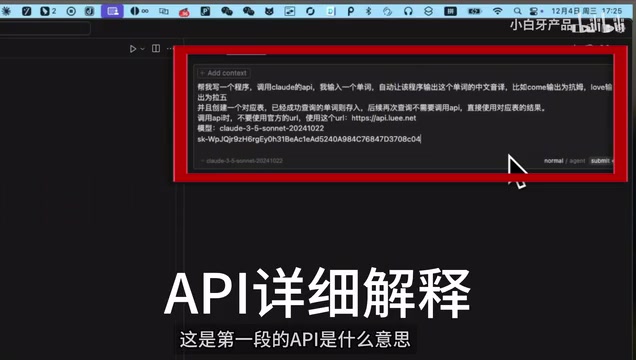
The caching mechanism design is very practical: Claude API charges per Token (a Token is the smallest unit of text processing for large models; one English word typically corresponds to 1-3 Tokens), and each call incurs costs for both input and output Tokens. The caching mechanism is called a "space-for-time" strategy in software engineering — trading local storage space for network request time and API costs. For word translation scenarios, common English vocabulary is about 20,000-30,000 words; caching all of them requires negligible storage space but can reduce response time from hundreds of milliseconds to single-digit milliseconds while dramatically lowering operational costs.
Pitfalls and the Debug Process
The development process wasn't entirely smooth. The first major pitfall the author encountered was: only giving AI an API URL and key without providing the actual content of the API documentation. AI cannot know how to call an interface just from a URL alone.
The solution was simple — copy the API documentation's example code directly to Cursor. This lesson is worth remembering for all AI programming beginners: AI isn't omniscient; it needs sufficient context information to work correctly. A large language model's knowledge comes from training data. For specific third-party APIs (especially niche or frequently updated interfaces), the model may lack relevant training data or may remember outdated versions. Providing the latest official documentation is key to ensuring AI calls things correctly.
After several rounds of debugging, the program finally ran normally, correctly translating words and writing them to the local dictionary.
Concurrency Support and Interface Encapsulation
Considering the multi-user simultaneous usage scenario after the APP goes live, the author had AI add concurrency support and encapsulate the program as a standard HTTP interface.
Concurrency refers to a system's ability to handle multiple requests simultaneously. After the APP launches, dozens or even hundreds of users might initiate translation requests at the same time. If the server processes them single-threaded, requests would queue up, resulting in terrible user experience. Common concurrency solutions in Python include the asyncio asynchronous framework or built-in concurrency handling in web frameworks like FastAPI. Encapsulating the program as HTTP interfaces (typically RESTful APIs) means the frontend can communicate with the backend through standard HTTP requests (GET, POST, etc.) — this is the foundational pattern of modern frontend-backend separation architecture, where the frontend handles only display and interaction while the backend handles only data processing and business logic.
Cursor not only completed the code refactoring but also thoughtfully generated concurrency test scripts.
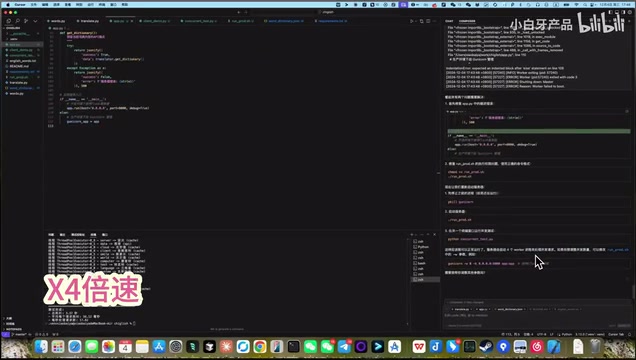
Test results showed that a single API call costs only about $0.0003 — extremely low for word-level queries.
A critical step was generating interface documentation. Interface documentation serves as the "communication protocol" between two programs — the backend tells the frontend: what I can do, how to call me, what the parameter format is, and what the returned data looks like. Such documentation typically follows the OpenAPI (Swagger) specification, containing interface addresses, request methods, parameter descriptions, and response examples. This laid the foundation for subsequent iOS development, as the AI can directly generate network request code based on the interface documentation during frontend development.
Concept Development and Product Design: Letting AI Assist Decision-Making
Using AI to Assist Product Design
The author used Claude to help brainstorm the APP's feature framework. AI provided numerous suggestions, including community interaction, personal learning systems, etc., but the author — based on his positioning as a lightweight entertainment APP rather than a learning tool — decisively removed unnecessary features.
This process reflects an important principle: AI is an assistive tool; product decision-making authority always remains with humans. You need to know clearly what you want, and AI helps you fill in details and implementation paths. In product design, this is called "MVP thinking" (Minimum Viable Product) — first validate core assumptions with minimal features rather than piling on features from the start. AI naturally tends to provide "comprehensive" solutions because it has no concept of resource constraints, making human judgment the critical filter.
iOS Frontend Development: From Project Creation to Interface Generation
Project Creation
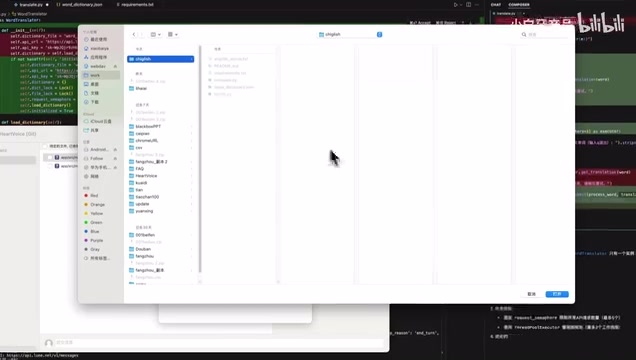
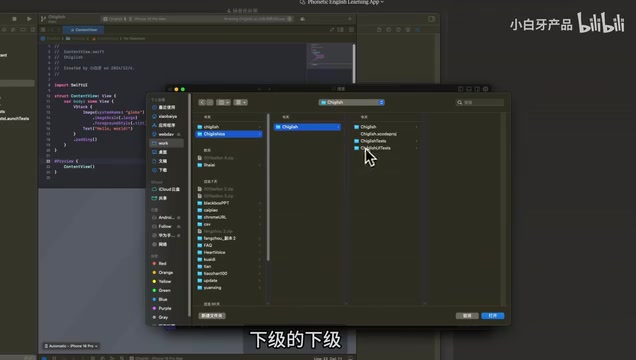
After creating an iOS project through Xcode, open the project folder in Cursor. There's a detail to note here: you need to select the correct directory level to ensure you can see the complete project file structure. This is important because Cursor's Agent mode needs to read the project's complete file tree to understand the code structure — if the directory level is wrong, AI may not correctly identify the project type and file dependencies.
Generating Core Interfaces in One Go
The author sent the complete requirements document and API interface documentation together to Cursor (using Agent mode), and AI generated the complete APP code in one pass, including the main interface, translation functionality, and favorites feature.
Agent mode represents the latest evolution in AI programming tools. Traditional code completion is passive — waiting for the developer to type before predicting the next code segment. Agent mode is proactive — it receives a high-level task description and then autonomously plans execution steps: creating files, writing code, running tests, fixing errors. The entire process resembles a junior programmer executing a task. This mode relies on the large model's "Planning" capability and "Tool Use" capability — the model doesn't just generate code text but can also invoke terminal commands and read/write the file system, forming a complete development loop.
The first Build succeeded (showing build success), and although some errors were encountered at runtime, feeding the error messages back to Cursor allowed for quick fixes in most cases.
Common Problem-Handling Tips
During the development process, the author summarized several practical tips:
- When Cursor freezes: If there's no response after 30 seconds, click Cancel and regenerate. This happens because large model inference sometimes gets stuck in loops or encounters server-side timeouts; re-initiating the request usually solves the problem.
- When code gets broken: Roll back to a previous state through SourceTree's version management. The specific operation is to find the last normally-working commit, right-click and select "Reset" to restore.
- For complex errors: Add all related Swift files to the context to help AI better diagnose the problem. Large model reasoning quality is positively correlated with context information — the more complete the information provided, the more accurate the diagnosis.
- Agent mode interactions: Note that AI may ask whether to execute certain operations — don't ignore these. Agent sometimes needs confirmation on whether to install dependency packages, whether to overwrite files, etc. Ignoring these confirmations will interrupt the workflow.
Core Methodology: Tips for Efficient AI Conversations
The Art of Conversing with AI
Throughout the 45-minute development process, the core skill isn't writing code but learning how to converse with AI:
- Make the first description complete: Include function definitions, technical approach, and configuration information. In Prompt Engineering, this is called "One-shot Prompting" — providing as complete information as possible in the first round of conversation to reduce subsequent back-and-forth communication costs.
- Provide sufficient context: API documentation, error messages, and related files should all be included. A large model's Context Window is limited (mainstream models currently support 128K to 200K Tokens), but within this range, the richer the information, the higher the output quality.
- Progress step by step: First get core functionality working, then gradually add concurrency, interface encapsulation, etc. This aligns with the "incremental development" principle in software engineering — each step has verifiable output, reducing overall risk.
- Maintain product judgment: Filter AI's suggestions; not all features are needed. AI lacks business intuition and user empathy — it provides "technically feasible" solutions, not necessarily "commercially optimal" ones.
Subsequent Extensions
At the end of the video, the author mentioned that he later spent 10 minutes adapting the app for mini-programs and adding features like likes and an admin dashboard. This demonstrates that once the core architecture is built, the marginal cost of feature expansion decreases continuously. This is also one of the advantages of frontend-backend separation architecture — the backend API is universal; whether it's an iOS APP, Android APP, or WeChat mini-program, they can all call the same set of interfaces, with the frontend only needing to adapt to different platforms' UI frameworks.
Final Thoughts
The essence of AI programming is transforming "programming ability" into "requirements expression ability." You don't need to know Swift or Python, but you need to clearly know what you want to build, accurately describe problems, and make correct judgments when AI presents solutions.
From a broader perspective, this represents an important milestone in the democratization of software development. In the past, years of programming learning costs stood between an idea and a product; now, AI has compressed that barrier down to the level of "can you clearly express your requirements." Of course, this doesn't mean professional programmers will disappear — complex system architecture design, performance optimization, security protection, and more still require deep engineering experience. But for MVP validation, personal tool development, creative prototyping, and similar scenarios, AI programming is already more than capable.
This is perhaps the "new programming literacy" that everyone should master in the future — not learning the syntax of a particular programming language, but learning how to transform vague ideas into precise requirement descriptions and how to collaborate with AI to create something from zero to one.
Related articles
 Tutorials
Cursor + Codex Dual-IDE Collaboration: A Practical Methodology for Open-Source Project Customization
A complete methodology for open-source project customization based on real-world experience, detailing the Cursor+Codex dual-IDE workflow, seven-stage process, MVP validation, and AI source code reading techniques.
 Tutorials
Cursor Multi-Agent in Practice: Building a Full-Stack Next.js Blog in 50 Minutes
Build a full-stack blog in 50 minutes using Cursor IDE's multi-Agent mode with Next.js, Clerk auth, and Supabase. Learn the 4-phase AI Agent workflow and key integration pitfalls.
 Tutorials
Building an AI Software Factory from Scratch: A Cursor Engineer's Hands-On Experience with Multi-Agent Collaboration
Cursor engineer Eric shares practical insights on building an AI software factory: automation levels, guardrail design, parallel Agent management, and scaling to 1000+ Agents for 24/7 development.