5 AI Image-to-Prompt Tools Tested and Compared: Which One Works Best?
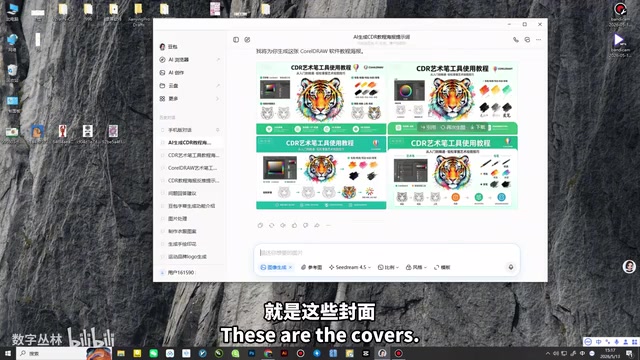
Hands-on comparison of 5 AI tools that reverse-engineer image prompts, with practical recommendations.
This article tests 5 mainstream AI reverse image prompt tools—Doubao, DeepSeek, Dreamina, Kimi, and ERNIE Bot—comparing their prompt generation quality, language support, visual element breakdown capabilities, and workflow integration. It provides step-by-step usage guides and practical tips for combining tools to achieve the best results in AI image generation.
Want to recreate a stunning design but don't know how to write the prompt? Several AI tools can now "reverse-engineer" image prompts for you—just upload a reference image, and the AI will automatically analyze the visual elements and generate a usable Prompt. You can then use these Prompts to generate new images. This article tests 5 mainstream AI reverse prompt tools, comparing their strengths and weaknesses to help you find the best workflow.
What Is AI Reverse Image Prompting?
Simply put, reverse image prompting means getting AI to "describe what it sees"—you give it a finished design (such as a cover image, logo, illustration, etc.), and the AI analyzes the composition, colors, style, elements, and other information in the image, then outputs a structured text description (i.e., a Prompt). With this Prompt, you can directly generate new images in a similar style, or modify keywords to customize the result you want.
The technical foundation of this capability is Multimodal Large Language Models (Multimodal LLM). Traditional language models can only process text, while multimodal models have both "seeing" and "speaking" abilities—they convert images into vector representations through visual encoders (such as ViT architecture), and then the language model decodes this visual information into natural language descriptions. This process is academically known as Image Captioning, but reverse prompting demands more than ordinary descriptions: it needs to not only explain "what's in the image" but also output structured Prompts suitable for AI image generation tools, including style keywords, composition descriptions, lighting atmosphere, and other professional dimensions.
This technique is extremely practical for designers and content creators: when you see an image you like, you don't need to figure out the prompt from scratch—just let AI break it down for you, saving time and effort.
It's worth noting that reverse prompting is closely related to Prompt Engineering. In the AI image generation field, a high-quality Prompt typically includes several key dimensions: Subject description, Style definition, Composition, Lighting & Color, and Negative Prompt (telling the AI what NOT to generate). Reverse prompt tools essentially automate this breakdown process—they replace the manual work of analyzing images and writing Prompts, significantly lowering the barrier to Prompt Engineering.
Hands-On Testing of 5 AI Reverse Prompt Tools
Doubao (ByteDance): All-in-One Workflow
Doubao plays a central role in the entire workflow, capable of both reverse-engineering prompts and generating images from them. The operation is very simple: drag an image into the chat box, type "help me generate a reverse image prompt," and within seconds you'll get prompts in both Chinese and English versions.
Doubao is powered by ByteDance's proprietary Yunque (Doubao) model, with image generation capabilities based on ByteDance's SDXL fine-tuned model and proprietary image generation engine. The reason Doubao can achieve a "reverse + generate" all-in-one workflow is that it integrates both multimodal understanding and image generation capabilities within a single product. This end-to-end product design reduces the friction of switching between different tools, and also improves compatibility between prompts and the generation engine—after all, Prompts reverse-engineered by the same company's model are naturally better understood by that company's generation model.
A major advantage of Doubao is that it extends prompts across different styles, such as hand-drawn style, sci-fi futuristic style, etc., giving you multiple directions for reference. Once you have the prompt, simply paste it into Doubao's "Image Generation" feature to create new images.
If the generated image isn't satisfactory, you can continue borrowing prompts from different styles to adjust and iteratively optimize.
DeepSeek: Transparent Thinking Process, Stable Prompt Quality
DeepSeek requires you to first switch to "Image Recognition Mode," then drag in the reference image and enter the same instruction. Its thinking process is more visible—you can see the AI in a "thinking" state before it generates prompts in both Chinese and English versions.
DeepSeek's feature of displaying the "thinking process" stems from its Chain-of-Thought reasoning mechanism. Chain-of-Thought is a technique that allows large language models to show step-by-step reasoning before giving a final answer. OpenAI's o1 model was the first to productize this mechanism, and DeepSeek-R1 was among the earliest domestic models to achieve similar capabilities. In the reverse prompting scenario, the value of Chain-of-Thought is that users can see how the AI analyzes the image—for example, it first identifies the main elements, then determines the artistic style, and finally organizes everything into a Prompt. This transparency not only builds user trust but also makes it easy for users to spot deviations in intermediate steps and correct them promptly.
In practice, DeepSeek generates prompts of good quality. After copying them into Doubao for image generation, you can get multiple variants from different angles. If a particular image meets expectations, you can further fine-tune the prompt.
Dreamina (即梦AI): Fast but Only Supports Chinese Prompts
Dreamina is another standalone AI creation tool under ByteDance, sharing the same ecosystem as Doubao but with a different positioning. Dreamina focuses more on image and video generation scenarios, with built-in text-to-image, image-to-image, and AI video features. The workflow is similar to other tools—drag in an image and send the instruction.
However, it has one notable limitation: it only generates Chinese prompts, requiring you to translate them yourself if you need English Prompts. This limitation relates to its product positioning targeting domestic creators, and also reflects differences in multilingual support across models. It's worth noting that in the AI image generation field, English Prompts typically perform better than Chinese ones, because mainstream image generation models (such as Stable Diffusion, Midjourney) are primarily trained on English data, making English keywords more precisely mapped to visual concepts. However, if you mainly use domestic AI image generation tools, Chinese Prompts already perform quite well.
Using a lobster image as an example, Dreamina generated descriptive prompts within seconds, which could be successfully used in Doubao for image generation. Overall, the functionality works, but flexibility is slightly lacking.
Kimi: Outstanding Visual Element Breakdown
Kimi is developed by Moonshot AI, with multimodal capabilities based on proprietary vision-language alignment technology. Kimi's distinguishing feature is its deep analysis of visual elements, generating more professional and structured reverse prompts.
In logo and typography design scenarios, AI needs to identify not just "what's in the image" but also font styles, letter spacing, spatial relationships between graphics and text, color contrast, and other professional design dimensions. In testing with a letter logo typography image, Kimi divided its analysis into three sections, each corresponding to different patterns and design elements in the image. This segmented output approach is essentially a structured information organization method, making it convenient for designers to independently adjust different elements rather than facing a single mixed description with no clear starting point.
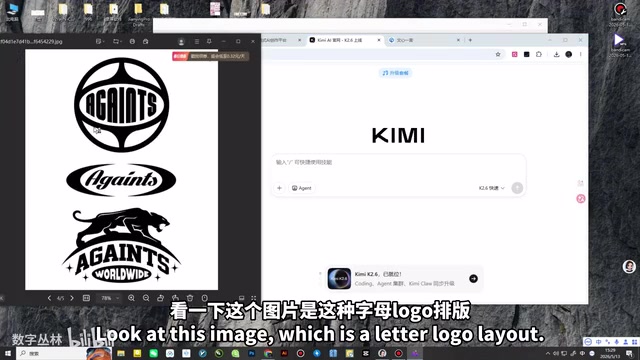
Kimi generates English prompts by default, which can be directly used in tools like Doubao, or you can ask it to translate into Chinese for easier subsequent modifications. For logo design and letter typography needs, Kimi's breakdown capability stands out—you can precisely replace desired letters and elements in the Chinese prompts.
ERNIE Bot (Baidu): Element-Level Breakdown for Fine-Tuned Adjustments
ERNIE Bot is based on Baidu's ERNIE model, with image understanding capabilities benefiting from Baidu's long-term expertise in computer vision. ERNIE Bot also supports dragging in images for reverse prompting. The wait time is slightly longer (about tens of seconds), but the output quality is high. It provides both English and Chinese prompts simultaneously, and can break down individual elements in the image, letting you clearly understand which keywords control which visual effects.
The so-called "element-level breakdown" means the model doesn't just provide an overall description but decomposes the image into independent semantic units—for example, "Background: gradient blue-purple starry sky," "Subject: golden 3D text," "Decorative elements: glowing particle effects," etc. This breakdown approach is similar to the "layers" concept in design software, where each element corresponds to an independently editable "layer." Users can add, delete, or modify individual elements in the Prompt like operating Photoshop layers, achieving fine-grained control.
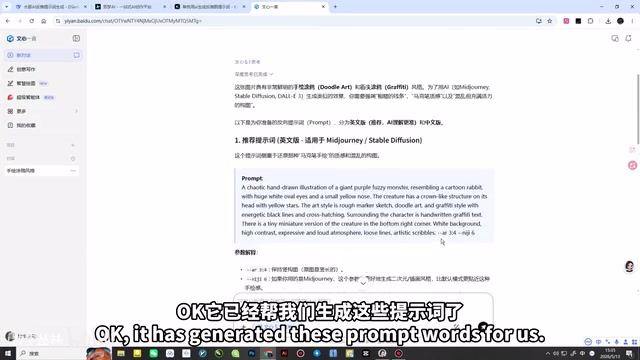
This element-level breakdown is extremely practical: you can remove unwanted element descriptions while keeping core style keywords, precisely controlling the generation results. After pasting the prompts into Doubao for generation, the image clarity is high, supporting direct saving or saving as.
Comparison Summary of 5 Reverse Prompt Tools
| Tool | Chinese Prompts | English Prompts | Key Advantage | Best For |
|---|---|---|---|---|
| Doubao | ✅ | ✅ | Multi-style extensions, built-in generation | All-in-one workflow |
| DeepSeek | ✅ | ✅ | Transparent thinking, stable quality | High-quality Prompts |
| Dreamina | ✅ | ❌ | Fast, simple operation | Quick Chinese-scene generation |
| Kimi | ❌ (needs translation) | ✅ | Professional visual element breakdown | Logo/typography design |
| ERNIE Bot | ✅ | ✅ | Element-level breakdown, easy to modify | Fine-tuned adjustments |
Practical Tips: How to Use Reverse Prompts Efficiently
Step 1: Choose the right tool combination. We recommend using Kimi or ERNIE Bot for reverse prompting (more detailed breakdown), and Doubao for final image generation (stable generation quality). Multi-tool combinations often produce better results than any single tool.
Step 2: Don't copy prompts verbatim. Reverse-engineered prompts are "descriptions" of the original image—using them directly will rarely reproduce the original 100%. The correct approach is to use the reverse-engineered result as a foundation, adding or removing keywords based on your needs, such as replacing colors, modifying subjects, or adjusting styles. This is also the core philosophy of Prompt Engineering—Prompts aren't written once and done; they're a dynamic process requiring continuous adjustment based on generation results.
Step 3: Iterate repeatedly. The first generation is often imperfect, and that's normal. The key is to compare differences between the original and generated images, identify which parts of the prompt need adjustment, and iterate 2-3 rounds to typically achieve satisfactory results.
Step 4: Build a personal prompt library. Save useful prompts from each reverse engineering session, categorized appropriately. Over time, you'll accumulate your own "style vocabulary," significantly improving both the speed and quality of future Prompt writing.
Reverse prompting is essentially a form of "reverse engineering" thinking—working backward from finished products to methodology. Reverse Engineering originally referred to analyzing finished products to deduce their design principles and manufacturing processes, with a long history in software engineering and product design. In the AI design context, reverse prompting is a form of creative reverse engineering: working backward from visual products to derive the "recipe" (Prompt) that generated them. The value of this mindset lies not just in replicating a specific image, but in helping users understand "what elements make up good design"—through repeatedly breaking down excellent works, users gradually develop intuition for composition, color schemes, style, and other design languages. This is a more lasting capability improvement than any single tool can provide.
Once you master this technique, you can quickly break down and adapt any good design you encounter—this is the true efficiency multiplier for designers in the AI era.
Related articles
AI Programming Learning Roadmap: A Complete Six-Stage Guide from Beginner to Expert
A systematic breakdown of the six-stage AI programming learning roadmap, from zero-code start to mastering Cursor and professional tools, methodology frameworks, advanced patterns, and project practice.
Deep Dive into Devin's Background Agent Architecture: Behind the 80% AI-Committed Code
Deep analysis of Devin's background agent architecture: brain-sandbox separation, environment setup, MCP integration, memory systems, and multi-agent collaboration challenges.
Claude Code in Practice: An In-Depth Efficiency Comparison Between Claude and DeepSeek for Programming
A hands-on comparison of Claude vs DeepSeek V4 for AI programming: code quality, development efficiency, and cost differences. DeepSeek costs 1/6 to 1/10 of Claude but requires 1-2x more time.