5 Steps to Connect Codex with DeepSeek — No GPT Account Required
Use CC Switch to connect Codex to DeepSeek in 5 steps — no GPT account required.
This tutorial shows how to connect OpenAI's Codex to DeepSeek's API using CC Switch, a local API proxy tool, in just 5 steps. By routing Codex's requests through CC Switch to DeepSeek's backend, developers can bypass GPT account registration, enjoy significantly lower API costs, and retain full access to Codex features including code completion and Skill plugins.
For many developers in China, OpenAI's Codex is an incredibly powerful AI coding assistant — but plenty of people get stuck at the GPT account registration or phone verification step. The good news is that with a clever proxy solution, you can seamlessly connect Codex to DeepSeek and other domestic large language models in just 5 steps, with full access to Skill plugins and all other features.
This article breaks down the entire configuration process step by step, helping you get everything up and running quickly.
Core Concept: Using CC Switch as an API Proxy
The core logic behind this solution is straightforward: Codex communicates through OpenAI's API, and CC Switch is a tool that sets up a local API routing proxy. It intercepts requests from Codex and forwards them to DeepSeek's API endpoint. This way, Codex thinks it's talking to OpenAI, but the backend has actually been swapped out for DeepSeek's large language model.
An API Proxy/Gateway is a common middleware architecture pattern. It works by inserting a proxy layer between the client and the target server. This proxy layer listens on a local port, receives HTTP/HTTPS requests from the client, then rewrites the requests according to predefined routing rules — including replacing the target URL, modifying authentication information in request headers, converting request body formats, and so on — before forwarding the rewritten requests to the actual backend service. Because both OpenAI and DeepSeek follow similar RESTful API specifications (with highly consistent request formats and response structures), this proxy approach enables a nearly seamless switch.
The advantages of this approach include:
- No GPT account needed — bypasses registration barriers like phone verification
- DeepSeek API pricing is much lower — significantly reduced usage costs
- Plugins and Skill features are fully preserved — virtually no loss in experience
Let's dive into the specific steps.
Step 1: Download and Install Codex
First, go to Codex's official download page and click the download button to get the installer. Once downloaded, Mac users simply drag the app into the Applications folder to complete installation, while Windows users follow the standard installation process.
OpenAI Codex was originally a code generation model fine-tuned from GPT-3, specifically trained on billions of lines of public code from GitHub. It supports over a dozen mainstream programming languages and can understand natural language descriptions and convert them into executable code. Codex is also the core engine behind GitHub Copilot. The new Codex client released by OpenAI in 2025 further integrates code completion, code review, automatic refactoring, and other features, and introduces a Skill plugin system that allows developers to quickly complete specific programming tasks through predefined skill templates — such as generating unit tests, writing API documentation, database query optimization, and more.
This step is fairly straightforward, so we won't go into too much detail.
Step 2: Obtain a DeepSeek API Key
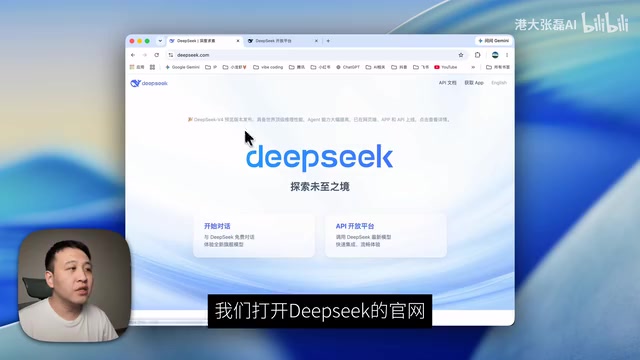
This is the critical credential for the entire process. Go to the DeepSeek official website and select the "API Platform" entry.
DeepSeek is a series of large language models developed by DeepSeek AI. DeepSeek-V3 uses a Mixture of Experts (MoE) architecture with a total of 671 billion parameters, but only activates approximately 37 billion parameters per inference, dramatically reducing computational costs while maintaining high performance. DeepSeek-Coder is a version specifically optimized for coding scenarios, performing excellently on mainstream code evaluation benchmarks like HumanEval and MBPP. DeepSeek API's pricing strategy is extremely competitive — input token prices are roughly one-tenth or even lower than OpenAI GPT-4, which is a major reason many developers choose it as an alternative.
Once inside, click "API Keys" in the left-side menu, then click "Create API Key." You can give it a custom name, such as "Codex," for easier management later.
After successful creation, the system will display an API Key string — make sure to copy and save it immediately. This Key is only shown in full once. If you forget to copy it, you'll have to create a new one.
💡 Tip: It's recommended to save the API Key in a password manager or secure note, as you'll need it again during configuration.
An API Key is essentially an authentication credential — think of it as a "password" for accessing the API service. If leaked, others can use your Key to make API calls and incur charges on your account. Industry-recommended security practices include: storing Keys in a professional password manager (such as 1Password or Bitwarden); creating separate Keys for different purposes with usage limits; rotating Keys regularly; and never hardcoding Keys into code repositories (use environment variables or .env files instead). The DeepSeek platform also supports setting monthly budget caps for API calls — it's recommended to configure this immediately after activation to prevent unexpected charges from Key leaks.
Step 3: Download and Install CC Switch
CC Switch is the core proxy tool in this solution. Go to its GitHub page and note the developer's name for finding future updates.
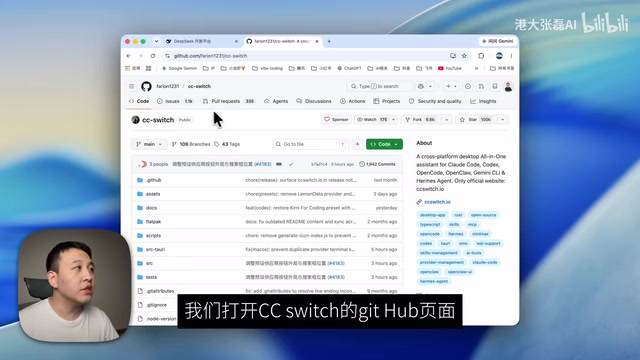
CC Switch is a lightweight local API gateway tool specifically designed for multi-backend switching scenarios with AI model clients. In the broader tech ecosystem, similar tools include open-source projects like LiteLLM and One API, all of which aim to solve the same problem: unifying API interface differences across different LLM providers. CC Switch stands out by offering a graphical interface and pre-built provider templates, lowering the configuration barrier. Its routing mechanism supports specifying backend models per application (such as Codex, Cursor, etc.), meaning you can simultaneously connect different AI tools to different model services, enabling a flexible multi-model scheduling strategy.
Find the "Releases" link on the right side of the page and click into it. Scroll down to see the "Assets" section, which lists installation packages for various operating systems:
- Mac users: Download the
.dmginstaller - Windows users: Download the
.exeinstaller
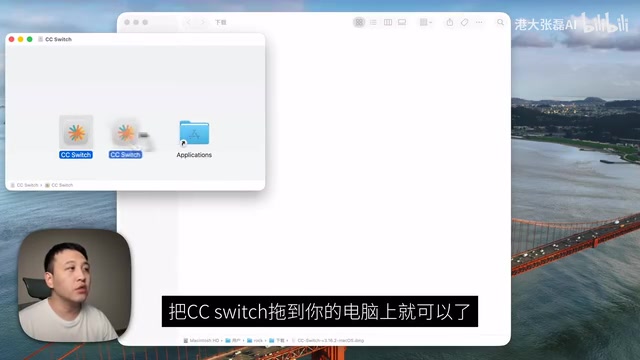
Once downloaded, Mac users drag CC Switch into the Applications folder, and Windows users install normally.
Step 4: Configure CC Switch to Connect to DeepSeek (The Most Critical Step)
This is the most important step in the entire process and requires careful attention.
Add DeepSeek as a Provider
After opening CC Switch, find the OpenAI icon at the top of the interface and click it, then click the "+" button on the right to add a new provider.
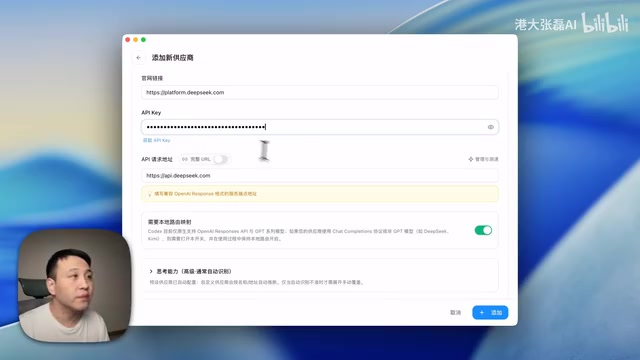
In the provider list, you'll see that CC Switch already has built-in configuration templates for multiple LLM service providers, including DeepSeek, Zhipu, MiniMax, and others. After selecting "DeepSeek," the system will automatically fill in most of the configuration details (such as API address, model list, etc.).
You only need to focus on one field: API Key. Paste the API Key you copied from the DeepSeek website in Step 2, then click the "Add" button in the bottom-right corner.
Enable Codex Route Forwarding
After adding the provider, click the gear icon in the top-left corner to enter the settings page, then follow these steps:
- Click "Routes"
- Click "Local Routes"
- Turn on the "Master Route Switch"
- Expand the route list, find "Codex" and expand it
- Go back to the previous level and click "Enable" on the DeepSeek row
What this series of operations essentially does is tell CC Switch: when Codex sends an API request, forward it to DeepSeek's endpoint. From a technical implementation perspective, CC Switch starts a local HTTP service listening on a specific port, and through modifying system proxy settings or application-level network configuration, it hijacks Codex's outbound requests to the local service. When the local service receives a request, it replaces the original OpenAI API address with DeepSeek's https://api.deepseek.com, swaps the OpenAI Key in the authentication header with your configured DeepSeek Key, performs model name mapping conversions when necessary, and finally sends the rewritten request to DeepSeek's servers.
Step 5: Open Codex and Verify the Connection
Once all configuration is complete, open the Codex application and go to the settings page. If everything is working correctly, you should see the interface showing that you've successfully logged in via API.
To verify the connection is actually working, try chatting with Codex directly — for example, ask: "What model are you currently using?" If it responds correctly (typically telling you it's using one of DeepSeek's models), the entire pipeline is up and running.
From here, you can use Codex for AI-assisted programming just as you normally would, including code completion, code explanation, Skill plugins, and all other features.
Additional Notes and FAQ
About costs: DeepSeek's API uses a pay-as-you-go billing model, and pricing is much cheaper compared to OpenAI. New users typically get a certain amount of free credits, and light daily usage costs are essentially negligible. Specifically, DeepSeek API's input price is approximately 1 RMB per million tokens (as low as 0.1 RMB with cache hits), and output price is approximately 2 RMB per million tokens. In comparison, OpenAI GPT-4o's corresponding prices are approximately 17.5 RMB and 70 RMB per million tokens respectively — a difference of up to several dozen times.
About model capabilities: DeepSeek-V3 and DeepSeek-Coder perform excellently in code generation and are more than sufficient for most everyday programming tasks. Of course, there may still be gaps compared to GPT-4 in certain specific scenarios, but the cost-performance advantage is clear. It's worth mentioning that the DeepSeek-R1 reasoning model performs particularly well in complex logical reasoning and mathematical proof scenarios — if your programming tasks involve algorithm design or complex business logic, you can try switching to the R1 model in CC Switch.
About stability: Since there's an additional local proxy layer, response times theoretically increase slightly, but in practice the latency is virtually imperceptible. The extra latency introduced by the local proxy is typically in the 1-5 millisecond range, which is completely negligible compared to the hundreds of milliseconds to several seconds of inference time for the large model itself. As an open-source tool, CC Switch has a fairly active community — if you encounter issues, you can file an Issue on GitHub.
This solution isn't limited to DeepSeek — other domestic LLMs supported by CC Switch (such as Zhipu GLM, MiniMax, etc.) can be connected in exactly the same way, and you can flexibly switch based on your needs. Zhipu AI's GLM-4 series excels in Chinese language understanding and multimodal capabilities, and their CodeGeeX is also an open-source model focused on code generation. MiniMax is known for its long context windows, making it suitable for analyzing large codebases. Additionally, Baidu's ERNIE, Alibaba's Tongyi, Moonshot's Kimi, and other domestic models are also rapidly iterating. Most of these models provide API interfaces compatible with the OpenAI format — this "interface compatibility" strategy has become an industry consensus, greatly reducing migration costs for developers and expanding the applicability of proxy tools like CC Switch.
Related articles
GML 5.2 Multimodal Upgrade Hands-On: Full Validation with DeepSeek V4
Hands-on testing of GML 5.2 and DeepSeek V4 multimodal upgrades on OneBlockBase, covering vision-text workflows, safety mechanisms, and deployment tips.
DeepSeek + Cline Setup Guide: A $1.50 Alternative to $20/Month AI Coding Subscriptions
Step-by-step guide to configuring DeepSeek API with VS Code plugin Cline, including API Key setup, Plan/Act dual-model strategy, and project management files for a $1.50 AI coding alternative.

A Systematic Guide to Claude Code: From Deployment to Architectural Analysis of 510K Lines of Source Code
A systematic guide to Claude Code covering environment deployment, domestic model integration, six core systems (memory, multi-Agent, etc.), a full-stack ChatBot project, and eight design patterns from 510K lines of open-source code.