5 Ways to Deploy LLMs Locally: From Getting Started to Production
A practical guide to 5 tools for running LLMs locally, from beginner-friendly to production-grade.
This article reviews five mainstream tools for running LLMs locally: LlamaCPP (lightweight C++ inference engine), Ollama (developer-friendly wrapper with OpenAI-compatible API), LM Studio (GUI desktop app), vLLM/SGLang (production-grade high-performance engines), and MLX-LM (optimized for Apple Silicon). It covers their core technologies, ideal use cases, and how they form a complete toolchain from exploration to production deployment.
As open-source LLMs like Qwen, DeepSeek, and GLM continue to grow more powerful, an increasing number of developers are asking: is it still necessary to rely on cloud-hosted APIs? The answer is — you can absolutely run these models on your own laptop, keeping your data local and your privacy intact.
This article covers the five most popular tools for running LLMs locally, ranging from lightweight command-line utilities to production-grade inference engines, to help you find the best solution for your use case.
LlamaCPP: The Foundation of Local LLM Inference
LlamaCPP is an inference engine that supports CPU, GPU, and Apple Silicon. It started as a personal project to run LLaMA models on a MacBook, initiated by developer Georgi Gerganov in March 2023, and has since evolved into the underlying infrastructure that most local tools depend on. Written entirely in C/C++ with no Python dependencies, it can be compiled and run on virtually any platform — from a Raspberry Pi to a high-end workstation.
One of LlamaCPP's most important contributions is the introduction of the GGUF file format — now the de facto standard for local models. GGUF (GPT-Generated Unified Format) replaced the earlier GGML format, packaging model weights, tokenizer, and metadata into a single file with support for 4-bit and even lower precision quantization. Quantization is the technique of compressing model weights from high-precision floating point (e.g., 16-bit FP16) to lower-precision representations. For example, a 7B-parameter model originally weighing 14GB can be compressed to roughly 4GB after 4-bit quantization, making it runnable on a laptop with just 8GB of RAM. Modern quantization algorithms (such as GPTQ, AWQ, and k-quant) intelligently select which layers retain higher precision, keeping performance loss within acceptable bounds. It's precisely this quantization technology that enables billion-parameter LLMs to run on consumer hardware.
Usage is straightforward: download a GGUF file from Hugging Face, run llama-cli, provide the model path and a prompt, and you get inference results.
Best for: Situations requiring the most lightweight runtime — edge device deployment, laptops without a dedicated GPU, or when you need deep customization of the inference process.
Ollama: The Fastest Starting Point for Developers to Run LLMs Locally
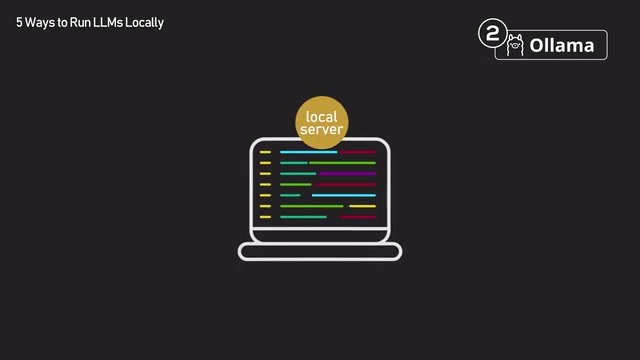
Ollama is essentially a wrapper around LlamaCPP, but it hides the underlying complexity and turns it into a ready-to-use developer tool. It automatically handles model downloads, quantization selection, and spins up a local server.
The experience is remarkably simple: run ollama run llama2, and it automatically pulls the model weights, starts a local server, and gives you a chat interface. The entire process requires zero manual configuration.
More importantly, Ollama exposes an OpenAI-compatible API. OpenAI's Chat Completions API has become the de facto standard interface for LLM application development — virtually all major frameworks (LangChain, LlamaIndex, AutoGen, etc.) and applications are built on top of it. When Ollama provides a compatible API endpoint, any code using the OpenAI SDK can seamlessly switch to a local model by changing just one line — the base_url (from api.openai.com to localhost:11434). This compatibility design dramatically reduces migration costs and allows developers to use local models during development to save on API fees while flexibly choosing between cloud and local deployment in production. This is enormously valuable for rapid prototyping.
Best for: The fastest path from choosing a model to calling it in your code. It's the most common starting point for engineers prototyping AI systems.
LM Studio: The Most User-Friendly GUI for Local LLMs
LM Studio is a desktop application with a full graphical interface, supporting Linux, Mac, and Windows. No terminal, no config files — after installation, you can search for models, download them with one click, and start chatting directly within the app.
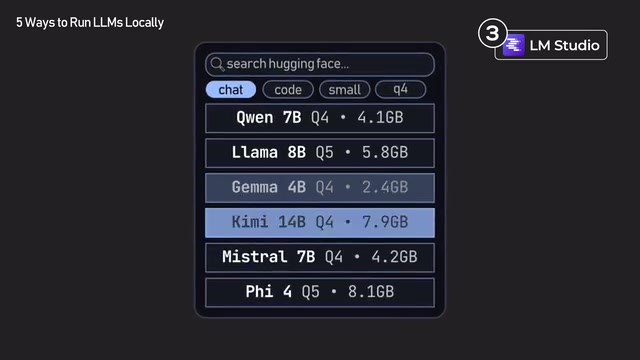
Under the hood, LM Studio also wraps LlamaCPP, but it puts significant effort into user experience optimization. Before you download any model, it clearly displays hardware requirements, quantization options, and GPU offloading settings. GPU Offloading refers to placing some model layers on the GPU for accelerated computation while keeping the rest on the CPU — particularly important when GPU VRAM isn't sufficient to load the entire model. If a model is too large for your machine to handle, it warns you in advance.
LM Studio's greatest strength is model browsing and comparison. You can explore all available quantized versions on Hugging Face directly within the app, download multiple models, and switch between them freely without restarting. The same model on Hugging Face typically comes in multiple quantized versions, such as Q4_K_M (4-bit medium quality), Q5_K_S (5-bit small size), Q8_0 (8-bit high quality), etc., each representing different trade-offs between model size, inference speed, and output quality. LM Studio makes these comparisons visual and intuitive, which is extremely helpful for finding the best model for your hardware and task.
Best for: Casual users or non-technical AI enthusiasts who want a simple, intuitive interface to experience local LLMs.
vLLM and SGLang: High-Performance Inference Engines for Production
If the first three tools are geared toward personal development and prototyping, vLLM and SGLang are high-performance inference engines built for production environments. They require NVIDIA GPUs (with CUDA support) to achieve full performance and primarily address throughput and latency optimization under high-concurrency scenarios.
vLLM's Core Technical Advantages
vLLM is designed to serve multiple users simultaneously. Developed by a research team at UC Berkeley, its high performance stems from two core technologies:
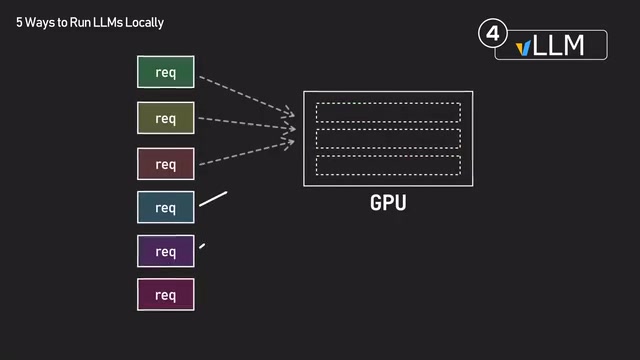
PagedAttention: To understand this technology, you first need to know about KV Cache. During the autoregressive generation process in Transformer architectures, the model needs to compute attention over all previous tokens. KV Cache stores previously computed Key and Value vectors to avoid redundant computation, but its memory footprint scales proportionally with sequence length and the number of concurrent requests. In long-context or high-concurrency scenarios, it often becomes the largest consumer of GPU VRAM — sometimes even exceeding the model weights themselves. Traditionally, KV Cache is stored as large contiguous blocks in GPU memory, causing significant memory fragmentation and waste. PagedAttention borrows the paging mechanism from operating system virtual memory management, splitting the KV Cache into fixed-size blocks (similar to memory pages). These blocks don't need to be stored contiguously in GPU memory and are managed through page tables, boosting GPU memory utilization from the traditional 20-40% to nearly 100%, freeing up more VRAM for larger batch processing.
Continuous Batching: In traditional static batching, the GPU collects a batch of requests and must wait for all requests in the batch to complete before starting the next one. Since output lengths vary dramatically across requests (some answers are 10 tokens, others 500), the GPU sits idle after short requests finish while waiting for long ones, causing severe computational waste. Continuous batching (also called dynamic batching or iteration-level batching) checks after each token generation step whether any request has completed, immediately inserting new requests into available slots in the running batch. This mechanism raises GPU utilization from 30-50% with static batching to nearly 100%, dramatically improving GPU efficiency.
Combined, these two technologies significantly boost GPU throughput. vLLM is already the core engine behind many companies' internal chatbots, coding assistants, and batch processing pipelines.
SGLang: Inference Powered by RadixAttention
SGLang comes from Berkeley's LMSYS team (the same team that maintains the well-known Chatbot Arena LLM evaluation platform) and employs a technique called RadixAttention. It uses a radix tree structure to cache shared prompt prefixes across different requests. A radix tree is a compressed prefix tree data structure that merges strings sharing common prefixes, greatly reducing storage redundancy. In LLM inference scenarios, many requests share the same system prompt or the same document fragments retrieved via RAG. SGLang uses radix trees to reuse the KV Cache corresponding to these shared prefixes, avoiding redundant attention computation on identical content. For example, if 100 users are chatting with the same system prompt, the traditional approach would compute the KV Cache for that prefix 100 times, while RadixAttention computes it just once and shares it across all requests. This makes inference particularly fast for RAG and multi-turn chat scenarios — where prompts often share long common prefixes.
Notably, SGLang is the inference engine used by xAI and many DeepSeek deployments in production.
Best for: After the prototyping phase, when you need to put local models into actual traffic serving — such as launching a chatbot for your company, deploying a coding assistant for your team, or running large-scale batch processing tasks.
MLX-LM: Purpose-Built Optimization for Apple M-Series Chips
MLX-LM is a local LLM tool built specifically for Apple M-series chip devices, based on Apple's open-source MLX machine learning framework. MLX's design philosophy is heavily influenced by NumPy and PyTorch, making it very friendly to Python developers while being optimized at a low level for Apple Silicon. Its advantage is rooted in the unique unified memory architecture of Apple chips.
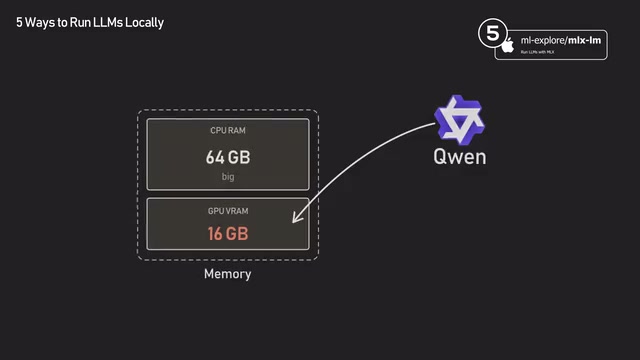
In a typical PC, the CPU and GPU have separate memory, and data must be transferred between them via the PCIe bus, which has limited bandwidth and relatively high latency. Models must fit entirely within the typically smaller GPU VRAM (consumer GPUs usually have 8-24GB). M-series Macs, however, use a Unified Memory Architecture (UMA), where the CPU and GPU share a single memory pool, eliminating the overhead of data copying. This means a Mac Studio with 192GB of memory (equipped with an M4 Ultra chip) can load massive models that would require multiple expensive GPUs (such as NVIDIA A100/H100) on a PC — for example, a full 70B-parameter model or even larger.
MLX-LM is an inference framework designed to fully leverage this hardware advantage, utilizing the GPU cores and Neural Engine on Apple Silicon for acceleration, achieving optimal inference speeds on Apple chips. In certain scenarios, the cost-performance ratio of running LLMs on M-series Macs even surpasses similarly priced NVIDIA GPU setups.
Best for: Users with Apple M-series Macs who want the best possible local inference performance.
How to Choose the Right Local LLM Tool for You
| Scenario | Recommended Tool | Reason |
|---|---|---|
| Rapid prototyping | Ollama | One command to start, OpenAI API compatible |
| General AI user experience | LM Studio | GUI, zero barrier to entry |
| Production deployment | vLLM / SGLang | High throughput, high concurrency |
| Apple Silicon users | MLX-LM | Unified memory architecture optimization |
| Deep customization / edge devices | LlamaCPP | Most lightweight, most flexible |
It's worth noting that these tools are not mutually exclusive. A typical developer workflow involves using LM Studio to quickly try and compare different models, Ollama for application prototyping and local debugging, and finally vLLM or SGLang for production deployment. Together, they form a complete toolchain from exploration to production.
Two years ago, running cutting-edge LLMs locally was hard to imagine. Today, pick any one of these five tools and you can have a model running on your own device within an hour. The rapid progress of open-source models combined with the maturity of local inference tools is transforming private AI deployment from an enterprise-only capability into something accessible to individuals. Whether you want to protect data privacy, reduce API costs, or simply enjoy the thrill of tinkering, now is the best time to dive into local LLMs.
Related articles
Complete Guide to Alibaba Cloud Website Architecture: The Full Request Path from DNS to Auto Scaling
A systematic guide to Alibaba Cloud website architecture covering DNS, CDN, WAF, CLB/ALB, ECS, Redis, NAS/OSS, and auto scaling along the full user request path.
Claude Code in Practice: Completing a Complex Payment System Integration in 4 Hours for $60
Real case study showing how Claude Code + Opus 4.7 completed a complex payment system integration in 4 hours for $60, covering CC Switch setup, prompt engineering, and model selection strategies.

Vibe Coding Beginner's Guide: A Complete Roadmap to Building Software with AI — No Coding Experience Required
Vibe Coding lets anyone build software using plain language instructions with AI. Learn what it is, when to use it, which tools to pick, and how to get started.