6 Must-Have MCPs for Claude Code: Upgrade It to a Full AI Development Workstation

Six essential MCPs that transform Claude Code from a code chatbot into a full AI development workstation.
This article covers the 6 most valuable MCPs to configure for Claude Code: Playwright for browser automation, File System for project understanding, Sequential Thinking for structured reasoning, Context7 for up-to-date documentation, GitHub for collaboration workflows, and Memos for long-term memory. Together, they form a complete capability matrix that upgrades Claude Code into a true AI development workstation.
Claude Code is already a powerful AI programming assistant, but many people treat it as nothing more than a "smarter code completion tool." The real key to transforming it is connecting it to MCPs (Model Context Protocol). MCP isn't about making AI better at chatting — it's about giving it real capabilities: the ability to see, search, operate, and remember.
MCP is an open-source standardized protocol released by Anthropic in late 2024, designed to provide large language models with a unified way to access external tools and data sources. Before MCP, every AI application that needed to integrate external capabilities (such as database queries, file operations, or API calls) required a custom adapter layer, leading to severe ecosystem fragmentation. MCP adopts a design philosophy similar to the USB interface — defining a standard communication protocol that allows any compliant "MCP Server" to be called plug-and-play by AI clients. The protocol is based on JSON-RPC 2.0, supports both stdio and HTTP+SSE transport methods, and includes three core primitives: Tools (tool invocation), Resources (resource reading), and Prompts (prompt templates). It's precisely this standardized design that has enabled the tool ecosystem around Claude Code to flourish rapidly.
This article covers the 6 MCPs most worth configuring first, spanning browser automation, file management, complex reasoning, documentation lookup, collaboration workflows, and long-term memory — helping you upgrade Claude Code from a code chatbot to a true AI development workstation.
Playwright: Let AI Directly Control the Browser
Playwright MCP is the one I recommend installing first. It gives Claude Code the ability to directly control a browser — opening web pages, clicking buttons, filling out forms, and checking for page errors, all automatically.
Playwright is a browser automation framework open-sourced by Microsoft in 2020, supporting three major browser engines: Chromium, Firefox, and WebKit. Compared to the earlier Selenium, Playwright natively supports auto-wait mechanisms, network interception, multi-tab operations, and mobile emulation, with faster execution and greater stability. The Playwright MCP Server wraps these capabilities into standard MCP tool interfaces, allowing AI to drive the browser through semantic commands (like "click the login button" or "check if the page has error messages") without writing specific automation scripts.
In traditional development workflows, frontend debugging requires developers to constantly switch between the editor and the browser. With Playwright connected, Claude Code can run through page flows on its own and even help you complete frontend automated testing. This pattern is especially suited for end-to-end testing (E2E Testing) scenarios, where AI can automatically generate and execute test flows based on requirement descriptions. For projects that require frequent UI interaction verification, this MCP can significantly reduce the time cost of manual operations.
File System: Let AI Truly Understand Your Project
File System is the most fundamental yet most important MCP. Without it, Claude Code can only see the snippet of code you copy and paste. With it, AI can autonomously read and manage local files, understand project structure, find entry files, review configurations, and analyze dependency relationships.
In other words, File System transforms Claude Code from "answering questions about a code snippet" to "working inside your project." This is the foundation for all other MCPs to function — if the AI doesn't even know what your project looks like, subsequent reasoning, debugging, and collaboration are impossible. It's worth noting that Claude Code already has built-in file system access capabilities, but the File System MCP provides more fine-grained permission control and richer file operation primitives, including directory tree traversal, file search, and batch read/write operations, enabling AI to navigate freely within a project like a real developer.
Sequential Thinking: A Structured Reasoning Engine for Complex Problems
Developers frequently encounter scenarios like this: a bug appears, but you're not sure whether it's a frontend issue, a backend issue, or a configuration issue. If you ask AI directly, it might "write whatever comes to mind," producing an answer that seems reasonable but lacks a logical chain.
Sequential Thinking MCP changes this. It makes Claude Code break down problems into a step-by-step reasoning chain: first confirm the symptoms, then propose hypotheses, then investigate each one systematically.

This MCP's design is inspired by the Chain-of-Thought reasoning paradigm. Google's 2022 research showed that having large language models demonstrate their reasoning process step by step rather than directly outputting answers significantly improves accuracy on complex tasks. Sequential Thinking MCP engineers this concept — it provides AI with a structured thinking framework that supports dynamically adjusting the number of reasoning steps, revising prior hypotheses, and switching between multiple branches. Unlike the model's built-in reasoning capabilities, this MCP uses an external tool to force AI to make its thinking process explicit and traceable, similar to equipping AI with a "thinking whiteboard."
After connecting this MCP, you'll notice a clear change in Claude Code's response style — no longer jumping from insight to insight, but more like an experienced engineer conducting systematic analysis. For scenarios like debugging complex bugs, making architectural decisions, and analyzing performance bottlenecks, Sequential Thinking's value is particularly pronounced.
Context7: The Secret Weapon Against Outdated Code
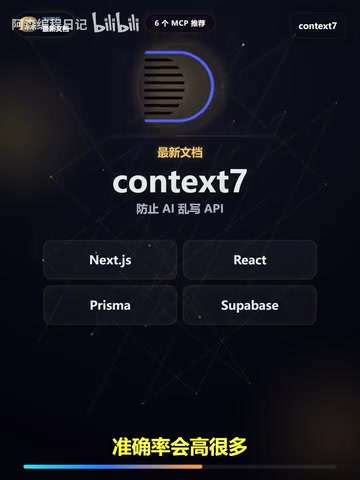
This is an easily underestimated but extremely practical MCP. AI models have a training data cutoff (knowledge cutoff), while the frontend ecosystem's frameworks, SDKs, and APIs update rapidly. The patterns stored in the model's memory may already be outdated — such as Next.js App Router syntax, the latest React Server Components usage, or new Prisma API versions.
Context7 is essentially a Retrieval-Augmented Generation (RAG) system designed for developer documentation. RAG is the mainstream approach for addressing the knowledge timeliness problem in large language models — before generating a response, the model retrieves relevant information from an external knowledge base and then generates based on the retrieved results. Context7 pre-indexes official documentation from a wide range of mainstream development frameworks and continuously updates it. When AI needs to write code for a specific framework, Context7 automatically retrieves the latest version's API documentation and usage examples, injecting them into the context.
Context7's role is to have Claude Code check the latest official documentation before writing code. It supports documentation retrieval for mainstream tools like Next.js, React, Prisma, Supabase, and more. A simple but effective workflow is: first have the AI check the docs, confirm the correct syntax for the current version, then have it generate code. This step may seem redundant, but it dramatically improves code accuracy and reduces debugging time caused by API changes. For example, the migration from Next.js Pages Router to App Router involves extensive API changes — without Context7's real-time documentation retrieval, AI can easily confuse the two patterns and generate non-functional code.
GitHub: Connecting to Real Development Collaboration Workflows
If your project is hosted on GitHub, this MCP is practically a must-install. It enables Claude Code to read Issues, view PRs, analyze Commit history, and even help you understand the full collaboration context.
GitHub MCP achieves deep integration with code repositories through GitHub's REST API and GraphQL API. In modern DevOps workflows, Issue tracking, Pull Request reviews, and CI/CD pipelines form the core loop of software delivery. Traditionally, developers need to frequently switch between the IDE, browser (GitHub pages), and terminal to complete a full development task. GitHub MCP unifies these operations within AI's capability scope, enabling Claude Code to directly read requirement descriptions and discussion context from Issues, view code changes and review comments in PRs, and analyze Commit history to understand code evolution.
The traditional approach is: you copy the requirement description from an Issue, paste it to the AI, and manually organize the context. With GitHub MCP connected, you can directly have Claude Code view the Issue, understand the requirement background, then modify code, summarize changes, and prepare the PR description — the entire workflow in one seamless flow.
This means Claude Code is no longer just a local assistant but has truly entered the team's development workflow. It can understand "why something needs to change" and not just "how to change it." This context-aware collaboration capability delivers substantial improvements to both code quality and collaboration efficiency.
Memos: Giving AI Long-Term Memory
The last MCP is one many people overlook, but it may deliver the highest value over long-term use. One of AI's biggest pain points is that every conversation feels like starting from scratch — it doesn't remember your project preferences, coding standards, common workflows, or which pitfalls have already been encountered.

The "stateless" nature of large language models is the core bottleneck in long-term use — each conversation's context window is independent, and even though Claude has an ultra-long context window of 200K tokens, it cannot retain information across sessions. Memos MCP solves this problem through external persistent storage, essentially building a readable and writable "external memory" for AI. This aligns with the "Extended Cognition" theory in cognitive science — humans also rely on external tools like notes and documents to extend their memory capabilities.
Memos MCP solves exactly this problem. It helps Claude Code remember long-term information: your project preferences, your team's coding standards, your common workflows, and which pitfalls to avoid. In engineering practice, Memos can store structured knowledge such as project tech stack preferences, known technical debt, and historical decision records. As usage time accumulates, Claude Code increasingly resembles a long-term partner who truly knows your project, rather than a newcomer who needs a fresh introduction every time. This personalized adaptation from "general assistant" to "project expert" is the key to improving the long-term user experience.
Six MCPs Building a Complete AI Development Capability Matrix
Looking back at these six MCPs, each solves a core problem, and together they form a complete capability matrix:
| MCP | Core Capability | Problem Solved |
|---|---|---|
| Playwright | Browser automation | Automated frontend testing and page verification |
| File System | Local project understanding | Let AI truly enter the project context |
| Sequential Thinking | Complex reasoning | Structured analysis replaces scattered responses |
| Context7 | Latest documentation lookup | Avoid generating outdated code |
| GitHub | Collaboration workflow | Connect the full Issue → Code → PR pipeline |
| Memos | Long-term memory | Accumulate project knowledge, getting smarter over time |
From a technical architecture perspective, these six MCPs cover the complete capability stack needed for an AI programming assistant: the perception layer (File System + Playwright provide awareness of the project and runtime environment), the cognition layer (Sequential Thinking + Context7 provide reasoning and knowledge retrieval capabilities), the action layer (GitHub provides interaction with external systems), and the memory layer (Memos provides cross-session state persistence). This layered architecture closely aligns with the agent model in cognitive science, which also explains why the combination of these six MCPs produces synergistic effects far exceeding any individual tool.
If you want to truly make Claude Code powerful, don't just study prompt engineering techniques. Start by connecting these six MCPs, upgrading it from a "chatbot that can write code" to an AI development workstation equipped with browser automation, project understanding, structured reasoning, documentation lookup, collaboration capabilities, and long-term memory. That's the right way to use AI programming tools.
Related articles
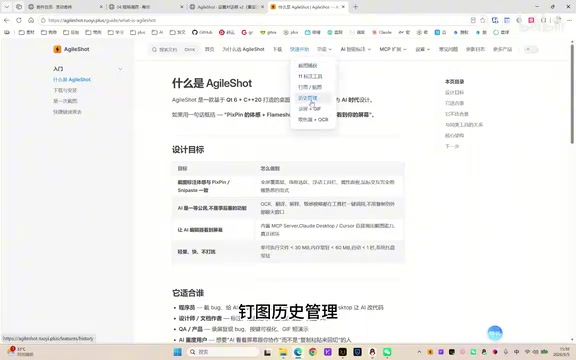
A Giant Shot: An AI Screenshot Tool with Built-in MCP That Lets AI Directly Control Your Computer
A Giant Shot is a desktop screenshot tool with a built-in MCP Server, offering 11 annotation tools, smart OCR, AI chat, and desktop automation for Cursor and Claude Desktop.
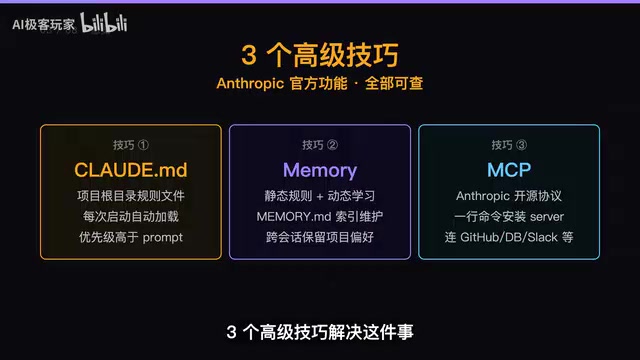
Three Essential Claude Code Configuration Techniques: A Practical Guide to CLAUDE.md, Memory & MCP
Master three Claude Code configuration techniques: use CLAUDE.md for project rules, Memory for auto-learning preferences, and MCP for connecting GitHub and external tools.

Token Doomsday: The Industry Truth Behind AI Coding's Spiraling Costs
GitHub Copilot shifts from flat-rate to per-token billing, sending dev costs from $29/mo to $1,000+. Uber burns its annual AI budget in months. A deep dive into Token Doomsday.