Agent Tool Selection Guide: A Comprehensive Comparison of API, CLI, MCP, Browser Use, and Computer Use
A practical guide to choosing the right Agent tools: CLI, API, MCP, Browser Use, and Computer Use compared.
This article compares five mainstream Agent tool types — CLI, API, MCP, Browser Use, and Computer Use — across speed, accuracy, token consumption, and coverage. It explains why CLI is experiencing a renaissance in the AI era, how MCP unifies tool integration, and why GUI-based approaches should be last resorts. A clear selection priority table helps you choose the right tool to minimize costs and maximize Agent efficiency.
Why do some people burn through massive amounts of tokens, suffer slow execution, and encounter frequent errors when having an Agent complete a task? The problem often isn't the model's capability or the Agent framework — it's that the wrong tool was chosen.
API, CLI, MCP, Browser Use, Computer Use — what are the characteristics of these five mainstream Agent tools? How should you choose the right one? This article breaks down each option and provides a clear set of selection priorities.
API: The Classic Inter-Program Interface
API (Application Programming Interface) has existed in the software industry for years. It's essentially a standardized communication interface between programs. For example, an email system can expose capabilities like creating and sending emails as APIs, with defined endpoints and request methods.
When you ask an Agent to send an email, it finds the API documentation, writes code according to the docs, executes the code, and the email is sent. The technical foundation of this process is Function Calling — a key capability of large language models, first officially introduced by OpenAI in June 2023 alongside the GPT-3.5/GPT-4 API. It allows models to output structured function call requests (including function names and parameters) after identifying user intent during a conversation. An external system then executes the call and returns results for the model to continue reasoning. This mechanism broke through the limitation of LLMs only being able to generate text, enabling them to interact with external tools and data sources — making it the technical cornerstone of Agent capabilities.
Advantages of API:
- Broad coverage: Mainstream software almost always offers APIs
- Fast and stable: The Agent calls the interface directly with no unnecessary intermediate steps
Disadvantages of API:
- The Agent needs to "write code on the fly" based on documentation, resulting in higher token consumption
- Writing more code means a higher probability of errors
- In practice, many websites and software still don't provide open APIs
That said, this drawback can be mitigated later through the Skill mechanism — saving and reusing previously written code.
Browser Use and Computer Use: Fallback GUI Control Solutions
When the target software doesn't provide an API, you need a different class of tools — Browser Use. It lets AI read webpage HTML, identify interface elements and nodes, and simulate human operations on web pages to complete tasks. Browser Use typically relies on browser automation frameworks like Playwright or Selenium under the hood, parsing the DOM tree (Document Object Model) to identify web elements and simulate clicks, inputs, and other interactions.
Taking it a step further is Computer Use, which can control not only web pages but also desktop applications by recognizing screen content and simulating mouse and keyboard operations. Unlike Browser Use, which relies on DOM structure, Computer Use depends on screenshots combined with Vision Language Models (VLMs) to understand desktop interface content, then uses OS-level input simulation to control the mouse and keyboard. Anthropic was the first to release Computer Use capability in October 2024, followed by OpenAI's Operator and other products. Currently, the authoritative benchmark OSWorld shows that the most advanced models still achieve less than 40% task success rate, far from production-grade reliability.
The greatest value of these two approaches is that they're not limited by whether an API is available — in theory, anything that's a web page or software application can be operated. But the drawbacks are equally obvious:
- Slow speed: Sending the same email that takes 2-3 seconds via API requires switching interfaces, analyzing page structure, visual recognition, and finding buttons to click with GUI simulation — at least dozens of seconds for the whole process
- High token consumption: Reading HTML and visual recognition are inherently token-intensive. To understand this, tokens are the basic units that large language models use to process text — roughly 1-2 Chinese characters per token, or about 4 English characters per token. Each time the model runs inference, it concatenates system prompts, conversation history, tool descriptions, and all other information into a context window. This window has a length limit (e.g., 128K tokens for GPT-4 Turbo), and token consumption directly correlates with API call costs and inference latency. A single webpage's HTML source code can easily run tens of thousands of tokens, and image encoding for visual recognition is equally expensive — this is the fundamental reason GUI control solutions are so costly.
- Limited accuracy: Even the strongest current models score only about 78% on GUI operations
Therefore, Browser Use and Computer Use should only serve as fallback solutions, not first choices.
CLI: A Veteran Revived in the AI Era
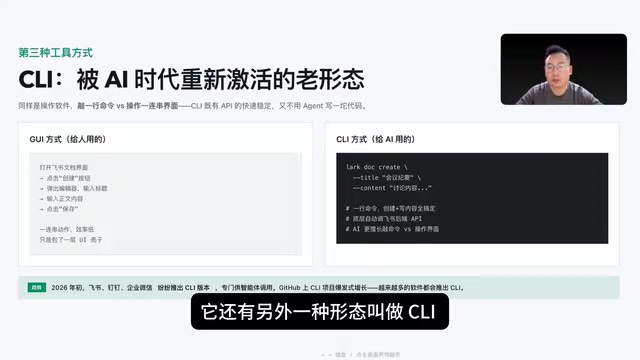
CLI (Command Line Interface) here refers to a form of interaction with software products, as opposed to the GUI (Graphical User Interface) we use daily.
Take Feishu (Lark) as an example — we normally use the GUI version with a visual interface. But Feishu also has a CLI version. Whether it's creating documents or sending meeting notes, CLI can handle it with a single command, while GUI requires opening the interface, clicking buttons, launching an editor, typing, and saving — a series of operations that's far less efficient.
Core differences between CLI and API:
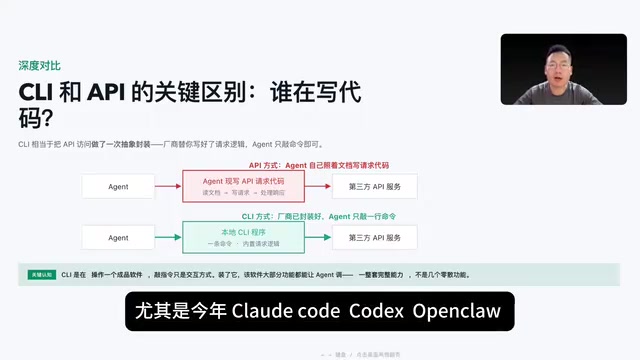
- CLI operates a finished software product, just with command-based interaction
- When you trigger a command, the local CLI accesses the backend API service on your behalf
- API calls mean the Agent actually writes a large block of code following documentation to connect to third-party interfaces
In other words, CLI is essentially an abstraction layer over API access — the vendor has already written the code for you, and the Agent only needs to execute basic command operations. Moreover, a single CLI product typically covers a complete set of product capabilities.
CLI is nothing new — it existed before the 1990s. Later, as Windows became widespread, GUI proved more suitable for human interaction, and CLI was gradually replaced. But in the AI era, CLI has been revitalized — especially with the breakout success of general-purpose agents like Claude Code and Codex, many of whose capabilities are achieved through CLI calls. Claude Code is a terminal-native AI programming tool launched by Anthropic in 2025 that runs directly in the command-line environment, capable of reading/writing files, executing shell commands, and calling CLI tools like Git to complete complex software engineering tasks. OpenAI's Codex CLI is a similarly positioned open-source command-line Agent. The success of these two products proves a trend: the most powerful AI Agents don't operate through graphical interfaces — they work in the terminal by combining various CLI tools to complete tasks, which aligns perfectly with the Unix philosophy of "each program does one thing well, combined through pipes."
This is why software like Feishu, DingTalk, and WeCom have been releasing CLI versions for agent integration, and CLI projects on GitHub are experiencing explosive growth.
MCP: A Unified Model Context Protocol
MCP (Model Context Protocol) was proposed by Anthropic at the end of 2024. Before this, agents used external tools through Function Calling, but every application had its own way of integrating external tools — the same tool would need one implementation for Claude Code and a completely different one for Cursor. Ten tools across ten systems meant writing a hundred different integrations — extremely cumbersome.
MCP defines a unified specification: a tool only needs to be written once to be callable by different Agents.
Here's how it works: third-party vendors release MCP Servers for their products, users install them into their agents, and when the Agent starts up, the tools and descriptions from the Server are injected into the context. The model sees these tools and selects the appropriate ones based on the user's request. From a technical architecture perspective, MCP uses a client-server architecture communicating via JSON-RPC 2.0 protocol. An MCP Server can expose three types of capabilities: Tools (callable functions), Resources (readable data sources), and Prompts (predefined prompt templates). The transport layer supports two modes: stdio (standard input/output, suitable for local processes) and HTTP+SSE (suitable for remote services). In March 2025, OpenAI announced full MCP support across its product line, marking the protocol's evolution from Anthropic's unilateral proposal to an industry de facto standard. The MCP ecosystem now has thousands of community-contributed Servers covering databases, cloud services, development tools, and more.
MCP compared to other tools:
- vs. Browser Use / Computer Use: MCP calls functions directly rather than simulating clicks — faster and more stable
- vs. API: MCP wraps API requests into ready-made functions, so the Agent doesn't need to read documentation and write code itself
- Disadvantage: MCP was only proposed at the end of 2024, so its ecosystem coverage is far less extensive than API
CLI vs MCP: Why CLI Is More Popular
This is the hottest topic in the industry right now. First, the similarities: neither requires the Agent to write API request code itself — one is encapsulated in an MCP Server, the other in a local CLI. The difference lies in the invocation method.
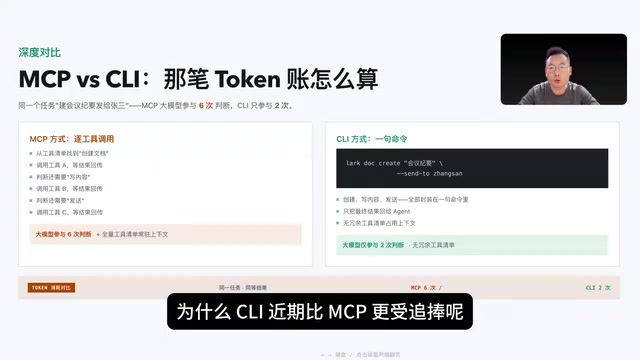
MCP invocation flow (using "create meeting notes in Feishu and send to Zhang San" as an example):
- Agent picks "create document" tool A from the tool list → calls it → gets result
- Agent picks "write content" tool B → calls it → gets result
- Agent picks "send" tool C → calls it → gets result
The LLM needs to participate in 6 rounds of judgment, each time carrying system prompts, conversation history, call results, and the entire tool inventory that MCP loads all at once. A single GitHub MCP service has over 90 tools — the more MCP Servers installed, the more bloated the context becomes. This is a concentrated manifestation of the token consumption problem mentioned earlier — each inference round requires sending the ever-expanding context in its entirety to the model. Not only do costs skyrocket, but the overly long context can cause the model to "lose focus," reducing the accuracy of tool selection. This is academically known as the "Lost in the Middle" phenomenon.
CLI invocation flow:
For the same task, because the local Feishu CLI is installed, creating a document, writing content, and sending can all be done with a single command. After the task runs, the final result is given to the Agent, which only needs to participate in 2 rounds of judgment, with no redundant tool inventory.
The difference in token consumption is immediately obvious — this is the core reason CLI is increasingly favored.
Skill: The Instruction Manual That Makes Tool Invocation Smarter
Everything discussed above covers tools that connect Agents to the external world. Skill can be thought of as the instruction manual for those tools. How to use CLI, MCP invocation logic, even the steps for calling APIs and pre-written code — all of this can be placed in a Skill.
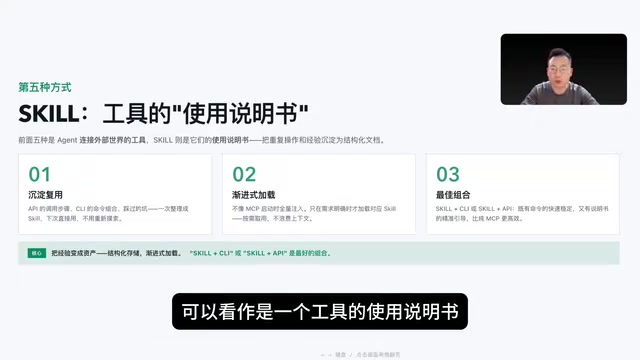
Skill has another key advantage — progressive loading. Unlike MCP, which dumps the entire tool inventory into the context upfront, Skill only loads the relevant content when the user's request explicitly mentions a specific CLI or API, then decides whether to link additional files based on the instructions. This on-demand loading mechanism is essentially a Retrieval-Augmented Generation (RAG) approach — rather than stuffing all knowledge into the model at once, it dynamically retrieves the most relevant information for the current task and injects it into the context, maximizing token savings while maintaining capability coverage. Therefore, Skill + CLI or Skill + API combinations are more token-efficient.
Selection Priority: One Table to Nail Your Tool Choice
Considering execution speed, accuracy, token consumption, feature coverage, and prerequisites, here's the recommended selection order:
| Tool Type | Speed | Accuracy | Token Consumption | Coverage | Prerequisites |
|---|---|---|---|---|---|
| CLI | ⭐⭐⭐⭐⭐ | ⭐⭐⭐⭐⭐ | Very Low | Medium | CLI installation required |
| API | ⭐⭐⭐⭐⭐ | ⭐⭐⭐⭐ | Medium | Broad | Code writing required |
| MCP | ⭐⭐⭐⭐ | ⭐⭐⭐⭐ | Relatively High | Medium | MCP Server required |
| Browser Use | ⭐⭐ | ⭐⭐⭐ | High | Very Broad | Browser environment required |
| Computer Use | ⭐ | ⭐⭐ | Very High | Very Broad | Desktop environment required |
Remember this selection order:
- First check if a CLI version exists → Use it as the priority, best when paired with Skill
- No CLI? Check for an API → Skill + API is the recommended approach
- No API either? Check for MCP → Be mindful of controlling the number of loaded tools
- None of the above work → Fall back to Browser Use / Computer Use as a last resort
Although Browser Use and Computer Use fall short of the first three in speed and accuracy, their advantage is that they're not limited by third-party constraints — in theory, anything a human can operate, they can handle too.
Conclusion
The essence of tool selection is finding the right balance between efficiency, cost, and coverage. CLI's revival in the AI era is no accident — it's naturally suited to the Agent's command-based interaction model, with high encapsulation, low token consumption, and strong stability. As more and more software releases CLI versions, the Agent tool ecosystem is undergoing a structural upgrade. Choosing the right tool may matter more than choosing the right model.
Related articles

Three Forms of AI: From Chat Windows to Collaborative Work to Command Line
AI isn't just a chat window. This article explains AI's three forms: Chatbox, Cowork, and CLI, with selection advice for Claude, Codex, Kimi, and DeepSeek.
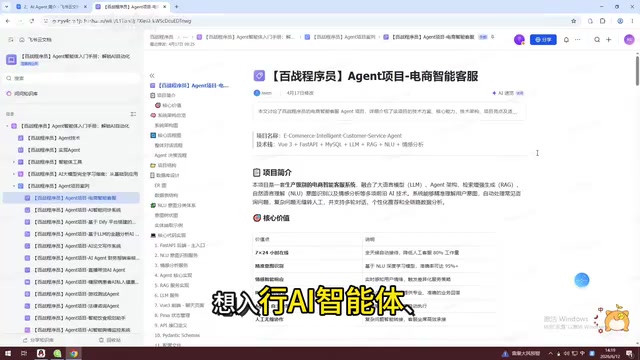
AI Agent Hands-On Learning Path: A Complete Guide from Beginner to Enterprise-Level Development
A systematic AI Agent development learning roadmap covering prompt engineering, RAG, multi-Agent collaboration, tool calling, and more—with phased learning advice and 28 hands-on project references.
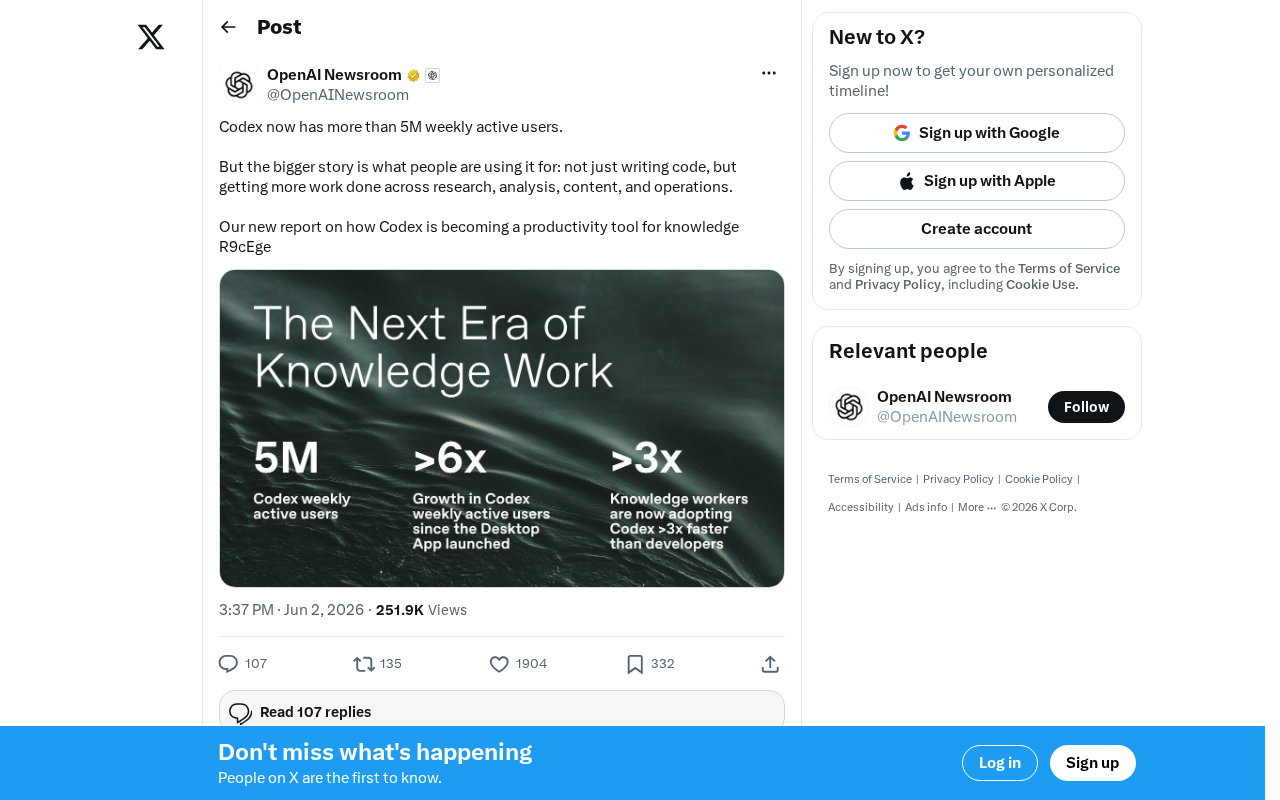
OpenAI Codex Surpasses 5 Million Weekly Active Users: The Transformation from Code Tool to Knowledge Work Platform
OpenAI Codex hits 5M weekly active users, expanding beyond code generation into research, content creation, and operations — evolving into a full knowledge work platform.