AI Coding Terminal Tools Compared: cmux vs Ghostty+tmux vs iTerm2
Comparing cmux, Ghostty+tmux, and iTerm2 to find the best terminal for AI-powered coding workflows.
This article compares terminal tools for AI coding: Mac Terminal, iTerm2, Ghostty+tmux, and cmux. Based on a month of hands-on use, it evaluates each tool's performance in multi-project parallel development, configuration effort, and AI-specific features. cmux stands out by combining Ghostty's GPU-accelerated rendering with tmux's multiplexing, adding a sidebar for project management, smart task notifications, and zero-config setup — making it the top choice for heavy AI coding users.
As AI coding becomes part of daily life, your choice of terminal tool directly impacts development efficiency. From Mac's built-in Terminal to iTerm2, from Ghostty+tmux to cmux, this article draws on a month of intensive hands-on experience to compare the pros and cons of various terminal tools, helping you find the best terminal solution for AI-powered programming.
Why Terminal Tools Matter So Much for AI Coding
In the age of AI coding, the way developers work has fundamentally changed. You might be running multiple AI coding assistants like Claude Code and Codex simultaneously, juggling two or three projects at once, and constantly switching between windows for debugging and testing. Traditional single-window terminals simply can't keep up with this kind of parallel development workflow.
Claude Code and Codex are command-line AI coding tools from Anthropic and OpenAI, respectively. Claude Code, powered by the Claude model, excels at understanding complex codebases and performing large-scale refactoring. Codex CLI, built on OpenAI's models, shines in code generation and completion. In practice, developers often use multiple AI assistants simultaneously — not just to compare output quality, but more importantly because these tools all have API rate limits and concurrency caps. When one tool hits its usage limit, you can seamlessly switch to another and keep working, maximizing development efficiency. This multi-AI parallel workflow places unprecedented demands on terminal tools — you need to maintain multiple independent interactive sessions and switch between them quickly.
A workflow worth noting comes from Peter, the author of OpenCloud: Codex Mac App for knowledge work, learning, and reading; cmux + Codex CLI for actual coding. This clear division of labor represents the typical working pattern of today's AI developers.
cmux: The Best Fusion of Ghostty + tmux
cmux is a product built on top of Ghostty (an open-source terminal tool), cleverly combining Ghostty's high-performance rendering with tmux's multiplexing capabilities, along with extensive UX optimizations.
Let's explain the concept of Terminal Multiplexing here. It's a technology that allows users to create, manage, and switch between multiple terminal sessions within a single terminal window. tmux is currently the most popular terminal multiplexer, with a core architecture built around three layers: sessions, windows, and panes. A session is the highest-level organizational unit — one session can contain multiple windows, and each window can be split into multiple panes. This hierarchical structure is particularly well-suited for AI coding scenarios, as developers can create independent sessions for each project, running AI assistants, code editors, and testing tools in separate panes within each session. More critically, tmux supports session persistence — even if the terminal window is closed or an SSH connection drops, all processes continue running, and you can seamlessly resume your work state upon reconnecting. cmux integrates all of these capabilities natively, eliminating the hassle of manual configuration.
Sidebar: The Killer Feature for Multi-Project Management
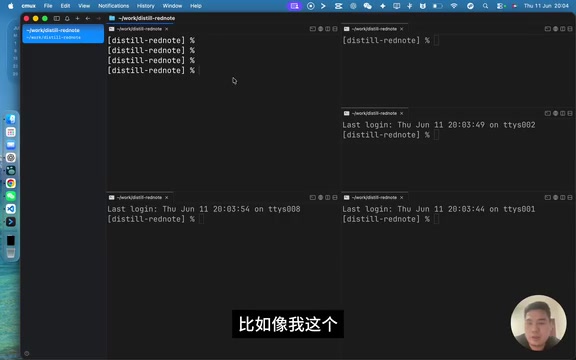
The most impressive feature of cmux is its left sidebar. While window splitting and pane management have long been possible with tmux, cmux's sidebar makes multi-project management far more intuitive.
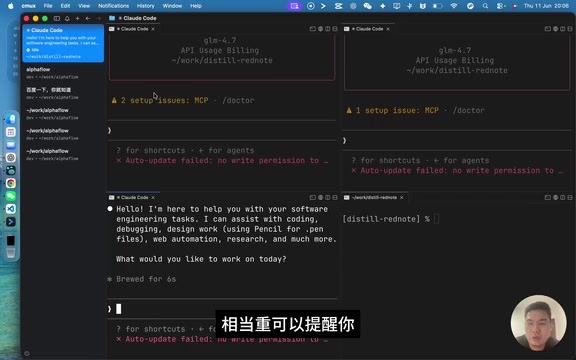
Here's a real-world scenario: you're working on a project with Claude Code in the left pane and testing/debugging in the right pane, with three AI assistants running in parallel. When you need to switch to another project, just click the plus icon in the sidebar to create an entirely new workspace — for example, opening Codex in the new space (when Claude Code's quota or concurrency limit is reached), then splitting it into multiple windows.
Zero Configuration, Ready Out of the Box
This is a massive advantage cmux has over tmux. Pane title bar colors, formatting, mouse switching, cross-pane copying — features that require extensive configuration in tmux are natively supported in cmux. For developers who don't want to spend time tinkering with config files, this saves a tremendous amount of time.
Smart Notifications and Keyboard Shortcuts
cmux inherits tmux's keyboard shortcut logic: zooming windows in/out and switching panes can all be done via keyboard. Even better, when an AI task finishes in a pane, a blue window flash notification alerts you, ensuring you never miss a completed result while juggling multiple parallel tasks.
Additionally, cmux has a built-in browser feature. While its everyday use cases are limited, it can save you the hassle of switching windows during frontend debugging.
Ghostty + tmux: A Classic but High-Maintenance Setup
If you're after maximum customizability, the Ghostty + tmux combination remains a powerful option.
Ghostty's Core Advantage: Blazing Speed
As a terminal emulator, Ghostty's biggest selling point is its extremely fast response and output speed. Buffer rendering efficiency is very high — when chatting with AI, large blocks of code output won't cause any lag. It also supports multi-line editing and allows vertical/horizontal pane splitting via the right-click menu.
Ghostty achieves this outstanding performance through its unique technical architecture. Written in Zig, it employs a GPU-accelerated rendering pipeline that offloads computationally intensive tasks like font rasterization and text compositing to the GPU, leveraging modern graphics APIs (such as Metal on macOS) for efficient rendering. Unlike traditional terminal emulators that use CPU-based text rendering, this architecture means that when AI assistants output large volumes of code or logs, Ghostty's frame rate and response latency are far superior to CPU-rendered terminals. Developed by Mitchell Hashimoto, co-founder of HashiCorp, Ghostty was officially open-sourced in late 2024 and quickly gained widespread attention in the developer community. Its design philosophy is "zero configuration for the best experience" — default settings are carefully tuned while retaining high customizability.
tmux's Power and Pain Points
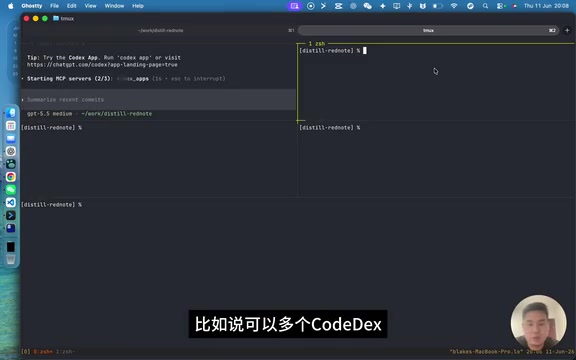
tmux is a classic terminal multiplexer that supports multi-session management, pane splitting, keyboard shortcuts, and more. You can create multiple sessions, split each one vertically or horizontally, and run four windows simultaneously with different AI assistants.
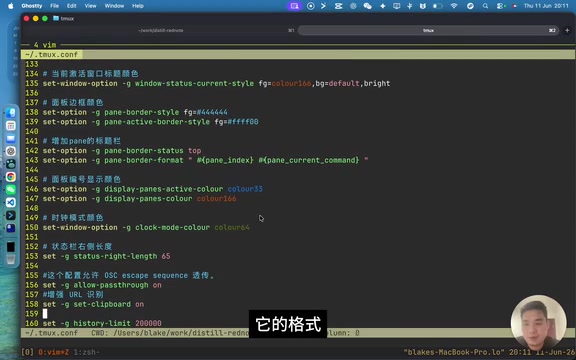
But tmux's biggest problem is its extremely high configuration cost. Mouse switching, cross-pane copying, title bar styling — every single feature requires manual configuration. A real-world tmux config file often contains a massive collection of settings gathered from the internet, plus custom configurations written with AI assistance, just to make tmux usable. While AI has made configuration less painful, it's still a significant barrier for newcomers.
Another pain point is that cross-pane copying frequently breaks, which creates a terrible experience when you constantly need to copy content between AI output and your code editor.
iTerm2 and Mac's Built-in Terminal: Options for Light Users
For light terminal users, iTerm2 or Mac's built-in Terminal can meet basic needs. But their limitations are quite obvious:
- Mac's built-in Terminal: Sluggish response, no multi-line editing support, poor multi-window switching experience, and subpar color output support
- iTerm2: Functional enough but lacks optimizations for AI coding scenarios, with no advanced project management features like a sidebar
From a performance perspective, the differences between terminal emulators mainly manifest across three dimensions: input latency (time from keypress to character display), throughput (characters rendered per second), and memory usage. Mac's built-in Terminal.app uses an older rendering architecture with input latency typically around 5-10 milliseconds, while GPU-accelerated terminals like Ghostty can keep latency to 1-3 milliseconds. In terms of throughput, when an AI assistant outputs hundreds of lines of code at once, low-performance terminals exhibit noticeable rendering stutters and scroll lag, while high-performance terminals stay smooth. Although iTerm2 is feature-rich, its Objective-C-based rendering engine and extensive feature modules mean its performance under extreme load falls short of the newer generation of speed-focused terminals.
If you only occasionally run commands in the terminal, these tools are perfectly adequate. But if you're a heavy AI coding user who needs to manage multiple AI assistants and projects in parallel every day, upgrading to cmux — or at least Ghostty + tmux — is a worthwhile investment.
Terminal Tool Selection Guide
Based on usage intensity, here's a reference guide:
| User Type | Recommended Solution | Reason |
|---|---|---|
| Light user | iTerm2 / Mac Terminal | Good enough, no learning curve |
| Moderate user | Ghostty + tmux | High performance, powerful features, but requires configuration |
| Heavy AI coding user | cmux | Zero config, sidebar management, best experience |
By combining Ghostty's high-performance rendering with tmux's multiplexing capabilities, plus UX optimizations like the sidebar, smart notifications, and zero configuration, cmux has become the best terminal tool for AI coding scenarios today. If you're developing with Claude Code or Codex every day, give cmux a try — the productivity boost might exceed your expectations.
Related articles
Claude Code Installation & Setup Guide: Low-Cost Vibe Coding with Chinese AI Models
Step-by-step guide to installing Claude Code and configuring it with Chinese models like DeepSeek for low-cost vibe coding, including Node.js setup and CCSwitcher usage.
Keyroll: An In-Depth Look at a Stability-Focused Claude Refill Tool
In-depth review of Keyroll, a stability-focused Claude refill tool. Analyzing its core strengths, security implications, and compliance considerations for developers facing usage limits.
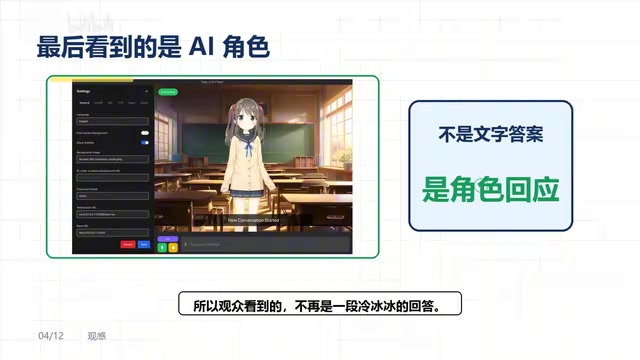
OpenLLMVTuber: A Deep Dive into the Open-Source AI Virtual Character Framework
Deep dive into OpenLLMVTuber, a 10K-star open-source AI virtual character framework integrating ASR, LLM, TTS, and Live2D with voice interruption, visual perception, and modular architecture.