AI Finishes Writing Code, Automatically Strikes a Gong to Alert You: Open-Source Physical Feedback Tool DAgent
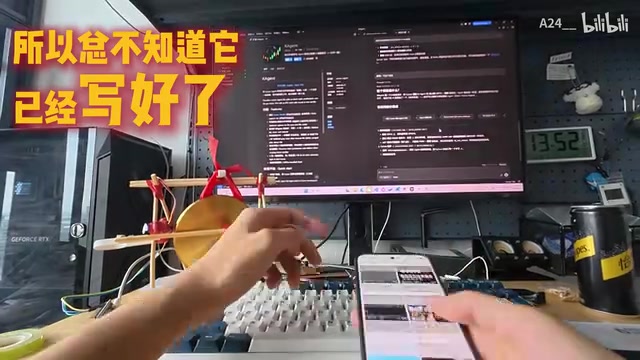
Open-source DAgent uses a physical gong to notify developers when AI finishes writing code.
A developer built a physical gong-striking device using chopsticks and electrical tape that automatically alerts them when AI finishes generating code, solving the common problem of getting distracted by phones during wait times. The project, open-sourced as DAgent, also integrates with a K-line chart plugin to simulate 'IPO bell-ringing' when new files are created, exploring physical notification solutions for AI programming workflows.
What Are You Doing While AI Writes Code? A Real Efficiency Pain Point
Every developer who uses AI-assisted programming has probably experienced this scenario—you ask AI to generate code, and during the few seconds to tens of seconds of waiting, you can't help but pick up your phone. Then you scroll for five minutes, completely forgetting that the AI finished its output long ago.
Current mainstream AI coding tools have response times ranging from a few seconds to tens of seconds when generating code, depending on task complexity and model size. For example, Claude or GPT-4 may need 30 seconds or even longer when handling complex multi-file refactoring tasks. This time window happens to fall right at what cognitive science calls the "attention drift threshold"—research shows that after waiting more than 8-10 seconds, human attention significantly decreases and tends to seek alternative stimulation sources. Smartphones, as highly optimized attention-capturing devices, naturally become the go-to filler during this gap.
One Bilibili creator was deeply troubled by this and decided to solve the problem in the most straightforward way possible: attach a gong to the AI, so it goes "DUANG" when it finishes writing code.
From 3D Printing to Chopsticks + Electrical Tape: Minimalist Prototyping
The developer's initial idea was to 3D print a gong-striking device, but since chopsticks and a roll of red electrical tape happened to be within reach, they went ahead and built a physical prototype directly.
This "use whatever's at hand" maker spirit actually made the entire project more fun. In the hardware maker community, this approach is called "Quick and Dirty Prototyping" and is one of the core practices in design thinking methodology. Compared to 3D printing, which requires modeling, slicing, and waiting hours for the print, building a prototype directly with available materials can validate concept feasibility in minutes. This methodology originates from the teaching traditions of MIT Media Lab and Stanford d.school, emphasizing "just make it first" and avoiding burning creative energy on perfectionism.
Using chopsticks as a frame, electrical tape for fastening, paired with a small gong—this constitutes a complete physical feedback device. Converting software events into physical actions involves the fundamental principles of Physical Computing—typically requiring a microcontroller (such as Arduino or ESP32) as a middleware layer to receive serial or network signals from the computer, then drive servos or electromagnets to complete physical actions. Such projects are very common in IoT development, where developers can trigger hardware responses through simple API calls, bridging the digital and physical worlds.
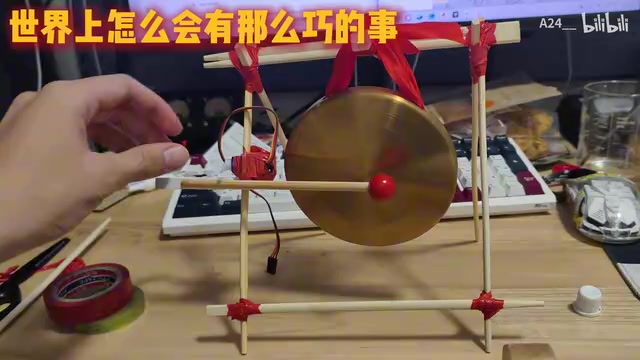
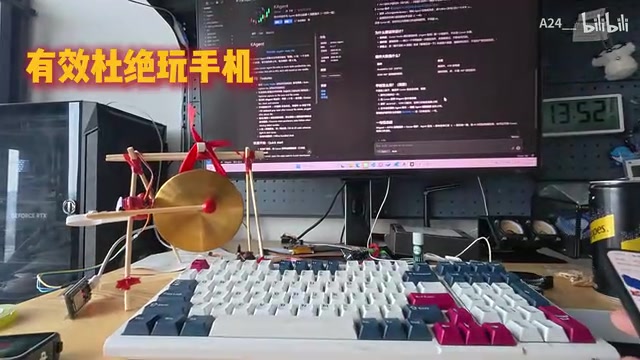
Now every time the AI completes its code output, the device automatically strikes the gong as a reminder, effectively eliminating the problem of getting lost in your phone during the waiting period.
K-Line Chart Plugin Integration: "Ring the Bell" When Creating New Files
Even more interesting is the feature extension. This developer had previously built a plugin that displays AI output as a K-line chart—visualizing the code generation process as a stock market trend chart.
Traditional K-line charts (also known as candlestick charts) originated from 18th-century Japanese rice trading, using four dimensions—open, close, high, and low prices—to describe price movements. In this plugin's context, the developer maps code line counts, token output speed, file creation events, and other metrics into similar multi-dimensional charts. It's both programmer humor and a way to provide intuitive perception of AI working status.
In this plugin's logic, every time a new file is created, the system marks it as an "IPO." And since it's an IPO, you obviously need to ring the bell! So every time the AI creates a new file, the physical gong sounds, simulating the ceremony of "ringing the bell at listing."
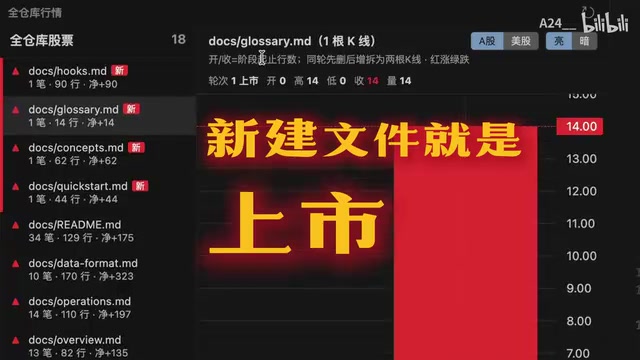
However, the developer also admitted that inserting gong-striking code into every event is indeed a bit noisy, and ultimately some filtering of trigger conditions is needed.
Open-Source Project DAgent: An Edge-Side AI Agent Assistance Tool
This project is already open-sourced on GitHub under the name DAgent, where the D stands for "Device/Edge"—meaning it's an edge-side AI agent assistance tool.
"Edge" (On-device/Edge) is a computing paradigm relative to "cloud," referring to running AI inference on the user's local device rather than relying on remote servers. The advantages of edge-side AI agents include: lower latency, better privacy protection, offline availability, and direct control over local hardware. In this project, the edge-side characteristic enables the AI agent to communicate directly with local physical devices (the gong-striking apparatus) without routing through the cloud, achieving instant physical feedback response.
While the gong itself might seem like a joke, it reflects a real interaction design question: When AI becomes a collaborative partner, what kind of notification mechanisms do we need?
Why Physical Feedback Is More Effective Than Software Notifications
- Cross-attention channels: Visual notifications are easily ignored (especially when you're looking at your phone), but audio + physical vibration is nearly impossible to miss
- Ritual-driven focus: The gong sound creates a clear "switch signal" that helps the brain transition from rest mode back to work mode
- Fun reduces resistance: Compared to boring system notification sounds, the delight from a gong strike makes people more willing to immediately return to work
This problem is classified in the Human-Computer Interaction (HCI) field as a "state synchronization in asynchronous collaboration" issue. Traditional software notification systems follow a "push-acknowledge" model, but in AI programming scenarios, the user's attention has often completely left the screen. This is similar to "alarm management" in industrial control—nuclear power plants, air traffic control, and other scenarios have long researched best practices for multimodal (visual + auditory + tactile) alerts, while AI programming tools remain at a very early stage in this aspect of design.
Implications for AI Programming Workflows
Although this small project is simple, it points to an overlooked aspect of AI-assisted programming—the user experience during waiting periods. Current mainstream AI programming tools (Cursor, Copilot, etc.) typically only show static interface changes after output completion, which is essentially no notification at all for users who have already looked away.
As AI programming tools handle increasingly complex tasks—from single-line completions to multi-file refactoring, from second-level responses to minute-level long task execution—waiting times will only grow longer. This means "completion notifications" will evolve from a nice-to-have feature to a necessity. It's foreseeable that future AI programming tools may incorporate built-in multimodal notification systems: desktop pop-ups, custom sound effects, smartwatch vibrations, or even support for custom hardware integration like DAgent.
In the future, more developers may pay attention to this "last mile" interaction problem, and the solution doesn't necessarily need to be complex—sometimes, a gong is all you need.
Key Takeaways
Related articles
Claude Code + AssemblyAI in Practice: A Complete Tutorial for Building a Voice Agent in One Afternoon
Learn how to build a Voice Agent with speech recognition, conversation understanding, and calendar booking using Claude Code and AssemblyAI in one afternoon.
Getting Started with Codex from Scratch: Complete Guide from Registration to Setup
Complete guide to getting started with Codex: GPT registration, SMS verification, US Apple ID setup, ChatGPT app installation, and subscription plan selection for beginners.
Conductor CEO Demo: Multi-AI Agent Programming Workflow Explained
Conductor co-founder Charlie Holtz demos his AI coding workflow, showing how to orchestrate multiple AI agents in parallel with insights on model selection and human-AI collaboration.